https://github.com/tinspham209/netflix-clone
Netflix Clone: Home, Browse (which uses Firebase authentication), sign in, and sign up, live search, lists of series, films, and watch video.
https://github.com/tinspham209/netflix-clone
context-api custom-hooks firebase firebase-authentication firestore fusejs normalize-css portals react styled-components
Last synced: 3 months ago
JSON representation
Netflix Clone: Home, Browse (which uses Firebase authentication), sign in, and sign up, live search, lists of series, films, and watch video.
- Host: GitHub
- URL: https://github.com/tinspham209/netflix-clone
- Owner: tinspham209
- Created: 2020-10-06T02:24:44.000Z (almost 6 years ago)
- Default Branch: master
- Last Pushed: 2023-12-15T05:54:01.000Z (over 2 years ago)
- Last Synced: 2025-03-11T17:55:06.210Z (over 1 year ago)
- Topics: context-api, custom-hooks, firebase, firebase-authentication, firestore, fusejs, normalize-css, portals, react, styled-components
- Language: JavaScript
- Homepage:
- Size: 18.3 MB
- Stars: 0
- Watchers: 1
- Forks: 1
- Open Issues: 1
-
Metadata Files:
- Readme: README.md
Awesome Lists containing this project
README
# Project: Netflix Clone
## Date: 5 ~> 9 - Oct - 2020
### Functions
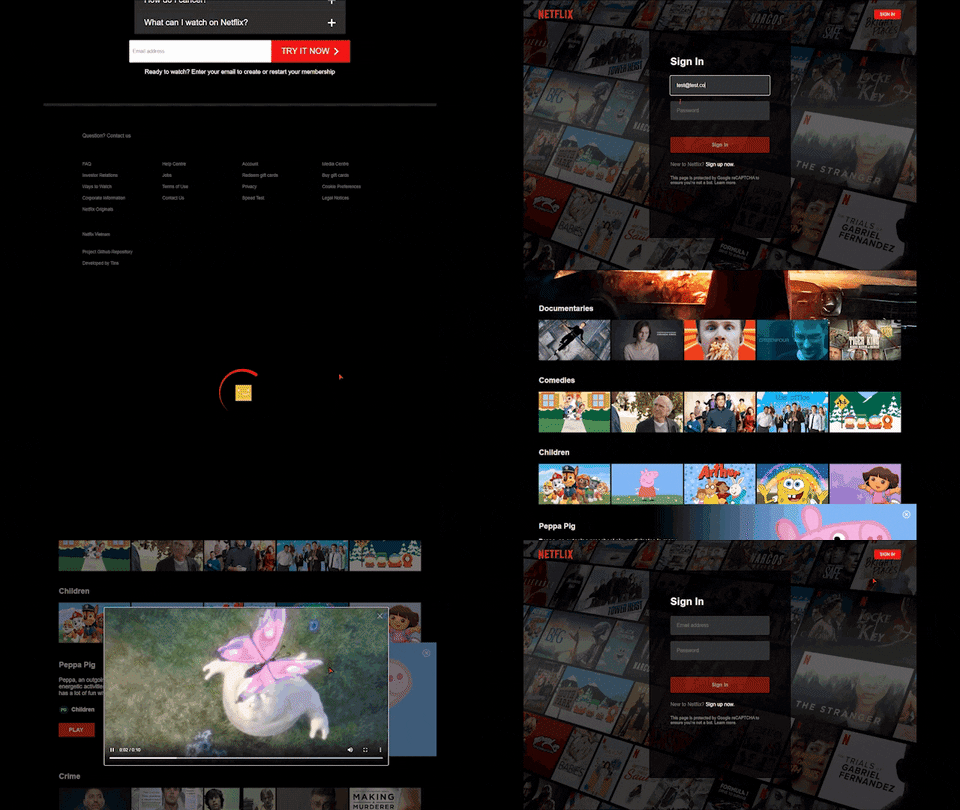
- This React project has multiple pages: Home, Browse (which uses Firebase authentication), sign in, and sign up.
- The sign in will connect to Firebase when a user tries to sign in, and when a user signs up, we will use Firebase auth to store the user in the Firebase auth database.
- I build this app using React and uses Styled Components for all the styling we implement.
- I use Fuse.js for live search.
- and Im test all our components using React Testing Library.
- And of course we will use React router for navigation!
### Screenshot

### Deploy
https://netflix.tinspham.info/
### Plan Of Action
- Initial project 🎉
- Architecture 🎉
- Project dependencies 🎉
- Installing create react app 🎉
- Project cleanup 🎉
- Creating files/folders 🎉
- Creating the Jumbotron component 🎉
- Styled components GlobalStyles 🎉
- Implementing Normalize.css 🎉
- Installing ESLint, Prettier 🎉
- Item component 🎉
- Item component direction prop 🎉
- Container derivative component 🎉
- Footer component 🎉
- Accordion component 🎉
- useContext for Compound Components 🎉
- Accordion component body 🎉
- Opt-form component creation 🎉
- Constants - routes 🎉
- Pages: Home, Browse, SignIn, SignUp 🎉
- Creating React Router Routes 🎉
- Header component 🎉
- Firebase connection 🎉
- React Context for Firebase 🎉
- SignIn Page 🎉
- Firebase top level authentication 🎉
- Firebase console authentication 🎉
- Debugging error auth (if user is in the db or not) 🎉
- SignUp Page 🎉
- Registration page, routes debugging 🎉
- Helpers: routes (React router auth) 🎉
- Protect routes 🎉
- Creating an auth listener (custom hook) 🎉
- Helpers routes review 🎉
- Browse page (categories films & series) component 🎉
- Custom hook:browse page 🎉
- Utils directory and setup 🎉
- Browse container 🎉
- Profiles container 🎉
- Profiles component 🎉
- Loading profile component 🎉
- Spinner review 🎉
- Header profile 🎉
- Header profile: dropdown, chevron 🎉
- Header search styling 🎉
- Header play button style 🎉
- Card list (categories, slides) - films & series logic 🎉
- Entities logic start 🎉
- Player component and Card component styling 🎉
- Movie recommendations 🎉
- Feature component (showing) 🎉
- Passing props into our Feature (item obj) 🎉
- More styling on the card style 🎉
- Debugging the slides 🎉
- Debugging play button and card 🎉
- Player component 🎉
- Review player video 🎉
- Live search using Fuse.js 🎉
- Review our project! 🎉
- Deploy to firebase 🎉
- Add custom domain 🎉
- Add SLL to domain 🎉
### After this project
Next Steps:
- Testing setup
- Player test
- Footer test
- Accordion test
- Card test
- Feature test
- Form test
- Opt form test
- Player test
- Loading test
- Profile test
- Jumbotron test
- Header test
- Home page test
- Profiles test
- Adding test-ids to Profiles
- Selection filter test
- SignIn Test
- SignUp Test
- We are done! Review and sign off!
### Application architecture

### Directory Structure

## Installation Guide
### Tech-Stack
- React( custom hooks, context, portals)
- Firebase (Firestore/auth)
- styled-components
- fuse.js
- normalize.css
### Production
- Clone this project
```
git clone https://github.com/tinspham209/netflix-clone
```
- Install dependencies
```
npm install
```
- Start the server
```
npm start
```
### Development
- Clone this project
- Install dependencies
```
npm install
```
- Start packager
```
npm start
```
### Components function:
- **accordion**:
- **card**:
- **feature**:
- **footer**:
- **form**:
- **header**:
- **jumbotron**:
- **loading**:
- **NotFound**:
- **opt-form**:
- **player**:
- **profiles**:
- **Spinner**:
### How to name a folder and a file
- Folder name: - Ex: `card`
- Components structure

### How to import and export module?
- Import:
```js
//import every thing
import * as React from "react";
import * as ReactDOM from "react-dom";
//for default export
import InfoSection from "./InfoSection";
//for named export
import { InfoSec, InfoRow } from "./components";
```
### How to style for each component?
- Create a styled-component file. Ex: `src/components/card/styles/card.js`
- Import to `src/components/card/index.js` file
```js
// InfoSection.jsx
import { InfoSec, InfoRow } from "./styles/card.js";
```
### How to style for Global?
- Open file `src/global-styles.js`
- Edit on function `GlobalStyles`
### How to connect to firebase
- go to https://console.firebase.google.com/
- create new project
- Get the config of firebase project
- After that, copy to `src/lib/firebase.prod.js`
### How to setup Firebase Authentication
- go to Firebase ~> click on `Authentication` and setup.
- Enable Email/Password (Sign-in method)
### How to update new data of films
- go to Firebase ~> click on `Cloud Firestore` and setup database in test mode (Everyone can edit database).
- After that, open file `src/seed.js`
- edit information that you want
- After that, go to `src/lib`
- uncomment line 4 & line 20
```js
// 4
import { seedDatabase } from "../seed";
// 20
seedDatabase(firebase);
```
- Reload the page, new data will import to Firestore
- After that, comment again line 4 & line 20.
```js
//4 import { seedDatabase } from "../seed";
//20 seedDatabase(firebase);
```
### How to update new image of films
- go to `public/images`
- select type of films: `films` or `series`
- import image to it
- Each films must have 2 images: `large.jpg` & `small.jpg`
### How to deploy to firebase
- go to Firebase ~> click on `Project settings`
- copy Project ID. Ex: `netflix-clone-8b12f`
- open file `deploy-firebase`
- update project ID in line 11
```js
firebase use project_ID
```
- open cmd
- Login firebase
```
firebase login
```
- Initial firebase project:
```
firebase init
```
1. Are you ready to proceed? `Y`
2. Choose `Hosting`
3. What do you want to use as your public directory? `build`
4. Configure as a single-page app `Y`
- Deploy
```
npm run deploy
```