https://github.com/tinybirdco/stocks-realtime
https://github.com/tinybirdco/stocks-realtime
Last synced: 10 months ago
JSON representation
- Host: GitHub
- URL: https://github.com/tinybirdco/stocks-realtime
- Owner: tinybirdco
- Created: 2022-10-11T18:02:56.000Z (over 3 years ago)
- Default Branch: main
- Last Pushed: 2022-10-14T14:55:44.000Z (over 3 years ago)
- Last Synced: 2025-02-27T05:25:07.212Z (over 1 year ago)
- Language: Python
- Size: 17.6 KB
- Stars: 1
- Watchers: 3
- Forks: 1
- Open Issues: 0
-
Metadata Files:
- Readme: README.md
Awesome Lists containing this project
README
# Data Project
Data project to analyze realtime stock market data in a candlestick chart using [Alpaca](https://alpaca.markets/) + [Tinybird](https://www.tinybird.co/).
## Working with the Tinybird CLI
To start working with data projects as if they were software projects, first install the Tinybird CLI in a virtual environment.
Check the [CLI documentation](https://docs.tinybird.co/cli.html) for other installation options and troubleshooting.
```bash
python3 -mvenv .e
. .e/bin/activate
pip install tinybird-cli
tb auth --interactive
```
Choose your region: __1__ for _us-east_, __2__ for _eu_
Go to your workspace, copy a token with admin rights and paste it. A new `.tinyb` file will be created.
## Alpaca Credentials
Go to [Alpaca](https://alpaca.markets/) and sign up for a free account (or login if you already have an account). On your dashboard overview, generate a new API key and secret.
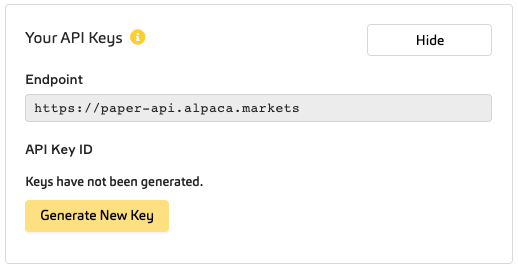
Update the `.alpaca` file with your credentials.
## Project Description
```bash
├── datasources
│ └── stocks_stream.datasource
├── endpoints
│ ├── api_candlestick_chart.pipe
│ └── api_ui_filters.pipe
```
In the `/datasources` folder, we have one data source to store the stock market data.
In the `/endpoints` folder, we have one pipe to transform quote data into a candlestick chart, and another pipe to feed a dropdown filter on the frontend.
Push the data project to your workspace:
```bash
tb push --no-check
```
## Streaming realtime stock data
Go to the `data-generator` folder and run the generator script to stream stock data:
```bash
python3 data-generator/stream_data.py
```
Feel free to play around with any of the flags to modify the data. See `python3 data-generator/stream_data.py --help` for all of the different flags.
For generating data for popular stock symbols, we used:
```bash
python3 data-generator/stream_data.py --symbols AMZN,TSLA,NVDA,AAPL,MSFT,META,GOOG
```
If required, install the required websocket library with `pip install websocket-client`.
_Note: data will only stream while the market is open._
## Token Security
You now have your data project in Tinybird with data.
The endpoints need a [token](https://www.tinybird.co/guide/serverless-analytics-api) to be consumed. You should not expose your admin token, so let's create one with more limited scope:
```bash
pip install jq
TOKEN=$(cat .tinyb | jq '.token'| tr -d '"')
HOST=$(cat .tinyb | jq '.host'| tr -d '"')
curl -H "Authorization: Bearer $TOKEN" \
-d "name=endpoints_token" \
-d "scope=PIPES:READ:api_candlestick_chart" \
-d "scope=PIPES:READ:api_ui_filters" \
$HOST/v0/tokens/
```
You will see a response similar to this:
```json
{
"token": "",
"scopes": [
{
"type": "PIPES:READ",
"resource": "api_candlestick_chart",
"filter": ""
}
],
"name": "endpoints_token"
}
```
## Clean the Workspace
If you want to delete all pipes and data sources, be sure you have them in your local folder `tb pull` and run `tb workspace clear`
```bash
$ tb workspace clear
```