https://github.com/tinyfish-io/bigset
What if you had all the data in the world?
https://github.com/tinyfish-io/bigset
bigset open-source tinyfish
Last synced: 14 days ago
JSON representation
What if you had all the data in the world?
- Host: GitHub
- URL: https://github.com/tinyfish-io/bigset
- Owner: tinyfish-io
- License: agpl-3.0
- Created: 2026-05-15T03:06:23.000Z (about 1 month ago)
- Default Branch: main
- Last Pushed: 2026-06-08T20:01:19.000Z (19 days ago)
- Last Synced: 2026-06-08T21:21:27.516Z (19 days ago)
- Topics: bigset, open-source, tinyfish
- Language: TypeScript
- Homepage:
- Size: 15.3 MB
- Stars: 1,217
- Watchers: 16
- Forks: 126
- Open Issues: 27
-
Metadata Files:
- Readme: README.md
- License: LICENSE
- Codeowners: .github/CODEOWNERS
- Agents: AGENTS.md
Awesome Lists containing this project
README

Build and maintain any dataset from the live web, that refreshes regularly




---
> ⚠️ **BigSet is experimental.** It works, sometimes surprisingly well, but expect rough edges. We're building in the open and shipping fast. Things will break, improve, and change. [Issues](https://github.com/tinyfish-io/bigset/issues) and feedback are very welcome.
---
## What Is BigSet?
You type a sentence:
> *"YC companies that are currently hiring engineers, with their funding stage, location, and number of open roles."*
BigSet infers the schema automatically, sends autonomous agents to research it on the live web, verifies what they find against real sources, deduplicates, and hands you a structured dataset. Download as CSV or XLSX.
You can even set a refresh cadence (30 min, 6 hours, 12 hours, daily, weekly) and the agents re-run on schedule, pulling fresh data so the dataset never goes stale.
Built on [TinyFish](https://www.tinyfish.ai?utm_source=github&utm_medium=organic&utm_campaign=bigset-developer-2026q2) APIs.
## Quick set up guide (~3 mins)

## ✨ Why BigSet?
At the end of the day, every interaction with the web, whether it's you or your AI agent, ultimately comes down to data. Prices, companies, jobs, research, availability, inventory. The web has all of it, scattered across millions of pages.
There are great tools out there for parts of this problem. Scraping frameworks that extract content from URLs you point them at. Search APIs that return ranked results. Pre-built actors for specific sites. Lead gen platforms that produce verified lists of people and companies. They work, and they work well for what they do.
But the moment you need something that cuts across those categories, or something none of them cover, you're back to square one. Stitching together search, extraction, schema design, deduplication, verification, and a cron job to keep it fresh. For every dataset. Every time. The data is right there on the web. Getting it into a table you can use is still a project.
BigSet closes that gap. One sentence in, verified structured data out, refreshed on whatever cadence you set. Your agents get live data to reason over; you get a table you can actually use.
Any dataset. Any source. Always fresh. That's the idea.
### How It Works
1. **You describe the dataset** in plain English, as vague or specific as you like
2. **AI infers the schema**: column names, types, primary keys, where to look on the web
3. **An orchestrator agent** discovers entities via web search
4. **Sub-agents fan out in parallel**: each one investigates a single entity, fetches real data, and inserts a verified row
5. **You get a structured table**: browse it in the UI, export CSV or XLSX
6. **Set a refresh cadence** and the agents re-run on schedule, keeping the dataset current automatically
## Things to Know Before You Start
- **It's experimental.** Expect rough edges; schema inference isn't always perfect, and some topics work better than others.
- **Dataset generation takes 2-5 minutes.** The agents are doing real web research: searching, fetching pages, verifying data. It's not instant, but the output is real.
- **It works best for topics with publicly available web data.** If the information exists on public web pages, BigSet can probably find it. Data behind logins or paywalls is out of reach for now.
- **Scheduled refresh keeps datasets current.** Set a cadence (30 min to weekly) and the agents re-run automatically. No manual re-runs.
- **Datasets are downloadable, not queryable.** You can browse in the UI and export CSV/XLSX. SQL query support is on the roadmap.
---
## 🚀 Quick Start
**Prerequisites:** [Node.js](https://nodejs.org/) 22+ with npm. No Docker needed.
```bash
npm install --global @adamexu/bigset
bigset
```
That's it. The `bigset` command downloads the current local BigSet release,
starts Convex, the backend, the frontend, and the local credential bridge, then
prints the app URL. Open [127.0.0.1:3500](http://127.0.0.1:3500) in your web browser to use it.
The first run caches release files under `~/.bigset`; after that, starting
BigSet is designed to take only a few seconds.
On first launch, BigSet sends you to setup. You'll connect two services:
| Service | What it's for | Get your key |
|---------|--------------|-------------|
| **TinyFish** | Web search + page fetching | [tinyfish.ai/api-keys](https://agent.tinyfish.ai/api-keys?utm_source=github&utm_medium=organic&utm_campaign=bigset-developer-2026q2) |
| **OpenRouter** | LLM calls (schema inference + agents) | [openrouter.ai/settings/keys](https://openrouter.ai/settings/keys) |
Local API keys are stored in your OS keychain.
For a one-off run without installing globally:
```bash
npx @adamexu/bigset
```
Useful local options:
| Command | What it does |
|---------|-------------|
| `bigset --force` | Redownload the latest cached release |
| `bigset --app-port 4500 --backend-port 4501` | Use alternate app/backend ports |
| `bigset --home ~/.bigset-dev` | Use a separate local cache directory |
### CLI dataset commands
Once `bigset` is running and setup is complete, you can create and export
datasets directly from your terminal.
Create a dataset:
```bash
bigset create "fintech startups in the bay area"
```
Create a dataset, wait for population to finish, and export CSV:
```bash
bigset create "fintech startups in the bay area" --rows 10 --wait --csv fintech.csv
```
List datasets:
```bash
bigset list
```
Inspect an existing dataset:
```bash
bigset status
bigset rows --json
```
Export an existing dataset:
```bash
bigset export --csv out.csv
```
Manage a run:
```bash
bigset populate
bigset stop
```
Useful create flags:
| Flag | What it does |
|------|-------------|
| `--rows ` | Maximum rows to collect |
| `--wait` | Keep the command open until population finishes |
| `--csv ` | Write populated rows to a CSV file |
| `--skip-populate` | Create the dataset without starting population |
| `--cadence manual\|30m\|6h\|12h\|daily\|weekly` | Set refresh cadence |
| `--backend-port ` | Target a non-default local backend port |
Agents such as Codex or Claude Code can use the same commands. A typical agent
workflow is:
```bash
bigset create "AI infrastructure startups hiring backend engineers" --rows 30 --wait --csv ai-infra-hiring.csv
```
The agent can then inspect `ai-infra-hiring.csv` and summarize or transform the
results.
---
## Developing From Source
Use this path when you're changing BigSet itself. The supported development
workflow is still `make dev`.
**Prerequisites:** [Node.js](https://nodejs.org/) 22+ with npm,
[Docker](https://docs.docker.com/get-docker/), and
[Make](https://www.gnu.org/software/make/).
### Step 1: Clone the repo
```bash
git clone https://github.com/tinyfish-io/bigset.git
cd bigset
```
### Step 2: Start everything
```bash
make dev
```
`make dev` creates a local `.env` if needed, installs dependencies, builds and
starts all Docker services (Postgres, Convex, frontend, backend, Mastra), and
deploys the Convex schema. On first run, it automatically generates the Convex
admin key. See [How `make dev` Works](#how-make-dev-works) for the full
breakdown.
Once everything is ready, you'll see:
| Service | URL |
|---------|-----|
| **BigSet app** | [localhost:3500](http://localhost:3500) |
| **Convex dashboard** | [localhost:6791](http://localhost:6791) |
| **Mastra Studio** (workflow inspector) | [localhost:4111](http://localhost:4111) |
Open [localhost:3500](http://localhost:3500). The setup screen will ask for
TinyFish and OpenRouter credentials and save them to your OS keychain for this
workspace.
### Step 3: Connect TinyFish and OpenRouter
TinyFish powers web search and page fetching. OpenRouter routes LLM calls to
the models BigSet uses for schema inference and agents.
1. Create a TinyFish key at [agent.tinyfish.ai/api-keys](https://agent.tinyfish.ai/api-keys?utm_source=github&utm_medium=organic&utm_campaign=bigset-developer-2026q2)
2. Create an OpenRouter key at [openrouter.ai/settings/keys](https://openrouter.ai/settings/keys)
3. Paste both into BigSet's setup screen
OpenRouter is pay-as-you-go; $5-10 is plenty to start.
> **Note:** root `.env` is the only local env file. If you edit Convex functions in `frontend/convex/`, run `make convex-push` to deploy the changes.
> **Free tier:** cloud signed-in accounts get **2,500 row operations per calendar month** (resets on the 1st, UTC). Local mode bypasses the cloud quota and uses your TinyFish/OpenRouter accounts directly.
### Step 4 (optional): Load curated datasets
BigSet includes 9 curated public datasets (AI companies hiring, GPU prices, model pricing, etc.) that show on the landing page:
```bash
make seed-public-datasets
```
This is idempotent; safe to run multiple times.
---
## How `make dev` Works
`make dev` is designed to handle everything — first run, subsequent runs, and recovery from bad state. You should never need to run any other setup command. Here's what it does, in order:
1. **Validates your `.env`** — creates local keychain bridge settings automatically.
2. **Installs dependencies** — runs `npm install` in both `frontend/` and `backend/`. Silent if already up to date.
3. **Starts the local keychain bridge** — runs a host-side helper so Docker services can read/write this workspace's OS keychain entries.
4. **Starts the database layer** — brings up Postgres and Convex (self-hosted) first, since other services depend on them.
5. **Waits for Convex** — polls the Convex health endpoint until it's ready (up to 120s).
6. **Ensures the admin key** — if `CONVEX_SELF_HOSTED_ADMIN_KEY` is empty in `.env`, generates one automatically and writes it. If a key exists, validates it against the running Convex instance. If the key is stale (e.g. you ran `make clean` and wiped the database), it detects the mismatch and regenerates.
7. **Configures Convex auth** — sets `BIGSET_LOCAL_MODE=1` for the local app.
8. **Deploys Convex schema** — pushes the table schema and functions from `frontend/convex/` to the running instance.
9. **Starts remaining services** — brings up the frontend, backend, and Mastra. These read the now-populated `.env` including the admin key.
10. **Streams logs** — tails all container logs so you can see what's happening. `Ctrl+C` to stop watching (containers keep running).
### Commands
You only need three commands:
| Command | What it does |
|---------|-------------|
| `make dev` | Start everything (or recover from any broken state) |
| `make down` | Stop all containers (data is preserved) |
| `make clean` | Stop containers, delete all data, and clear the admin key |
Other commands you might use during development:
| Command | What it does |
|---------|-------------|
| `make convex-push` | Deploy Convex schema changes (run after editing `frontend/convex/`) |
| `make seed-public-datasets` | Load 9 curated public datasets for the landing page |
### What if something goes wrong?
`make dev` is self-healing. If you hit a problem, the fix is almost always just running `make dev` again.
| Problem | What happens |
|---------|-------------|
| Missing `.env` | `make dev` creates a local one automatically |
| Stale admin key (after `make clean`) | Detected automatically, regenerated |
| Containers already running | No-op for running services, starts any that are missing |
| Convex won't start | Error after 120s timeout — check Docker is running |
If you want a completely fresh start: `make clean` then `make dev`.
---
## Your `.env` at a Glance
| Variable | Required | Where to get it |
|----------|----------|----------------|
| `CONVEX_SELF_HOSTED_ADMIN_KEY` | Auto | Auto-generated by `make dev` on first run |
| `LOCAL_KEYCHAIN_PORT`, `LOCAL_KEYCHAIN_TOKEN`, `BIGSET_LOCAL_WORKSPACE_ID` | Auto | Auto-generated by `make dev` for local OS keychain access |
| `RESEND_API_KEY` | Optional | For "dataset ready" emails. Leave blank to skip. |
| `NEXT_PUBLIC_POSTHOG_KEY` | Optional | For product analytics. Leave blank to disable. |
---
## 🛠 Tech Stack
| Layer | Tech |
|-------|------|
| Frontend | Next.js 16, React 19, Tailwind 4 |
| Backend | Fastify, TypeScript (agent runner) |
| Auth | Local auth (dev); [Clerk](https://clerk.com) (cloud) |
| Database | [Convex](https://convex.dev) (self-hosted) |
| Data Collection | [TinyFish](https://www.tinyfish.ai?utm_source=github&utm_medium=organic&utm_campaign=bigset-developer-2026q2) APIs (Search, Fetch, Browser) |
| AI orchestration | [Mastra](https://mastra.ai) workflows + [Vercel AI SDK](https://sdk.vercel.ai) + [OpenRouter](https://openrouter.ai) → Claude Sonnet (schema inference + populate agent) |
| Table view | [TanStack Table](https://tanstack.com/table) + [react-window](https://github.com/bvaughn/react-window) virtualization |
| Exports | CSV (built-in) + XLSX ([SheetJS](https://sheetjs.com), dynamic-imported) |
| Analytics | [PostHog](https://posthog.com) — events, session replay, error tracking (optional) |
## 📁 Project Structure
```text
bigset/
├── frontend/ Next.js 16 — UI + Convex schema & functions
│ ├── convex/ Convex functions, schema, authz + quota helpers
├── backend/ Fastify + Mastra — schema inference + populate agent
│ ├── src/pipeline/ Pure pipelines: schema inference + populate context
│ ├── src/mastra/ Mastra workflows, agents, and tools (Studio at :4111 in dev)
│ ├── src/email/ Transactional email (Resend) — sends "dataset ready" notifications
│ └── src/analytics/ Server-side PostHog wrapper for backend-only events
├── scripts/ One-off scripts (e.g. verify-authz.sh)
├── .env Local env for frontend, backend, Convex CLI, and Docker (not committed)
├── docker-compose.dev.yml
└── Makefile
```
---
## 🛣️ Roadmap
We're building BigSet in the open. Here's what's coming:
- [ ] **TinyFish Browser + Agent integration** — For JS-heavy sites, SPAs, and pages that need interaction to reveal data.
- [ ] **Agent-native API** — So your agents can create, query, and consume BigSet datasets programmatically. Build datasets on the fly, export them, feed them to your agents today. Next up: agents generate and query datasets directly.
- [ ] **SQL query layer** — Query your datasets with SQL instead of just exporting.
- [ ] **Per-cell source provenance** — Click any cell to see exactly where the data came from.
- [ ] **Healer agents** — Automatically detect and fix broken or stale rows.
- [ ] **Incremental updates** — Refresh only what changed instead of rebuilding the whole dataset.
---
## 🏗 Building in Public
BigSet is a work in progress. We're building in the open because the best ideas come from the people who actually want to use the thing.
We'd love your feedback, ideas, or help building — come say hi:
- 🐦 **Twitter:** [@Tiny_Fish](https://x.com/Tiny_Fish) for project updates
- 🗣 **Twitter:** [@not_simantak](https://x.com/not_simantak) for the unfiltered version
- 🐛 **GitHub Issues:** [Report bugs or request features](https://github.com/tinyfish-io/bigset/issues)
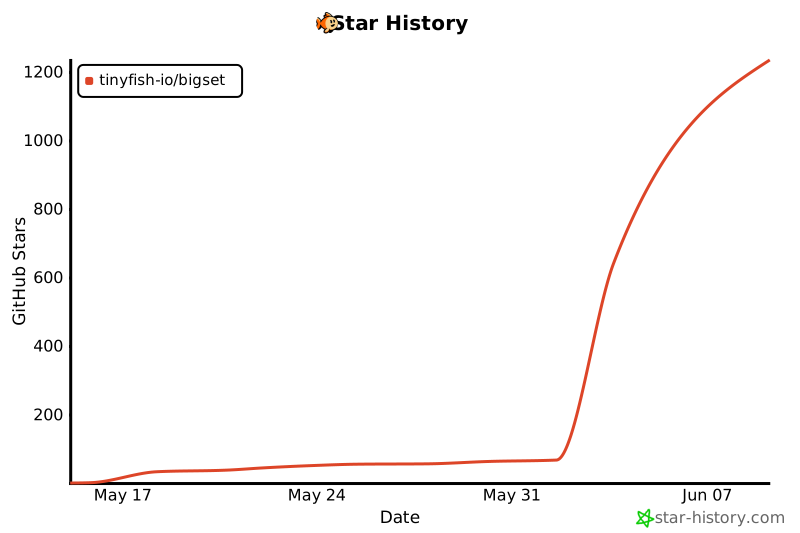
## Star History
## 🤝 Contributing

^ This awesome team is behind BigSet! We'd love to have you on board :)
Contributions are very welcome — whether it's code, feedback, or just telling us what datasets you'd want to build.
1. Fork the repo
2. Create a branch (`git checkout -b my-feature`)
3. Make your changes
4. Run `bash scripts/verify-authz.sh` to confirm the authorization layer still holds
5. Open a PR
If you're not sure where to start, [open an issue](https://github.com/tinyfish-io/bigset/issues) or come say hi.
## 📄 License
[AGPL-3.0](LICENSE)