https://github.com/tkssharma/apollo-federation-with-microservices
Apollo Federation with set of Microservices
https://github.com/tkssharma/apollo-federation-with-microservices
apollo-client apollo-federation apollo-federation-subgrapgh nestjs-backend nestjs-graphql postgresql
Last synced: 2 months ago
JSON representation
Apollo Federation with set of Microservices
- Host: GitHub
- URL: https://github.com/tkssharma/apollo-federation-with-microservices
- Owner: tkssharma
- Created: 2022-05-12T20:20:01.000Z (about 4 years ago)
- Default Branch: develop
- Last Pushed: 2022-06-12T11:49:04.000Z (about 4 years ago)
- Last Synced: 2025-12-31T01:58:49.197Z (6 months ago)
- Topics: apollo-client, apollo-federation, apollo-federation-subgrapgh, nestjs-backend, nestjs-graphql, postgresql
- Language: TypeScript
- Homepage:
- Size: 1.11 MB
- Stars: 2
- Watchers: 1
- Forks: 1
- Open Issues: 0
-
Metadata Files:
- Readme: README.md
Awesome Lists containing this project
README
## Atlas Fractional
#### example diagram to talk about gateway and other micro services
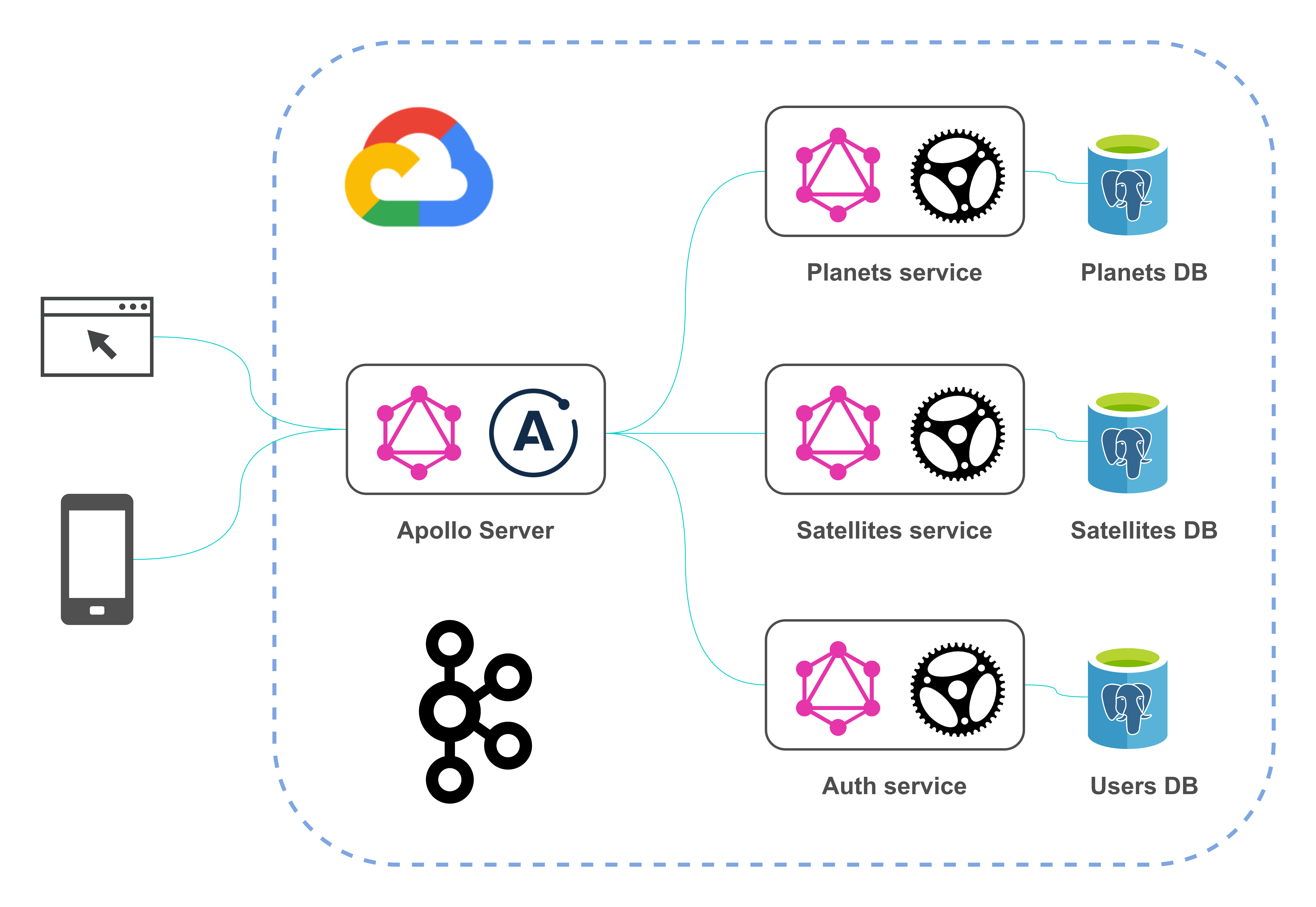
Atlas Fractional
================
Lerna monorepo that holds common platform code and all packages
## Getting Started
Install dependencies
```
npm ci
npm run bootstrap
```
Build
```
npm run build
```
### Setting up the whole platform Locally
This platform contains all these components
- User Manegement service
- Home Manager service
- Gateway Service
- Home Manager Service
- File Manager Service
- Notification Manager
### Running all these services
> we are using docker-compose to bootstrap all container only (database containers)
> in the root of the project run
```
git clone https://github.com/MobileLeapLabs/atlas-fractional.git
cd atlas-fractional
docker-compose up
➜ atlas-fractional git:(intergrations-and-notifications) docker-compose up
atlas-fractional_postgres-notification-manager_1 is up-to-date
atlas-fractional_postgres-auth_1 is up-to-date
atlas-fractional_postgres-home-manager_1 is up-to-date
atlas-fractional_postgres-file-manager_1 is up-to-date
atlas-fractional_postgres-booking-manager_1 is up-to-date
Attaching to atlas-fractional_postgres-notification-manager_1, atlas-fractional_postgres-auth_1, atlas-fractional_postgres-home-manager_1, atlas-fractional_postgres-file-manager_1, atlas-fractional_postgres-booking-manager_1
```
Note: make sure docker-utils script should have 777 permission on local to get executed
> check the logs and make sure databases has been created
```
as example ::
postgres-notification-manager_1 | server started
postgres-notification-manager_1 | CREATE DATABASE
postgres-notification-manager_1 |
postgres-notification-manager_1 |
postgres-notification-manager_1 | /usr/local/bin/docker-entrypoint.sh: running /docker-entrypoint-initdb.d/postgres-database.sh
postgres-notification-manager_1 | Multiple database creation requested: "notification-manager-api","notification-manager-api-testing"
postgres-notification-manager_1 | Creating user and database '"notification-manager-api"'
postgres-notification-manager_1 | CREATE ROLE
postgres-notification-manager_1 | CREATE DATABASE
postgres-notification-manager_1 | GRANT
postgres-notification-manager_1 | Creating user and database '"notification-manager-api-testing"'
postgres-notification-manager_1 | CREATE ROLE
postgres-notification-manager_1 | CREATE DATABASE
postgres-notification-manager_1 | GRANT
postgres-notification-manager_1 | Multiple databases created
```
All services follow same pattern for running locally, now we just need to populate .env and run `npm run start:dev` command
### Running Auth service
```sh
cd auth-service
vi .env
```
Note: You cna take reference from Heroku App setting to know any missing env variables
update env with this content
```
DATABASE_URL= postgres://api:development_pass@localhost:5431/auth-api
SENDGRID_API_KEY=23456754324567854324567
SENDGRID_VERIFIED_SENDER_EMAIL=ack@gmail.com
DEBUG="qapi:*"
LOG_LEVEL=http
PORT=5006
NODE_ENV=local
JWT_SECRET=HELLODEMO
JWT_EXPIRE_IN=3600*24
NOTIFICATION_API_URL=https://notification-manager-api-dev.herokuapp.com/api/v1
```
Now run application in watch mode it will be live on localhost:5006
```sh
npm run start:dev
```
### Running Home Manager
```sh
cd home-manager
vi .env
```
update env with this content
```
NODE_ENV=local
LOG_LEVEL=http
PORT=5003
SECRET_KEY=HELLODEMO
NEW_RELIC_KEY=
DATABASE_URL=postgres://api:development_pass@localhost:5433/home-manager-api
NODE_ENV=local
JWT_SECRET=HELLODEMO
JWT_EXPIRE_IN=3600*24
```
Now run application in watch mode it will be live on localhost:5003
```sh
npm run start:dev
```
### Running Booking Manager
```sh
cd booking-manager
vi .env
```
update env with this content
```
NODE_ENV=local
LOG_LEVEL=http
PORT=5004
JWT_SECRET=HELLODEMO
JWT_EXPIRE_IN=3600*24
DATABASE_URL=postgres://api:development_pass@localhost:5434/booking-manager-api
```
Now run application in watch mode it will be live on localhost:5004
```sh
npm run start:dev
```
### Running File Manager
```sh
cd file-manager
vi .env
```
update env with this content
```
NODE_ENV=local
LOG_LEVEL=http
PORT=5009
DATABASE_URL=postgres://api:development_pass@localhost:5439/file-manager-api
NODE_ENV=local
JWT_SECRET=HELLODEMO
JWT_EXPIRE_IN=3600*24
AWS_BUCKET_NAME=atlas-fractional-home-ownership
AWS_ACCESS_KEY=AKIAZGLBBDEH7JMRHCWI
AWS_SECRET_ACCESS=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
AWS_REGION=us-east-1
```
Now run application in watch mode it will be live on localhost:5009
```sh
npm run start:dev
```
### Running Notification Manager
```sh
cd notification-manager
vi .env
```
update env with this content
```
NODE_ENV=local
PORT=3010
AUTH_PROVIDER=auth0
AUTH_SECRET=HELLODEMO
DATABASE_URL= postgres://api:development_pass@localhost:5435/notification-manager-api
ROLLBAR_TOKEN=
NEW_RELIC_LICENSE_KEY=
LOG_LEVEL=http
SWAGGER_USERNAME=money-moves
SWAGGER_PASSWORD=money-moves
SENDGRID_USER=hello
SENDGRID_PASSWORD=hello
```
Now run application in watch mode it will be live on localhost:5010
```sh
npm run start:dev
```
### Running Gateway Service
```sh
cd gateway-service
vi .env
```
update env with this content
```
NODE_ENV=local
LOG_LEVEL=info
PORT=5002
NEW_RELIC_KEY=
SECRET_KEY=HELLODEMO
HOME_MANAGER_API=http://localhost:5003/graphql
AUTH_API=http://localhost:5006/graphql
BOOKING_MANAGER_API=http://localhost:5004/graphql
FILE_MANAGER_API=http://localhost:5009/graphql
```
Now run application in watch mode it will be live on localhost:5002
```sh
npm run start:dev
```
Once all services are up we can use gateway service to connect with all apis
```sh
http://localhost:5002/graphql
```
## Helpful command for Lerna
Full list of commands
```
lerna add [globs..] Add a single dependency to matched packages
lerna bootstrap Link local packages together and install remaining package dependencies
lerna changed List local packages that have changed since the last tagged release [aliases: updated]
lerna clean Remove the node_modules directory from all packages
lerna create [loc] Create a new lerna-managed package
lerna diff [pkgName] Diff all packages or a single package since the last release
lerna exec [cmd] [args..] Execute an arbitrary command in each package
lerna import Import a package into the monorepo with commit history
lerna init Create a new Lerna repo or upgrade an existing repo to the current version of Lerna.
lerna link Symlink together all packages that are dependencies of each other
lerna list List local packages [aliases: ls, la, ll]
lerna publish [bump] Publish packages in the current project.
lerna run Run an npm script in each package that contains that script
lerna version [bump] Bump version of packages changed since the last release.
```
## Reference
- [Lerna versioning](https://github.com/lerna/lerna/blob/main/commands/version/README.md)
- [Lerna bootstrap command](https://github.com/lerna/lerna/tree/main/commands/bootstrap#readme)
- [Issue. Lerna bootstrap does not install all dependencies](https://github.com/lerna/lerna/issues/1457)
- [Issue. bootstrap removes node_modules from root (during hoist)](https://github.com/lerna/lerna/issues/2361)
- [Blog. Multi-Package Repos with Lerna](https://www.christopherbiscardi.com/post/multi-package-repos-with-lerna)