https://github.com/tlack/xxl
a minimal vector programming language
https://github.com/tlack/xxl
Last synced: 11 months ago
JSON representation
a minimal vector programming language
- Host: GitHub
- URL: https://github.com/tlack/xxl
- Owner: tlack
- License: bsd-3-clause
- Created: 2016-01-15T22:50:40.000Z (over 10 years ago)
- Default Branch: master
- Last Pushed: 2020-10-11T20:01:54.000Z (almost 6 years ago)
- Last Synced: 2025-04-02T02:38:27.573Z (over 1 year ago)
- Language: C
- Homepage:
- Size: 1.14 MB
- Stars: 181
- Watchers: 21
- Forks: 11
- Open Issues: 3
-
Metadata Files:
- Readme: README.md
- License: LICENSE
Awesome Lists containing this project
README

# What is XXL?
XXL is a new programming language whose goals are simplicity, power, and speed.
We throw out most of conventional programming language thinking in order to
attain these goals.
## Status
Passes tests. Useful for writing small utilities, for me.
Ideas valid, but development stalled pending rethink of virtual machine. The current
VM leaks memory during complex operations and is generally too slow. A more modular
type system would be nice as well.
Tested so far on Linux (64bit x86 & GCC or Clang), OS X (Clang), Windows
(Cygwin64), Android under termux, Intel Edison and Raspberry Pi. Should work on iOS as well
but untested.
## Examples
### Manipulate variables
In XXL, we call functions verbs, and they can have only one or two arguments (named `x` and `y`).
You call a verb like `x func` or `x func y`.
Code reads left to right. There is no order of operations. Semicolons are important.
Comments are `//` to end of line.
Aside from the poorly documented built-in verbs, there isn't much to learn in terms of syntax.
When you name variables, you specify their names as a special name starting
with `'`, and use the `as` or `is` verb. Afterward you refer to them without the
`'`.
(Note: the `0.` and `1.` below are part of the XXL interactive prompt.)
```
0. 41,6,2 as 'ages // create a variable named ages with "as"
(41,6,2)
1. 'ages is (41,6,2) // equivalent to the above, reverse order with "is"
(41,6,2)
2. ages
(41,6,2)
3. 'ages is 41,6,2 // WRONG! there is no order of operations - group with ()
(41,6,2)
4. ages
41 // oops..
5. ages; 666 // semicolons separate expressions
666 // repl shows you result of last expr
```
XXL is functional, so you don't use any loops to manipulate values:
```
3. ages each {x * 2}
(82,12,4)
4. ages each {x str," years old"} join "\n" // join into separate lines
"41 years old\n6 years old\n2 years old\n"
```
(Note: `\n` is nerd speak for newline or linebreak in the terminal)
To save time, XXL has the questionable feature of allowing you to omit the `x` part of the
very beginning of a function. You'll often see this pattern employed for brevity in the examples
below. Examples:
```
3. ages each {x * 2}
(82,12,4)
4. ages each {* 2}
(82,12,4)
5. ages each {x str," years old"} join "\n"
"41 years old\n6 years old\n2 years old"
6. ages each {str," years old"} join "\n"
"41 years old\n6 years old\n2 years old"
```
`each` is a regular function (verb), believe it or not. It happens to understand what to do
given a list (vector) on the left side and a function on the right. In contrast to most languages,
XXL doesn't really have any syntax that defines looping abilities. It's all just regular XXL functions.
### Quasi-JSON encoder
Not really to spec, but what is? About 6 lines of code, without the tests:
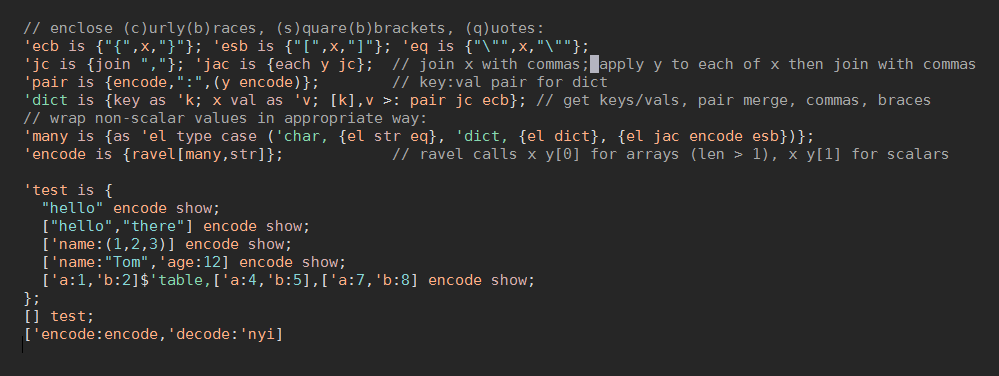
Here's what's going on in this monster. I'll explain the parts, and then the sequence of how it comes together.
```
// (e)nclose (c)urly(b)races, (s)quare(b)brackets, (q)uotes:
'ecb is {"{",x,"}"}; 'esb is {"[",x,"]"}; 'eq is {"\"",x,"\""};
```
Line 1: Define three functions to enclose values in the typical JSON delimeters. `ecb`/`esb`/`eq` enclose their
argument in curly braces, square braces, or quotes, respectively. They use the name `x` to refer to their argument.
```
'jc is {join ","}; 'jac is {each y jc}; // join x with commas; apply y to each of x then join with commas
```
Line 2: `jc` (join comma) joins the contents of its argument together with a comma in between each item. `jac` does the same
thing, but after first calling its right argument (`y`) on each item - `jac` here is a mnemonic for "join and call".
The astute might notice that `jc` and `jac` don't refer to`x`, because the first verb inside a function will be invoked
automatically with `x` as the left argument. In small functions, `x` is almost always the first term in the function's
code, so being able to omit it results in some expressivity. More on this later.
```
'pair is {encode,":",(y encode)}; // key:val pair for dict
```
Line 3: `pair` calls another function, `encode` (which we define later), without referring to `x`. It then appends a `:` to the
string that is returned from `encode`, and then appends that to the result of calling `encode` with the `y` argument.
This is a form of recursion.
```
'dict is {key as 'k; x val as 'v; [k],v >: pair jc ecb}; // get keys/vals, pair merge, commas, braces
```
Line 4: `dict` takes a dictionary as an argument, gets its keys as a list using the built-in `key` verb, and saves them in a
new variable called `k`. The values of the dictionary (also a list) are extracted using the built-in `val` verb and
become `v`.
These two lists then become the left and right arguments for successive calls to `jc` using the "each pair" or `>:` verb.
Each of the key/value pairs will get commas between them. Then, we enclose the whole of the dictionary in curly braces,
like `{"name":"Tyler","age":"2"}`.
All the looping verbs have short names that end in `:`.
```
'many is {as 'el type case ('char, {el str eq}, 'dict, {el dict}, {el jac encode esb})};
```
Line 5: `many` isn't as grody as it looks. Its purpose is to handle multiple-item collections (called vectors in XXL).
In our case, we have to worry about two main ones: character vectors (strings) and dictionaries.
First, we store the value of `x` as `el` (element). Then we extract the value's type
using the `type` verb, and then use the `case` verb to decide how to treat all the different types.
`x case (y0, f0, y0, f0, ..., else0)` will check x against each of the `y` values; if it matches, the corresponding
function `f` will be invoked with `x` as its argument. If none match, `x else0` will be invoked.
If it's a character vector (a string), we pass `el` through the `str` verb to remove its tag (a feature we'll explain later).
If it's a dictionary, we call our `dict` function.
If it's anything else, we recurse by calling `encode` again, and then enclose the result in square braces (think arrays of numbers).
```
'encode is {ravel[many,str]}; // ravel calls x y[0] for arrays (len > 1), x y[1] for scalars
```
Line 6: And finally the star of the show, `encode`. `ravel` is a verb that allows you to take one branch of logic for single-item
values (like the number `3`), or a different branch for values that have many items, like an array or string (vector of char).
Depending on the type of `x`, `encode` will dispatch either `many` (for multiple values) or `str` (for simple, single values).
### MySQL Slow Query Watcher
Here we use command-line MySQL to get process list, turn into table, find interesting slow queries.
Note that the `0.`, `1.` etc is XXL's prompt in interactive mode. The number you see next to the
prompt allows you to refer later to that line of input or the result XXL produced for it. Don't type
this part, or the comments, at the interactive REPL.
```
0. 'slowtime is 2;
// get output, split it by line, then by column, save
1. "mysql -e \"show full processlist\" --batch" Shell.get split "\n" each {split "\t"} as 'lines;
// the first line is column headings, massage data for each row, create table with keys:data
2. lines first each {make '} : (lines behead curtail each {make "issstiss"}) as 'procs;
// Use except with an anonymous function to filter rows we don't care about
3. procs except {@'Time",x,""}]; // define some formatting templates
3. mdtxt nest ["*","*"] :: {ravel [{x body html.b},str]} flat
"My Markdown parser"
```
The contents of the html callbacks, the nest control parameters, are all just
data that you can build up or pull in from anywhere. Compare with traditional
control structures used to manipulate data which exist inside the source code
only and are not mutable at runtime.
Or use `deep` and `wide` for more explicit macro-control of
recursion.
### Erlang-inspired mailboxes
Thread safe for both readers and writers (at some cost to performance of
course). Fast enough to be usable for basic purposes (800 request/reply cycles
a second on a $5 Digital Ocean box).
```
0. [] Mbox.new as 'myservice;
1. myservice Mbox.watch {x show}
2. myservice Mbox.send 55;
55
```
`watch` spawns a thread to act on mailbox messages. The `55` seen here is from
the `show` statement in the lambda. A `y` variable is available inside the
callback to maintain state; it starts as [] and it set to whatever your
function returns.
See [`doc/sect_mbox.xxl`](https://github.com/tlack/xxl/blob/master/doc/sect_mbox.xxl)
for more.
### Files
The `File` namespace contains file-related stuff. Let's explore:
```
0. File
['basename:'1(...), 'cwd:'1(...), 'dirname:'1(...), 'get:'1(...), 'ls:'1(...), 'path:'1(...), 'set:'2(...)]
```
`[] File.cwd` tells you the current working directory:
```
1. [] File.cwd
"/mnt/tlack/work/xxl"
```
Note: Here we use `[]` as a placeholder because `cwd` doesn't take any arguments.
`fname File.dirname` strips the last component off a name.
```
2. [] File.cwd File.dirname
"/mnt/tlack/work/"
```
`pattern File.ls` shows you what's in a folder:
```
3. [] File.cwd,"/*.c" File.ls
["/mnt/tlack/work/net.c", "/mnt/tlack/work/repl.c", ....]
```
`data File.set fname` sets the contents of file `fname` to `data`, which must be a string (vector of char).
It returns the data so you can continue using it in your expression.
```
4. "Hello world!" File.set "test.txt"
"Hello world!"
```
`fname File.get` reads and returns the contents of `fname` as a char vector.
```
5. "test.txt" File.get
"Hello world!"
```
`pathpartslist File.path` converts from lists of filename parts to actual platform-specific paths.
```
6. ["mnt","tlack","work","xxl"] File.path
inputs@0: ["mnt","tlack","work","xxl"] File.path
outputs@0:
"mnt/tlack/work/xxl"
```
### Tables
Well, the beginnings of them anyway.
```
0. "name,age,job\nBob,30,Programmer\nJane,25,CFO\nTyler,2,Dinosaur Hunter" as 'data;
1. data split "\n" each {split ","} as 'fields; // in a fantasy world where csv is never escaped
2. fields first:(fields behead) as 'emp // : creates dicts or tables
["name", "age", "job"]:[
["Bob", "30", "Programmer"],
["Jane", "25", "CFO"],
["Tyler", "2", "Dinosaur Hunter"]]
```
This is similar to the MySQL example above in that we are unpacking data and
making a table out of it.
Notice that the printed representation of the table is similar to what you'd
type in to regenerate it.
The in-memory table works very much like a regular value, and you can join it
with more dictionaries to append rows with `,` as you'd expect.
```
3. emp,["name":"Steve","age":"42","job":"Fact Checker"]
["name", "age", "job"]:[
["Bob", "30", "Programmer"],
["Jane", "25", "CFO"],
["Tyler", "2", "Dinosaur Hunter"],
["Steve", "42", "Fact Checker"]]
```
Or join it with a list that has a value for each column:
```
4. emp,["Arca","2","Tiny Dog"]
["name", "age", "job"]:[
["Bob", "30", "Programmer"],
["Jane", "25", "CFO"],
["Tyler", "2", "Dinosaur Hunter"],
["Arca", "2", "Tiny Dog"]]
```
Notice that we did not save the result of expression 3 (where we joined `emp`
with a dictionary containing Steve's record) so the change was not saved to
`emp`. Like most verbs in XXL, `,` does not modify the x argument, it creates
and returns a new value. Looks like Steve is going to have to check someone
else's facts from here on out.
Use `amend` (or equivalent the short operator `!`) to update `emp` in place.
`emp![["age"],{::{base 10}}]` would convert the ages to numbers so you can
ruthlessly compute them. In this example, "age" has to be put into a list here
because otherwise it would think you want to update three indices - "a", "g",
and "e".
Get individual rows with `emp@0` or `0,2 from emp`, or rows with `"age" from
emp` or `emp@"age"` or, if the key "age" was a tag like `'age`, you could use
simply `emp.age`.
Search for matching values using `match` (or `~`) or filter rows with
`{..} from emp` or `emp except {..}`.
Still no joins, many rough edges, untested performance.
### Other
- Variable names can't contain numbers, so you can build up some pretty clean and
short expressions that mirror mathematics. `3u b5` means `3 u b 5`, or
`b(u(3),5)`, assuming u is a single argument (unary) function and b is a two argument (binary) function.
If you're recoiling in horror right now at losing your precious numerals in variable
names, consider how often you're just poorly naming a temp variable.
- Variable names can contain `?`, so you can name your predicate functions in a
pleasant manner.
- Values can have "tags" associated with them, allowing you to create an
OOP-like concept of structure within data, while all regular operations work
seamlessly as if you were using the underlying data type. Consider the
classic OOP example of a "point", which in XXL would just be a tagged int
vector like `'point#(100,150)`.
- Vector-oriented and convenient manipulation on primitive values. For instance,
`1,2,3 * (4,5,6)` is perfectly legal and returns 4,10,18. This is a huge time saver
and eliminates many loops. It's also pretty fast, which somewhat makes up for the
dangerously slow interpreter.
- Diverse integer type options, including 128bit octaword (`1 make 'octa`). At
this time we don't display the int type when displaying the representation of
the numeric value. Use the `x type` verb to discovere what size of int you
are working with.
- Fast-enough unboxed binary data files. 25 million int/s to disk per second on $5/mo
Digital Ocean droplet via `1024*1024*50 count Xd.set "/tmp/50m.xd"`
- Threading support, kinda. XXL has the notion of threads available internally, but
the only way they are usable from inside XXL code is via `mb Mbox.watch {..}`.
This is because modifications to contexts' data items are not locked or synchronized,
So chaos will surely ensue if you modify global data from threads. Thus, the mailbox
acts as both a safe communication mechanism for threads, and a way to discourage global
state mutation. See [`doc/sect_mbox.xxl`](https://github.com/tlack/xxl/blob/master/doc/sect_mbox.xxl)
for more.
- Built in simple networking. Client-speaks-first protocols are a snap to implement.
World's easiest echo server: `[8888,""]Net.bind{"Echo: ",x}`. Net.bind creates one
thread to service each port/service.
- Vim syntax file in tools/syntax/vim-syntax.vim (which is generated by vim-build.xxl
in that same directory).
- No stinkin loops (and no linked lists, either)
- Supports `\\` to exit the REPL, as god intended (`quit` and `exit` too)
- BSD license
## Not yet implemented
XXL is still very much a work in progress and is mostly broken. That said, here are the
major features I anticipate finishing soon-ish.
- **Currently has severe memory leaks and performance problems**
- ~~Floats!~~ We've got floats now - no comparison tolerance yet tho.
- ~~Dictionary literals (dictionaries do work and exist as a primitive type, just
can't decide on a literal syntax for them)~~
Settled on and implemented `['a:1,'b:2]` by creating `:` as the make-dict operator
and making `,` smart about dicts.
- JSON
- FancyRepl(tm)
- Dates/times (need to figure out core representation and a way to express them as literals
in code..)
- ~~In-memory tables~~ Few operations yet, and bugs remain, but the notion of tables has
slowly seeped in. See tests.
- ~~Non-pointer tags implementation to avoid logic to enc/decode to binary for disk and IPC~
Temporarily replaced tag representation with 128bit pointer string. Fast to compare,
almost as fast as possible to create (memcpy), zero overhead on IPC ingest/excrete,
not terribly large on today's memory sizes.
- I/O (~~files~~, ~~sockets~~, mmap)
- Logged updates (I like [Kdb's approach to this](http://code.kx.com/wiki/Cookbook/Logging))
- ~~Mailboxes/processes (implemented as a writer-blocks general list)~~ Available in "Mbox"
class.
- Streams, laziness (perhaps based on mailboxes? studying other systems now)
- Tail call optimization in functions using the `self` keyword
[as per Kuc's approach](https://github.com/zholos/kuc/blob/1cace4608ba0398de6054349abea9b97100386cd/func.c#L726)
- Sorted vectors
- Grouped/index types
- Well-supported Apter trees ([see also APL's approach](https://dfns.dyalog.com/n_Trees.htm)).
## Well known bugs
Work in progress on these:
- Interpreter speed and memory leaks. These are at times severe.
- The interpreter still recurses too much in some scenarios, even though its
main loop is self-managed on the heap. C call stack depth gets too deep. I
have a simple plan to resolve this, but it requires a (much needed) rewrite
to `applyexpr()`, which can be thought of as the interpreter loop.
- The join verb (`,`) is still finnicky about joining like-types of data with
general lists. In particular, I often find myself a bit puzzled by results
like `['a,2],3` - should this be a two-item list with two items in the first
sublist, or a three element list? Before you answer, consider `['a,2] as
'q;q,3`. When in doubt, build parts separately and combine.
- You can't name a variable you define `x` or `y`, since the interpreter treats
those specially. There's no real reason for this other than the idea that
it's faster to resolve this short literal symbol manually using what we know
about the calling frame, rather than setting it as a regular variable in the
dictionary that is used by the context to resolve symbols. The setting part
works, it's just resolving `x` afterward doesn't consider the dictionary.
## Open questions
- Date and time stamps: Nanosecond precision from uint64 sufficient? What about literal
representation? Can we use `1997.12.31.09.31.45.333` or something non-pollutey like that?
Need to patch up apply() to allow you to index `'day` and similar.
## Maybe later
- JS/Emscripten (both in terms of Node.js interop and use of XXL in the browser)
- LLVM IR
- GUI
## Probably not
- Unicode
## Installation
Pretty rough right now. You'll need a C compiler and a minimally POSIX
environment but that's about it.
### Customize your build
XXL is meant to be tailored to the device you're using it on. You can remove
You can customize the features that XXL includes out of the box.
We use a build script called `./c` instead of a Makefile. It tries to make some
guesses about how your system is configured and what options are best to use.
We use a shell script to keep it simple (without having to resort to Autoconf).
When in doubt, you can make your own decisions by editing the `c` source. It's
very simple.
Around line 15 of this file you'll see a line like:
```
STDLIB="-DOCTA -DSTDLIBFILE -DSTDLIBGLOB -DSTDLIBMBOX -DSTDLIBNET -DSTDLIBSHAREDLIB -DSTDLIBSHELL -DSTDLIBXD "
```
Each of those "-D" statements enables a feature. You can remove those features
if you don't want any of them.
In particular, on platforms that do not support glob.h you should remove `-DSTDLIBGLOB`.
If you're on a 32 bit system that doesn't provide support for 128bit integers, which we call
octawords in XXL, remove `-DOCTA`.
If you don't have support for sockets on your platform, remove `-DSTDLIBNET`.
No filesystem? Remove `-DSTDLIBFILE`.
Without threading? Remove `-DSTDLIBMBOX` and `-DTHREAD` in DEFS a few lines above.
Not Unix-like? Remove `-DSTDLIBSHELL`.
No shared libraries, or don't care for `dlopen`? Remove `-DSTDLIBSHAREDLIB`.
### Regenerating auto-built .h files
Some of the .h files in the source are automatically generated by some
primitive .js scripts. If you don't have Node installed, or don't care to
rebuild those (it's not necessary unless you change the definitions of the
built in data types), just comment out "BUILDH" at the top of the `./c`
script.
Try something like:
```
git clone https://github.com/tlack/xxl.git
cd xxl
./c
```
The default build has a TON of debugging info turned on which it will violently
spit at you while you use it. Commented out the "DEBUG=" line in `./c` to make the
system more silent and friendly - but perhaps less predictable when things go
wrong (which they will.. often).
Turning off debugging also allows XXL to run much more quickly.
## Size
XXL is about 3,000 lines of hand-written C, plus 2,000 lines of auto-generated
.h files. Stripped executable is about 400kb.
I dislike large systems and aim to keep XXL small, but I also want programmers
to be able to easily get at functionality they need, both through a decent set
of built-ins, and through something akin to npm (still pondering this).
I believe XXL could be reduced to 1,000 lines or less of JavaScript or another
language that offers a more flexible type system than C's. I also wrote different
versions of similar code a lot for speed; implementing everything in terms
of each() (and other forms of iteration) would probably require much less code.
## Inspiration
K4/Q by [Kx Systems™](http://kx.com), the quirky
[Klong by Nils Holm](http://t3x.org/klong/), Erlang
(process model, introspection, parse tree/transforms),
[Kerf's approachablity](http://kerfsoftware.com),
Io (self-similarity of objects and asceticism)
and C (simplicity, performance, rectangularity of data).
## Imminent Rename
(I was trying to make this an eminent domain joke.)
I'm considering renaming XXL to `tx`, so if you see some mixing of names here
and there, please be patient with me as I consider this change. Input
appreciated!
## Contact, Community, Chat
Visit with the XXL crew and many other smart folks on #kq and #xxl on Freenode IRC.
## Credits
Wetly birthed by @tlack at [Building.co](http://building.co) in sunny Miami
Many thanks to co-conspirators:
Eblin Lopez @ classic.com, Mike Martinez @ classic.com, Khalife Nizar @ Ironhack for
keeping me grounded and much input. :)
@joebo for help with Android.
## Disclaimer
No warranty. Trademarks right of their respective owners.
This project is not related in any way to the interesting [XL project by
Dinechin et al](http://xlr.sourceforge.net/).
## License
BSD-L (3 clause)