https://github.com/tng/jgiven-azure-plugin
https://github.com/tng/jgiven-azure-plugin
Last synced: about 1 month ago
JSON representation
- Host: GitHub
- URL: https://github.com/tng/jgiven-azure-plugin
- Owner: TNG
- License: apache-2.0
- Created: 2021-09-13T07:36:26.000Z (almost 5 years ago)
- Default Branch: master
- Last Pushed: 2025-05-02T10:53:38.000Z (about 1 year ago)
- Last Synced: 2025-06-15T05:42:27.108Z (about 1 year ago)
- Language: JavaScript
- Size: 1.02 MB
- Stars: 0
- Watchers: 7
- Forks: 1
- Open Issues: 5
-
Metadata Files:
- Readme: README.md
- Contributing: CONTRIBUTING.md
- License: LICENSE
Awesome Lists containing this project
README
# Azure DevOps - Publish JGiven Reports
This extension enables users to publish JGiven HTML reports to a newly created tab inside the DevOps console, next to the `Summary` tab.
# Usage
## 1. Install the extension from the marketplace
To install the JGiven Extension, perform the following steps:
* In Azure DevOps, navigate to *Organization Settings*.
* Choose *Extensions*.
* Click on *Browse marketplace*.
* Search for *JGiven*, choose the extension and click on *Get*.
## 2. Add a JGiven step in your Azure DevOps pipeline task
To activate the JGiven Extension, include the following step in your pipeline:
```
- script: ./gradlew -b build.gradle test
displayName: '${some_name_to_display}'
```
Depending on your projects structure it might be necessary to provide a path to `build.gradle`, for example `jgiven-repository/build.gradle`.
## 3. Include a JGiven Task in your pipeline:
Add a task specification to your pipeline:
```
- task: publishjgivenreport@0
inputs:
jgivenReportPatterns: '${path_to_index.html} '**/html'
#workingDir: 'custom/working/dir' #if not set, default value is $(Build.SourcesDirectory)
```
The `jgivenReportPatterns` contains the path to the folder where the file `index.html` is located.
The syntax for `jgivenReportPatterns` follows the Unix file name matcher mechanism. You may use wildcards such as `*`
to match any number of characters or `**` to recursively match subdirectories.
For example, if `index.html` is included in a folder named `html5` the above task may include
`jgivenReportPatterns: '**/html5'`
Further, jgivenReportPatterns supports input of multiple paths by separating the paths with a `#`, i.e.
`jgivenReportPatterns: 'path_1#path_2#path_3'`
In case the working directory differs from `${Build.SourcesDirectory}` you may specify another working directory
via the `workingDir` parameter.
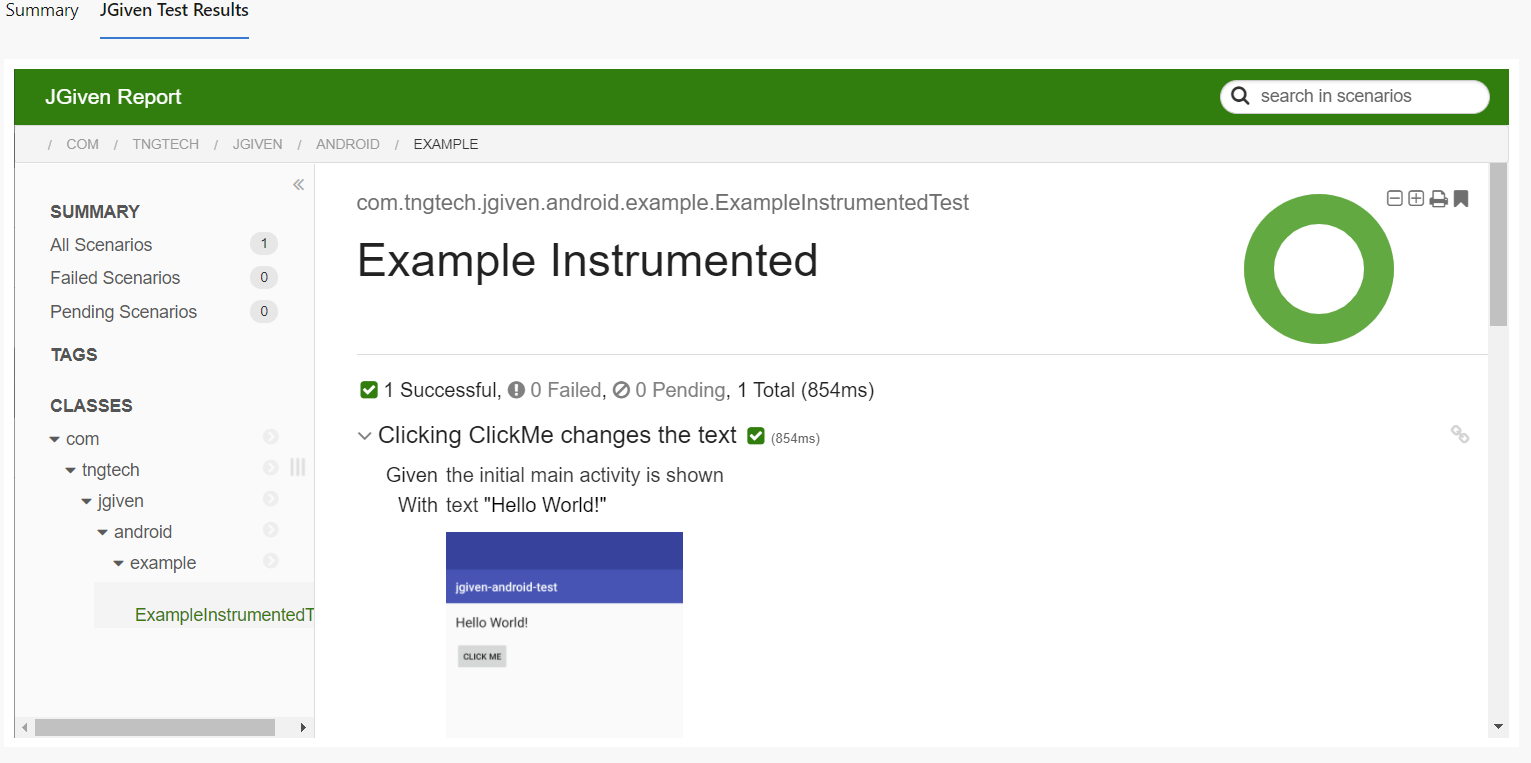
## 4. Verification
After executing the pipeline, a new tab in Azure DevOps will appear with content similar to
the following screenshot:
# License
The JGiven Azure DevOps Plugin is published under the Apache License 2.0, see https://www.apache.org/licenses/LICENSE-2.0 or [LICENSE](https://github.com/TNG/jgiven-azure-plugin/blob/master/LICENSE) for details.
# Contributing
See [CONTRIBUTING](https://github.com/TNG/jgiven-azure-plugin/blob/master/CONTRIBUTING.md)