https://github.com/tobysolutions/eliza-twitter-agent
This is a simple Twitter AI agent built with Eliza to test out the integrations that Eliza has!
https://github.com/tobysolutions/eliza-twitter-agent
Last synced: 4 months ago
JSON representation
This is a simple Twitter AI agent built with Eliza to test out the integrations that Eliza has!
- Host: GitHub
- URL: https://github.com/tobysolutions/eliza-twitter-agent
- Owner: tobySolutions
- License: mit
- Created: 2024-12-17T07:15:51.000Z (over 1 year ago)
- Default Branch: main
- Last Pushed: 2025-01-02T15:49:06.000Z (over 1 year ago)
- Last Synced: 2025-02-09T21:44:40.015Z (over 1 year ago)
- Language: TypeScript
- Size: 9.35 MB
- Stars: 2
- Watchers: 1
- Forks: 0
- Open Issues: 0
-
Metadata Files:
- Readme: README.md
- Changelog: CHANGELOG.md
- Contributing: CONTRIBUTING.md
- License: LICENSE
- Security: SECURITY.md
Awesome Lists containing this project
README
# Eliza 🤖

📖 [Documentation](https://ai16z.github.io/eliza/) | 🎯 [Examples](https://github.com/thejoven/awesome-eliza)
## 🌍 README Translations
[中文说明](./README_CN.md) | [日本語の説明](./README_JA.md) | [한국어 설명](./README_KOR.md) | [Français](./README_FR.md) | [Português](./README_PTBR.md) | [Türkçe](./README_TR.md) | [Русский](./README_RU.md) | [Español](./README_ES.md) | [Italiano](./README_IT.md) | [ไทย](./README_TH.md) | [Deutsch](./README_DE.md)
## ✨ Features
- 🛠️ Full-featured Discord, Twitter and Telegram connectors
- 🔗 Support for every model (Llama, Grok, OpenAI, Anthropic, etc.)
- 👥 Multi-agent and room support
- 📚 Easily ingest and interact with your documents
- 💾 Retrievable memory and document store
- 🚀 Highly extensible - create your own actions and clients
- ☁️ Supports many models (local Llama, OpenAI, Anthropic, Groq, etc.)
- 📦 Just works!
## Video Tutorials
[AI Agent Dev School](https://www.youtube.com/watch?v=ArptLpQiKfI&list=PLx5pnFXdPTRzWla0RaOxALTSTnVq53fKL)
## 🎯 Use Cases
- 🤖 Chatbots
- 🕵️ Autonomous Agents
- 📈 Business Process Handling
- 🎮 Video Game NPCs
- 🧠 Trading
## 🚀 Quick Start
### Prerequisites
- [Python 2.7+](https://www.python.org/downloads/)
- [Node.js 23+](https://docs.npmjs.com/downloading-and-installing-node-js-and-npm)
- [pnpm](https://pnpm.io/installation)
> **Note for Windows Users:** [WSL 2](https://learn.microsoft.com/en-us/windows/wsl/install-manual) is required.
### Use the Starter (Recommended)
```bash
git clone https://github.com/ai16z/eliza-starter.git
cp .env.example .env
pnpm i && pnpm build && pnpm start
```
Then read the [Documentation](https://ai16z.github.io/eliza/) to learn how to customize your Eliza.
### Manually Start Eliza (Only recommended if you know what you are doing)
```bash
# Clone the repository
git clone https://github.com/ai16z/eliza.git
# Checkout the latest release
# This project iterates fast, so we recommend checking out the latest release
git checkout $(git describe --tags --abbrev=0)
```
### Start Eliza with Gitpod
[](https://gitpod.io/#https://github.com/ai16z/eliza/tree/main)
### Edit the .env file
Copy .env.example to .env and fill in the appropriate values.
```
cp .env.example .env
```
Note: .env is optional. If your planning to run multiple distinct agents, you can pass secrets through the character JSON
### Automatically Start Eliza
This will run everything to setup the project and start the bot with the default character.
```bash
sh scripts/start.sh
```
### Edit the character file
1. Open `packages/core/src/defaultCharacter.ts` to modify the default character. Uncomment and edit.
2. To load custom characters:
- Use `pnpm start --characters="path/to/your/character.json"`
- Multiple character files can be loaded simultaneously
3. Connect with X (Twitter)
- change `"clients": []` to `"clients": ["twitter"]` in the character file to connect with X
### Manually Start Eliza
```bash
pnpm i
pnpm build
pnpm start
# The project iterates fast, sometimes you need to clean the project if you are coming back to the project
pnpm clean
```
#### Additional Requirements
You may need to install Sharp. If you see an error when starting up, try installing it with the following command:
```
pnpm install --include=optional sharp
```
### Community & contact
- [GitHub Issues](https://github.com/ai16z/eliza/issues). Best for: bugs you encounter using Eliza, and feature proposals.
- [Discord](https://discord.gg/ai16z). Best for: sharing your applications and hanging out with the community.
## Contributors
## Star History
[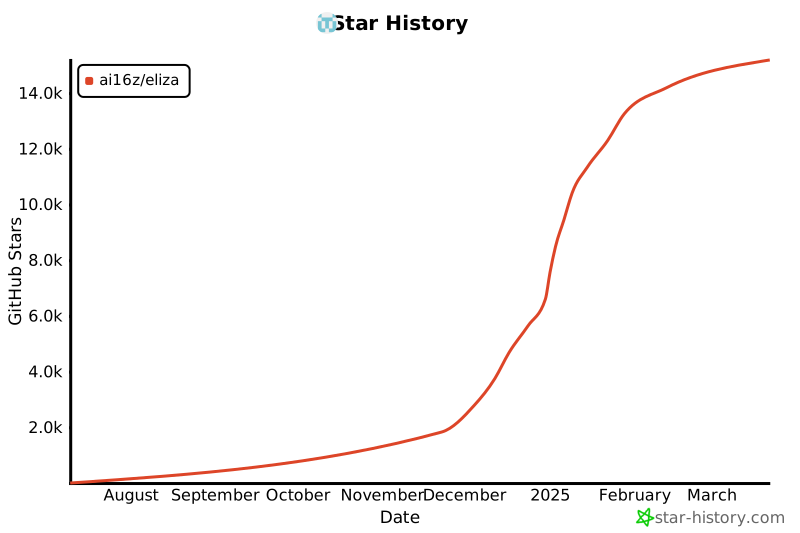](https://star-history.com/#ai16z/eliza&Date)