https://github.com/tom-pytel/sympad
Graphical symbolic math calculator / scratchpad using SymPy
https://github.com/tom-pytel/sympad
computer-algebra gui math python sympy
Last synced: 5 months ago
JSON representation
Graphical symbolic math calculator / scratchpad using SymPy
- Host: GitHub
- URL: https://github.com/tom-pytel/sympad
- Owner: tom-pytel
- License: bsd-2-clause
- Created: 2019-06-18T16:22:55.000Z (about 7 years ago)
- Default Branch: master
- Last Pushed: 2021-01-02T18:35:25.000Z (over 5 years ago)
- Last Synced: 2025-12-30T16:32:33.580Z (6 months ago)
- Topics: computer-algebra, gui, math, python, sympy
- Language: Python
- Homepage:
- Size: 7.76 MB
- Stars: 21
- Watchers: 4
- Forks: 1
- Open Issues: 0
-
Metadata Files:
- Readme: README.md
- Changelog: changelog.txt
- License: LICENSE
Awesome Lists containing this project
README
# SymPad
SymPad is a simple single script graphical symbolic calculator / scratchpad using SymPy for the math, MathJax for the display in a browser and matplotlib for plotting.
User input is intended to be quick, easy and intuitive and is displayed in symbolic form as it is being entered.
Sympad will accept Python expressions, LaTeX formatting, unicode math symbols and a native shorthand intended for quick entry, or a mix of all of these.
The input will be evaluated symbolically or numerically with the results being copy/pasteable in Python or LaTeX formats, so it acts as a translator as well.
The following are examples of valid inputs to SymPad:
```
cos -pi
N cos**-1 -\log_2 sqrt[4] 16
\lim_{x\to\infty} 1/x
\sum_{n=0}**oo x^n / n!
d**6 / dx dy**2 dz**3 x^3 y^3 z^3
\int_0^\pi \int_0^{2pi} \int_0^1 rho**2 sin\phi drho dtheta dphi
\[[1, 2], [3, 4]]**-1
Matrix (4, 4, lambda r, c: c + r if c > r else 0)
factor (x**3 + 3 y x**2 + 3 x y**2 + y**3)
f (x, y) = sqrt (x**2 + y**2)
solve (x**2 + y = 4, x)
y = y (t)
dsolve (y'' - 4y' - 12y = 3e**{5t})
pdsolve (x * d/dx u (x, y) - y * d/dy u (x, y) + y**2 u (x, y) - y**2)
```
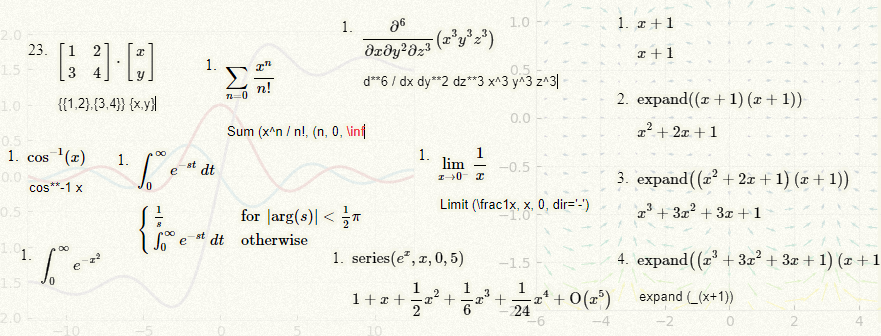
And here are some examples of the visual output as you type:
## Installation
If you just want to use the program you only need the file **sympad.py**, and of course Python and the SymPy Python package.
You can download **sympad.py** from here or install it directly from the PyPI repository.
This version of SymPad works with SymPy 1.5, a version of SymPad which works correctly with SymPy 1.4 is available on the branch **SymPy1.4**.
To install the latest version on Linux from PyPI:
```
pip3 install sympad
```
To install on Windows from PyPI:
```
pip3 install --user sympad
```
If you install SymPad from PyPI then SymPy will be installed automatically.
If you want to install SymPy yourself: [https://sympy.org/](https://sympy.org/)
```
pip3 install sympy
```
In order to get the optional plotting functionality you must have the matplotlib package installed: [https://matplotlib.org/](https://matplotlib.org/)
```
pip3 install matplotlib
```
As said to use the program you just need **sympad.py**, this is an autogenerated Python script which contains all the modules and web resources in one handy easily copyable file.
Otherwise if you want to play with the code then download everything and run the program using **server.py**.
If you want to regenerate the parser tables you will need the PLY Python package: [https://www.dabeaz.com/ply/](https://www.dabeaz.com/ply/)
```
pip3 install ply
```
## Running SymPad
If you downloaded **sympad.py** from here and have SymPy installed then you can just run the SymPad script from anywhere.
If you installed from PyPI then you can run SymPad on Linux or Windows via:
```
python -m sympad
```
On Linux a non-py extension script version is also installed so you can just run it as:
```
sympad
```
## Open-Source License
SymPad is made available under the BSD license, you may use it as you wish, as long as you copy the BSD statement if you redistribute it. See the LICENSE file for details.