https://github.com/tommeier/rails-prg
Rails handler for implementing full POST-REDIRECT-GET pattern (even on errors)
https://github.com/tommeier/rails-prg
Last synced: 8 months ago
JSON representation
Rails handler for implementing full POST-REDIRECT-GET pattern (even on errors)
- Host: GitHub
- URL: https://github.com/tommeier/rails-prg
- Owner: tommeier
- License: mit
- Created: 2014-02-21T01:02:51.000Z (over 12 years ago)
- Default Branch: master
- Last Pushed: 2015-04-14T08:10:30.000Z (about 11 years ago)
- Last Synced: 2025-10-08T03:55:07.485Z (9 months ago)
- Language: Ruby
- Homepage:
- Size: 421 KB
- Stars: 21
- Watchers: 4
- Forks: 1
- Open Issues: 3
-
Metadata Files:
- Readme: README.md
- License: LICENSE.txt
Awesome Lists containing this project
README
# Rails::Prg (post-redirect-get)
[](https://travis-ci.org/tommeier/rails-prg)
[](https://saucelabs.com/u/rails-prg)
[](https://saucelabs.com/u/rails-prg)
Secure applications disable browser history and internal cache. Unfortunately, this causes problems with most browsers when following the standard Rails pattern for displaying errors.
We never really see an issue as Rails developers because we usually allow browser-history and internal store. This gem is ***only*** required when `no-cache, no-store` is applied in your headers for a secure application.
Standard Rails method for error handling:
* POST form
* Error generated -> Render same action
* POST form
* No errors -> Redirect to successful action
At this point, and the back button is pressed; each browser handles it slightly differently. Firefox skips back two pages in the history with new content and no error, and chrome skips back one, and displays the previous content (with error).
In a secure application, browsers are unable to determine the content from the internal cache and raise an error. Example from Chrome when clicking back button after successful redirect raises an `ERR_CACHE_MISS`:

For full protection from ERR_CACHE_MISS, and equivalent in other browsers, the pattern should be altered to follow a full POST-REDIRECT-GET patten.
Full Post-Redirect-Get pattern:
* POST form
* Error generated -> ***redirect*** back displaying errors
* POST form
* No errors -> Redirect to successful action
This way the browser will always have a consistent back-button history to traverse without
triggering browser errors. This error can also be triggered by:
* Browser crashing (and attempting restore)
* Abnormal closure of browser such as power cutting out (and attempting restore)
* 'Restore' last session
## Installation
Add this line to your application's Gemfile:
`gem 'rails-prg'`
And then execute:
`$ bundle`
Or install it yourself as:
`$ gem install rails-prg`
## Usage
The standard controller method for Rails (in a changing action like Create/Update) would look like:
```
def update
if @object.save
flash[:notice] = 'Huzzah - I was successful!'
redirect_to objects_path
else
flash[:error] = 'Oh no - saving failed'
render :edit
end
end
```
To enable full Post-Redirect-Get for errors, the object has to be reinitialized after the redirect with both the set params and the new errors via the flash object (one request only). For security reasons, this will raise errors unless `permitted` params are passed for the redirect (see [strong parameters](http://api.rubyonrails.org/classes/ActionController/Parameters.html)).
Using `Rails-Prg` and to implement full POST-REDIRECT-GET this action (and any other change action such as `create`) should be changed to the following.
Example with filters:
```
before_filter :load_object, only: [:edit, :update]
before_filter :load_redirected_objects!, only: [:edit]
def update
if @object.save
flash[:notice] = 'Huzzah - I was successful!'
redirect_to objects_path
else
set_redirected_object!('@object', @object, clean_params) # Pass errors
redirect_to edit_object_path(@object) # Redirect back
end
end
```
On redirection to the edit page the filter `set_redirected_object!` will assign any params passed on to the object (by submission) and any errors present in the flash object to act as normal, as if it was simply rendered on the previous page.
Example without filters:
```
def new
@object = Object.new
load_redirected_objects!
end
def create
@object = Object.new(params[:object])
if @object.save
flash[:notice] = 'Huzzah - I was created!'
redirect_to objects_path
else
set_redirected_object!('@object', @object, safe_params) # Pass errors
redirect_to new_object_path # Redirect back
end
end
```
This strategy also has the benefit of being completely uniform across all browsers in behaviour. Before, for instance, Chrome ended on a different page to Firefox when clicking back (one skips a page in history and goes further back, chrome displays with the errors instead).
## Further explanation
The way Rails `render`s an error instead of redirecting, is completely expected and normal. The primary reason is for performance, no additional HTTP hit required, and the object is already loaded (with errors). Pretty much every framework has a similar strategy. In fact, you can duplicate the browser cache bug in the majority of secure websites online today.
However, though better for performance reasons, this breaks the old browser pattern of POST-REDIRECT-GET (http://en.wikipedia.org/wiki/Post/Redirect/Get)
```
Post/Redirect/Get (PRG) is a web development design pattern that prevents some duplicate form
submissions, creating a more intuitive interface for user agents (users). PRG implements
bookmarks and the refresh button in a predictable way that does not create duplicate
form submissions.
```
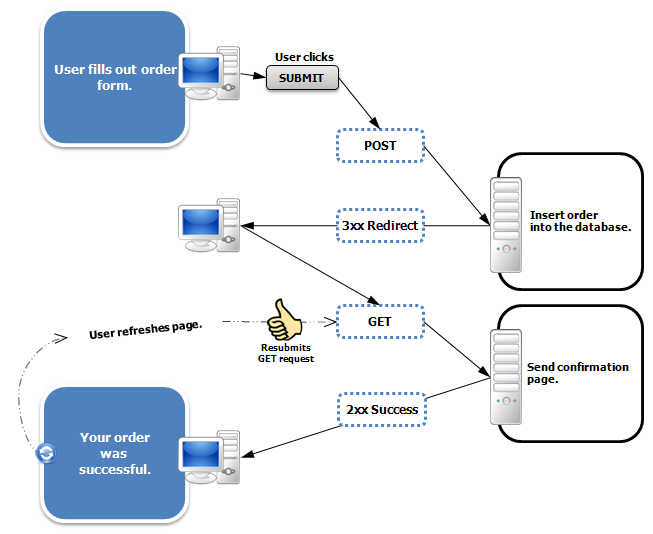
As such, for a secure application, we need to always ensure `no-cache,no-store` is set, and always use the POST-REDIRECT-GET pattern.
### Browser peculiarities
Chrome (other browsers have their own equivalent) has the following code that breaks with the Rails method when `no-store` is set:
* https://chromium.googlesource.com/chromium/chromium/+/master/webkit/appcache/appcache_response.cc
Chrome code:
```
void AppCacheResponseReader::ContinueReadData() {
if (!entry_) {
ScheduleIOCompletionCallback(net::ERR_CACHE_MISS);
return;
}
}
```
Basically, with `no-store` as a header, and allowing 'back button' to be used, the browser gets into a state, where it attempts to load the rendered error page (without redirect) and the headers have already blocked saving the history, and raises the `ERR_CACHE_MISS` error.
With POST-REDIRECT-GET pattern this is avoided (as the form submission page always ends in redirect)
Example of error displayed on Chrome:

## Contributing
1. Fork it ( http://github.com/tommeier/rails-prg/fork )
2. Create your feature branch (`git checkout -b my-new-feature`)
3. Add specs and ensure all tests pass (in multiple browsers)
3. Commit your changes (`git commit -am 'Add some feature'`)
4. Push to the branch (`git push origin my-new-feature`)
5. Create new Pull Request
## Running tests
To display in Chrome browsers, ensure you have the latest `chromedriver` installed:
`brew install chromedriver`
### Running all tests, with setup, Chrome and Firefox browser features
`script/spec`
### Running features only in Chrome
`BROWSER=chrome rspec spec/rails/prg/features`
### Running features only in Firefox (default)
`BROWSER=firefox rspec spec/rails/prg/features`
## Appendix
### How to to generate dummy rails app for test structure (use when updating rails)
* Command for dummy rails app
* Scaffolding request objects:
* `rails generate scaffold ExamplePrg subject:text:uniq body:text published:boolean`
* `rails generate scaffold ErrorDuplicator subject:text:uniq body:text published:boolean`