https://github.com/tompave/tagbox
A simple jQuery plugin to painlessly create input boxes for tag lists like the ones used on StackOverflow or Linkedin.
https://github.com/tompave/tagbox
Last synced: about 1 year ago
JSON representation
A simple jQuery plugin to painlessly create input boxes for tag lists like the ones used on StackOverflow or Linkedin.
- Host: GitHub
- URL: https://github.com/tompave/tagbox
- Owner: tompave
- License: mit
- Created: 2013-09-05T10:29:24.000Z (almost 13 years ago)
- Default Branch: master
- Last Pushed: 2015-07-26T02:52:04.000Z (almost 11 years ago)
- Last Synced: 2025-02-01T08:41:46.282Z (over 1 year ago)
- Language: CSS
- Homepage: http://tompave.github.io/tagbox/
- Size: 383 KB
- Stars: 1
- Watchers: 2
- Forks: 0
- Open Issues: 0
-
Metadata Files:
- Readme: README.md
- License: license.txt
Awesome Lists containing this project
README
#tagbox
A simple jQuery plugin to painlessly create input boxes for tag lists like the ones used on StackOverflow or Linkedin.
__jQueryUI is NOT required!__
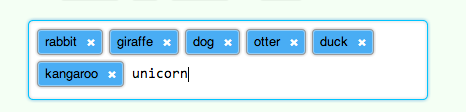
##Demo
A demo with live HTML preview is available [here](http://tommaso.pavese.me/tagbox/example.html).
##How To
###What you'll need
Just import jQuery (either `1.10` or `2.0`), the plugin javascript file and the related stylesheet (a default CSS file is inlcuded).
```html
```
(of course, you can package and minify everything in a single file)
To use the plugin, you'll need a `` containing the `
` you plan to use as the tag input.
```html
```
###Trigger the plugin
Once you have setup your `` and your `
`, you can just call:
```javascript
$("#tag_box").tagbox();
```
The result will be:
```html
```
###Options
You can pass the function an optional object with some configuration values. Here are the defaults:
```javascript
$("#tag_box").tagbox({
typeTargetNameAndId : "type_target",
tagInputsArrayName : "tag_list",
includeExampleTag : true
});
```
###Style
The plugin comes with a default stylesheet for the tag widget (SCSS).
Of course you can use your own.
##How it works
The plugin listens for keypress events and reacts on `enter`, `,`, `space` or `tab`.
When one of these keys is pressed, it creates a new graphical _tag\_element_ in the tag box, and inserts in the form a new hidden input for the new inserted value. The hidden inputs have a collective name (can be configured) and will be received by the server as an array of values.
Removing a graphical _tag\_element_ also removes the corresponding hidden input.
##Contribute
With this plugin I wanted to keep things simple, but I'd like to hear suggestions about features and configuration options.
If you want you can send me a pull request:
* fork on GitHub
* `git clone` your fork on your computer
* `git checkout -b your_new_feature_branch`
* implement your modifications
* `git add .` and `git commit`
* `git push`
* create a pull request on GitHub