https://github.com/tomwayson/generator-esri-widget
Yeoman generator to create custom Dojo widgets for Esri web applications
https://github.com/tomwayson/generator-esri-widget
Last synced: about 1 year ago
JSON representation
Yeoman generator to create custom Dojo widgets for Esri web applications
- Host: GitHub
- URL: https://github.com/tomwayson/generator-esri-widget
- Owner: tomwayson
- Created: 2014-06-09T17:25:03.000Z (about 12 years ago)
- Default Branch: master
- Last Pushed: 2016-09-22T02:03:59.000Z (over 9 years ago)
- Last Synced: 2025-03-29T06:51:16.982Z (about 1 year ago)
- Language: JavaScript
- Homepage:
- Size: 65.4 KB
- Stars: 17
- Watchers: 4
- Forks: 10
- Open Issues: 4
-
Metadata Files:
- Readme: README.md
- Contributing: CONTRIBUTING.md
Awesome Lists containing this project
README
# generator-esri-widget [](https://travis-ci.org/tomwayson/generator-esri-widget)
> [Yeoman](http://yeoman.io) generator to create custom Dojo widgets for Esri web applications.
**Not to be confused with [Esri/generator-esri-appbuilder-js](http://github.com/Esri/generator-esri-appbuilder-js) which scaffolds out widgets specifically for the ArcGIS Web AppBuilder**
## About
This generator scaffolds out the boilerplate files that are need each time you create a new custom Dojo widget for a web application using Esri's ArcGIS API for JavaScript.
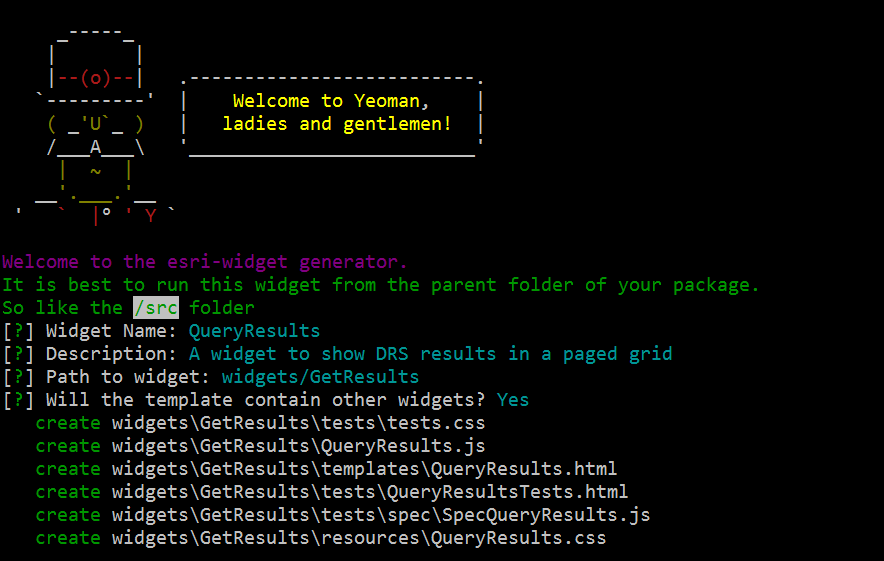
This generator was stolen forked and adapted from [@steveoh](https://github.com/steveoh)'s [generator-dojo-widget](https://github.com/steveoh/generator-dojo-widget). I've been using that generator for a while now, and it does an excellent job of scaffolding out the files needed for a Dojo widget. However, I found myself making the same changes to those files each time I ran it, so I wanted to change the generator so that it would:
* Include a map in the test page by default
* Write the spec tests with [mocha] instead of [jasmine](http://jasmine.github.io/)
* Indent using 2 spaces instead of 4 for .js files, 'cause a hata's gotta hate.
Since these are *my* preferences and I didn't think that they would make their way back into the original generator, I decided to make my fork its own source with a new name - with nothing but love and respect for [@steveoh](https://github.com/steveoh).
## Getting Started
### Installation
To install Yeoman from npm (if not already), run:
```bash
$ npm install -g yo
```
To install generator-esri-widget from npm, run:
```bash
$ npm install -g generator-esri-widget
```
### Running the Generator
Navigate to your application's root folder and run the following at the command line:
```
$ yo esri-widget
```
A few opinionated files will be created. If you created a widget called `test` in the `app` folder, the following files will be created for you.
'app/test.js',
'app/templates/test.html',
'app/tests/testTests.html',
'app/tests/spec/Spectest.js',
'app/resources/test.css'
The `/test.js` file will contain your widget logic.
`/templates/test.html` will be an empty template file if your widget has a template.
`tests/testTests.html` is an html page that you can load to see your widget in isolation.
`tests/spec/Spectest.js` is a [mocha] test spec file with a default test instantiating your new widget.
`tests/test.css` is the style sheet containing styles specific to your new widget.
`resources/test.css` is the style sheet containing styles specific to your new widget.
## License
MIT
[mocha]:http://mochajs.org/