https://github.com/toni08bit/ipnote
Python package to post and get a stored IP address from an info server
https://github.com/toni08bit/ipnote
ip ipv4 python python3 requests-module
Last synced: over 1 year ago
JSON representation
Python package to post and get a stored IP address from an info server
- Host: GitHub
- URL: https://github.com/toni08bit/ipnote
- Owner: toni08bit
- License: mit
- Created: 2022-05-23T19:35:34.000Z (about 4 years ago)
- Default Branch: main
- Last Pushed: 2022-05-24T07:35:43.000Z (about 4 years ago)
- Last Synced: 2025-01-21T00:50:32.470Z (over 1 year ago)
- Topics: ip, ipv4, python, python3, requests-module
- Language: Python
- Homepage:
- Size: 7.22 MB
- Stars: 1
- Watchers: 1
- Forks: 0
- Open Issues: 0
-
Metadata Files:
- Readme: README.md
- License: LICENSE
Awesome Lists containing this project
README
# IpNote
This app makes a request to an external server every 5 minutes (default value, configurable), which then notes the IP to be accessible by other clients.
Here a more detailed description:
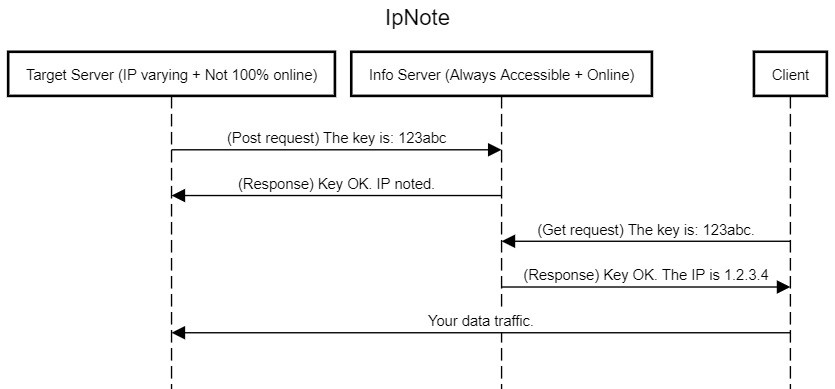
## Requirements
About **any Python 3** version that supports the pre-installed *requests* module.
The core of this project runs **without any modules**. If you choose to use any tutorials I linked, the extra requirements will be listed there.
Project made for Ubuntu 20.04 Focal Fossa, **probably working on any Ubuntu/Linux system**.
## Setup
### Info Server
1. Clone the InfoServer folder to your /home directory.
2. (*Recommended*) Set up the flask server utilizing uWSGI and nginx. (Have a look at [this](https://www.digitalocean.com/community/tutorials/how-to-serve-flask-applications-with-uswgi-and-nginx-on-ubuntu-18-04) good tutorial.)
### Target Server
1. Clone the TargetServer folder to your machine.
2. (*Optional*) If you do not wish to manually run the script every time at startup and you are using Ubuntu you should consider looking into [converting it into a service](https://websofttechs.com/tutorials/how-to-setup-python-script-autorun-in-ubuntu-18-04/).
### Client
I've uploaded a demo inside the Client folder. You can build this function into your code easily and without any external modules.