https://github.com/tonisives/clawtab
https://github.com/tonisives/clawtab
agents claude-code mobile remote-control rust
Last synced: about 2 months ago
JSON representation
- Host: GitHub
- URL: https://github.com/tonisives/clawtab
- Owner: tonisives
- License: mit
- Created: 2026-02-19T06:59:33.000Z (5 months ago)
- Default Branch: main
- Last Pushed: 2026-04-07T11:14:43.000Z (4 months ago)
- Last Synced: 2026-04-07T13:16:47.287Z (4 months ago)
- Topics: agents, claude-code, mobile, remote-control, rust
- Language: TypeScript
- Homepage: https://clawtab.cc
- Size: 55.8 MB
- Stars: 3
- Watchers: 0
- Forks: 0
- Open Issues: 0
-
Metadata Files:
- Readme: README.md
- License: LICENSE
Awesome Lists containing this project
README
ClawTab - Agent Control Center
Desktop app to create and manage groups of agents from any provider and monitor them on the web or mobile.

---
## Features
- Unified interface for all agent tools like Claude Code, Codex and OpenCode
- Split agents into side-by-side panes
- Fork agents into different tools or models
- Display info about model, task and queries
- Auto-yes - accept all questions as `Yes`
- Scheduled jobs - create cronjobs and read their past logs
- Remote Control - view logs and answer questions on the web or ClawTab mobile app
- Notifications - job failures or agent questions sent to mobile or Telegram
- Secrets Management - Secrets from macOS Keychain and gopass, injected as environment variables. Per-job secret assignment.
### Small bundle
Written with Rust+Tauri. <20MB bundle size and efficient backend.
## Full terminal support
ClawTab uses [xterm](https://github.com/xtermjs/xterm.js) to display full interface of the Agent. You can
- answer questions
- edit in nvim
- use your full shell configuration
You can launch normal shells beside agents and use them for any purpose

Think of it like [tmux](https://github.com/tmux/tmux) on steroids. Every Agent related inconvenience that cannot be handled in shell is fixed in the supporting GUI.
Shells are running in a background tmux process, and they stay alive through app restarts. Never worry about losing your work again!
## Mind Map
A canvas view that lays out every running Claude Code, Codex, and OpenCode agent as a recency-weighted constellation around its group hub. Agents that just spoke sit close and large; idle ones drift to the edge. Click any node to pop a live terminal modal anchored to the node by a curved connector, without leaving the canvas.
- **Recency layout** - card size, opacity, and edge weight all driven by how recently the agent was active
- **Agents and Jobs modes** - one floating toggle switches between live agent processes and scheduled jobs
- **State at a glance** - working agents pulse green, agents waiting on a permission prompt pulse on the border
- **Multiple live terminals** - click a card to open a draggable, resizable terminal modal; open as many as you want
- **Spawn from a hub** - hover any group hub and hit the plus button to launch a new agent into that group
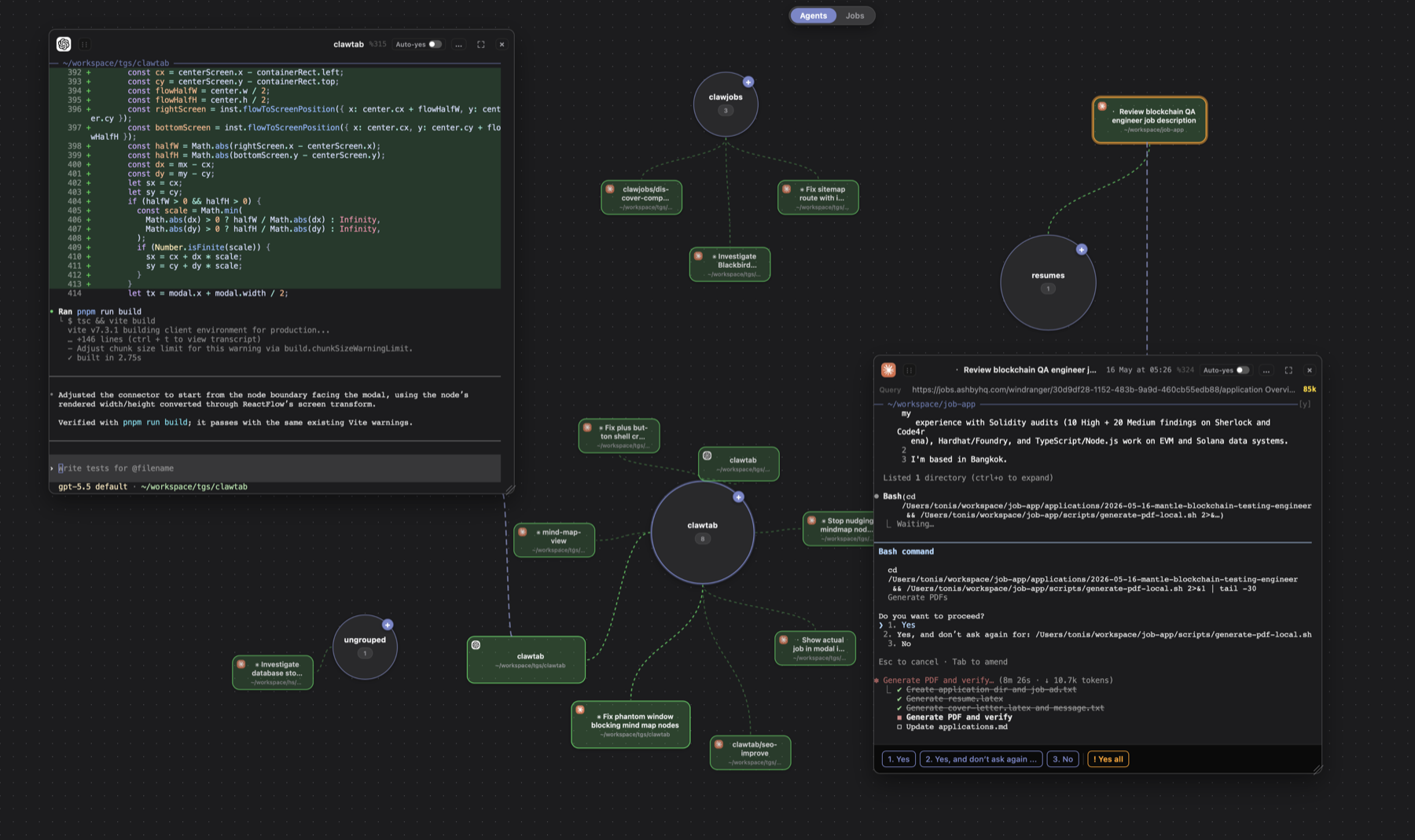
Read more in the [Mind Map article](https://clawtab.cc/articles/mind-map).
## Remote Control
- **Auto-detect questions** - Detects when Claude Code agents are waiting for input across your panes.
- **Unified card view** - See all pending questions from all instances in one interface.
- **One-tap answers** - Answer options are rendered as buttons. Tap to send the response back to the agent.
- **Multi-instance support** - Works across multiple terminal windows, agents providers and tabs simultaneously.

**Architecture:** A relay server (Rust/Axum) sits between your local machine and remote clients. The desktop app (Tauri) monitors your tmux panes, parses CLI output to detect when an agent is waiting for input, and pushes the state to the relay.
The web/mobile client connects to the relay, renders agent cards with answer buttons, and sends responses back through the relay to your terminal.
Desktop (Tauri) -> Relay Server (Rust/Axum) -> Web/Mobile Client
## How It Works
1. **Launch Agents** -- Launch any Agent software (Claude Code, Codex, etc) from a single interface. Combine them into groups and side-by-side tabs
2. **Define Jobs** -- Create jobs in the GUI: Agent prompts, or project-based folder agents with centralized instructions.
3. **ClawTab Schedules** -- Jobs run on cron in tmux windows. Secrets are injected, output is captured, and status is tracked.
4. **Monitor Anywhere** -- Watch from the GUI, Web App, Mobile App or Telegram. Get notifications on success or failure.
## Save costs
How to get a 50$ LLM subscription?
Mix and match between providers
- Use Claude promotion periods to use cheap tokens
- Switch to ChatGPT when they are promoting their product
- Switch to OpenCode when both tokens are exhausted and wait for the next reset
## Install
### Homebrew
```sh
brew install --cask tonisives/tap/clawtab
```
### Build from Source
Requires macOS 10.15+, [Rust](https://rustup.rs/), [Node.js](https://nodejs.org/), and [pnpm](https://pnpm.io/).
```sh
git clone https://github.com/tonisives/clawdtab.git
cd clawdtab
pnpm install
cargo tauri build
```
Produces three binaries: `clawtab` (GUI), `cwtctl` (CLI), `cwttui` (TUI).
### Runtime Dependencies
- tmux (for Claude Code and folder jobs)
- Claude Code, Codex or OpenCode
## iOS App
Download from the [App Store](https://apps.apple.com/us/app/clawtab/id6759683841)
## Web remote
Access at https://remote.clawtab.cc.
## Relay
Relay is required for Web Remote or iOS app. You can deploy relay yourself or use the provided subscription for relay.lawtab.cc.
## Documentation
Full docs are available in the [docs/](./docs/) folder or at [clawtab.cc](https://clawtab.cc).
## License
See [LICENSE](./LICENSE) for details.
## FAQ
### Why not just use tmux or other multiplexers?
ClawTab adds info about agent tasks, groups them together for projects, searches between them, and launches them in single interface. Tmux goes a long way, but gets harder to manage when workload increases.
### What is the difference between OpenClaw and ClawTab?
ClawTab includes many of OpenClaw features like autonomous agents, scheduled jobs and remote notifications. Main benefit is the full Desktop/Remote app that allows you to orchestrate agents visually.
### Why not just use Claude Code?
With Claude Code, you are locked into a single provider. Anthropic and ChatGPT are known to reduce model quality or increase pricing without prior notice. ClawTab allows you to be provider agnostic and prepare for model downtime. I use 3 different providers so I stay in control.
### What is the pricing?
Desktop app is MIT licensed and completely free. If you want to use Remote features, you can deploy the relay yourself for free or use the provided subscription.