https://github.com/tony1223/better-agent-terminal
Multi-workspace terminal aggregator with Claude Code AI integration
https://github.com/tony1223/better-agent-terminal
ai-agent anthropic claude claude-code developer-tools electron multi-terminal terminal terminal-emulator workspace
Last synced: about 2 months ago
JSON representation
Multi-workspace terminal aggregator with Claude Code AI integration
- Host: GitHub
- URL: https://github.com/tony1223/better-agent-terminal
- Owner: tony1223
- License: mit
- Created: 2025-12-17T01:18:17.000Z (7 months ago)
- Default Branch: main
- Last Pushed: 2026-06-01T05:58:07.000Z (about 2 months ago)
- Last Synced: 2026-06-01T06:23:08.172Z (about 2 months ago)
- Topics: ai-agent, anthropic, claude, claude-code, developer-tools, electron, multi-terminal, terminal, terminal-emulator, workspace
- Language: TypeScript
- Size: 10.9 MB
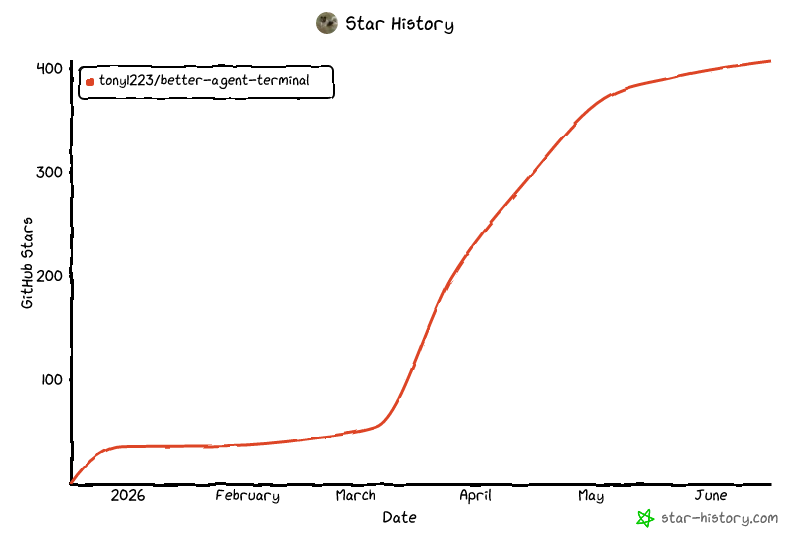
- Stars: 399
- Watchers: 0
- Forks: 93
- Open Issues: 0
-
Metadata Files:
- Readme: README.md
- License: LICENSE
- Agents: AGENTS.md
Awesome Lists containing this project
README
# Better Agent Terminal





**A Tauri-powered terminal aggregator with multi-workspace support and built-in AI agent integration**
Manage multiple project terminals in one window, with built-in Claude Code and Codex agent panels, file browser, git viewer, snippet manager, and remote access — all in a single Tauri app.
Version 3.0 is the Tauri-only release. The Electron runtime has been removed; the app now uses a Rust/Tauri host, a React renderer, and a small bundled Node sidecar only where JavaScript SDK/runtime support is still required.
[Download Latest Release](https://github.com/tony1223/better-agent-terminal/releases/latest)
---
## Screenshots
**Claude Code Agent Panel** — Built-in AI agent with permission controls, status line, and streaming output

**Terminal** — Run persistent terminals alongside your agent for long-running commands and monitoring

**File Browser** — Browse and preview project files without leaving the app

**Git Viewer** — View commit history and diffs at a glance

---
## Features
### Workspace Management
- **Multi-Workspace** — Organize terminals by project folders; each workspace binds to a directory
- **Drag & Drop** — Reorder workspaces freely in the sidebar
- **Groups** — Categorize workspaces into named groups with a filter dropdown
- **Profiles** — Save and switch between multiple workspace configurations (local or remote)
- **Detachable Windows** — Pop out individual workspaces to separate windows; auto-reattach on restart
- **Per-Workspace Env Vars** — Configure custom environment variables per workspace
- **Activity Indicators** — Visual dots showing which workspaces have active terminal processes
- **Double-click to rename**, right-click context menu for all workspace actions
### Terminal
- **Split-panel layout** — 70% main panel + 30% scrollable thumbnail bar showing all terminals
- **Multiple terminals per workspace** — Powered by xterm.js with full Unicode/CJK support
- **Agent presets** — Pre-configured terminal roles: Claude Code, Claude Code (worktree), Codex Agent, or plain terminal
- **Git worktree isolation** — Spawn Claude agents in an isolated worktree to prevent destructive changes to your main working tree
- **Tab navigation** — Switch between Terminal, Files, and Git views per workspace
- **File browser** — Search, navigate, and preview files with syntax highlighting (highlight.js)
- **Git integration** — Commit log, diff viewer, branch display, untracked file list, GitHub link detection
- **GitHub panel** — Browse PRs and issues directly from the Git tab
- **Snippet manager** — Save, organize, search, and paste code snippets (SQLite-backed with categories and favorites)
- **Markdown preview** — Preview `.md` files in a dedicated right sidebar panel with live file watching and right-click context menu
- **Worker panel (Procfile)** — Run multiple processes from a [Procfile](https://github.com/DarthSim/overmind?tab=readme-ov-file#procfile-format) in a single tab with combined log view and per-process start/stop/restart controls, inspired by [Overmind](https://github.com/DarthSim/overmind)
- **Per-terminal prompt history** — Access previous commands per terminal session
### Claude Code Agent
- **Built-in Claude Code** via SDK — Runs the agent directly inside the app; no separate terminal needed
- **Message streaming** with extended thinking blocks (collapsible)
- **Permission modes** — Multiple levels of tool execution control:
- **Default** — Approve each tool call individually
- **Accept Edits** — Auto-approve file edits, prompt for other tools
- **Plan mode** — Agent proposes a plan file first; approve the plan to auto-execute
- **Bypass** — Full auto-approval (use with caution)
- **Subagent tracking** — See spawned subagent tasks with progress indicators, elapsed time, and stall detection
- **Session resume** — Persist conversations and resume them across app restarts
- **Session fork** — Branch off from any point in a conversation with pending prompt auto-send
- **Rest/Wake sessions** — Pause and resume agent sessions from the context menu to save resources
- **Effort level** — Configure default effort level (high/medium/low) for new agent sessions
- **Auto-compact** — Automatically compact context when token count exceeds a configurable threshold
#### Statusline
A configurable status bar at the bottom of the agent panel, with 15 items across three zones (left / center / right):
| Item | Description |
|---|---|
| Session ID | First 8 chars of SDK session ID (click to resume a past session) |
| Git Branch | Current git branch name |
| Tokens | Total input + output token count (click for context breakdown) |
| Turns | Number of conversation turns |
| Duration | Session duration |
| Context % | Percentage of context window used (color-coded) |
| Cost | Total session cost in USD |
| Workspace | Current workspace name |
| 5h Usage / Reset | 5-hour API rate limit usage and reset countdown |
| 7d Usage / Reset | 7-day API rate limit usage and reset countdown |
| Max Output | Maximum output tokens for current model |
| Cache Eff. | Cache read efficiency percentage (click for cache history with per-turn cost breakdown) |
| Prompts | Link to view prompt history |
Items can be reordered, colored, and toggled on/off via a drag-and-drop template editor in Settings.
#### Cache Cost Awareness
- **Cache history** — Per-turn cache read/write breakdown with cost calculations per model (Opus, Sonnet, Haiku)
- **Cache TTL countdown** — Optional floating badge in the top-right corner showing remaining time for 5-minute and 1-hour cache TTLs; updates every 30 seconds, only appears after 1 minute of idle
- **Cache expiry warning** — Pre-send confirmation dialog when >150k cached tokens have expired (>1 hour), preventing accidental full-price reprocessing
#### Account & Usage
- **Multi-account switching** — `/switch` to manage and switch between multiple Claude accounts
- **Usage monitoring** — Track API rate limits (5-hour and 7-day windows) via Anthropic OAuth or Chrome session key
- **Context usage panel** — Visualize token usage breakdown by category (code, conversation, tools, memory, MCP, etc.)
#### UI & Interaction
- **Image attachment** — Drag-drop or use the attach button (up to 5 images per message)
- **Clickable URLs** — Markdown links and bare URLs open in the default browser
- **Clickable file paths** — Click any file path in agent output to preview it with syntax highlighting and search (Ctrl+F)
- **Ctrl+P file picker** — Fuzzy-search project files and attach them to the conversation context
- **Skills & Agents panels** — Browse available slash commands and agent configurations in the right sidebar
- **Markdown preview search** — In-pane Ctrl+F search inside markdown previews and file previews
- **Long MCP tool output collapse** — Auto-collapse oversized MCP tool results with a one-click expand
- **Notifications** — Dock badge, sound, and system notifications on agent completion (configurable)
- **Update notifications** — Automatic check for new releases on GitHub
### Codex Agent
Optional alternate agent backend powered by [`@openai/codex-sdk`](https://www.npmjs.com/package/@openai/codex-sdk). Pick **Codex Agent** (or **Codex Agent (worktree)**) from the agent preset list when creating a terminal.
- **GPT-5.5 / 5.4 / 5.3-codex / o4-mini / o3 / GPT-4.1** — Switch models inline; ChatGPT login or OpenAI API key
- **Sandbox modes** — `read-only`, `workspace-write`, or `danger-full-access`
- **Approval policies** — `untrusted`, `on-request`, or `never` (auto)
- **Worktree preset** — Spawn Codex in an isolated git worktree, same as the Claude worktree flow
- **Session resume** — JSONL transcripts under `~/.codex/sessions/` are auto-indexed; resume hits a local cache so re-opening a thread is fast even with months of history
- **Inline plan approval** — Codex `plan` items render as approvable blocks in the panel
### Semantic Code Navigation (cx)
Optional integration with [`cx`](https://github.com/ind-igo/cx) — a tree-sitter-based CLI that gives agents file overviews, symbol search, definitions, and references without spinning up a language server. Useful for cutting context tokens on large codebases: agents can run `cx overview` (~20 tokens) before deciding which files to actually read.
When enabled in **Settings → Agents → cx semantic navigation**, BAT:
- Detects `cx` on `PATH` (or uses a custom binary path)
- Appends a short system-prompt section telling the agent to prefer `cx overview / symbols / definition / references` over full file reads
- Sets `CX_CACHE_DIR` to a per-app cache directory so repeated queries are fast
**Install:**
| Platform | Command |
|---|---|
| macOS (Homebrew) | `brew tap ind-igo/cx && brew install cx` |
| Cargo | `cargo install cx-cli` |
| macOS / Linux (script) | `curl -sL https://raw.githubusercontent.com/ind-igo/cx/master/install.sh \| sh` |
| Windows (PowerShell) | `irm https://raw.githubusercontent.com/ind-igo/cx/master/install.ps1 \| iex` |
After installing, run `cx lang add ` for each language you want grammars for (e.g. `rust`, `typescript`, `python`), then toggle the option in BAT settings. The toggle is off by default — agents continue to work normally without `cx` installed.
### Internationalization (i18n)
- **English**, **Traditional Chinese (繁體中文)**, **Simplified Chinese (简体中文)**
---
## Keyboard Shortcuts
| Shortcut | Action |
|---|---|
| `` Ctrl+` `` (Windows) | Switch to the next BAT window |
| `` Cmd+` `` (macOS) / `` Ctrl+` `` (Linux) | Toggle between Agent terminal and first regular terminal |
| `Ctrl+←/→` / `Cmd+←/→` | Cycle workspace tabs (Terminal / Files / Git) |
| `Ctrl+↑/↓` / `Cmd+↑/↓` | Switch to previous / next workspace |
| `Ctrl+P` / `Cmd+P` | File picker (search & attach files to agent context) |
| `Ctrl+N` / `Cmd+N` | Open new window |
| `Ctrl+Shift+T` / `Cmd+T` | Open the new-terminal quick-pick (choose Shell, Worktree, Claude / Codex agent…) |
| `Ctrl+Shift+W` / `Cmd+Shift+W` | Close the focused terminal |
| `Shift+Tab` | Switch between Terminal and Agent mode |
| `Enter` | Send message |
| `Shift+Enter` | Insert newline (multiline input) |
| `Escape` | Stop streaming / close modal |
| `Ctrl+Shift+C` | Copy selected text |
| `Ctrl+Shift+V` | Paste from clipboard |
| `Right-click` | Copy (if text selected) or Paste |
## Slash Commands
| Command | Description |
|---|---|
| `/resume` | Resume a previous Claude session from history |
| `/model` | Switch between available Claude models |
| `/new` / `/clear` | Reset session (clear conversation, fresh start) |
| `/abort` | Stop the current agent session immediately |
| `/snippet` | Show snippets to Claude for management |
| `/switch` | Switch between Claude accounts |
| `/login` | Sign in to Claude (switch account) |
| `/logout` | Sign out of Claude |
| `/whoami` | Show current account info and usage |
| `/auto-continue` / `/ac` | Auto-resend a prompt when the agent stops — see [Auto-Continue](#auto-continue) |
### Auto-Continue
Some tasks are too long to finish in a single turn — the agent stops mid-plan, or pauses waiting for the user to say "keep going". `/auto-continue` (alias `/ac`) tells the host to re-send a prompt automatically when the turn ends, up to N times.
**Syntax** (typed into the agent input box):
```
/auto-continue # enable, max 3, prompt="繼續"
/auto-continue 5 # enable, max 5, prompt="繼續"
/auto-continue 繼續做完 # enable, max 3, custom prompt
/auto-continue 10 keep going # enable, max 10, custom prompt
/ac 5 # short alias
/auto-continue off # disable (also: /ac stop)
```
**Behavior**
- State lives on the **host** (per-session), so remote clients and other views see the same counter.
- The counter resets to `0` every time you manually send a new message — your own input always restarts the budget.
- Triggers only when the previous turn ended with `subtype=success`; errors, abort, max-turns, or rate-limit halts stop auto-continue.
- Skipped if the session is streaming, aborted, or has queued messages.
- Each auto-sent turn shows ` [auto N/max]` in the message list so you can tell the agent didn't type that.
- `/abort` and manual session stop clear the auto-continue state.
**Tips**
- Use a concrete prompt like `/auto-continue 5 請依照 plan 的 step 繼續,做完一步就停下` instead of just `繼續` — the agent behaves more predictably.
- Set a low `max` (3–5) the first time you try it on a new task, then raise it once you trust the loop.
- Turn it off with `/ac off` before a long lunch break — auto-continue will happily burn credits while you're away.
---
## Quick Start
### Option 1: Homebrew (macOS)
```bash
brew install --cask tonyq-org/tap/better-agent-terminal
```
### Option 2: Chocolatey (Windows) *(coming soon)*
```powershell
choco install better-agent-terminal
```
> Package is currently pending review on Chocolatey.org.
### Option 3: Download Release
Download from [Releases](https://github.com/tony1223/better-agent-terminal/releases/latest) for your platform:
| Platform | Format |
|---|---|
| Windows | NSIS installer, `.zip` |
| macOS | `.dmg` (universal binary) |
| Linux | `.AppImage` |
**macOS DMG installation:**
1. Download the `.dmg` file from Releases
2. Double-click the `.dmg` to mount it
3. Drag **Better Agent Terminal** into the **Applications** folder
4. On first launch, macOS may block the app — go to **System Settings > Privacy & Security**, scroll down and click **Open Anyway**
5. The Claude Code binary is bundled — no separate install needed. (You can still `npm install -g @anthropic-ai/claude-code` if you prefer to use a system-wide CLI; BAT will pick the global one when present.)
### Option 4: Build from Source
**Prerequisites:**
- [Node.js](https://nodejs.org/) 18+
- [Rust](https://www.rust-lang.org/tools/install) stable toolchain
- Platform build tools for Tauri 2: Xcode Command Line Tools on macOS, Microsoft C++ Build Tools/WebView2 on Windows, or the standard Tauri Linux WebKitGTK dependencies
- A Claude account (sign in via `/login` inside the app, or pre-authenticate the [Claude Code CLI](https://docs.anthropic.com/en/docs/claude-code) — the binary is bundled, no separate global install required)
```bash
git clone https://github.com/tony1223/better-agent-terminal.git
cd better-agent-terminal
corepack enable
pnpm install
```
**Development mode:**
```bash
pnpm run dev
```
**Build for production:**
```bash
pnpm run build
```
For an unsigned local installer/package check, use:
```bash
pnpm run tauri:build:debug
```
### Option 5: Quick Install (Script)
Run the following command in your terminal (macOS, Linux, or Windows with Git Bash/MSYS2):
```bash
curl -fsSL https://raw.githubusercontent.com/tony1223/better-agent-terminal/main/install.sh | bash
```
This script will detect your OS and install the application to the standard location.
### macOS Build Notes
Native dependencies (`node-pty`, `better-sqlite3`) require Xcode Command Line Tools:
```bash
xcode-select --install
```
Then:
```bash
corepack enable
pnpm install
pnpm run dev # Development
pnpm run build # Build signed/release package when signing env is configured
pnpm run tauri:build:debug # Local unsigned package
```
---
## Architecture
```
better-agent-terminal/
├── renderer/ # React renderer running inside the Tauri webview
│ └── src/
│ ├── App.tsx # Root component, layout, profile orchestration
│ ├── components/ # Workspace, terminal, agent, file, git, settings UI
│ ├── stores/ # Renderer state stores
│ ├── locales/ # EN / zh-TW / zh-CN translations
│ ├── types/ # Shared renderer/domain TypeScript types
│ ├── host-api.ts # Tauri host adapter used by renderer code
│ └── styles/ # Component-specific styles
├── src-tauri/ # Tauri host runtime (Rust)
│ ├── src/ # Commands, PTY, profiles, remote server, sidecar bridge
│ ├── capabilities/ # Tauri IPC capability declarations
│ ├── windows/ # Windows installer hooks
│ └── tauri.conf.json # Tauri app and bundle configuration
├── node-sidecar/ # Bundled Node sidecar for SDK/runtime pieces not yet native Rust
├── assets/ # App icons and screenshots
├── scripts/
│ └── build-version.js # Version string generator
└── package.json
```
### Tech Stack
- **Frontend:** React 18 + TypeScript + i18next (EN / zh-TW / zh-CN)
- **Terminal:** xterm.js + node-pty
- **Framework:** Tauri 2, with Rust as the host/runtime layer
- **AI:** `@anthropic-ai/claude-agent-sdk` + bundled `@anthropic-ai/claude-code` binary (Claude); `@openai/codex-sdk` (Codex Agent)
- **Build:** Vite + Tauri
- **Storage:** better-sqlite3 (snippets, session data)
- **Remote:** Rust WebSocket server/client + QR code connection flow
- **Syntax Highlighting:** highlight.js
---
## Remote Access & Mobile Connect
BAT includes a built-in WebSocket server that allows other BAT instances or mobile devices to connect and control it remotely. This feature is currently **experimental**.
### How It Works
1. The **Host** enables the WebSocket server in Settings → Remote Access (default port: 9876)
2. On startup, the server generates a **Connection Token** (32-character hex string) used to authenticate connections
3. The **Client** connects by entering the host IP, port, and token via a Remote Profile
4. Once connected, the client can operate all terminals, Claude Agent sessions, workspaces, and other features on the host
### Connection Methods
#### Method 1: Remote Profile (BAT-to-BAT)
On the client BAT instance:
1. Open Settings → Profiles
2. Create a new profile and set the type to **Remote**
3. Enter the host IP, port (9876), and token
4. Load the profile to connect to the remote host
#### Method 2: QR Code (Mobile Devices)
On the host BAT instance:
1. Open Settings → Remote Access → **Generate QR Code**
2. If the server is not yet running, it will start automatically
3. Scan the QR code with a mobile device to retrieve the connection info
4. The QR code contains the WebSocket URL and token (in JSON format)
### Recommended: Use Tailscale for Cross-Network Connections
If the host and client are not on the same local network (e.g., connecting from home to an office machine), we recommend using [Tailscale](https://tailscale.com/) to establish a secure peer-to-peer VPN:
- **Free plan** supports up to 100 devices
- No port forwarding or additional server setup required
- Each device gets a stable `100.x.x.x` IP address
- BAT automatically detects Tailscale IPs and uses them preferentially
**Installation:**
| Platform | Install |
|----------|---------|
| macOS | [Download](https://tailscale.com/download/macos) or `brew install tailscale` |
| Windows | [Download](https://tailscale.com/download/windows) |
| iOS | [App Store](https://apps.apple.com/app/tailscale/id1470499037) |
| Android | [Google Play](https://play.google.com/store/apps/details?id=com.tailscale.ipn) |
| Linux | [Install Guide](https://tailscale.com/download/linux) |
After installation, sign in with the same account on all devices and they will be able to communicate. BAT's QR code will automatically use the Tailscale IP.
### Security Notice
> **Warning:** Enabling the Remote Server opens a WebSocket connection. Any device with the token can fully control BAT on the host machine, including executing terminal commands, accessing the file system, and controlling Claude Agent sessions.
>
> - Do not start the server on untrusted networks
> - Do not share the token with untrusted parties
> - Shut down the server when not in use
> - Strongly recommended to use Tailscale to avoid direct exposure to the public internet
### Headless Mode (`bat-server`)
`bat-server` starts the same Tauri/Rust Remote Server without opening the GUI. It is useful for always-on hosts, SSH sessions, and container-style deployments where another BAT instance connects remotely.
```bash
pnpm run start:server -- --port=9876 --bind=localhost
```
Options:
| Option | Description |
|---|---|
| `--port=N` | TCP port to listen on (default: `9876`) |
| `--bind=localhost\|tailscale\|all` | Bind only localhost, the first Tailscale `100.x.x.x` address, or all interfaces |
| `--data-dir=PATH` | Override the persistent state directory |
| `--token=HEX` | Use a fixed connection token instead of the persisted/random token |
| `--debug` | Enable debug logging |
Environment variables mirror the flags: `BAT_DATA_DIR`, `BAT_TAURI_DATA_DIR`, `BAT_PORT`, `BAT_BIND`, `BAT_TOKEN`, and `BAT_DEBUG`.
On startup, the server prints the `wss://` URL, token, certificate fingerprint, data directory, and a one-shot `connect` URL that can be pasted into a Remote Profile.
## Configuration
Workspaces, settings, and session data are saved to:
| Platform | Path |
|---|---|
| Windows | `%APPDATA%/better-agent-terminal/` |
| macOS | `~/Library/Application Support/better-agent-terminal/` |
| Linux | `~/.config/better-agent-terminal/` |
### Debug Logging
Set the `BAT_DEBUG=1` environment variable to enable disk-based debug logging. Logs are written to `debug.log` in the configuration directory.
---
## Release
### Version Format
Follows semantic versioning: `vMAJOR.MINOR.PATCH` (e.g., `v2.2.27`)
Pre-release versions use the `-pre.N` suffix (e.g., `v2.2.28-pre.1`). Tags containing `-pre` are automatically marked as pre-release on GitHub and do not update the Homebrew tap.
### Automated Release (GitHub Actions)
Push a tag to trigger builds for all platforms:
```bash
git tag v2.2.28
git push origin v2.2.28
```
---
## License
MIT License - see [LICENSE](LICENSE) for details.
---
## Author
**TonyQ** - [@tony1223](https://github.com/tony1223)
## Contributors
- **lmanchu** - [@lmanchu](https://github.com/lmanchu) - macOS/Linux support, workspace roles
- **bluewings1211** - [@bluewings1211](https://github.com/bluewings1211) - Shift+Enter newline, preserve workspace state, resizable panels
- **Henry Hu** - [@ninedter](https://github.com/ninedter) - Key API discovery and valuable architectural feedback
- **craze429** - [@craze429](https://github.com/craze429) - Windows/Linux credential reading, permission fix, git parsing fix, async dialog
- **Owen** - [@Owen0857](https://github.com/Owen0857) - Windows zombie process fix, terminal resize black screen fix, debug log cleanup
- **MikeThai** - [@mikethai](https://github.com/mikethai) - macOS .dmg spawn ENOENT fix
- **Luke Chang** - [@lukeme117](https://github.com/lukeme117) - Snippet sidebar and UI improvements
---
## Acknowledgments
- **[Overmind](https://github.com/DarthSim/overmind)** — Inspired our Worker panel and Procfile-based multi-process management integration
- **[cx](https://github.com/ind-igo/cx)** — Semantic code navigation CLI integrated as an optional context-saver for agents
---
## Star History
---
Built with Claude Code