https://github.com/toolsprods/arducky
Simple Rubber Ducky for Arduino 32U4 boards
https://github.com/toolsprods/arducky
arducky arduino diy duckyscript malduino rubber-ducky
Last synced: 10 months ago
JSON representation
Simple Rubber Ducky for Arduino 32U4 boards
- Host: GitHub
- URL: https://github.com/toolsprods/arducky
- Owner: toolsprods
- License: mit
- Created: 2018-01-23T16:41:39.000Z (over 8 years ago)
- Default Branch: master
- Last Pushed: 2018-01-23T16:44:24.000Z (over 8 years ago)
- Last Synced: 2025-07-21T15:14:01.823Z (11 months ago)
- Topics: arducky, arduino, diy, duckyscript, malduino, rubber-ducky
- Language: C
- Size: 276 KB
- Stars: 12
- Watchers: 3
- Forks: 4
- Open Issues: 0
-
Metadata Files:
- Readme: README.md
- License: LICENSE
Awesome Lists containing this project
README

# ArDucky
Modification of the [malduino project of Seytonic](https://github.com/Seytonic/malduino) for simple connection on Arduino 32U4 boards.
Based on [malduino](https://github.com/Seytonic/malduino) and [LocaleKeyboard.js](https://github.com/Nurrl/LocaleKeyboard.js) repositories.
Features
========
- microSD to store [Ducky Script](https://github.com/hak5darren/USB-Rubber-Ducky/wiki/Duckyscript) code
- up to 8 DIP to choose between 256 different payloads
- button to launch the payload selected by the DIP
- led to indicate when the payload has finished executing
- you can choose easily between different keyboard layouts!
Connection
==========
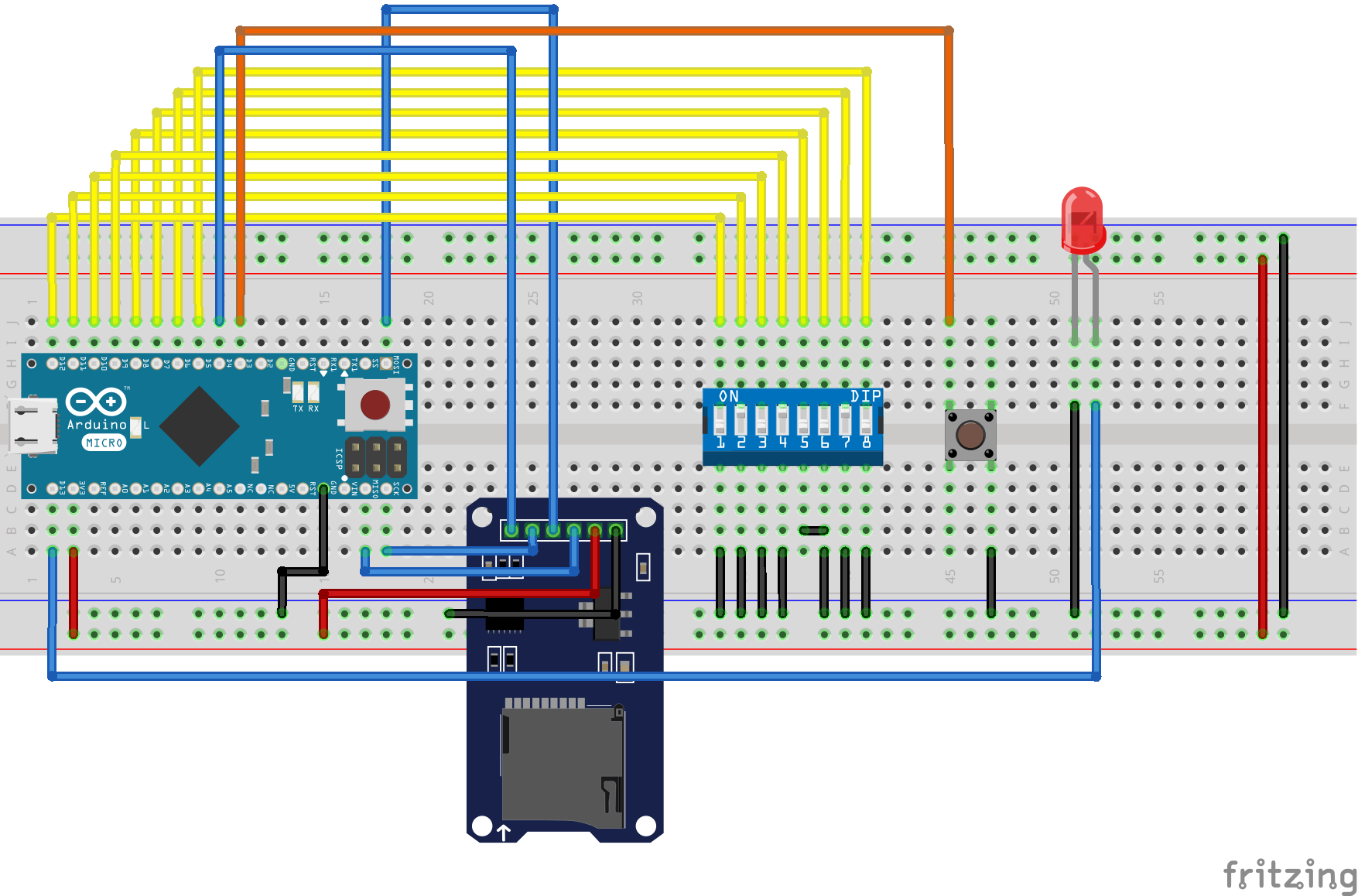
Made with [Fritzing](https://github.com/fritzing/fritzing-app).
If you have to connect it to a Leonardo connects the microSD module to the SPI pins that are in the ICSP connector on the board. The microSD module usually works at 3.3V.
Configuration
=============
Before uploading the code to the board you need to modify the `Configuration.h` file to configure and check some parameters such as the keyboard layout or the correct pins on all components.
You can review the `ConfigurationProMicro.h` file to see the connection to a SparkFun ProMicro board.
License
=======
This project is licensed under the MIT License - see the LICENSE file for details.