https://github.com/toreylittlefield/quadrant-basic-test-challenge
Coding Challenge with React, Node, Express, Apollo GraphQL
https://github.com/toreylittlefield/quadrant-basic-test-challenge
apollo express express-graphql graphql nodejs react styled-components
Last synced: about 2 months ago
JSON representation
Coding Challenge with React, Node, Express, Apollo GraphQL
- Host: GitHub
- URL: https://github.com/toreylittlefield/quadrant-basic-test-challenge
- Owner: toreylittlefield
- Created: 2021-06-11T11:15:16.000Z (almost 5 years ago)
- Default Branch: main
- Last Pushed: 2023-01-08T00:40:38.000Z (over 3 years ago)
- Last Synced: 2025-03-27T07:16:03.667Z (about 1 year ago)
- Topics: apollo, express, express-graphql, graphql, nodejs, react, styled-components
- Language: JavaScript
- Homepage:
- Size: 4.96 MB
- Stars: 2
- Watchers: 3
- Forks: 0
- Open Issues: 8
-
Metadata Files:
- Readme: README.md
Awesome Lists containing this project
README
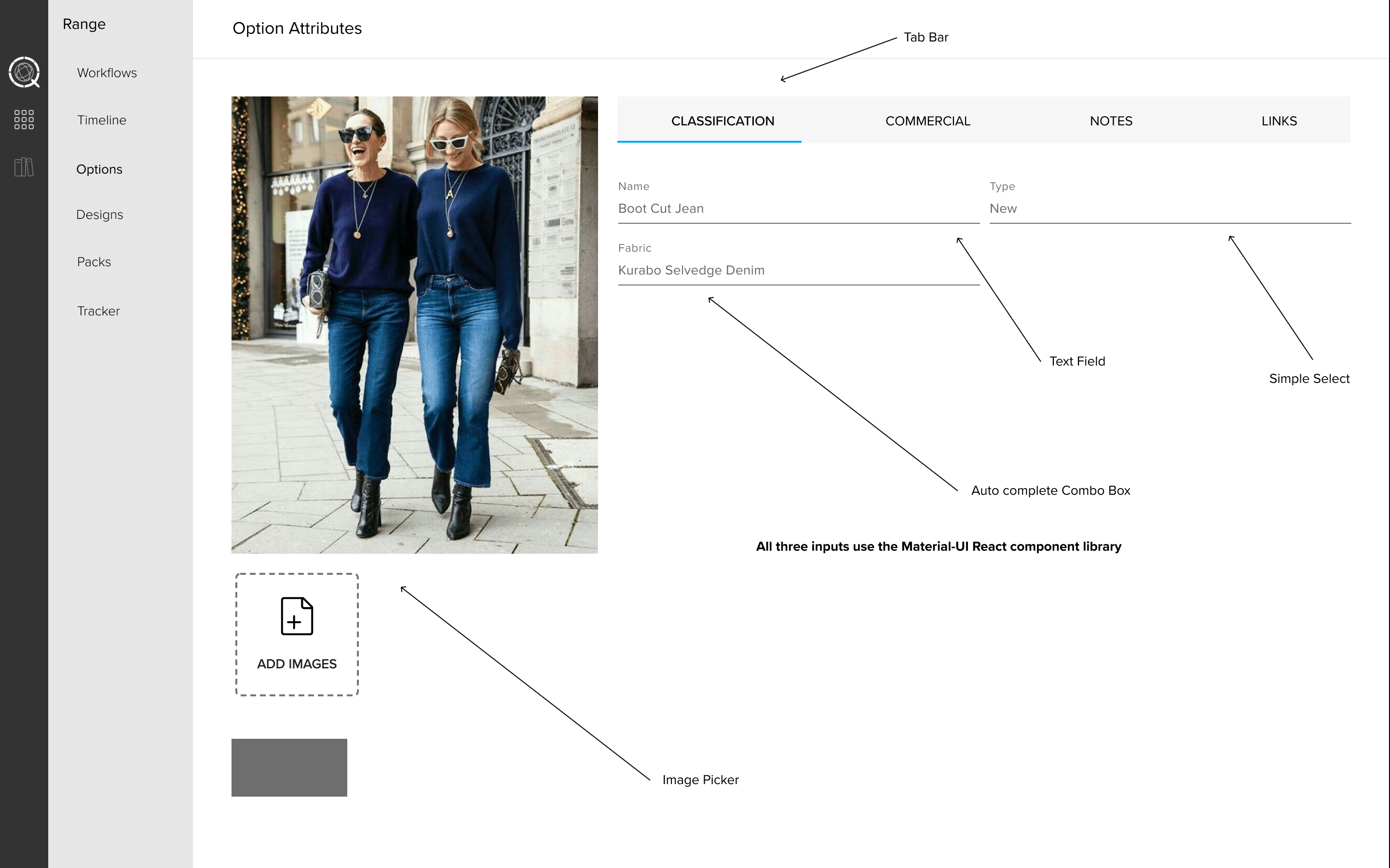
Quadrant Basic Test
[]()
[](https://github.com/toreylittlefield/quadrant-basic-test-challenge/issues)
[](https://github.com/toreylittlefield/quadrant-basic-test-challenge/pulls)
[](https://app.netlify.com/sites/quadrant-basic-test/deploys)
---
A practical challenge creating a basic form component for a eCommerce CRM using React with Node.js and GraphQL
## 📝 Table of Contents
- [View Live Site](#live-site)
- [Quick Start](#quick-start)
- [About](#about)
- [System Architecture](#architecture)
- [File Structure](#file-structure)
- [Getting Started](#getting_started)
- [Testing](#tests)
- [Deployment](#deployment)
- [Usage](#usage)
- [Built Using](#built_using)
- [Authors](#authors)
- [Acknowledgments](#acknowledgement)
See the live project @ [https://quadrant-basic-test.netlify.app/](https://quadrant-basic-test.netlify.app/) hosted on Netlify
[](https://app.netlify.com/sites/quadrant-basic-test/deploys)
_Requires npm and node_
###### Run:
```
git clone https://github.com/toreylittlefield/quadrant-basic-test-challenge.git
```
```
cd quadrant-basic-test-challenge
```
```
cd client
npm install
npm start
```
```
cd server
npm install
npm start
```
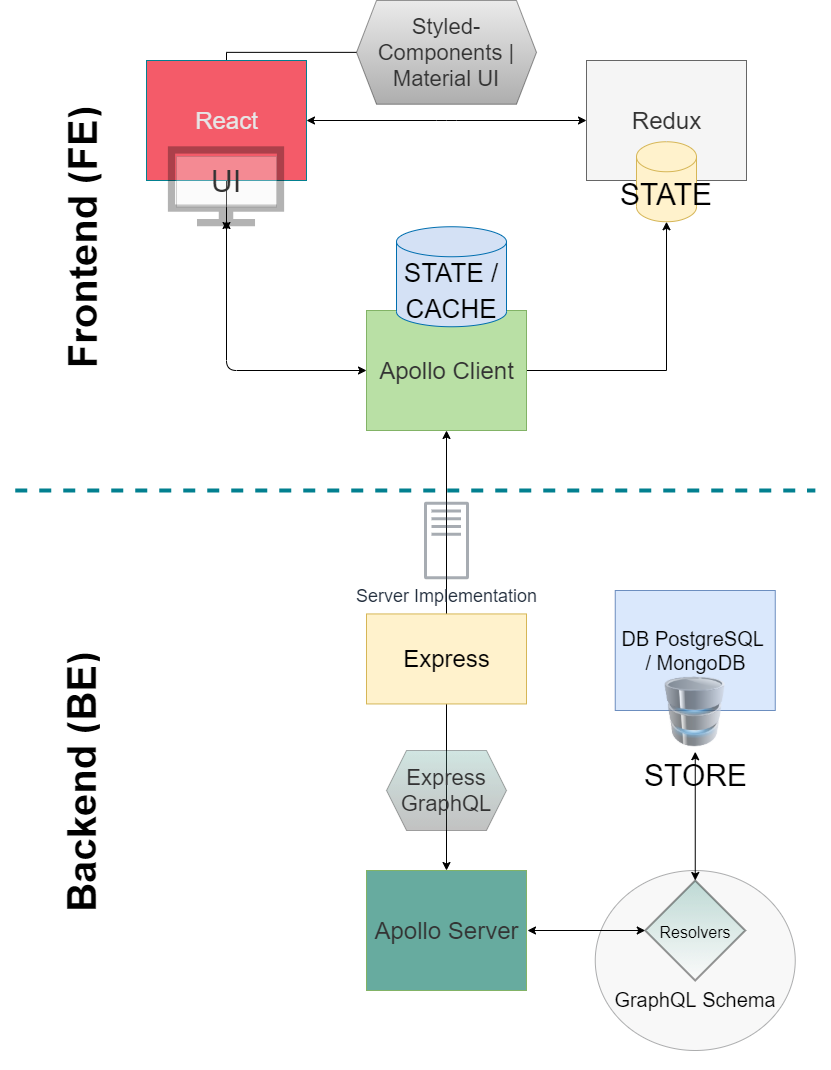
This repo consists of a React Single Page Application that demonstrates a single client facing component for adding, editing, and deleting existing fashion items & listings in a larger eCommerce CRM. The backend is built with Node.js and runs an Express GraphQL server which queries & mutations item & listing data for the CRM.
#### Frontend
```
├ client/
├── src/
| ├── components/
| | ├── Buttons/...
| | ├── ImageLoader/...
| | ├── Inputs/...
| | ├── Navs/...
| | └── index.js // <- All Styled Components
| |
| ├── utils/
| | └── ... <- All Utilities
| |
| ├── ui/
| | ├── globalstyles.js <- For Global themeing
| | └── ...
| |
| ├── screens/
| | └── MainPage.js <- Only Page View
| |
| ├── Apollo/ <-- Apollo GraphQL Services
| | ├── queries.js
| | └── mutations.js
| |
| ├── assets/ <-- Icons/Images
| | ├── images/...
| | └── icons/...
| |
| └── __tests__/ <- Our Client Tests
| ├── ...test.js
| └── App.test.js
|
├── App.js <- React App & Apollo Client Instance
└── public/
└── index.html
```
These instructions will get you a copy of the project up and running on your local machine for development and testing purposes. See [deployment](#deployment) for notes on how to deploy the project on a live system.
### Prerequisites
System Requirements
- npm v6.14.5+
- Node.js v12.18+
To check Node & npm versions run:
```
npm -v
node -v
```
For installation & downloading Node.js & npm see:
[Setup Node & npm](https://docs.npmjs.com/downloading-and-installing-node-js-and-npm)
### Installing
Local Development Installation Instructions Are As Follows
- Clone the repo:
```
git clone https://github.com/toreylittlefield/quadrant-basic-test-challenge.git
```
- Open the directory
```
cd quadrant-basic-test-challenge
```
##### Client (Frontend)
To run the React App client on port 3000
- Open the terminal at the root project directory & run
```
cd client
npm install
npm start
```
Then open the developer React server @ http://localhost:3000/
##### Express GraphQL Server (Backend)
To run the Express GraphQL Server on port 4000
- Open the terminal at the root project directory & run
```
cd server
npm install
npm start
```
Optional: run the Express GraphQL server playground @ http://localhost:4000/graphql
Explain how to run the automated tests for this system.
### Break down into end to end tests
Explain what these tests test and why
```
Give an example
```
### And coding style tests
Explain what these tests test and why
```
Give an example
```
Add notes about how to use the system.
Add additional notes about how to deploy this on a live system.
##### Frontend
- [Styled Components](https://styled-components.com/) - CSS-in-JS Styling Library
- [Material UI](https://material-ui.com/) - React Component Library
- [React](https://reactjs.org/) - UI JS Library -> _Created with [create-react-app](https://github.com/facebookincubator/create-react-app)_
- [Apollo Client](https://www.apollographql.com/docs/react) - State | Store Management For GraphQL
- **Optional** --- [Redux-Toolkit](https://redux-toolkit.js.org/) - State | Store Management
##### Backend
- [NodeJs](https://nodejs.org/en/) - Server Environment
- [Express](https://expressjs.com/) - Server Framework
- [Express GraphQL](https://github.com/graphql/express-graphql) - GraphQL Express Server Middleware
- [Apollo Server](https://www.apollographql.com/docs/apollo-server/) - GraphQL Server
- **Optional** --- [MongoDB / PostgresSQL](https://www.mongodb.com/) - Database / Store
- [@toreylittlefield](https://github.com/toreylittlefield) - The one who completed this project
- [@kukielp](https://github.com/kukielp) - Mentor & reviewer for this project (thanks!)
- Special thanks to Paul K. for providing his time, knowledge, mentorship, and for pushing me to build out this challenge.
