https://github.com/totaltechgeek/pineapple
Make your test development sweet!
https://github.com/totaltechgeek/pineapple
javascript test testing typescript
Last synced: 3 months ago
JSON representation
Make your test development sweet!
- Host: GitHub
- URL: https://github.com/totaltechgeek/pineapple
- Owner: TotalTechGeek
- License: mit
- Created: 2022-04-22T16:41:52.000Z (about 4 years ago)
- Default Branch: master
- Last Pushed: 2023-06-09T18:20:46.000Z (about 3 years ago)
- Last Synced: 2025-10-20T03:39:46.447Z (8 months ago)
- Topics: javascript, test, testing, typescript
- Language: JavaScript
- Homepage:
- Size: 3.45 MB
- Stars: 15
- Watchers: 1
- Forks: 1
- Open Issues: 4
-
Metadata Files:
- Readme: readme.md
- License: LICENSE
- Code of conduct: CODE_OF_CONDUCT.md
Awesome Lists containing this project
README

Making your software tests sweet!
---
## What is this?
[](https://badge.fury.io/js/pineapple) [](https://github.com/TotalTechGeek/pineapple/actions/workflows/node.js.yml) [](https://coveralls.io/github/TotalTechGeek/pineapple)
Pineapple is a test framework designed to remove the cruft from writing unit tests and creating snapshots.
```js
/**
* Adds numbers together for the sake of demonstrating pineapple.
* @test 1, 2 returns 3
* @test '1', 2 throws "Not a number"
* @param {number} a
* @param {number} b
*/
export function add(a, b) {
if (typeof a !== 'number' || typeof b !== 'number') throw new Error('Not a number')
return a + b
}
```
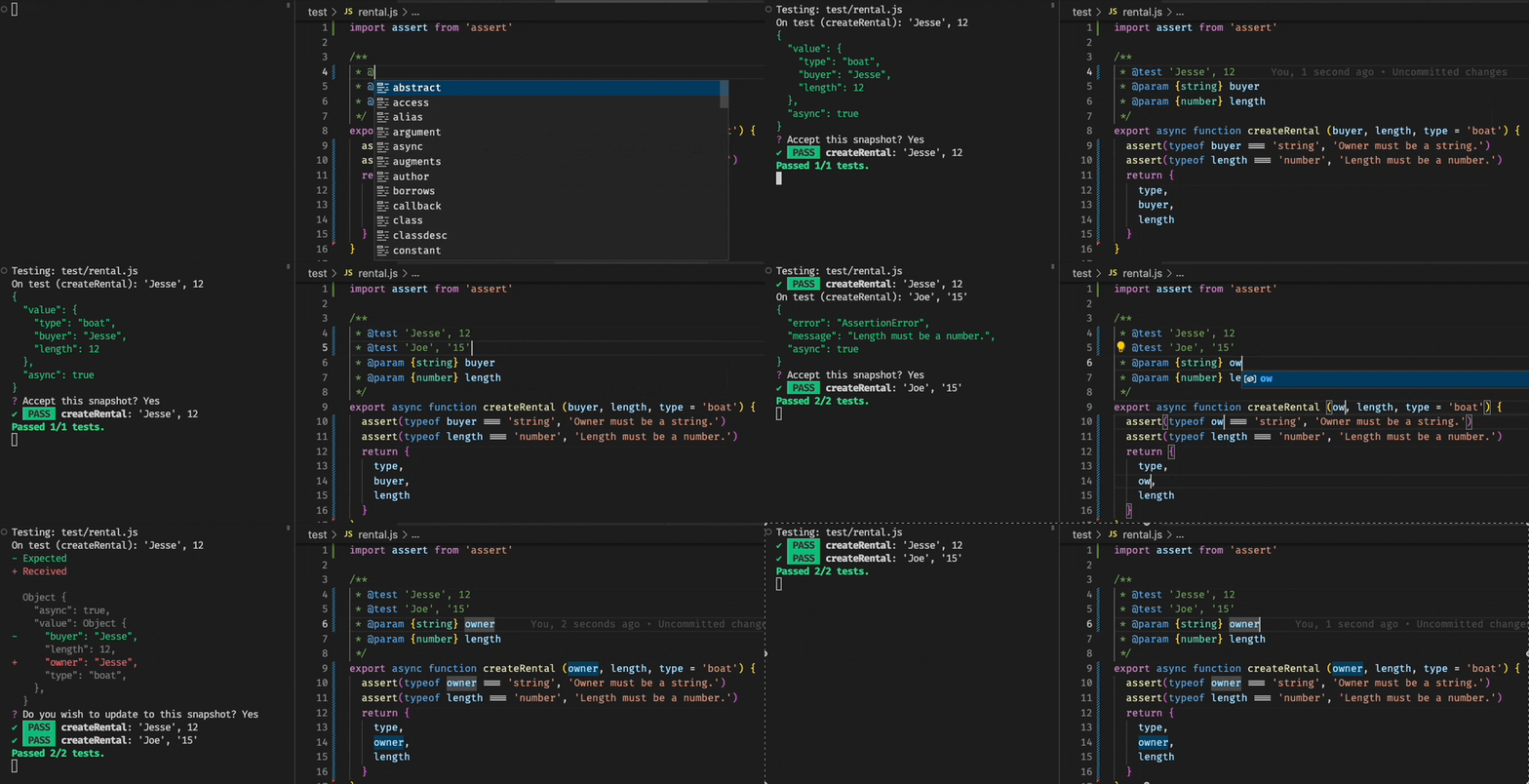
Pineapple allows you to embed a few example test-cases in your JSDocs, making it easier to focus on your code and less on defining `it` & `expect` chains.
## Documentation
Visit our [documentation here](https://pineapple.js.org).
## Highlights
### Snapshots
When you omit conditions from your test cases, Pineapple will automatically capture the result of your test & snapshot it, making it easier to preserve expected behavior in your applications, and even easier for users to find examples on how to call your code.
### Property Based / Fuzz Testing
By leveraging fast-check, Pineapple makes it simple to fuzz-test your functions with simple clauses.
This pairs extremely well with the snapshot testing for capturing a variety of test-cases that would've taken time to generate by hand.
```typescript
/**
* Computes the sum of numbers.
* @test #array(#integer)
*/
export function sum(arr: number[]) {
return arr.reduce((a,b) => a + b, 0)
}
```
### Language-Idiomatic Test Code
Even in cases where you might need to write a more complex unit test, Pineapple encourages you to write normal JavaScript functions.
### Continuous Test Runner
By enabling the `-w` or `--watch-mode` flag, Pineapple will watch your project for changes. Any changes to a file will kick off all tests that could be potentially impacted by your change.
**And Much More**
## To Install
```
npm i pineapple --save-dev
```
or
```
yarn add pineapple --dev
```
Alternatively, you may install the runner globally (add a `-g` flag).
### To Run
```
Usage: pineapple [options]
Options:
-V, --version output the version number
-i, --include Comma separated globs of files to include.
-e, --exclude Comma separated globs of files to exclude.
-w, --watch-mode Will run tests only when a file is modified.
-a, --accept-all Accept all snapshots.
-u, --update-all Update all snapshots.
-t, --transpile Enables transpilation.
--typescript Enables transpilation for TypeScript. (legacy flag)
--timeout The timeout for each test. (default: "5000")
--strict Enables additional checks to enforce better testing, namely validating that all snapshots are used.
--clean Cleans up unused snapshots.
--omit-snapshot-inputs Omits input from being captured in snapshots for fuzz testing.
--only Allows you to specify which tests you would like to run.
--fuzz-runs The number of runs that fuzz tests perform. (default: "100")
--snapshot-fuzz-runs The number of runs that fuzz tests perform on a snapshot. (default: "10")
-f, --format The output format (choices: "json", "console", default: "console")
--bun Uses Bun as the test runner.
-h, --help display help for command
```
#### Example
```
pineapple -i src/**/*.js
```
#### Continuous Integration
If `process.env.CI` / the environment variable `CI` is set, it will automatically fail if a snapshot is not set or if the snapshot does not match.
## Q&A
#### Does Pineapple support TypeScript?
Yes! Out of the box, Pineapple supports JavaScript, TypeScript, JSX & TSX.
It also supports both CommonJS and ES Modules, and a few other common module mechanisms.
By using `-t` or `--transpile`, you can enable the bundling functionality.
#### Does Pineapple support alternative builds / Babel?
Yes. If you're using a Flow or another JavaScript framework that might need some additional transpilation, Pineapple will allow you to register a custom transpiler with the `@pineapple_transpile` annotation.
#### Should I put pineapple on my pizza?
The author of this project holds no opinion on this subject, but you might want to consider that Pineapple doesn't necessarily go well with every use case, so for certain types of tests we actively encourage you to choose a framework better suited for that style of test.
Pineapple is oriented towards simplifying unit tests & making it easy to run multiple test cases against functions, but if you're trying to test a series of complex processes against something stateful (transactions against a rewards points system, combat, etc), scenario tests are likely your better bet.
Because of this, Pineapple does include a [scenario testing framework](https://pineapple.js.org/docs/scenario-testing/introduction) similar to [Cucumber.js](https://cucumber.io/docs/cucumber/api/?lang=javascript), but if you're trying to implement end-to-end UI tests or integration tests, Newman or Playwright or Cypress might fit the bill better.