https://github.com/totvs/thf-cli
THF Command Line Interface
https://github.com/totvs/thf-cli
Last synced: about 1 year ago
JSON representation
THF Command Line Interface
- Host: GitHub
- URL: https://github.com/totvs/thf-cli
- Owner: totvs
- License: mit
- Created: 2019-01-08T18:18:27.000Z (over 7 years ago)
- Default Branch: main
- Last Pushed: 2020-09-04T14:50:33.000Z (almost 6 years ago)
- Last Synced: 2025-05-22T04:46:13.816Z (about 1 year ago)
- Language: JavaScript
- Size: 20.5 KB
- Stars: 5
- Watchers: 19
- Forks: 1
- Open Issues: 1
-
Metadata Files:
- Readme: README.md
- Changelog: CHANGELOG.md
- License: LICENSE
Awesome Lists containing this project
README
# THF CLI
The THF CLI is a command-line interface tool that you use to initialize and develop Angular applications with THF already configured.
You can use the tool directly in a command shell.
## Installation
Make sure Node, NPM and GIT are installed.
Then, install the CLI globally:
```
$ npm install -g @totvs/thf-cli
```
## Getting Started
Start a new project using the THF CLI and add components dynamically in your project.
To run an application, follow the steps below:
```
thf new SampleProject
cd SampleProject
ng serve
```

To check the commands list of THF CLI, invoke --help:
```
thf --help
```
## Commands
Command | Alias | Description
--- | --- | ---
*[add](#add)* | a | Add a module that has a dynamic component of your choice.
*[new](#new)* | n | Creates a new project based in a template.
*[convert-imports](#convert-imports)* | ci | Converts imports from THF version 3 to THF version 4.
```
thf add
```
```
thf new
```
```
thf convert-imports
```
### add
This command adds in your project a module that has a dynamic component of your choice with internal routes configured, simply adding in your main application path or another module to run.
> Must be in project root folder.
```
thf add
```
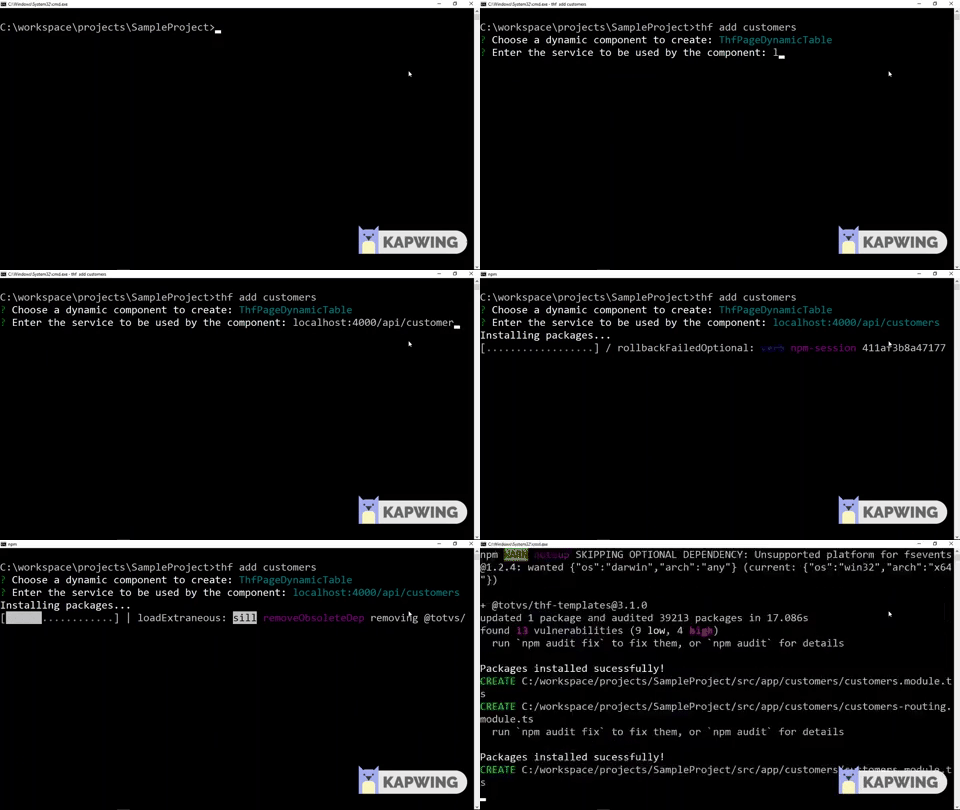
If the project was built through the "sidemenu" template, you need to configure the new module by adding it in the route and in the menu list of the project.
> app.component.ts
```
readonly menus: Array = [
{ label: 'Home', link: '/home' },
{ label: 'Users', link: '/users' },
// add here
{ label: 'newComponent', link: '/newComponent' },
];
```
> app-routing.component.ts
```
const routes: Routes = [
{ path: 'home', loadChildren: './home/home.module#HomeModule' },
{ path: 'users', loadChildren: './users/users.module#UsersModule' },
// add here
{ path: 'newComponent', loadChildren: './newComponent/newComponent.module#NewComponentModule' },
{ path: '', redirectTo: '/home', pathMatch: 'full'}
];
```
> If is a common Angular project, it's necessary import the new module in app module or adding it in lazy load route.
### new
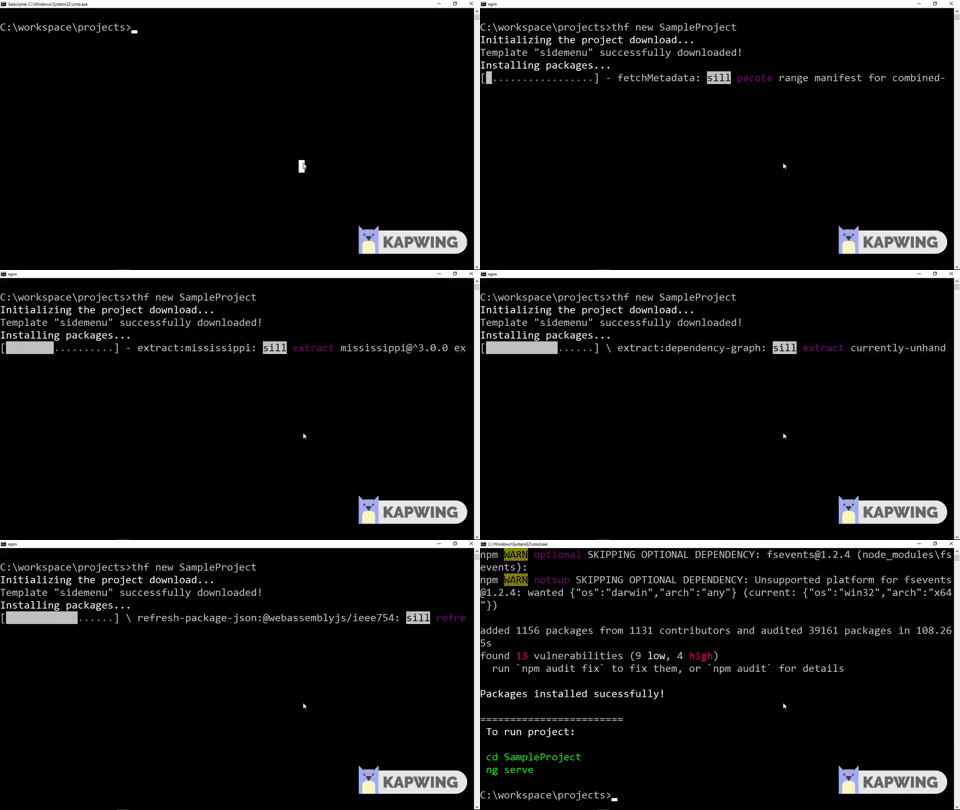
This command initialize a project to you start your development more quickly with the THF already set up ready to run!
```
thf new --template --title
```
#### -t / --template
All templates have the THF configured, the templates that you can start are:
Template | Description
--- | ---
*blank* | Creates a simple project with THFModule and THF css configured.
*sidemenu* | Creates a project containing the menu and modules using lazy loading to start development.
> The default template is `sidemenu`.
```
thf new --template
```
#### --title
The informed value in this option will be used by the `thf-toolbar` title, if you don't use this option, the project name will be used.
```
thf new --title
```
### convert-imports
New version of THF 4 has a new and easier way to import components. Now all you need is the project name.
For example this:
```
import { ThfPageLogin } from '@totvs/thf-templates/components/thf-page-login';
```
Is now is changed to:
```
import { ThfPageLogin } from '@totvs/thf-templates';
```
Using this command in your project Angular or Ionic folder changes those imports automatically.
```
thf convert-imports
```
### Add Git remote repository
To add a remote repository to your new project, run in folder project the command:
```
git remote add origin
```
## License
MIT