https://github.com/touhouworldcup/thprac
A tool for practicing Touhou shmups.
https://github.com/touhouworldcup/thprac
anime c-plus-plus cheats dll-injection game-mod-tool game-modding game-patch game-patcher shmup touhou touhou-project
Last synced: 4 months ago
JSON representation
A tool for practicing Touhou shmups.
- Host: GitHub
- URL: https://github.com/touhouworldcup/thprac
- Owner: touhouworldcup
- License: mit
- Created: 2022-04-06T14:18:07.000Z (over 4 years ago)
- Default Branch: master
- Last Pushed: 2026-04-20T22:53:29.000Z (4 months ago)
- Last Synced: 2026-04-21T00:40:15.762Z (4 months ago)
- Topics: anime, c-plus-plus, cheats, dll-injection, game-mod-tool, game-modding, game-patch, game-patcher, shmup, touhou, touhou-project
- Language: C++
- Homepage:
- Size: 19 MB
- Stars: 378
- Watchers: 5
- Forks: 39
- Open Issues: 148
-
Metadata Files:
- Readme: README.md
- Contributing: CONTRIBUTING.md
- Funding: .github/FUNDING.yml
- Code of conduct: CODE_OF_CONDUCT
Awesome Lists containing this project
README
## [简体中文](/README_CN.md) [日本語](/README_JP.md)
# **thprac**
> thprac is a tool for practicing Touhou shmups.
[](https://ko-fi.com/V7V7O03J4)
## [Download](https://github.com/touhouworldcup/thprac/releases/latest) - [Download Beta](https://nightly.link/touhouworldcup/thprac/workflows/main/master/thprac.zip)
> Note that beta versions will only update to the next stable version, not the next beta version.
## **Table of Contents**
* [Downloading](#downloading)
* [Usage](#usage)
* [Compatability](#compatability)
* [Features](#-features)
* [Quick Menu](#quick-menu)
* [Advanced Options](#advanced-options)
* [Game Specific Features](#game-specific-features)
* [Credits](#credits)
* [Building from Source](#building-from-source)
* [FAQ](#faq)
## **Downloading**
If you want to download the tool, you can download the [latest release](https://github.com/touhouworldcup/thprac/releases/latest) here and the [latest beta](https://nightly.link/touhouworldcup/thprac/workflows/main/master/thprac.zip) here. Do note that the latest beta will update into the next stable release and NOT the next beta release.
## **Usage**
You can use this tool in a variety of ways; the main ways to do this are **placing the executable in the same folder as your game**, **running the executable after running your game**, or **using thprac's launcher**.
### **thprac in the Game Folder**
**This method will NOT work with Steam games.** You can run thprac by placing the `thprac.exe` file in the same folder as your game. This method will also automatically detect vpatch. You must ensure that the game is updated to the latest version and follows one of the following naming schemes. This method also works with vpatch.
- thXX.exe (most games)
- 東方紅魔郷.exe (Embodiment of Scarlet Devil)
- alcostg.exe (Uwabami Breakers)
### **thprac after Running the Game**
**This method will work for most methods.** First, run the game in whichever method you want (whether it's thcrap, using vpatch, Steam, etc.) and then run `thprac.exe`. thprac will then detect the running game and attempt to attach itself to it. You may have to return to the menu screen to see thprac take effect.
### **thprac Using the Launcher**
This video explains how to use the launcher.
[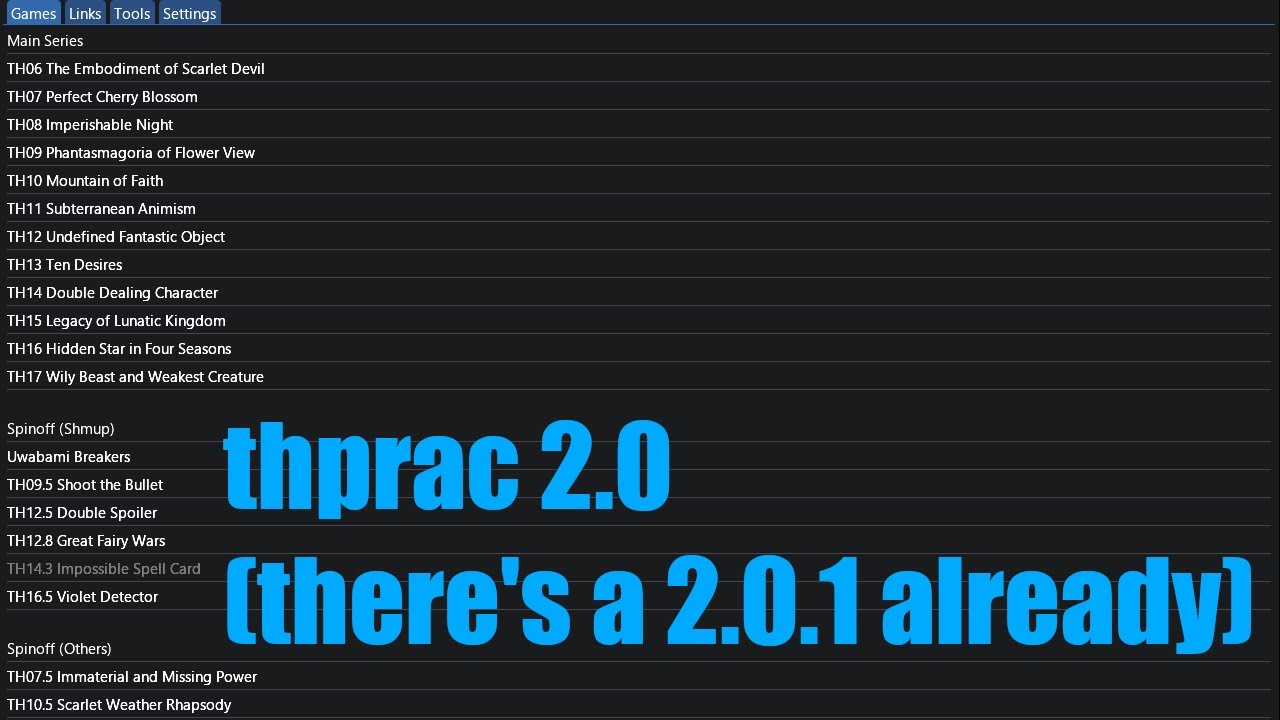](https://www.youtube.com/watch?v=sRV4PDQceYo)
### Command line
The following command line options are supported:
- `` The command `thprac.exe ` will run a game and attach thprac without any confirmation prompt. This makes it possible to drag a Touhou game executable onto thprac.exe and it will run with thprac.
- `--attach ` immediately inject thprac into a process with ID `` without any confirmation prompts.
- `--attach` (without any other flags). The command `thprac.exe --attach` will attach thprac to the first Touhou game process it finds without opening any kind of confirmation prompt.
- `--without-vpatch` Prevent automatically applying vpatch.
Example commands:
```
thprac.exe --attach 1234
thprac.exe --attach
thprac.exe C:\Users\Name\Desktop\Games\Touhou\th17\th17.exe
thprac.exe --without-vpatch C:\Users\Name\Desktop\Games\Touhou\th17\th17.exe
```
## **Compatability**
thprac officially supports every version of Windows starting with **Windows Vista**. Windows XP may work using [One-Core-API](https://github.com/Skulltrail192/One-Core-API-Binaries), but this is **NOT** being actively tested.
thprac is also compatible with **Wine** and the Steam Deck. Do note that the Quick Menu is tailored to work well with the Steam Deck, although this is untested.
thprac features an enhanced practice mode that supports all main games along with Great Fairy Wars and Uwabami Breakers.


thprac replaces the original practice menu with a new UI shown in the image above; certain spells allow you to select phases or change certain parameters. For the games without an original practice mode (Uwabami Breakers, Great Fairy War, etc.), a practice menu is added to the "Start Game" menu.


This menu can be controlled using your keyboard or your controller. Using this, you can select options using the **UP** and **DOWN** keys and change the option using the **LEFT** and **RIGHT** keys and the **SHOT** key to select. You can also use your mouse to interact with the menu.
thprac will also automatically save the options you selected into any replay saved. When playing back the replay, thprac will automatically apply said options. **Replays saved while thprac is active using "Custom" mode will NOT work with the unmodified game.**
## **Quick Menu**
In any supported game **(except Touhou 9 and 19)**, you can press the **`Backspace`** key to enter the Quick Menu. This menu shows a variety of options that can be activated using the function (F) keys.
These options are always clickable, meaning you can interact with them using a mouse on a desktop computer or by tapping on them with your left thumb when using a Steam Deck. To use this feature on the Steam Deck, map the **`Backspace`** key in Steam Input.
The hotkey for this menu can be changed from the launcher's settings tab to a different key or combination of keys if you want it bound to something else.


## **Advanced Options**
In any supported game **(except Touhou 9 and 19)**, you may use the **`F12`** key to access the Advanced Options; these options may offer fixes or patches related to the game or other quality of life features.
Like the Quick Menu, the hotkey for this can also be changed from the launcher's settings tab.


## **Game-specific Features**
### 100th BM - Force Wave

If thprac is enabled using "Custom" mode, the popup above will appear when the game is about to choose a wave.
### PoFV - Tools

When starting a game in Match Mode, you can select "Custom" in a "Mode" prompt. If you do that, this window will appear in your game. You can move and adjust this window as much as you want. This replaces Advanced Options and can be opened with **`F12`**.
### UDoALG - Tools

It's just like PoFV Tools, but for UDoALG.
### EoSD - Pause Menu

Choosing "Exit" will now prompt you to save a replay.
**Warning**: replays saved like this will continue after the point you chose to save the replay. The player character will stand still and not shoot.
### ESC + R fix for EoSD, VD and beyond
## **Credits (post May 27th, 2022)**
- Development: [32th System](https://www.youtube.com/channel/UChyVpooBi31k3xPbWYsoq3w), [muter3000](https://github.com/muter3000), [zero318](https://github.com/zero318), [Lmocinemod](https://github.com/Lmocinemod), [Cao Minh](https://github.com/hoangcaominh), [raviddog](https://github.com/raviddog)
- Chinese translations: [CrestedPeak9](https://twitter.com/CrestedPeak9), maksim71_doll, DeepL
- Japanese translations: [Yu-miya](https://www.twitch.tv/toho_yumiya), [wefma](https://github.com/wefma), CyrusVorazan, DeepL
- Moving all reports from the [old bugtracker](https://github.com/ack7139/thprac/issues) [here](https://github.com/touhouworldcup/thprac/issues): [toimine](https://www.youtube.com/channel/UCtxu8Rg0Vh8mX6iENenetuA)
- English README.md: [Galagyy](https://github.com/Galagyy)
- Chinese README.md translation: [TNT569](https://github.com/TNT569), [H-J-Granger](https://github.com/H-J-Granger)
- Japanese README.md translation: [wefma](https://github.com/wefma)
## **Building from Source**
### First time setup (only needs to be performed once)
Inside the folder named thprac, compile loc_json.cpp into loc_json.exe in whatever way you like most. I recommend this command
```
cl /Isrc\3rdparties\yyjson /nologo /EHsc /O2 /std:c++20 loc_json.cpp .\src\3rdParties\yyjson\yyjson.c /Fe:loc_json.exe
```
### Building on the command line
In a Visual Studio Developer Command Prompt, run the following command
```
msbuild thprac.sln -t:restore,build -p:RestorePackagesConfig=true,Configuration=Release
```
### Building from the Visual Studio GUI
Open `thprac.sln` click on "Build", then "Build solution"
## **Frequently Asked Questions (FAQ)**
### General
#### Why did thprac move?
The original developer, Ack, has indefinitely ceased all future development of thprac/Marketeer. Below is their statement:
> I will indefinitely cease all future development on thprac/Marketeer, you are free to continue working on it, granting that you follow the license's terms.
> Due to my insufficient skill, the code is glutted with obscure writings and terrible logic, turning the whole thing into a complete mess. I'm sorry if that disturbs you.
Ack cannot be contacted at this time, and development has been taken over by others.
#### My antivirus says thprac is malware. Is it safe?
Thprac contains no malicious code, but its behavior may trigger your antivirus. If flagged, add an exception or trust rule in your antivirus to allow thprac to work. Alternatively, you can try [this version](https://github.com/touhouworldcup/thprac/issues/112) and report back if the issue persists.
---
### Compatibility
#### Does thprac work with English patches?
Thprac is compatible with **thcrap** and can function as a thcrap launcher, similar to the [Universal THCRAP Launcher](https://github.com/thpatch/Universal-THCRAP-Launcher/). It does not support static English patches, like those created by gensokyo.org.
---
#### thprac cannot find Embodiment of Scarlet Devil. What should I do?
Ensure your executable is named either `東方紅魔郷.exe` or `th06.exe`. If thprac still fails to detect it, you can manually launch the game with any filename through the launcher, which will attach thprac to the game.
---
### Features
#### How do I save a replay mid-game in TH06-10?
Saving replays mid-game is not supported due to technical limitations. As per the thprac 2.0.8.3 manual:
> Because of how these games were programmed, adding this feature would be quite troublesome, so currently there's no direct solution to this.
However, EoSD now supports this functionality.
Note: replays saved mid-game do not return to the title screen after the save point.
---
#### What does "Everlasting BGM" mean?
This option prevents the background music (BGM) from resetting when you restart the game.
---
#### What does "Coercive Reporting" mean? (Shoot the Bullet/Double Spoiler)
This feature locks the camera onto the boss at all times and eliminates the camera's recharge time.
---
#### How do I switch languages?
- The launcher automatically selects its language based on your Windows settings.
- To change the language in-game, use the shortcuts:
- **`ALT + 1`**: Japanese
- **`ALT + 2`**: Chinese
- **`ALT + 3`**: English
The hotkey for changing languages can be changed from the launcher's settings tab.
These shortcuts do not work in the launcher itself. Refer to the video in the **"How to Use"** section for detailed instructions.
---
### Bug Reporting
#### Where can I report bugs?
Visit the [Issues tab on GitHub](https://github.com/touhouworldcup/thprac/issues) to report bugs or suggest improvements.
---
### Technical Issues
#### Unsupported VsyncPatch version in advanced options
Ensure you're using a compatible version of VsyncPatch. You can download it from [here](https://maribelhearn.com/tools#vpatch). Use DLLs from **rev7** whenever possible.
---
#### FPS adjustment seems to be broken when using vpatch
Some tools, like "DX8 to DX9 Converter," conflict with VsyncPatch. Replay speed adjustment (slowdown/speedup) is only supported in **TH13**.
---
### Game-Specific
#### What is "DDC - Marisa Laser Related"?
This fixes the infamous Marisa laser desync bug in **Double Dealing Character (TH14)**. Please refer to the original developer, Ack's [demonstration video on Bilibili](https://www.bilibili.com/video/av285566068) (in Chinese, [backup video link on YouTube](https://www.youtube.com/watch?v=Hkh_AEGHLto))