https://github.com/toxblh/node-red-contrib-samsung-tv-control
node-red plugin for samsung tv control
https://github.com/toxblh/node-red-contrib-samsung-tv-control
Last synced: 9 months ago
JSON representation
node-red plugin for samsung tv control
- Host: GitHub
- URL: https://github.com/toxblh/node-red-contrib-samsung-tv-control
- Owner: Toxblh
- License: mit
- Created: 2020-01-13T00:56:01.000Z (over 6 years ago)
- Default Branch: master
- Last Pushed: 2023-05-08T15:54:18.000Z (about 3 years ago)
- Last Synced: 2025-02-07T18:18:07.399Z (over 1 year ago)
- Language: HTML
- Size: 969 KB
- Stars: 26
- Watchers: 5
- Forks: 9
- Open Issues: 25
-
Metadata Files:
- Readme: README.md
- License: LICENSE
Awesome Lists containing this project
README
node-red-contrib-samsung-tv-control
========================
[](https://www.npmjs.com/package/node-red-contrib-samsung-tv-control) [](https://www.npmjs.com/package/node-red-contrib-samsung-tv-control) [](https://www.npmjs.com/package/node-red-contrib-samsung-tv-control) [](https://www.npmjs.com/package/node-red-contrib-samsung-tv-control) [](https://www.paypal.com/cgi-bin/webscr?cmd=_s-xclick&hosted_button_id=WUAAG2HH58WE4) [](https://www.patreon.com/toxblh)
[🇷🇺 🐙 Инструкция на русском [sprut.ai]](https://sprut.ai/client/plugins/instruction/2295)
The plugin for Node-RED for control your samsung TV!
Now it should work on models produced after 2017. I tested it on my UE43NU7400 TV.
For TVs produced in 2016, you should set "TV 2016 (8001 port)" model in config
Install
-------
Find the plugin in Manage palette -> Install -> `node-red-contrib-samsung-tv-control`
Or
Run command on Node-RED installation directory `npm install node-red-contrib-samsung-tv-control`
Usage
------
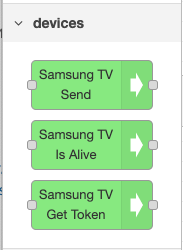
- Drag and drop any node
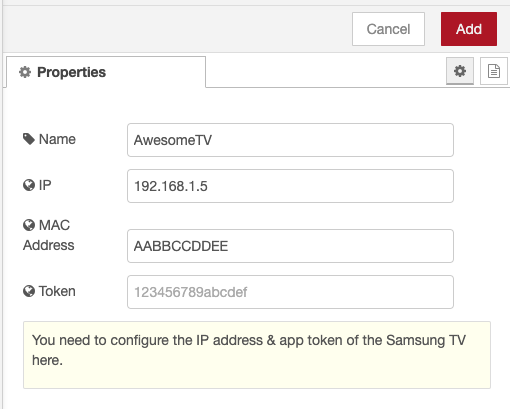
- Set IP and Mac address of the TV (You can find it in your Wifi Router, or via [the network status menu, see these steps on samsung support](https://www.samsung.com/au/support/tv-audio-video/connect-tv-to-internet/))
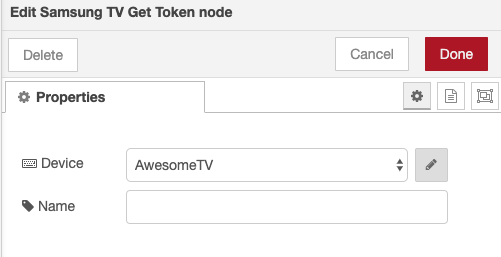
- Your TV may show a dialog, requesting permission for remote control. If you confirm this dialog, the TV will send an access token back to NodeRed, and it will be displayed in the debug window. Copy & Paste your token from the debug window into the Samsung TV configuration node.

- Enjoy to use it!
- to power on the tv from network, you may need to follow [these steps from samsung support](https://www.samsung.com/au/support/tv-audio-video/control-your-tv-using-the-smartthings-app/).
Roadmap
------
- [ ] Supporting previous version of Samsung TVs
- [ ] Polishing by guildlines from NodeRED for the node
## Donate and Support
The project was developed with ♥ save you (for sure) a lot of time and help you to increase your productivity so, please consider a [donation](https://www.paypal.com/cgi-bin/webscr?cmd=_s-xclick&hosted_button_id=WUAAG2HH58WE4) or become a [supporter](https://www.patreon.com/toxblh) and help to become more awesome than ever.
[](https://www.patreon.com/toxblh)
[](https://www.paypal.com/cgi-bin/webscr?cmd=_s-xclick&hosted_button_id=WUAAG2HH58WE4)
You can also fund specific issues via Issuehunt. That can boost the development of a feature you need and make it more attractive for contributors.
[](https://issuehunt.io/r/Toxblh/node-red-contrib-samsung-tv-control)