https://github.com/tpdlshdmlrkfmcla/random_dice
Flutter Digital Random Dice Project
https://github.com/tpdlshdmlrkfmcla/random_dice
flutter flutter-project random-dice shake
Last synced: 3 months ago
JSON representation
Flutter Digital Random Dice Project
- Host: GitHub
- URL: https://github.com/tpdlshdmlrkfmcla/random_dice
- Owner: tpdlshdmlrkfmcla
- Created: 2023-02-21T04:06:52.000Z (over 3 years ago)
- Default Branch: master
- Last Pushed: 2024-06-16T10:03:15.000Z (about 2 years ago)
- Last Synced: 2025-06-18T13:58:24.661Z (about 1 year ago)
- Topics: flutter, flutter-project, random-dice, shake
- Language: C++
- Homepage:
- Size: 614 KB
- Stars: 0
- Watchers: 1
- Forks: 0
- Open Issues: 0
-
Metadata Files:
- Readme: README.md
Awesome Lists containing this project
README
## 구글 플레이스토어에서 랜덤 주사위 앱을 다운로드하세요 !
[랜덤 주사위](https://play.google.com/store/apps/details?id=com.wonchihyeon.randomdice)

# Random_Dice
```
개발 툴 : Flutter
개발 언어 : Dart
개발 일시 : 2023-02-21 ~ 2023-02-22
개발자 : Won Chi Hyeon
```
## 앱 개요
```
기능 : 2개의 BottomNavigation을 가지는 탭 형태의 UI
가속도계를 사용해서 흔들기 기능을 구현
Slider를 이용해서 흔들기 민감도를 설정하는 기능 구현
조작법 : 첫 번째 탭에서 핸드폰을 흔들면 주사위의 숫자가 랜덤하게 바뀝니다.
두 번째 탭에서 슬라이더를 움직이면 흔들기의 민감도를 정할 수 있습니다.
사용한 플러그인 : shake, sensors_plus
```
### 최종 화면


## Theme 설정하기
```
만난 지 며칠 프로젝트 앱에서 폰트와 폰트색상 등 테마를 설정해주었던 것처럼 상수를 이용해서
슬라이더, BottomNavigation 위젯 등에 테마를 미리 설정하였습니다.
```

## TabBarView 작업하기
```
TabBarView 위젯은 TabController가 필수입니다. TabController는 한 번만 초기화되어야 하므로
initState안에서 초기화해주고 초기화할 때는 vsync 기능이 필수인데 이는 State위젯에 TickerProviderMixin을 mixin으로 제공해주어야만
사용가능합니다.
TickerProviderMixin와 SingleTrickerProviderMixin은 애니메이션의 효율을 올려주는 역할을 합니다.
length 매개변수의 2는 탭의 개수를 의미합니다.
```

## BottomNavigationBar 작업하기
```
하단 탭바의 2개의 버튼을 각각 구현하였습니다. label과 icon을 주어서 UI를 구성하였습니다.
```


## TabBarView UI 설정
```
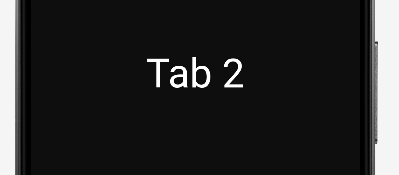
TabBarView가 잘 작동하는 지 알아보기 위해 Widget List에 텍스트 2개를 각각 넣고 좌우로 슬라이드하여
잘 작동하는 것을 확인하였습니다.
```


### [왼쪽으로 슬라이드했을 때]
## BottomNavigationBar와 controller 연동
```
TabBarView를 스와이프할 때는 화면 전환이 이루어지지만 BottomNavigationBar의 탭을 누르면 이동되지 않습니다.
그 이유는 BottomNavigationBar를 누를 때마다 TabBaraView와 연동을 해야 하기 때문입니다.
TabController을 연동하여 BottomNavigationBar를 눌러도 화면전환이 잘 이루어지도록 하였습니다.
```
### [컨트롤러 속성이 변경될 때마다 실행할 함수]

### [위젯이 삭제될 때 등록된 listener도 삭제]

### [현재 선택된 상태로 표시해야 되는 BottomNavigationBarItem의 인덱스]

## 첫 번째 인덱스화면에 주사위 이미지 추가
```
첫 번째 인덱스 화면(HomeScreen)에 주사위 이미지를 추가하였습니다.
향후에 생성자로 number를 넘겨줘서 이미지를 변경할 수 있도록 설계하였습니다.
```


## 주사위 값에 해당되는 숫자 텍스트 추가
```
주사위 값에 해당되는 숫자(number) 텍스트를 주사위 이미지 하단에 추가하였습니다.
```


## 두 번째 인덱스 화면에 민감도 조절 슬라이더 추가
```
두 번째 인덱스 화면(SettingScreen)에 슬라이더를 추가하였습니다.
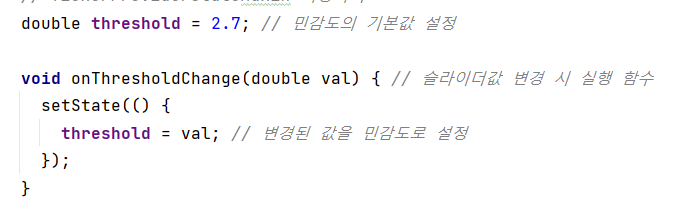
슬라이더의 주요 설정값은 threshold(민감도)로 기본 민감도 값과 슬라이더가 변경될 때마다 실행되는 함수를 생성자로 등록하였습니다.
슬라이더가 변경될 때마다 실행되는 함수는 변경된 값을 민감도 값으로 변경해주는 역할을 합니다.
```



## 흔들기를 감지하여 주사위 번호를 변경하기
```
주사위 번호(number)를 상태관리를 하기위해서 선언을 해준다음 setState를 사용하여
흔들기가 감지되었을 때 number를 rand().nextInt + 1 (0~6까지의 난수)로 변경하도록 하여
최종적으로 주사위 번호를 변경과 더불어 주사위에 해당하는 이미지로 수정하도록 하는 기능을 추가하였습니다.
```


## 향후 앱 출시 계획
```
저작권 상 문제로 주사위 이미지 변경
주사위 개수를 늘리는 옵션 추가
흔들었을 때 주사위 이미지가 애니메이션 되도록 수정
특정 숫자가 더 높은 확률로 나오도록 확률 조작 기능 추가
```
## 향후 프로젝트 계획
```
이번 프로젝트에 사용된 Shake 플러그인은 x, y, 축으로의 직선 움직임만을 측정할 수 있습니다.
자이로스코프(Gyroscope)는 이 단점을 보완해서 x, y, z 축으로의 회전을 측정할 수 있습니다.
센서의 데이터를 정규화하는 작업을 진행하고(움직임 수치를 계산해서 핸드폰을 흔든 정도를 수치화하는 작업)
헬스케어의 대표 앱 중에 하나인 만보기 앱을 개발하기로 하였습니다.
```