https://github.com/transcental/slackeline
https://github.com/transcental/slackeline
Last synced: 4 months ago
JSON representation
- Host: GitHub
- URL: https://github.com/transcental/slackeline
- Owner: transcental
- Created: 2024-08-24T19:43:12.000Z (over 1 year ago)
- Default Branch: main
- Last Pushed: 2025-07-22T11:38:53.000Z (6 months ago)
- Last Synced: 2025-08-29T17:57:11.620Z (4 months ago)
- Language: Python
- Size: 56.6 KB
- Stars: 3
- Watchers: 1
- Forks: 1
- Open Issues: 0
-
Metadata Files:
- Readme: README.md
Awesome Lists containing this project
README
# Slackeline
Slackeline is a bot for my personal channel in the Hack Club Slack, [#ambers-mine](https://hackclub.slack.com/archives/C06R5NKVCG5). The name comes from the Madeline who is the protaganist in Celeste, my favourite game - an indie puzzle platformer.
Currently, Slackeline only welcomes people and can run scheduled messages but I plan to add more functionality to increase channel interaction! Stories, questions and mysteries are some things planned.
## Features
### Sequences
This is the barebones of Slackeline. Sequences are a series of messages that are sent in order. They can contain (rudimentary) buttons, custom avatars, custom usernames and custom text.
To update the dialogue, or add new dialogue, you only need to modify the dictionaries in `dialogue.py`.
Dialogue trees _might_ come in the future!
### Welcoming
Slackeline detects when a new user joins a channel she is in and then starts a dialogue sequence reminiscent of the prologue in Celeste.
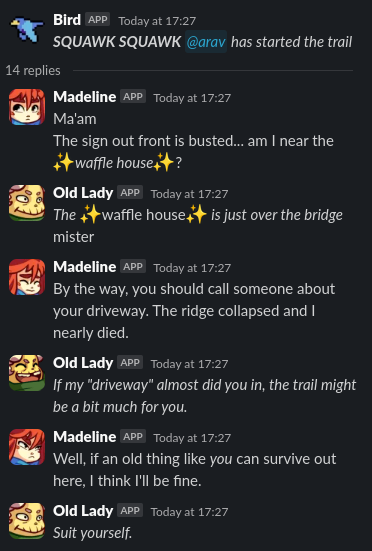
> _Part of the dialogue sequence_
### Buttons
Currently there are two types of button - `wait` and `custom`.
A `wait` button will wait for it to be pressed before proceeding to the message with the value of `waitFor` set to the action id of the button.
A `custom` button needs to have a handler created manually and can do anything you program it to.
Handlers for all buttons except `custom` are automatically created.
### Scheduling
Sequences can be scheduled to run using cron syntax. This is useful for things like daily messages or reminders.
To schedule a sequence, add a dictionary to the `SCHEDULED` list in `dialogue.py`.
The dictionary should be structured as follows:
```py
{
"cron": "0 9 * * *", # cron syntax for how often you want it to run
"sequences": [ # A sequence will be randomly selected, only one is necessary
[
{
"icon_emoji": ":madeline:",
"username": "Madeline",
"messages": [
"Good morning Theo!\nGood morning Granny!\nGood morning Baddy"
]
}, {
"icon_emoji": ":theo_:"
}
]
]
}
```
## Setup
Create a virtual environment
```sh
python3.12 -m venv .venv
```
Activate it
```sh
source .venv/bin/activate`
```
Install packages
```sh
python3.12 -m pip install -r requirements.txt
```
Run
```sh
python3.12 main.py
```
You will also need the following environment variables for your Slack app:
```
SLACK_SIGNING_SECRET=""
SLACK_CLIENT_SECRET=""
SLACK_BOT_TOKEN=""
```
Here's an app manifest that has the necessary permissions:
```
{
"display_information": {
"name": "Slackeline",
"description": "Survive the journey across the mountain trail.",
"background_color": "#2f042f"
},
"features": {
"app_home": {
"home_tab_enabled": true,
"messages_tab_enabled": false,
"messages_tab_read_only_enabled": false
},
"bot_user": {
"display_name": "Madeline",
"always_online": false
},
"shortcuts": [
{
"name": "Respond to call",
"type": "message",
"callback_id": "respond_to_call",
"description": "Opens a modal to respond to the message in character"
}
]
},
"oauth_config": {
"scopes": {
"bot": [
"channels:read",
"channels:write.invites",
"chat:write",
"chat:write.customize",
"commands",
"groups:read",
"groups:write.invites",
"im:history",
"im:read",
"mpim:read",
"reactions:write",
"users.profile:read",
"users:read",
"groups:history"
]
}
},
"settings": {
"event_subscriptions": {
"request_url": "URL",
"bot_events": [
"app_home_opened",
"member_joined_channel",
"member_left_channel",
"message.im"
]
},
"interactivity": {
"is_enabled": true,
"request_url": "URL"
},
"org_deploy_enabled": false,
"socket_mode_enabled": false,
"token_rotation_enabled": false
}
}
```