https://github.com/transistorsoft/native-background-geolocation
Advanced Background Geolocation & Geofencing SDK for iOS & Android
https://github.com/transistorsoft/native-background-geolocation
Last synced: 4 months ago
JSON representation
Advanced Background Geolocation & Geofencing SDK for iOS & Android
- Host: GitHub
- URL: https://github.com/transistorsoft/native-background-geolocation
- Owner: transistorsoft
- License: other
- Created: 2017-07-11T13:06:28.000Z (about 9 years ago)
- Default Branch: master
- Last Pushed: 2026-04-02T16:13:28.000Z (4 months ago)
- Last Synced: 2026-04-03T09:14:27.090Z (4 months ago)
- Language: Swift
- Homepage:
- Size: 139 MB
- Stars: 51
- Watchers: 7
- Forks: 18
- Open Issues: 3
-
Metadata Files:
- Readme: README.md
- Changelog: CHANGELOG.md
- License: LICENSE
Awesome Lists containing this project
README
Background Geolocation Module for iOS & Android
==============================================================================
[](https://www.transistorsoft.com)
-------------------------------------------------------------------------------
The *most* sophisticated background **location-tracking & geofencing** module with battery-conscious motion-detection intelligence for **iOS** and **Android**.
The plugin's [Philosophy of Operation](../../wiki/Philosophy-of-Operation) is to use **motion-detection** APIs (using accelerometer, gyroscope and magnetometer) to detect when the device is *moving* and *stationary*.
- When the device is detected to be **moving**, the plugin will *automatically* start recording a location according to the configured `distanceFilter` (meters).
- When the device is detected be **stationary**, the plugin will automatically turn off location-services to conserve energy.
Also available for [React Native](https://github.com/transistorsoft/react-native-background-geolocation), [Cordova](https://github.com/transistorsoft/cordova-background-geolocation-lt) and [NativeScript](https://github.com/transistorsoft/nativescript-background-geolocation-lt)
----------------------------------------------------------------------------
The **[Android module](http://www.transistorsoft.com/shop/products/native-background-geolocation)** requires [purchasing a license](http://www.transistorsoft.com/shop/products/native-background-geolocation). However, it *will* work for **DEBUG** builds. It will **not** work with **RELEASE** builds [without purchasing a license](http://www.transistorsoft.com/shop/products/native-background-geolocation).
(2018) This plugin is supported **full-time** and field-tested **daily** since 2013.
----------------------------------------------------------------------------
[](https://play.google.com/store/apps/details?id=com.transistorsoft.backgroundgeolocation.react)
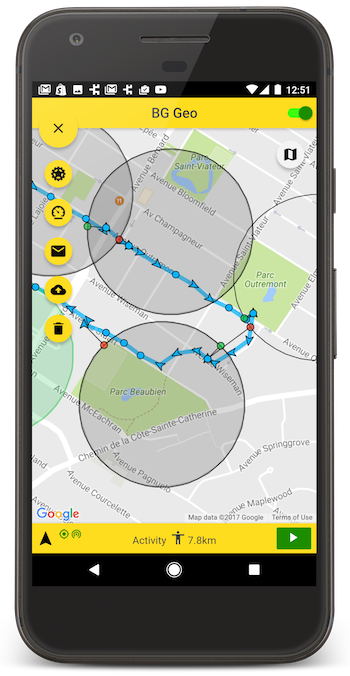
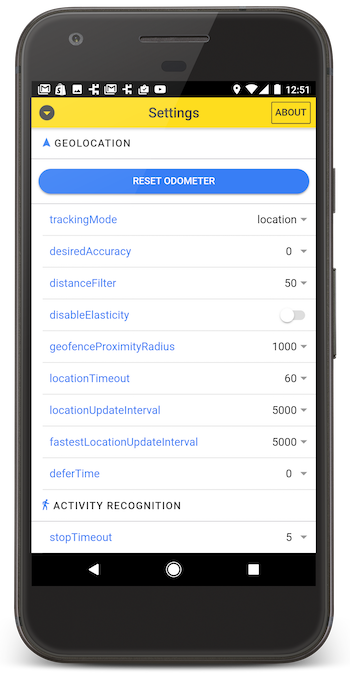
# Contents
- ### :books: [API Documentation](./docs/README.md)
- [iOS](./docs/README-iOS.md)
- [Android](./docs/README-Android.md)
- ### [Installing the Plugin](#large_blue_diamond-installing-the-plugin)
- ### [Setup Guides](#large_blue_diamond-setup-guides)
- ### [Configure your License](#large_blue_diamond-configure-your-license)
- ### [Android SDK Setup](#large_blue_diamond-android-sdk)
- ### [Example](#large_blue_diamond-example)
- ### [Debugging](../../wiki/Debugging)
- ### [Demo Application](#large_blue_diamond-demo-application)
- ### [Testing Server](#large_blue_diamond-simple-testing-server)
## :large_blue_diamond: Installing the Plugin
You will have to install the plugin by manually downloading [a Release](https://github.com/transistorsoft/background-geolocation-lt/releases) from this repository. The plugin is not currently submitted to a package manager (eg: jCenter)
Create a folder in the root of your application project, eg: `/Libraries` and place the extracted **`background-geolocation`** folder into it:
eg: :open_file_folder: **`Libraries/background-geolocation-lt`**
## :large_blue_diamond: Setup Guides
- ### iOS
- [Cocoapods Setup (*recommended*)](docs/INSTALL-IOS-COCOAPOD.md)
- [Manual Setup](docs/INSTALL-IOS.md)
- ### Android
- [Manual Setup](docs/INSTALL-ANDROID.md)
## :large_blue_diamond: Example
### iOS
```obj-c
#import "ViewController.h"
@import TSLocationManager;
@interface ViewController ()
@end
@implementation ViewController
- (void)viewDidLoad {
[super viewDidLoad];
// Get a reference to the SDK
TSLocationManager *bgGeo = [TSLocationManager sharedInstance];
TSConfig *config = [TSConfig sharedInstance];
// Provide a reference to your viewController.
bgGeo.viewController = self;
[config updateWithBlock:^(TSConfigBuilder *builder) {
builder.debug = YES;
builder.logLevel = tsLogLevelVerbose;
builder.desiredAccuracy = kCLLocationAccuracyBest;
builder.distanceFilter = 10;
builder.stopOnTerminate = NO;
builder.startOnBoot = YES;
builder.url = @"http://your.server.com/locations";
}];
// Listen to events.
[bgGeo onLocation:^(TSLocation *location) {
NSLog(@"[location] %@", [location toDictionary]);
} failure:^(NSError *error) {
NSLog(@"[location] error %@", @(error.code));
}];
// Signal #ready to the plugin.
[bgGeo ready];
if (!config.enabled) {
// Start tracking immediately (if not already).
[bgGeo start];
}
}
```
### Android
```java
package com.your.app;
import com.transistorsoft.locationmanager.adapter.BackgroundGeolocation;
public class MainActivity extends AppCompatActivity {
private static String TAG = "MyApp";
@Override
protected void onCreate(Bundle savedInstanceState) {
super.onCreate(savedInstanceState);
setContentView(R.layout.activity_main);
// Get a reference to the SDK
final BackgroundGeolocation bgGeo = BackgroundGeolocation.getInstance(getApplicationContext(), getIntent());
final TSConfig config = TSConfig.getInstance(getApplicationContext());
// Configure the SDK
config.updateWithBuilder()
.setDebug(true) // Sound Fx / notifications during development
.setLogLevel(5) // Verbose logging during development
.setDesiredAccuracy(LocationRequest.PRIORITY_HIGH_ACCURACY)
.setDistanceFilter(10F)
.setStopTimeout(1L)
.setHeartbeatInterval(60)
.setStopOnTerminate(false)
.setForegroundService(true)
.setStartOnBoot(true)
.setUrl("http://your.server.com/locations")
.commit();
// Listen events
bgGeo.onLocation(new TSLocationCallback() {
@Override
public void onLocation(TSLocation location) {
Log.i(TAG, "[location] " + location.toJson());
}
@Override
public void onError(Integer code) {
Log.i(TAG, "[location] ERROR: " + code);
}
});
bgGeo.onMotionChange(new TSLocationCallback() {
@Override
public void onLocation(TSLocation tsLocation) {
Log.i(TAG, "[motionchange] " + tsLocation.toJson());
}
@Override
public void onError(Integer error) {
Log.i(TAG, "[motionchange] ERROR: " + error);
}
});
bgGeo.onHeartbeat(new TSHeartbeatCallback() {
@Override
public void onHeartbeat(HeartbeatEvent heartbeatEvent) {
Log.i(TAG, "[heartbeat] " + heartbeatEvent.toJson());
}
});
// Finally, signal #ready to the SDK.
bgGeo.ready(new TSCallback() {
@Override public void onSuccess() {
Log.i(TAG, "[ready] success");
if (!config.getEnabled()) {
// Start tracking immediately (if not already).
bgGeo.start();
}
}
@Override public void onFailure(String error) {
Log.i(TAG, "[ready] FAILURE: " + error);
}
});
}
}
```
## :large_blue_diamond: Demo Application
This repo hosts demo apps for both iOS and Android. Start by cloning this repo.
- ### iOS
In XCode, open the project at **`/ios/BackgroundGeolocation/BackgroundGeolocation.xcworkspace`** and launch the **`Demo`** target.
- ### Android
In Android Studio, open the project at **`/android`** and launch the **`app`** target.
# License
The MIT License (MIT)
Copyright (c) 2018 Chris Scott, Transistor Software
Permission is hereby granted, free of charge, to any person obtaining a copy
of this software and associated documentation files (the "Software"), to deal
in the Software without restriction, including without limitation the rights
to use, copy, modify, merge, publish, distribute, sublicense, and/or sell
copies of the Software, and to permit persons to whom the Software is
furnished to do so, subject to the following conditions:
The above copyright notice and this permission notice shall be included in all
copies or substantial portions of the Software.
THE SOFTWARE IS PROVIDED "AS IS", WITHOUT WARRANTY OF ANY KIND, EXPRESS OR
IMPLIED, INCLUDING BUT NOT LIMITED TO THE WARRANTIES OF MERCHANTABILITY,
FITNESS FOR A PARTICULAR PURPOSE AND NONINFRINGEMENT. IN NO EVENT SHALL THE
AUTHORS OR COPYRIGHT HOLDERS BE LIABLE FOR ANY CLAIM, DAMAGES OR OTHER
LIABILITY, WHETHER IN AN ACTION OF CONTRACT, TORT OR OTHERWISE, ARISING FROM,
OUT OF OR IN CONNECTION WITH THE SOFTWARE OR THE USE OR OTHER DEALINGS IN THE
SOFTWARE.