https://github.com/transistorsoft/react-native-background-geolocation-firebase
Firebase Adapter for React Native Background Geolocation
https://github.com/transistorsoft/react-native-background-geolocation-firebase
Last synced: 5 months ago
JSON representation
Firebase Adapter for React Native Background Geolocation
- Host: GitHub
- URL: https://github.com/transistorsoft/react-native-background-geolocation-firebase
- Owner: transistorsoft
- Created: 2018-08-02T21:12:42.000Z (almost 8 years ago)
- Default Branch: master
- Last Pushed: 2024-10-17T15:20:21.000Z (almost 2 years ago)
- Last Synced: 2025-10-20T02:43:49.049Z (9 months ago)
- Language: Objective-C
- Size: 223 KB
- Stars: 24
- Watchers: 9
- Forks: 4
- Open Issues: 1
-
Metadata Files:
- Readme: README.md
- Changelog: CHANGELOG.md
Awesome Lists containing this project
README
react-native-background-geolocation-firebase · []() []()
============================================================================
[](https://www.transistorsoft.com)
-------------------------------------------------------------------------------
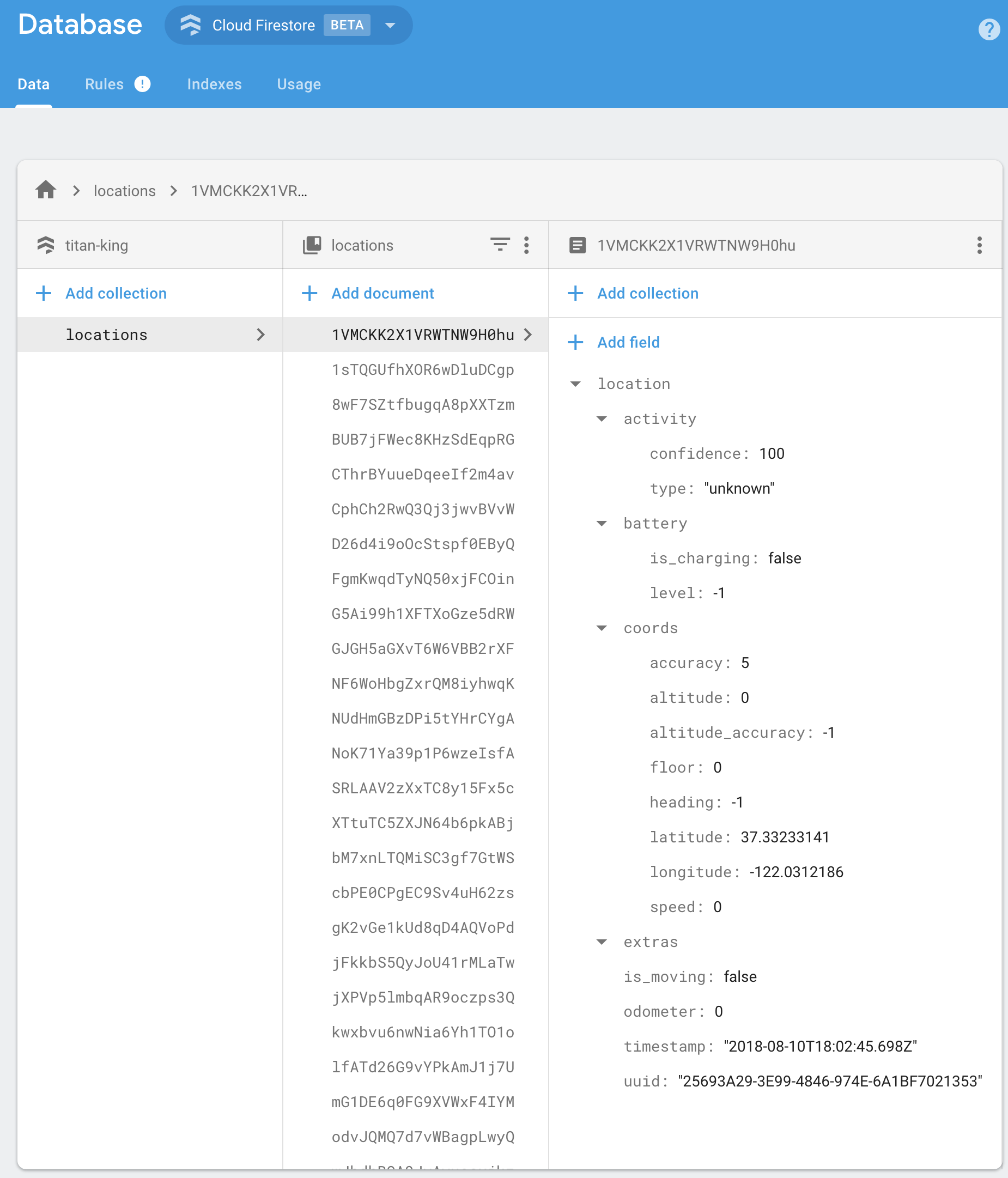
Firebase Proxy for [React Native Background Geolocation](https://github.com/transistorsoft/react-native-background-geolocation). The plugin will automatically post locations to your own Firebase database, overriding the `react-native-background-geolocation` plugin's SQLite / HTTP services.
----------------------------------------------------------------------------
The **[Android module](https://shop.transistorsoft.com/collections/frontpage/products/background-geolocation-firebase)** requires [purchasing a license](https://shop.transistorsoft.com/collections/frontpage/products/background-geolocation-firebase). However, it *will* work for **DEBUG** builds. It will **not** work with **RELEASE** builds [without purchasing a license](https://shop.transistorsoft.com/collections/frontpage/products/background-geolocation-firebase).
----------------------------------------------------------------------------
## :large_blue_diamond: Installing the Plugin
-------------------------------------------------------------
:warning: If you have a previous version of **`react-native-background-geolocation-firebase < 0.3.0`** installed into **`react-native >= 0.60`**, you should first `unlink` your previous version as `react-native link` is no longer required.
```bash
$ react-native unlink react-native-background-geolocation-firebase
```
-------------------------------------------------------------
### From yarn
```bash
$ yarn add react-native-background-geolocation-firebase
```
### From npm
```
$ npm install react-native-background-geolocation-firebase --save
```
### Latest from Github
```
$ npm install git+https://git@github.com:transistorsoft/react-native-background-geolocation-firebase.git --save
```
## :large_blue_diamond: Setup Guides
## iOS
- [Auto-linking Setup](docs/INSTALL-IOS-AUTO.md)
## Android
- [Auto-linking Setup](docs/INSTALL-ANDROID-AUTO.md)
## :large_blue_diamond: Configure your license
1. Login to Customer Dashboard to generate an application key:
[www.transistorsoft.com/shop/customers](http://www.transistorsoft.com/shop/customers)

2. Add your license-key to `android/app/src/main/AndroidManifest.xml`:
```diff
+
.
.
.
```
## :large_blue_diamond: Using the plugin ##
```javascript
import BackgroundGeolocationFirebase from "react-native-background-geolocation-firebase";
```
## :large_blue_diamond: Example
```javascript
import BackgroundGeolocation from "react-native-background-geolocation";
import BackgroundGeolocationFirebase from "react-native-background-geolocation-firebase";
.
.
.
function App(): React.JSX.Element {
React.useEffect(() => {
// Configure BackgroundGeolocation Firebase adapter.
BackgroundGeolocationFirebase.configure({
locationsCollection: "locations",
geofencesCollection: "geofences"
});
// Configure BackgroundGeolocation
const onLocation = BackgroundGeolocation.onLocation((location) => {
console.log('[onLocation] ', location);
});
BackgroundGeolocation.ready({
debug: true,
logLevel: BackgroundGeolocation.LOG_LEVEL_VERBOSE
}).then((state) => {
console.log('- ready: ', state.enablede);
if (!state.enabled) {
BackgroundGeolocation.start();
}
})
return () => {
// Remove event-listeners.
onLocation.remove();
}
});
}
```
## :large_blue_diamond: Firebase Functions
`BackgroundGeolocation` will post its default "Location Data Schema" to your Firebase app.
```json
{
"location":{},
"param1": "param 1",
"param2": "param 2"
}
```
You should implement your own [Firebase Functions](https://firebase.google.com/docs/functions) to "*massage*" the incoming data in your collection as desired. For example:
```typescript
import * as functions from 'firebase-functions';
exports.createLocation = functions.firestore
.document('locations/{locationId}')
.onCreate((snap, context) => {
const record = snap.data();
const location = record.location;
console.log('[data] - ', record);
return snap.ref.set({
uuid: location.uuid,
timestamp: location.timestamp,
is_moving: location.is_moving,
latitude: location.coords.latitude,
longitude: location.coords.longitude,
speed: location.coords.speed,
heading: location.coords.heading,
altitude: location.coords.altitude,
event: location.event,
battery_is_charging: location.battery.is_charging,
battery_level: location.battery.level,
activity_type: location.activity.type,
activity_confidence: location.activity.confidence,
extras: location.extras
});
});
exports.createGeofence = functions.firestore
.document('geofences/{geofenceId}')
.onCreate((snap, context) => {
const record = snap.data();
const location = record.location;
console.log('[data] - ', record);
return snap.ref.set({
uuid: location.uuid,
identifier: location.geofence.identifier,
action: location.geofence.action,
timestamp: location.timestamp,
latitude: location.coords.latitude,
longitude: location.coords.longitude,
extras: location.extras,
});
});
```
## :large_blue_diamond: Configuration Options
#### `@param {String} locationsCollection [locations]`
The collection name to post `location` events to. Eg:
```javascript
BackgroundGeolocationFirebase.configure({
locationsCollection: '/locations'
});
BackgroundGeolocationFirebase.configure({
locationsCollection: '/users/123/locations'
});
BackgroundGeolocationFirebase.configure({
locationsCollection: '/users/123/routes/456/locations'
});
```
#### `@param {String} geofencesCollection [geofences]`
The collection name to post `geofence` events to. Eg:
```javascript
BackgroundGeolocationFirebase.configure({
geofencesCollection: '/geofences'
});
BackgroundGeolocationFirebase.configure({
geofencesCollection: '/users/123/geofences'
});
BackgroundGeolocationFirebase.configure({
geofencesCollection: '/users/123/routes/456/geofences'
});
```
#### `@param {Boolean} updateSingleDocument [false]`
If you prefer, you can instruct the plugin to update a *single document* in Firebase rather than creating a new document for *each* `location` / `geofence`. In this case, you would presumably implement a *Firebase Function* to deal with updates upon this single document and store the location in some other collection as desired. If this is your use-case, you'll also need to ensure you configure your `locationsCollection` / `geofencesCollection` accordingly with an even number of "parts", taking the form `/collection_name/document_id`, eg:
```javascript
BackgroundGeolocationFirebase.configure({
locationsCollection: '/locations/latest' // <-- 2 "parts": even
});
// or
BackgroundGeolocationFirebase.configure({
locationsCollection: '/users/123/routes/456/the_location' // <-- 4 "parts": even
});
// Don't use an odd number of "parts"
BackgroundGeolocationFirebase.configure({
locationsCollection: '/users/123/latest_location' // <-- 3 "parts": odd!! No!
});
```
# License
The MIT License (MIT)
Copyright (c) 2018 Chris Scott, Transistor Software
Permission is hereby granted, free of charge, to any person obtaining a copy
of this software and associated documentation files (the "Software"), to deal
in the Software without restriction, including without limitation the rights
to use, copy, modify, merge, publish, distribute, sublicense, and/or sell
copies of the Software, and to permit persons to whom the Software is
furnished to do so, subject to the following conditions:
The above copyright notice and this permission notice shall be included in all
copies or substantial portions of the Software.
THE SOFTWARE IS PROVIDED "AS IS", WITHOUT WARRANTY OF ANY KIND, EXPRESS OR
IMPLIED, INCLUDING BUT NOT LIMITED TO THE WARRANTIES OF MERCHANTABILITY,
FITNESS FOR A PARTICULAR PURPOSE AND NONINFRINGEMENT. IN NO EVENT SHALL THE
AUTHORS OR COPYRIGHT HOLDERS BE LIABLE FOR ANY CLAIM, DAMAGES OR OTHER
LIABILITY, WHETHER IN AN ACTION OF CONTRACT, TORT OR OTHERWISE, ARISING FROM,
OUT OF OR IN CONNECTION WITH THE SOFTWARE OR THE USE OR OTHER DEALINGS IN THE
SOFTWARE.