https://github.com/travisvn/gptree-gui
A tool to provide LLM context for coding projects by combining project files into a single text file (or clipboard text) with directory tree structure.
https://github.com/travisvn/gptree-gui
ai artificial-intelligence chatgpt claude coding-assistant copilot cursor developer-tools devtools gemini gpt llama llm llms openai productivity rust tauri tool
Last synced: 3 months ago
JSON representation
A tool to provide LLM context for coding projects by combining project files into a single text file (or clipboard text) with directory tree structure.
- Host: GitHub
- URL: https://github.com/travisvn/gptree-gui
- Owner: travisvn
- Created: 2025-04-22T19:28:20.000Z (about 1 year ago)
- Default Branch: main
- Last Pushed: 2025-04-22T19:53:45.000Z (about 1 year ago)
- Last Synced: 2025-04-23T16:16:25.671Z (about 1 year ago)
- Topics: ai, artificial-intelligence, chatgpt, claude, coding-assistant, copilot, cursor, developer-tools, devtools, gemini, gpt, llama, llm, llms, openai, productivity, rust, tauri, tool
- Language: TypeScript
- Homepage:
- Size: 3.51 MB
- Stars: 0
- Watchers: 1
- Forks: 0
- Open Issues: 0
-
Metadata Files:
- Readme: README.md
Awesome Lists containing this project
README
# GPTree GUI 🌳
**Prep your codebase for LLMs — with full control, no IDE lock-in, and zero cloud dependencies.**



---
## 🧠 What It Does
GPTree GUI lets you visually select which files from your local project to include in a combined file tree + code output — perfect for pasting into ChatGPT, Claude, or a local LLM. It gives you full control over what the model sees, while respecting your privacy and workflow.

---
## ⚡ Why Use GPTree?
Other tools (like Cursor or cloud-based repo summarizers) either:
- Automatically include irrelevant files
- Require installing a new IDE or extension
- Send your code to the cloud without control
**GPTree GUI is different**:
- 🧩 Pick only what you want the model to see
- 🧠 Use _your own_ LLM (OpenAI, Claude, LM Studio, etc.)
- 🖥️ Works offline and respects `.gitignore`
- ⚡ Outputs ready-to-paste markdown + source in seconds
> “It’s not an AI copilot — it’s the pre-flight checklist before the prompt.”
---
## ✅ Features
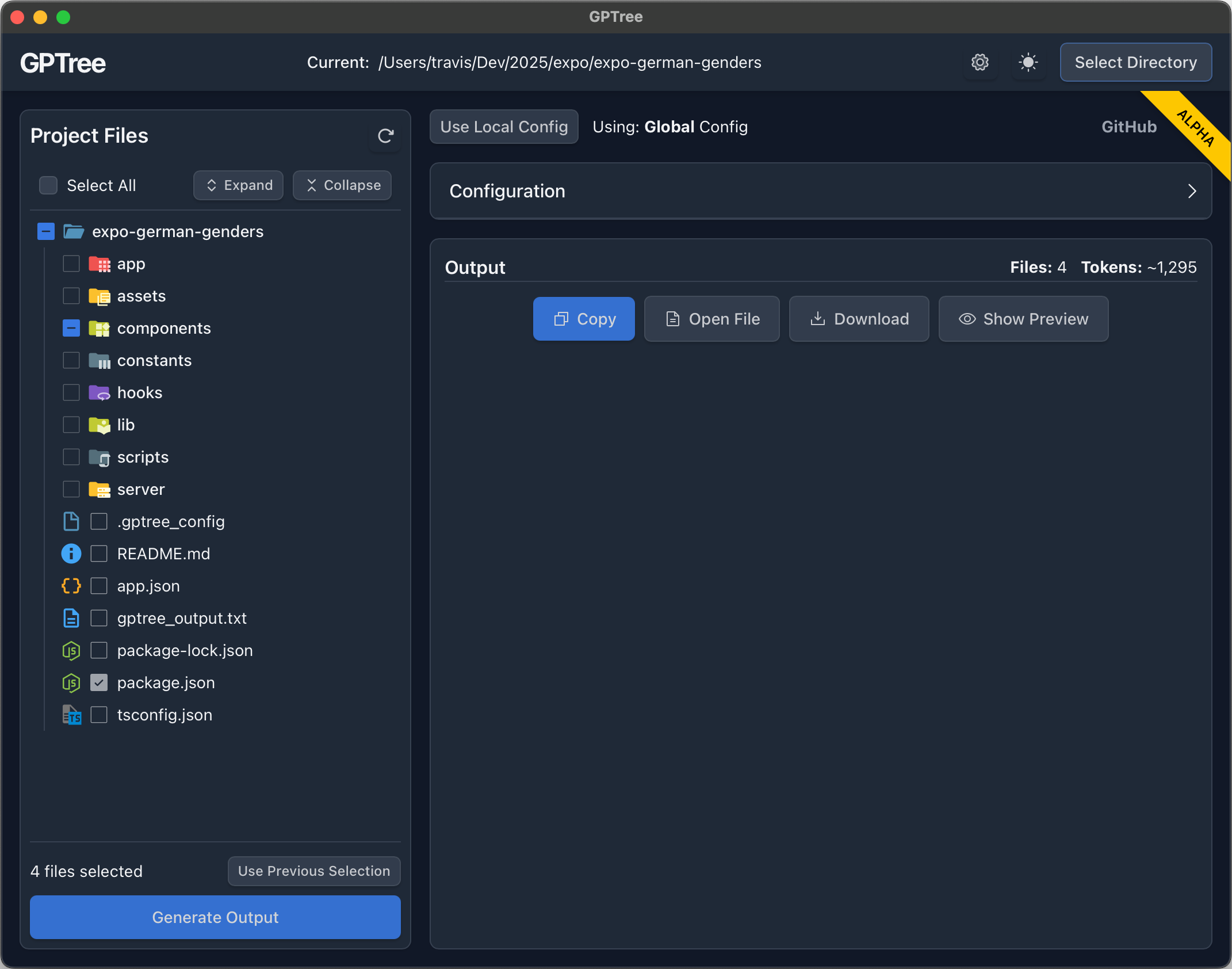
- **Visual File/Folder Tree** – Easily browse and toggle file selection
- **Output Panel** – Preview the file tree + selected code content in one scrollable blob
- **Clipboard Export** – Copy or save the LLM-ready output in one click
- **Smart Ignoring** – Automatically skips `.gitignore`d files and large binaries
- **Config Manager** – Toggle and edit global/project-specific configs in the UI
- **Dark/Light Mode** – Adapts to system or manual preference
- **Blazing Fast + Lightweight** – Uses ~100MB RAM total
---
## 🧪 Installation
### 🍎 macOS
- [Download GPTree for macOS (.dmg) - Universal](https://github.com/travisvn/gptree-gui/releases/latest/download/GPTree-mac-universal.dmg)
### 🐧 Linux
```bash
curl -fsSL https://raw.githubusercontent.com/travisvn/gptree-gui/main/scripts/install.sh | sh
```
### 🪟 Windows
- [Download GPTree for Windows (.exe)](https://github.com/travisvn/gptree-gui/releases/latest/download/GPTree-windows.exe)
- [Download GPTree for Windows (.msi)](https://github.com/travisvn/gptree-gui/releases/latest/download/GPTree-windows.msi)
---
## 🧭 How To Use
1. Launch the app, select your project folder
2. Use checkboxes to select files or folders
3. Adjust config options in the right-hand panel (file types, exclusions, etc.)
4. Click “Generate Output” → preview shows combined tree + contents
5. Copy to clipboard or open the file to paste into your LLM
---
## 🔧 Configuration
GPTree GUI uses the same config system as the [gptree CLI](https://github.com/travisvn/gptree):
- Global config: `~/.gptreerc`
- Local config: `.gptree_config` in the current repo
---
## ⚙️ Tech Stack
- Tauri (Rust backend, system Webview)
- React + TypeScript + Tailwind (frontend)
- Jotai (state management)
- Vite (build tooling)
---
## 🆚 Performance Snapshot
| Metric | GPTree GUI | Typical Electron App |
| --------------- | ---------- | -------------------- |
| RAM Usage | \~100 MB | 300–600+ MB |
| Backend | Rust | Node.js |
| Cold Start Time | Fast | Slower |
| Bundle Size | \~3–10 MB | 100MB+ |
> GPTree GUI is 5× leaner than most dev GUI tools.
---
🖼️ **Demo Screenshot**
## 💬 Feedback Welcome
If this is useful to you, please star the repo ⭐ or file an issue if you have feature requests or bugs.
Built by [@travisvn](https://github.com/travisvn), based on the original [gptree CLI](https://github.com/travisvn/gptree).