https://github.com/trazyn/alfred-ieasemusic
🍭 Alfred 3 workflow to controller ieasemusic
https://github.com/trazyn/alfred-ieasemusic
alfred-workflow ieasemusic
Last synced: over 1 year ago
JSON representation
🍭 Alfred 3 workflow to controller ieasemusic
- Host: GitHub
- URL: https://github.com/trazyn/alfred-ieasemusic
- Owner: trazyn
- License: mit
- Created: 2018-07-15T19:12:36.000Z (about 8 years ago)
- Default Branch: master
- Last Pushed: 2022-08-16T14:14:15.000Z (almost 4 years ago)
- Last Synced: 2025-02-28T11:49:16.962Z (over 1 year ago)
- Topics: alfred-workflow, ieasemusic
- Language: Python
- Homepage:
- Size: 11.8 MB
- Stars: 28
- Watchers: 3
- Forks: 6
- Open Issues: 3
-
Metadata Files:
- Readme: README.md
- License: LICENSE
Awesome Lists containing this project
README

🍡 Controller of ieaseMusic for Alfred


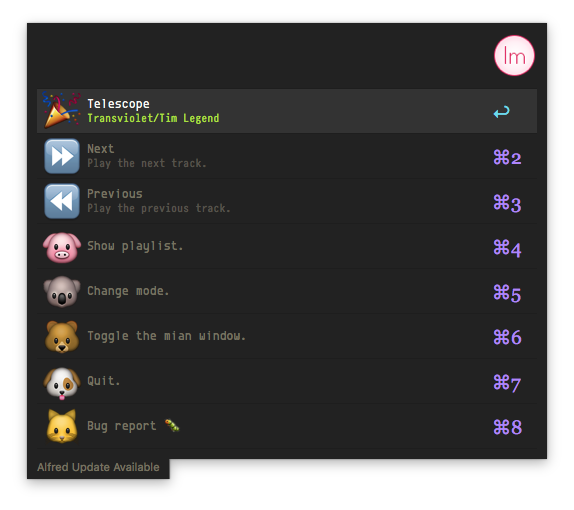

## Feature
- Alfred like.
- Hotkeys, Full support of Alfred hotkeys.
- Easy to control your [ieaseMusic](https://github.com/trazyn/ieaseMusic).
## Required
- [Alfred 3](https://www.alfredapp.com/)
- [IeaseMusic v1.2.6+](https://github.com/trazyn/ieaseMusic/releases/latest)
## Install
Last version: [v1.0.0](https://github.com/trazyn/alfred-ieasemusic/releases/latest)
1. Downlaod [alfred-ieasemusic.alfredworkflow](https://github.com/trazyn/alfred-ieasemusic/releases/latest).
2. Open `alfred-ieasemusic.alfredworkflow` in the Fidner, double-clicking it or drag to into Alfred.
3. Double-click the first thingy marked `Hotkey`.
4. Click the textfiled labeled `Hotkey` and press `⌥⌘.`(Any hotkeys as you wish).

5. Click `Save`.
## How to use
Just press `⌥⌘.`(Your hotkeys binding).
## License
`MIT` see [LICENSE](https://github.com/trazyn/alfred-ieasemusic/blob/master/LICENSE)