https://github.com/tripflex/wp-advanced-cron-manager
WordPress Advanced Cron Manager Plugin
https://github.com/tripflex/wp-advanced-cron-manager
Last synced: 9 days ago
JSON representation
WordPress Advanced Cron Manager Plugin
- Host: GitHub
- URL: https://github.com/tripflex/wp-advanced-cron-manager
- Owner: tripflex
- Created: 2016-04-18T18:48:58.000Z (over 10 years ago)
- Default Branch: master
- Last Pushed: 2016-04-19T16:05:56.000Z (over 10 years ago)
- Last Synced: 2025-10-25T09:39:37.882Z (9 months ago)
- Language: PHP
- Size: 33.2 KB
- Stars: 2
- Watchers: 1
- Forks: 0
- Open Issues: 2
-
Metadata Files:
- Readme: README.md
Awesome Lists containing this project
README
# WP Advanced Cron Manager #
**Contributors:** tripflex, Kubitomakita
**Tags:** cron, wp cron, manager, cron manager, add cron, execute cron, run cron, add cron, custom cron, cron list, remove cron, delete cron
**Requires at least:** 3.8
**Tested up to:** 4.5
**Stable tag:** 2.0.0
**License:** GPLv3+
**License URI:** http://www.gnu.org/licenses/gpl-3.0.html
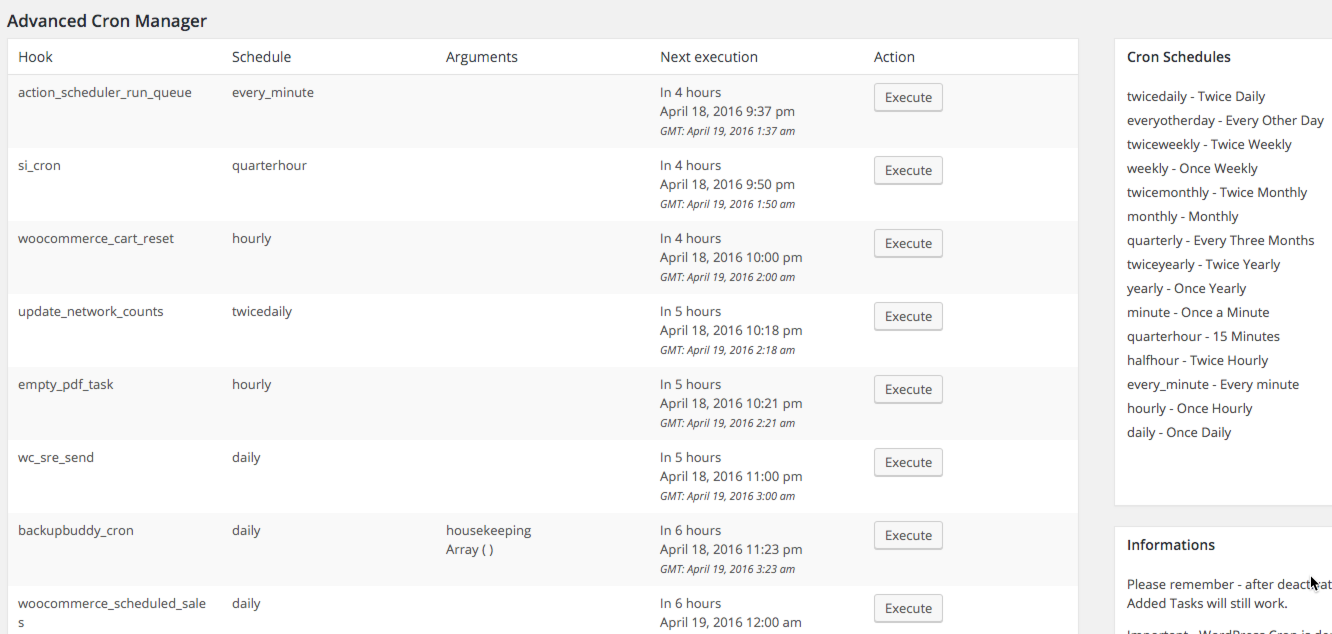
Advanced manager for WordPress Cron tasks and schedules. Adding, removing and viewing with a few clicks.
## Description ##
This plugin allow you to manage WP Cron tasks:
* viewing
* deleting tasks and schedules
* adding tasks and schedules
Plugin use AJAX request so you'll need enabled Javascript in order to use it.
**Advanced Cron Manager PRO**
PRO version includes
* Cron Logger - log cron executions
[Buy now](http://underdev.it/downloads/advanced-cron-manager-pro/ "Advanced Cron Manager PRO")
**Informations about WP Cron**
Please remember - after deactivation of this plugin added Schedules will be not available. Added Tasks will still work unless they use your custom schedule.
Important - WordPress Cron is depended on the User. WP Cron fires only on the page visit so it can be inaccurate.
**Additional informations**
Plugin supports i18n. If you would like to translate it grab a .po file, translate it and send it to me for plugin update. I'll be thankful :)
## Installation ##
1. Upload `wp-advanced-cron-manager` directory to the `/wp-content/plugins/` directory
1. Activate the plugin through the 'Plugins' menu in WordPress
Plugin's page sits under Tools menu item.
## Frequently Asked Questions ##
### Tasks and schedules will be still working after plugin deactivation/removal? ###
Tasks yes. Schedules no.
### What is the task hook? ###
It's used for action. For example if your hook is hook_name you'll need to add in PHP:
'add_action('hook_name', 'function_name');'
## Screenshots ##

## Changelog ##
### 2.0.0 ###
* Fork of Advanced Cron Manager created, major version bump to 2.0.0 to differentiate between source of fork
* Fixed “On next page load” incorrectly showing when not true
* Fixed output next run time
* Next run now shows GMT time AND local time based on WordPress timezone settings
* Next run date format now uses WordPress date format by default
* Next run time format now uses WordPress time format by default
* Fixed output PHP warning and error for cron args when argument is an array
### 1.4.3 ###
* Metabox promo update
### 1.4.1 ###
* Fixed executing when args are provided
### 1.4 ###
* Added hooks for PRO version
* Removed PHP closing tags
* Added settings widget
### 1.3.2 ###
* Fixed arguments passed to the action on AJAX request
### 1.3 ###
* Added promo metabox
* WordPress 4.1 comatybility check
* Updated translation
* Added plugin icon
### 1.2 ###
* Readme improvement
* Added execution button
* Removed debug alert
### 1.1 ###
* Fixed Schedules list from other plugins
### 1.0 ###
* Plugin relase
## Upgrade Notice ##
### 1.2 ###
Removed debug alert and added execution button
### 1.1 ###
Fixed Schedules list from other plugins
### 1.0 ###
Plugin relase