https://github.com/tripolskypetr/backtest-kit
A powerful TypeScript framework for backtesting trading strategies with clean architecture and real-time execution capabilities.
https://github.com/tripolskypetr/backtest-kit
algotrading backtest backtesting backtesting-strategy backtesting-trading-strategies crypto finance financial-analysis framework library stock-market trading trading-strategies
Last synced: 4 months ago
JSON representation
A powerful TypeScript framework for backtesting trading strategies with clean architecture and real-time execution capabilities.
- Host: GitHub
- URL: https://github.com/tripolskypetr/backtest-kit
- Owner: tripolskypetr
- License: mit
- Created: 2025-11-19T11:55:02.000Z (8 months ago)
- Default Branch: master
- Last Pushed: 2026-02-25T14:22:13.000Z (5 months ago)
- Last Synced: 2026-02-25T16:44:02.881Z (5 months ago)
- Topics: algotrading, backtest, backtesting, backtesting-strategy, backtesting-trading-strategies, crypto, finance, financial-analysis, framework, library, stock-market, trading, trading-strategies
- Language: TypeScript
- Homepage: https://backtest-kit.github.io
- Size: 43.4 MB
- Stars: 14
- Watchers: 2
- Forks: 4
- Open Issues: 0
-
Metadata Files:
- Readme: README.md
- Changelog: CHANGELOG.md
- Contributing: CONTRIBUTING.md
- Funding: .github/FUNDING.yml
- License: LICENSE
- Code of conduct: CODE_OF_CONDUCT.md
- Security: SECURITY.md
Awesome Lists containing this project
README

# 🧿 Backtest Kit
> A TypeScript framework for backtesting and live trading strategies on multi-asset, crypto, forex or [DEX (peer-to-peer marketplace)](https://en.wikipedia.org/wiki/Decentralized_finance#Decentralized_exchanges), spot, futures with crash-safe persistence, signal validation, and AI optimization.
[](https://deepwiki.com/tripolskypetr/backtest-kit)
[](https://npmjs.org/package/backtest-kit)
[]()
[](https://github.com/tripolskypetr/backtest-kit/actions/workflows/webpack.yml)
Build reliable trading systems: backtest on historical data, deploy live bots with recovery, and optimize strategies using LLMs like Ollama.
📚 **[API Reference](https://backtest-kit.github.io/documents/example_02_first_backtest.html)** | 🌟 **[Quick Start](https://github.com/tripolskypetr/backtest-kit/tree/master/demo)** | **📰 [Article](https://backtest-kit.github.io/documents/article_02_second_order_chaos.html)**
## 🚀 Quick Start
### 🎯 The Fastest Way: Sidekick CLI
> **Create a production-ready trading bot in seconds:**
```bash
# Create project with npx (recommended)
npx -y @backtest-kit/sidekick my-trading-bot
cd my-trading-bot
npm start
```
### 📦 Manual Installation
> **Want to see the code?** 👉 [Demo app](https://github.com/tripolskypetr/backtest-kit/tree/master/demo) 👈
```bash
npm install backtest-kit ccxt ollama uuid
```
## ✨ Why Choose Backtest Kit?
- 🚀 **Production-Ready**: Seamless switch between backtest/live modes; identical code across environments.
- 💾 **Crash-Safe**: Atomic persistence recovers states after crashes, preventing duplicates or losses.
- ✅ **Validation**: Checks signals for TP/SL logic, risk/reward ratios, and portfolio limits.
- 🔄 **Efficient Execution**: Streaming architecture for large datasets; VWAP pricing for realism.
- 🤖 **AI Integration**: LLM-powered strategy generation (Optimizer) with multi-timeframe analysis.
- 📊 **Reports & Metrics**: Auto Markdown reports with PNL, Sharpe Ratio, win rate, and more.
- 🛡️ **Risk Management**: Custom rules for position limits, time windows, and multi-strategy coordination.
- 🔌 **Pluggable**: Custom data sources (CCXT), persistence (file/Redis), and sizing calculators.
- 🧪 **Tested**: 350+ unit/integration tests for validation, recovery, and events.
- 🔓 **Self hosted**: Zero dependency on third-party node_modules or platforms; run entirely in your own environment.
## 📋 Supported Order Types
> With the calculation of PnL
- Market/Limit entries
- TP/SL/OCO exits
- Grid with auto-cancel on unmet conditions
- Partial profit/loss levels
- Trailing stop-loss
- Breakeven protection
- Stop limit entries (before OCO)
- Dollar cost averaging
## 📚 Code Samples
### ⚙️ Basic Configuration
```typescript
import { setLogger, setConfig } from 'backtest-kit';
// Enable logging
setLogger({
log: console.log,
debug: console.debug,
info: console.info,
warn: console.warn,
});
// Global config (optional)
setConfig({
CC_PERCENT_SLIPPAGE: 0.1, // % slippage
CC_PERCENT_FEE: 0.1, // % fee
CC_SCHEDULE_AWAIT_MINUTES: 120, // Pending signal timeout
});
```
### 🔧 Register Components
```typescript
import ccxt from 'ccxt';
import { addExchangeSchema, addStrategySchema, addFrameSchema, addRiskSchema } from 'backtest-kit';
// Exchange (data source)
addExchangeSchema({
exchangeName: 'binance',
getCandles: async (symbol, interval, since, limit) => {
const exchange = new ccxt.binance();
const ohlcv = await exchange.fetchOHLCV(symbol, interval, since.getTime(), limit);
return ohlcv.map(([timestamp, open, high, low, close, volume]) => ({ timestamp, open, high, low, close, volume }));
},
formatPrice: (symbol, price) => price.toFixed(2),
formatQuantity: (symbol, quantity) => quantity.toFixed(8),
});
// Risk profile
addRiskSchema({
riskName: 'demo',
validations: [
// TP at least 1%
({ pendingSignal, currentPrice }) => {
const { priceOpen = currentPrice, priceTakeProfit, position } = pendingSignal;
const tpDistance = position === 'long' ? ((priceTakeProfit - priceOpen) / priceOpen) * 100 : ((priceOpen - priceTakeProfit) / priceOpen) * 100;
if (tpDistance < 1) throw new Error(`TP too close: ${tpDistance.toFixed(2)}%`);
},
// R/R at least 2:1
({ pendingSignal, currentPrice }) => {
const { priceOpen = currentPrice, priceTakeProfit, priceStopLoss, position } = pendingSignal;
const reward = position === 'long' ? priceTakeProfit - priceOpen : priceOpen - priceTakeProfit;
const risk = position === 'long' ? priceOpen - priceStopLoss : priceStopLoss - priceOpen;
if (reward / risk < 2) throw new Error('Poor R/R ratio');
},
],
});
// Time frame
addFrameSchema({
frameName: '1d-test',
interval: '1m',
startDate: new Date('2025-12-01'),
endDate: new Date('2025-12-02'),
});
```
### 💡 Example Strategy (with LLM)
```typescript
import { v4 as uuid } from 'uuid';
import { addStrategySchema, dumpSignalData, getCandles } from 'backtest-kit';
import { json } from './utils/json.mjs'; // LLM wrapper
import { getMessages } from './utils/messages.mjs'; // Market data prep
addStrategySchema({
strategyName: 'llm-strategy',
interval: '5m',
riskName: 'demo',
getSignal: async (symbol) => {
const candles1h = await getCandles(symbol, "1h", 24);
const candles15m = await getCandles(symbol, "15m", 48);
const candles5m = await getCandles(symbol, "5m", 60);
const candles1m = await getCandles(symbol, "1m", 60);
const messages = await getMessages(symbol, {
candles1h,
candles15m,
candles5m,
candles1m,
}); // Calculate indicators / Fetch news
const resultId = uuid();
const signal = await json(messages); // LLM generates signal
await dumpSignalData(resultId, messages, signal); // Log
return { ...signal, id: resultId };
},
});
```
### 🧪 Run Backtest
```typescript
import { Backtest, listenSignalBacktest, listenDoneBacktest } from 'backtest-kit';
Backtest.background('BTCUSDT', {
strategyName: 'llm-strategy',
exchangeName: 'binance',
frameName: '1d-test',
});
listenSignalBacktest((event) => console.log(event));
listenDoneBacktest(async (event) => {
await Backtest.dump(event.symbol, event.strategyName); // Generate report
});
```
### 📈 Run Live Trading
```typescript
import { Live, listenSignalLive } from 'backtest-kit';
Live.background('BTCUSDT', {
strategyName: 'llm-strategy',
exchangeName: 'binance', // Use API keys in .env
});
listenSignalLive((event) => console.log(event));
```
### 📡 Monitoring & Events
- Use `listenRisk`, `listenError`, `listenPartialProfit/Loss` for alerts.
- Dump reports: `Backtest.dump()`, `Live.dump()`.
## 🌐 Global Configuration
Customize via `setConfig()`:
- `CC_SCHEDULE_AWAIT_MINUTES`: Pending timeout (default: 120).
- `CC_AVG_PRICE_CANDLES_COUNT`: VWAP candles (default: 5).
## 💻 Developer Note
Backtest Kit is **not a data-processing library** - it is a **time execution engine**. Think of the engine as an **async stream of time**, where your strategy is evaluated step by step.
### 💰 How PNL Works
These three functions work together to manage a position dynamically. To reduce position linearity, the framework treats every DCA entry as a fixed **$100 unit** regardless of price — this flattens the effective entry curve and makes PNL weighting independent of position size.
**Public API:**
- **`commitAverageBuy`** — adds a new DCA entry. For LONG, **only accepted when current price is below a new low**. Silently rejected otherwise. This prevents averaging up. Can be overridden using `setConfig`
- **`commitPartialProfit`** — closes X% of the position at a profit. Locks in gains while keeping exposure.
- **`commitPartialLoss`** — closes X% of the position at a loss. Cuts exposure before the stop-loss is hit.
The Math
**Scenario:** LONG entry @ 1000, 4 DCA attempts (1 rejected), 3 partials, closed at TP.
`totalInvested = $400` (4 × $100, rejected attempt not counted).
**Entries**
```
entry#1 @ 1000 → 0.10000 coins
commitPartialProfit(30%) @ 1150 ← cnt=1
entry#2 @ 950 → 0.10526 coins
entry#3 @ 880 → 0.11364 coins
commitPartialLoss(20%) @ 860 ← cnt=3
entry#4 @ 920 → 0.10870 coins
commitPartialProfit(40%) @ 1050 ← cnt=4
entry#5 @ 980 ✗ REJECTED (980 > ep3≈929.92)
totalInvested = $400
```
**Partial#1 — commitPartialProfit @ 1150, 30%, cnt=1**
```
effectivePrice = hm(1000) = 1000
costBasis = $100
partialDollarValue = 30% × 100 = $30 → weight = 30/400 = 0.075
pnl = (1150−1000)/1000 × 100 = +15.00%
costBasis → $70
coins sold: 0.03000 × 1150 = $34.50
remaining: 0.07000
```
**DCA after Partial#1**
```
entry#2 @ 950 (950 < ep1=1000 ✓ accepted)
entry#3 @ 880 (880 < ep1=1000 ✓ accepted)
coins: 0.07000 + 0.10526 + 0.11364 = 0.28890
```
**Partial#2 — commitPartialLoss @ 860, 20%, cnt=3**
```
costBasis = 70 + 100 + 100 = $270
ep2 = 270 / 0.28890 ≈ 934.58
partialDollarValue = 20% × 270 = $54 → weight = 54/400 = 0.135
pnl = (860−934.58)/934.58 × 100 ≈ −7.98%
costBasis → $216
coins sold: 0.05778 × 860 = $49.69
remaining: 0.23112
```
**DCA after Partial#2**
```
entry#4 @ 920 (920 < ep2=934.58 ✓ accepted)
coins: 0.23112 + 0.10870 = 0.33982
```
**Partial#3 — commitPartialProfit @ 1050, 40%, cnt=4**
```
costBasis = 216 + 100 = $316
ep3 = 316 / 0.33982 ≈ 929.92
partialDollarValue = 40% × 316 = $126.4 → weight = 126.4/400 = 0.316
pnl = (1050−929.92)/929.92 × 100 ≈ +12.91%
costBasis → $189.6
coins sold: 0.13593 × 1050 = $142.72
remaining: 0.20389
```
**DCA after Partial#3 — rejected**
```
entry#5 @ 980 (980 > ep3≈929.92 ✗ REJECTED)
```
**Close at TP @ 1200**
```
ep_final = ep3 ≈ 929.92 (no new entries)
coins: 0.20389
remainingDollarValue = 400 − 30 − 54 − 126.4 = $189.6
weight = 189.6/400 = 0.474
pnl = (1200−929.92)/929.92 × 100 ≈ +29.04%
coins sold: 0.20389 × 1200 = $244.67
```
**Result (toProfitLossDto)**
```
0.075 × (+15.00) = +1.125
0.135 × (−7.98) = −1.077
0.316 × (+12.91) = +4.080
0.474 × (+29.04) = +13.765
─────────────────────────────
≈ +17.89%
Cross-check (coins):
34.50 + 49.69 + 142.72 + 244.67 = $471.58
(471.58 − 400) / 400 × 100 = +17.90% ✓
```
**`priceOpen`** is the harmonic mean of all accepted DCA entries. After each partial close (`commitPartialProfit` or `commitPartialLoss`), the remaining cost basis is carried forward into the harmonic mean calculation for subsequent entries — so `priceOpen` shifts after every partial, which in turn changes whether the next `commitAverageBuy` call will be accepted.
### 🔍 How getCandles Works
backtest-kit uses Node.js `AsyncLocalStorage` to automatically provide
temporal time context to your strategies.
The Math
For a candle with:
- `timestamp` = candle open time (openTime)
- `stepMs` = interval duration (e.g., 60000ms for "1m")
- Candle close time = `timestamp + stepMs`
**Alignment:** All timestamps are aligned down to interval boundary.
For example, for 15m interval: 00:17 → 00:15, 00:44 → 00:30
**Adapter contract:**
- First candle.timestamp must equal aligned `since`
- Adapter must return exactly `limit` candles
- Sequential timestamps: `since + i * stepMs` for i = 0..limit-1
**How `since` is calculated from `when`:**
- `when` = current execution context time (from AsyncLocalStorage)
- `alignedWhen` = `Math.floor(when / stepMs) * stepMs` (aligned down to interval boundary)
- `since` = `alignedWhen - limit * stepMs` (go back `limit` candles from aligned when)
**Boundary semantics (inclusive/exclusive):**
- `since` is always **inclusive** — first candle has `timestamp === since`
- Exactly `limit` candles are returned
- Last candle has `timestamp === since + (limit - 1) * stepMs` — **inclusive**
- For `getCandles`: `alignedWhen` is **exclusive** — candle at that timestamp is NOT included (it's a pending/incomplete candle)
- For `getRawCandles`: `eDate` is **exclusive** — candle at that timestamp is NOT included (it's a pending/incomplete candle)
- For `getNextCandles`: `alignedWhen` is **inclusive** — first candle starts at `alignedWhen` (it's the current candle for backtest, already closed in historical data)
- `getCandles(symbol, interval, limit)` - Returns exactly `limit` candles
- Aligns `when` down to interval boundary
- Calculates `since = alignedWhen - limit * stepMs`
- **since — inclusive**, first candle.timestamp === since
- **alignedWhen — exclusive**, candle at alignedWhen is NOT returned
- Range: `[since, alignedWhen)` — half-open interval
- Example: `getCandles("BTCUSDT", "1m", 100)` returns 100 candles ending before aligned when
- `getNextCandles(symbol, interval, limit)` - Returns exactly `limit` candles (backtest only)
- Aligns `when` down to interval boundary
- `since = alignedWhen` (starts from aligned when, going forward)
- **since — inclusive**, first candle.timestamp === since
- Range: `[alignedWhen, alignedWhen + limit * stepMs)` — half-open interval
- Throws error in live mode to prevent look-ahead bias
- Example: `getNextCandles("BTCUSDT", "1m", 10)` returns next 10 candles starting from aligned when
- `getRawCandles(symbol, interval, limit?, sDate?, eDate?)` - Flexible parameter combinations:
- `(limit)` - since = alignedWhen - limit * stepMs, range `[since, alignedWhen)`
- `(limit, sDate)` - since = align(sDate), returns `limit` candles forward, range `[since, since + limit * stepMs)`
- `(limit, undefined, eDate)` - since = align(eDate) - limit * stepMs, **eDate — exclusive**, range `[since, eDate)`
- `(undefined, sDate, eDate)` - since = align(sDate), limit calculated from range, **sDate — inclusive, eDate — exclusive**, range `[sDate, eDate)`
- `(limit, sDate, eDate)` - since = align(sDate), returns `limit` candles, **sDate — inclusive**
- All combinations respect look-ahead bias protection (eDate/endTime <= when)
**Persistent Cache:**
- Cache lookup calculates expected timestamps: `since + i * stepMs` for i = 0..limit-1
- Returns all candles if found, null if any missing (cache miss)
- Cache and runtime use identical timestamp calculation logic
#### Candle Timestamp Convention:
According to this `timestamp` of a candle in backtest-kit is exactly the `openTime`, not ~~`closeTime`~~
**Key principles:**
- All timestamps are aligned down to interval boundary
- First candle.timestamp must equal aligned `since`
- Adapter must return exactly `limit` candles
- Sequential timestamps: `since + i * stepMs`
### 🔍 How getOrderBook Works
Order book fetching uses the same temporal alignment as candles, but with a configurable time offset window instead of candle intervals.
The Math
**Time range calculation:**
- `when` = current execution context time (from AsyncLocalStorage)
- `offsetMinutes` = `CC_ORDER_BOOK_TIME_OFFSET_MINUTES` (configurable)
- `alignedTo` = `Math.floor(when / (offsetMinutes * 60000)) * (offsetMinutes * 60000)`
- `to` = `alignedTo` (aligned down to offset boundary)
- `from` = `alignedTo - offsetMinutes * 60000`
**Adapter contract:**
- `getOrderBook(symbol, depth, from, to, backtest)` is called on the exchange schema
- `depth` defaults to `CC_ORDER_BOOK_MAX_DEPTH_LEVELS`
- The `from`/`to` range represents a time window of exactly `offsetMinutes` duration
- Schema implementation may use the time range (backtest) or ignore it (live trading)
**Example with CC_ORDER_BOOK_TIME_OFFSET_MINUTES = 10:**
```
when = 1704067920000 // 2024-01-01 00:12:00 UTC
offsetMinutes = 10
offsetMs = 10 * 60000 // 600000ms
alignedTo = Math.floor(1704067920000 / 600000) * 600000
= 1704067800000 // 2024-01-01 00:10:00 UTC
to = 1704067800000 // 00:10:00 UTC
from = 1704067200000 // 00:00:00 UTC
```
#### Order Book Timestamp Convention:
Unlike candles, most exchanges (e.g. Binance `GET /api/v3/depth`) only expose the **current** order book with no historical query support — for backtest you must provide your own snapshot storage.
**Key principles:**
- Time range is aligned down to `CC_ORDER_BOOK_TIME_OFFSET_MINUTES` boundary
- `to` = aligned timestamp, `from` = `to - offsetMinutes * 60000`
- `depth` defaults to `CC_ORDER_BOOK_MAX_DEPTH_LEVELS`
- Adapter receives `(symbol, depth, from, to, backtest)` — may ignore `from`/`to` in live mode
### 🔍 How getAggregatedTrades Works
Aggregated trades fetching uses the same look-ahead bias protection as candles - `to` is always aligned down to the nearest minute boundary so future trades are never visible to the strategy.
**Key principles:**
- `to` is always aligned down to the 1-minute boundary — prevents look-ahead bias
- Without `limit`: returns one full window (`CC_AGGREGATED_TRADES_MAX_MINUTES`)
- With `limit`: paginates backwards until collected, then slices to most recent `limit`
- Adapter receives `(symbol, from, to, backtest)` — may ignore `from`/`to` in live mode
The Math
**Time range calculation:**
- `when` = current execution context time (from AsyncLocalStorage)
- `alignedTo` = `Math.floor(when / 60000) * 60000` (aligned down to 1-minute boundary)
- `windowMs` = `CC_AGGREGATED_TRADES_MAX_MINUTES * 60000 − 60000`
- `to` = `alignedTo`, `from` = `alignedTo − windowMs`
**Without `limit`:** fetches a single window and returns it as-is.
**With `limit`:** paginates backwards in `CC_AGGREGATED_TRADES_MAX_MINUTES` chunks until at least `limit` trades are collected, then slices to the most recent `limit` trades.
**Example with CC_AGGREGATED_TRADES_MAX_MINUTES = 60, limit = 200:**
```
when = 1704067920000 // 2024-01-01 00:12:00 UTC
alignedTo = 1704067800000 // 2024-01-01 00:12:00 → aligned to 00:12:00
windowMs = 59 * 60000 // 3540000ms = 59 minutes
Window 1: from = 00:12:00 − 59m = 23:13:00
to = 00:12:00
→ got 120 trades — not enough
Window 2: from = 23:13:00 − 59m = 22:14:00
to = 23:13:00
→ got 100 more → total 220 trades
result = last 200 of 220 (most recent)
```
**Adapter contract:**
- `getAggregatedTrades(symbol, from, to, backtest)` is called on the exchange schema
- `from`/`to` are `Date` objects
- Schema implementation may use the time range (backtest) or ignore it (live trading)
**Compatible with:** [garch](https://www.npmjs.com/package/garch) for volatility modelling and [volume-anomaly](https://www.npmjs.com/package/volume-anomaly) for detecting abnormal trade volume — both accept the same `from`/`to` time range format that `getAggregatedTrades` produces.
### 🔬 Technical Details: Timestamp Alignment
**Why align timestamps to interval boundaries?**
Because candle APIs return data starting from exact interval boundaries:
```typescript
// 15-minute interval example:
when = 1704067920000 // 00:12:00
step = 15 // 15 minutes
stepMs = 15 * 60000 // 900000ms
// Alignment: round down to nearest interval boundary
alignedWhen = Math.floor(when / stepMs) * stepMs
// = Math.floor(1704067920000 / 900000) * 900000
// = 1704067200000 (00:00:00)
// Calculate since for 4 candles backwards:
since = alignedWhen - 4 * stepMs
// = 1704067200000 - 4 * 900000
// = 1704063600000 (23:00:00 previous day)
// Expected candles:
// [0] timestamp = 1704063600000 (23:00)
// [1] timestamp = 1704064500000 (23:15)
// [2] timestamp = 1704065400000 (23:30)
// [3] timestamp = 1704066300000 (23:45)
```
**Pending candle exclusion:** The candle at `00:00:00` (alignedWhen) is NOT included in the result. At `when=00:12:00`, this candle covers the period `[00:00, 00:15)` and is still open (pending). Pending candles have incomplete OHLCV data that would distort technical indicators. Only fully closed candles are returned.
**Validation is applied consistently across:**
- ✅ `getCandles()` - validates first timestamp and count
- ✅ `getNextCandles()` - validates first timestamp and count
- ✅ `getRawCandles()` - validates first timestamp and count
- ✅ Cache read - calculates exact expected timestamps
- ✅ Cache write - stores validated candles
**Result:** Deterministic candle retrieval with exact timestamp matching.
### 🕐 Timezone Warning: Candle Boundaries Are UTC-Based
All candle timestamp alignment uses UTC (Unix epoch). For intervals like `4h`, boundaries are `00:00, 04:00, 08:00, 12:00, 16:00, 20:00 UTC`. If your local timezone offset is not a multiple of the interval, the `since` timestamps will look "uneven" in local time.
For example, in UTC+5 the same 4h candle request logs as:
```
since: Sat Sep 20 2025 13:00:00 GMT+0500 ← looks uneven (13:00)
since: Sat Sep 20 2025 17:00:00 GMT+0500 ← looks uneven (17:00)
since: Sat Sep 20 2025 21:00:00 GMT+0500 ← looks uneven (21:00)
since: Sun Sep 21 2025 05:00:00 GMT+0500 ← looks uneven (05:00)
```
But in UTC these are perfectly aligned 4h boundaries:
```
since: Sat, 20 Sep 2025 08:00:00 GMT ← 08:00 UTC ✓
since: Sat, 20 Sep 2025 12:00:00 GMT ← 12:00 UTC ✓
since: Sat, 20 Sep 2025 16:00:00 GMT ← 16:00 UTC ✓
since: Sun, 21 Sep 2025 00:00:00 GMT ← 00:00 UTC ✓
```
Use `toUTCString()` or `toISOString()` in callbacks to see the actual aligned UTC times.
### 💭 What this means:
- `getCandles()` always returns data UP TO the current backtest timestamp using `async_hooks`
- Multi-timeframe data is automatically synchronized
- **Impossible to introduce look-ahead bias** - all time boundaries are enforced
- Same code works in both backtest and live modes
- Boundary semantics prevent edge cases in signal generation
## 🧠 Two Ways to Run the Engine
Backtest Kit exposes the same runtime in two equivalent forms. Both approaches use **the same engine and guarantees** - only the consumption model differs.
### 1️⃣ Event-driven (background execution)
Suitable for production bots, monitoring, and long-running processes.
```typescript
Backtest.background('BTCUSDT', config);
listenSignalBacktest(event => { /* handle signals */ });
listenDoneBacktest(event => { /* finalize / dump report */ });
```
### 2️⃣ Async Iterator (pull-based execution)
Suitable for research, scripting, testing, and LLM agents.
```typescript
for await (const event of Backtest.run('BTCUSDT', config)) {
// signal | trade | progress | done
}
```
## ⚔️ Think of it as...
**Open-source QuantConnect/MetaTrader without the vendor lock-in**
Unlike cloud-based platforms, backtest-kit runs entirely in your environment. You own the entire stack from data ingestion to live execution. In addition to Ollama, you can use [neural-trader](https://www.npmjs.com/package/neural-trader) in `getSignal` function or any other third party library
- No C#/C++ required - pure TypeScript/JavaScript
- Self-hosted - your code, your data, your infrastructure
- No platform fees or hidden costs
- Full control over execution and data sources
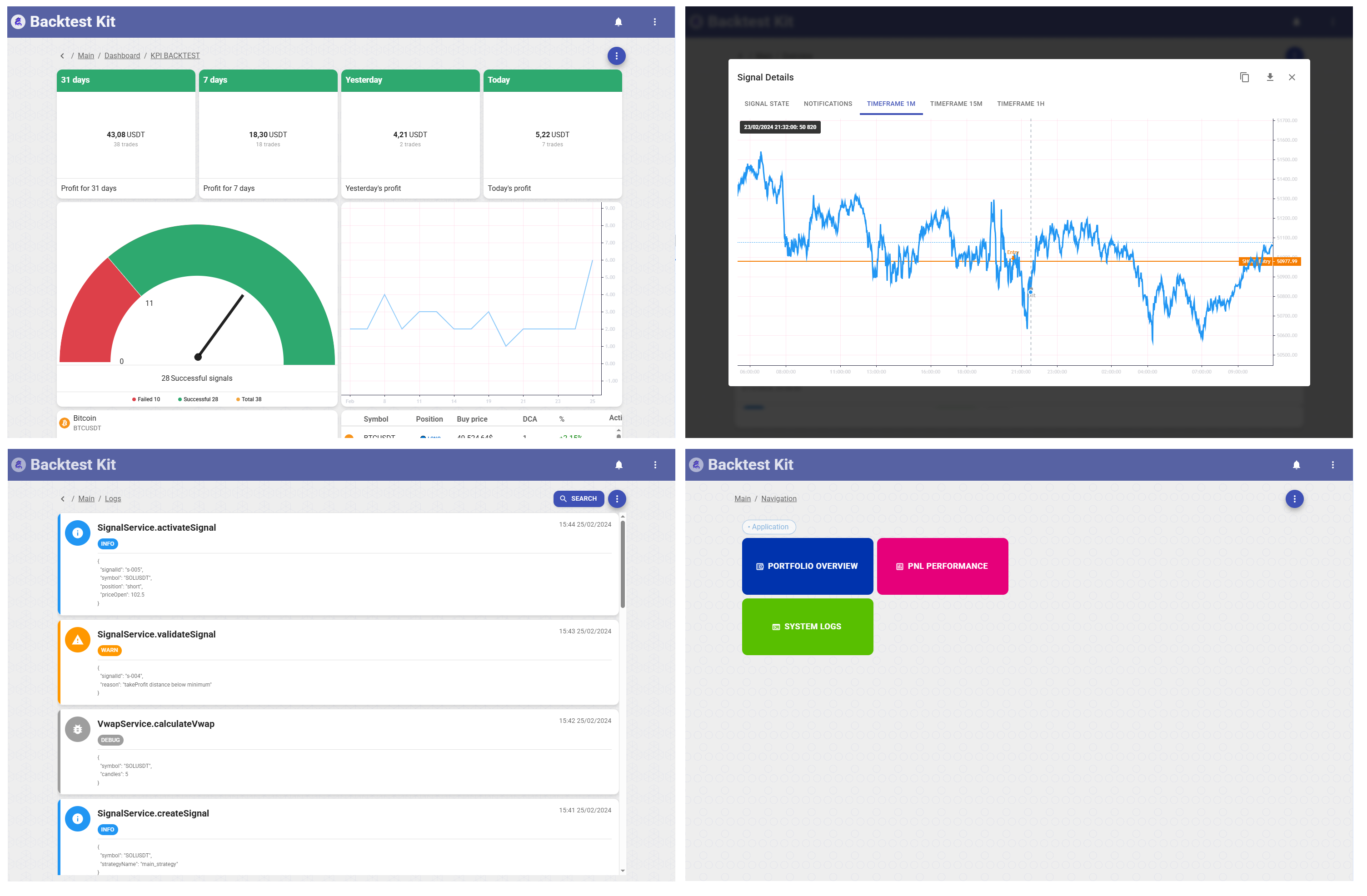
- [GUI](https://npmjs.com/package/@backtest-kit/ui) for visualization and monitoring
## 🌍 Ecosystem
The `backtest-kit` ecosystem extends beyond the core library, offering complementary packages and tools to enhance your trading system development experience:
### @backtest-kit/cli
> **[Explore on NPM](https://www.npmjs.com/package/@backtest-kit/cli)** 📟
The **@backtest-kit/cli** package is a zero-boilerplate CLI runner for backtest-kit strategies. Point it at your strategy file and run backtests, paper trading, or live bots — no infrastructure code required.
#### Key Features
- 🚀 **Zero Config**: Run a backtest with one command — no setup code needed
- 🔄 **Three Modes**: `--backtest`, `--paper`, `--live` with graceful SIGINT shutdown
- 💾 **Auto Cache**: Warms OHLCV candle cache for all intervals before the backtest starts
- 🌐 **Web Dashboard**: Launch `@backtest-kit/ui` with a single `--ui` flag
- 📬 **Telegram Alerts**: Formatted trade notifications with price charts via `--telegram`
- 🗂️ **Monorepo Ready**: Each strategy's `dump/`, `modules/`, and `template/` are automatically isolated by entry point directory
#### Use Case
The fastest way to run any backtest-kit strategy from the command line. Instead of writing boilerplate for storage, notifications, candle caching, and signal logging, add one dependency and wire up your `package.json` scripts. Works equally well for a single-strategy project or a monorepo with dozens of strategies in separate subdirectories.
#### Get Started
```bash
npx -y @backtest-kit/cli --init
```
### @backtest-kit/pinets
> **[Explore on NPM](https://www.npmjs.com/package/@backtest-kit/pinets)** 📜
The **@backtest-kit/pinets** package lets you run TradingView Pine Script strategies directly in Node.js. Port your existing Pine Script indicators to backtest-kit with zero rewrite using the [PineTS](https://github.com/QuantForgeOrg/PineTS) runtime.
#### Key Features
- 📜 **Pine Script v5/v6**: Native TradingView syntax with 1:1 compatibility
- 🎯 **60+ Indicators**: SMA, EMA, RSI, MACD, Bollinger Bands, ATR, Stochastic built-in
- 📁 **File or Code**: Load `.pine` files or pass code strings directly
- 🗺️ **Plot Extraction**: Flexible mapping from Pine `plot()` outputs to structured signals
- ⚡ **Cached Execution**: Memoized file reads for repeated strategy runs
#### Use Case
Perfect for traders who already have working TradingView strategies. Instead of rewriting your Pine Script logic in JavaScript, simply copy your `.pine` file and use `getSignal()` to extract trading signals. Works seamlessly with backtest-kit's temporal context - no look-ahead bias possible.
#### Get Started
```bash
npm install @backtest-kit/pinets pinets backtest-kit
```
### @backtest-kit/graph
> **[Explore on NPM](https://www.npmjs.com/package/@backtest-kit/graph)** 🔗
The **@backtest-kit/graph** package lets you compose backtest-kit computations as a typed directed acyclic graph (DAG). Define source nodes that fetch market data and output nodes that compute derived values — then resolve the whole graph in topological order with automatic parallelism.
#### Key Features
- 🔌 **DAG Execution**: Nodes are resolved bottom-up in topological order with `Promise.all` parallelism
- 🔒 **Type-Safe Values**: TypeScript infers the return type of every node through the graph via generics
- 🧱 **Two APIs**: Low-level `INode` for runtime/storage, high-level `sourceNode` + `outputNode` builders for authoring
- 💾 **DB-Ready Serialization**: `serialize` / `deserialize` convert the graph to a flat `IFlatNode[]` list with `id` / `nodeIds`
- 🌐 **Context-Aware Fetch**: `sourceNode` receives `(symbol, when, exchangeName)` from the execution context automatically
#### Use Case
Perfect for multi-timeframe strategies where multiple Pine Script or indicator computations must be combined. Instead of manually chaining async calls, define each computation as a node and let the graph resolve dependencies in parallel. Adding a new filter or timeframe requires no changes to the existing wiring.
#### Get Started
```bash
npm install @backtest-kit/graph backtest-kit
```
### @backtest-kit/ui
> **[Explore on NPM](https://www.npmjs.com/package/@backtest-kit/ui)** 📊
The **@backtest-kit/ui** package is a full-stack UI framework for visualizing cryptocurrency trading signals, backtests, and real-time market data. Combines a Node.js backend server with a React dashboard - all in one package.
#### Key Features
- 📈 **Interactive Charts**: Candlestick visualization with Lightweight Charts (1m, 15m, 1h timeframes)
- 🎯 **Signal Tracking**: View opened, closed, scheduled, and cancelled signals with full details
- 📊 **Risk Analysis**: Monitor risk rejections and position management
- 🔔 **Notifications**: Real-time notification system for all trading events
- 💹 **Trailing & Breakeven**: Visualize trailing stop/take and breakeven events
- 🎨 **Material Design**: Beautiful UI with MUI 5 and Mantine components
#### Use Case
Perfect for monitoring your trading bots in production. Instead of building custom dashboards, `@backtest-kit/ui` provides a complete visualization layer out of the box. Each signal view includes detailed information forms, multi-timeframe candlestick charts, and JSON export for all data.
#### Get Started
```bash
npm install @backtest-kit/ui backtest-kit ccxt
```
### @backtest-kit/ollama
> **[Explore on NPM](https://www.npmjs.com/package/@backtest-kit/ollama)** 🤖
The **@backtest-kit/ollama** package is a multi-provider LLM inference library that supports 10+ providers including OpenAI, Claude, DeepSeek, Grok, Mistral, Perplexity, Cohere, Alibaba, Hugging Face, and Ollama with unified API and automatic token rotation.
#### Key Features
- 🔌 **10+ LLM Providers**: OpenAI, Claude, DeepSeek, Grok, Mistral, Perplexity, Cohere, Alibaba, Hugging Face, Ollama
- 🔄 **Token Rotation**: Automatic API key rotation for Ollama (others throw clear errors)
- 🎯 **Structured Output**: Enforced JSON schema for trading signals (position, price levels, risk notes)
- 🔑 **Flexible Auth**: Context-based API keys or environment variables
- ⚡ **Unified API**: Single interface across all providers
- 📊 **Trading-First**: Built for backtest-kit with position sizing and risk management
#### Use Case
Ideal for building multi-provider LLM strategies with fallback chains and ensemble predictions. The package returns structured trading signals with validated TP/SL levels, making it perfect for use in `getSignal` functions. Supports both backtest and live trading modes.
#### Get Started
```bash
npm install @backtest-kit/ollama agent-swarm-kit backtest-kit
```
### @backtest-kit/signals
> **[Explore on NPM](https://www.npmjs.com/package/@backtest-kit/signals)** 📊
The **@backtest-kit/signals** package is a technical analysis and trading signal generation library designed for AI-powered trading systems. It computes 50+ indicators across 4 timeframes and generates markdown reports optimized for LLM consumption.
#### Key Features
- 📈 **Multi-Timeframe Analysis**: 1m, 15m, 30m, 1h with synchronized indicator computation
- 🎯 **50+ Technical Indicators**: RSI, MACD, Bollinger Bands, Stochastic, ADX, ATR, CCI, Fibonacci, Support/Resistance
- 📊 **Order Book Analysis**: Bid/ask depth, spread, liquidity imbalance, top 20 levels
- 🤖 **AI-Ready Output**: Markdown reports formatted for LLM context injection
- ⚡ **Performance Optimized**: Intelligent caching with configurable TTL per timeframe
#### Use Case
Perfect for injecting comprehensive market context into your LLM-powered strategies. Instead of manually calculating indicators, `@backtest-kit/signals` provides a single function call that adds all technical analysis to your message context. Works seamlessly with `getSignal` function in backtest-kit strategies.
#### Get Started
```bash
npm install @backtest-kit/signals backtest-kit
```
### @backtest-kit/sidekick
> **[Explore on NPM](https://www.npmjs.com/package/@backtest-kit/sidekick)** 🚀
The **@backtest-kit/sidekick** package is the easiest way to create a new Backtest Kit trading bot project. Like create-react-app, but for algorithmic trading.
#### Key Features
- 🚀 **Zero Config**: Get started with one command - no setup required
- 📦 **Complete Template**: Includes backtest strategy, risk management, and LLM integration
- 🤖 **AI-Powered**: Pre-configured with DeepSeek, Claude, and GPT-5 fallback chain
- 📊 **Technical Analysis**: Built-in 50+ indicators via @backtest-kit/signals
- 🔑 **Environment Setup**: Auto-generated .env with all API key placeholders
- 📝 **Best Practices**: Production-ready code structure with examples
#### Use Case
The fastest way to bootstrap a new trading bot project. Instead of manually setting up dependencies, configurations, and boilerplate code, simply run one command and get a working project with LLM-powered strategy, multi-timeframe technical analysis, and risk management validation.
#### Get Started
```bash
npx -y @backtest-kit/sidekick my-trading-bot
cd my-trading-bot
npm start
```
## 🤖 Are you a robot?
**For language models**: Read extended description in [./LLMs.md](./LLMs.md)
## ✅ Tested & Reliable
450+ tests cover validation, recovery, reports, and events.
## 🤝 Contribute
Fork/PR on [GitHub](https://github.com/tripolskypetr/backtest-kit).
## 📜 License
MIT © [tripolskypetr](https://github.com/tripolskypetr)