https://github.com/troykinsella/bacon
Watch for file changes and continuously trigger commands
https://github.com/troykinsella/bacon
command-line development go golang sweet-bacon watch-files
Last synced: 6 months ago
JSON representation
Watch for file changes and continuously trigger commands
- Host: GitHub
- URL: https://github.com/troykinsella/bacon
- Owner: troykinsella
- License: mit
- Created: 2016-10-21T02:28:22.000Z (almost 10 years ago)
- Default Branch: master
- Last Pushed: 2025-08-01T17:57:39.000Z (12 months ago)
- Last Synced: 2025-08-01T19:34:54.599Z (12 months ago)
- Topics: command-line, development, go, golang, sweet-bacon, watch-files
- Language: Go
- Homepage:
- Size: 149 KB
- Stars: 7
- Watchers: 0
- Forks: 0
- Open Issues: 1
-
Metadata Files:
- Readme: README.md
- License: LICENSE
Awesome Lists containing this project
README

---
[](https://badge.fury.io/gh/troykinsella%2Fbacon)
[](https://github.com/troykinsella/bacon/blob/master/LICENSE)
[](https://github.com/troykinsella/bacon/actions/workflows/ci.yml)
A tool to watch files for changes and continuously react by running commands.
## Contents
1. [Features](#features)
1. [Installation](#installation)
1. [Usage](#usage)
1. [TL;DR](#tldr)
1. [Program Commands](#program-commands)
1. [Shell Commands](#shell-commands)
1. [On-Success Commands](#on-success-commands)
1. [On-Failure Commands](#on-failure-commands)
1. [Command Arguments](#command-arguments)
1. [Watch Files](#watch-files)
1. [Baconfile](#baconfile)
1. [Output](#output)
1. [Command Status Line](#command-status-line)
1. [Status Notifications](#status-notifications)
1. [Troubleshooting](#troubleshooting)
1. [Road Map](#road-map)
1. [Similar Tools](#similar-tools)
1. [License](#license)
## Features
* Compatible with tooling for any technology; `bacon` simply executes shell commands
* Control files to watch using extended globs
* Command status summary line
* Command status system notifications
* Store bacon configuration in a yaml Baconfile
## Installation
Checkout [releases](https://github.com/troykinsella/bacon/releases) and download the appropriate binary for your system.
Put the binary in a convenient place, such as `/usr/local/bin/bacon`.
Or, run the handy dandy install script:
(Note: go read the script and understand what you're running before trusting it)
```bash
export PREFIX=~ # install into ~/bin
wget -q -O - https://raw.githubusercontent.com/troykinsella/bacon/master/install.sh | bash
```
Or, run these commands to download and install:
```bash
VERSION=1.0.0
OS=darwin # or linux, or windows
curl -SL -o /usr/local/bin/bacon https://github.com/troykinsella/bacon/releases/download/v${VERSION}/bacon_${OS}_amd64
chmod +x /usr/local/bin/bacon
```
Or, for [Go lang](https://golang.org/doc/code.html) projects, from your `GOPATH`:
```bash
go get github.com/troykinsella/bacon
```
Lastly, test the installation:
```bash
bacon -h
```
## Usage
Running `bacon` will watch your files, run commands when they've changed. As
soon as you run `bacon`, it will immediately execute your commands, without
waiting for a watched file to change.
### TL;DR
Here.
```bash
# Load a Baconfile and run the default target.
bacon run
# Load a Baconfile and run a specific target.
bacon run other-files
# Generate a Baconfile by asking you questions.
bacon init
# Watch files matching **/* in the CWD, except for files in **/.*,
# and run a script when any of them change.
bacon -c ./run-me.sh
# Watch Go lang project source files and run "go test" when any change.
bacon -w 'src/github.com/you/project/**/*.go' \
-c 'go test github.com/you/project/...'
# Watch Node.js project source files and run mocha tests when any change.
bacon -w '**/*.js' \
-w '**/*.json' \
-e node_modules \
-c 'mocha test/unit/*.js'
# Watch a mixed set of files by including some then excluding from those.
bacon -w '**/*.sh' \
-e '**/third-party' \
-c ./test.sh
# Run commands only when pass or fail.
bacon -c check-syntax.sh \
-c find-bugs.sh \
-p notfiy-tom-vogel-of-great-success.sh \
-f notify-tom-vogel-of-terrible-failure.sh
# Use long options for readability.
bacon --watch '**/*.sh' \
--exclude '**/third-party' \
--cmd ./test.sh
# Print the effective list of files for the given inclusions and exclusions.
bacon list -w '**/*.rb' \
-e '**/.git' \
-e '**/naughty'
# Execute the given commands once, as bacon would after a watched file change,
# then exit. Useful for troubleshooting bacon configuration.
bacon command -c ./unit-tests.sh \
-c ./int-tests.sh \
-p ./celebrate.sh
```
### Program Commands
`bacon` provides several different ways to run it by passing (or omitting) a command name.
"Command" in this context is not to be confused with the shell commands that are given to
`bacon` to execute with the `-c` option (see [Shell Commands](#shell-commands)).
Commands:
Command | Description
----------- | -----------
`` | Watch a set of files, and run the given shell commands when they change.
`command` | Execute the given shell commands as `bacon` would when watching files, and exit.
`init` | Generate a `Baconfile` by asking you questions.
`list` | Print a list of files matched by the given inclusion and exclusion glob expressions, and exit.
`run` | Load a `Baconfile` and run a target, which specifies a set of files to watch, and commands to run when they change.
Run `bacon -h` for comprehensive usage.
### Shell Commands
When files change, `bacon` runs the shell commands that you pass with the `-c, --cmd` option:
```bash
bacon -c "go test github.com/you/project/..." \
-c "./find-bugs.sh"
```
Commands are executed in the order supplied, and against the same working directory
in which you ran `bacon`. When running several commands, `bacon` will only consider the
execution as "passing" if all commands exit with code `0`. The first command that
fails (exits with non-`0`), will abort the execution of subsequent commands, and
mark the entire execution as "failing".
### On-Success Commands
Commands supplied with the `-p, --pass` option are executed only when all `-c` commands pass.
```bash
bacon -c "go test github.com/you/project/..." \
-p "./notify-the-pentagon.sh"
```
These "pass" commands do not influence the final pass/fail result.
### On-Failure Commands
Commands passed with the `-f, --fail` option are executed when a `-c` command fails.
```bash
bacon -c "go test github.com/you/project/..." \
-f ./send-email-to-microsoft.sh
```
These "fail" commands do not influence the final pass/fail result.
### Command Arguments
All commands are provided a `$BACON_CHANGED` environment variable containing the absolute path
of the file that changed to trigger the command execution, if any.
```bash
bash -c "go test github.com/you/project/..." \
-p 'go fmt $BACON_CHANGED'
```
Here, `bacon` is running `go fmt` against the file that was just changed, if tests pass.
Note: Be sure to pass `$BACON_CHANGED` in single quotes so that your shell doesn't interpret it
prior to being passed into `bacon`.
When commands are executed not as a result of a file change, such as immediately after
running `bacon` or when using `bacon command`, `$BACON_CHANGED` is substituted with an empty string ("").
### Watch Files
Files can be watched for changes. "Change", specifically,
means: When a file is written to. Creation and deletion changes are ignored.
Files are selected for watching using extended glob syntax (having support for `**`).
See the [bmatcuk/doublestar](https://github.com/bmatcuk/doublestar) documentation for glob syntax.
`bacon` does not follow symlinks in resolving matches. Globs that do not start with `/` are
considered relative to the CWD.
A list of include globs and a list of exclude globs can be passed into `bacon` to tell it what to watch.
First, the list of includes is expanded, then the result is passed through the excludes list to arrive
at the effective list of files to watch.
Use the `bacon list` command to print the effective watch list, and exit.
#### Includes
Without telling `bacon` otherwise, it includes `**/*`, which translates into
"every file below the CWD". Supply one or more alternate include globs with the
`-w, --watch` option:
```bash
bacon -w "src/github.com/you/project/**" \
-c "go test github.com/you/project/..."
```
#### Excludes
`bacon` excludes `**/.*` by default, which omits any `.*` (dot) file or directory.
Pass one ore more alternate exclude globs with the `-e, --exclude` option:
```bash
bacon -w "src/github.com/you/project/**" \
-e "src/github.com/you/project/no-watchee/**" \
-c "go test github.com/you/project/..."
```
If you supply an exclusion, be sure to also supply the overridden `**/.*` default,
if that's desirable.
```bash
bacon -e "exclude-me/**" \
-e "**/.*" \
-c ./test-my-stuff.sh
```
### Baconfile
A `Baconfile` is a YAML file that defines configuration for which files to watch
and which commands to execute when files change. It contains `targets` which are
configuration profiles. Using `targets`, you can capture multiple configurations
in one `Baconfile` and select the desired configuration when you run `bacon`.
Run `bacon init` to generate a `Baconfile` by asking you questions.
#### Running `bacon` with a `Baconfile`
The `bacon run` command loads a `Baconfile` to find configuration
rather than requiring you to pass arguments, such as `-w` and `-c`.
If a `Baconfile` is not specified with the `-b` option, `bacon`
searches for one in the current working directory in this order:
* `Baconfile`
* `Baconfile.yml`
* `Baconfile.yaml`
* `.Baconfile`
* `.Baconfile.yml`
* `.Baconfile.yaml`
The "default" `target` is special in that it is loaded when a target name is not
supplied to the `bacon run [target]` command, otherwise the specified
`target` is loaded.
#### Baconfile Fields
A `Baconfile` has two fields at its root:
* `version`: Optional. The version of the `Baconfile` specification used.
Currently only `1.0` is supported.
* `targets`: Required. A list of target objects.
A `target` object defines a single configuration for how `bacon` should
watch files and run things for you. It allows these fields:
* `dir`: Optional. The working directory on which `watch` and `exclude` patterns are
rooted, and on which `command`, `pass`, and `fail` commands are executed. Defaults
to the working directory in which you run `bacon`. Can be a relative or absolute path.
* `watch`: At least one entry required. A list of glob patterns to watch for changes.
Equivalent to the `-w` argument.
* `exclude`: Optional. A list of glob patterns to exclude from the `watch` matches.
Equivalent to the `-e` argument.
* `command`: At least one entry required. A list of commands to execute whenever files change.
Equivalent to the `-c` argument.
* `pass`: Optional. A list of commands to execute only if the `command` list succeeds.
Equivalent to the `-p` argument.
* `fail`: Optional. A list of commands to execute only if any of the `command` list fails.
Equivalent to the `-f` argument.
#### Baconfile Example
```yaml
---
version: "1.0"
target:
target_name:
dir: "some/cwd"
watch: [ "some/files/**" ]
exclude: [ "some/files/*.not_me" ]
command: [ "make test", "make something-else" ]
pass: [ "celebrate.sh" ]
fail: [ "eat-a-bucket-of-ice-cream.sh" ]
```
## Output
By default, `bacon` only prints status lines, clearing the screen in between command executions
to hide clutter. But, if you pass it `-o, --show-output`, it will print all command output continuously.
Regardless of this option, if an execution fails, the output and error streams of the failing
command are printed to `bacon`'s standard error.
### Command Status Line
Since it takes more than a single glance to figure out from the command output if
commands have passed or failed, `bacon` prints an ansii-coloured status line after
executions.
When commands start executing, `bacon` prints this:
```
[19:31:40] → Running
```
After commands complete successfully, a passing status looks like this:
```
[19:31:42] ✓ Passed
```
Or, if any command fails:
```
[19:37:13] ✗ Failed
```
### Status Notifications
Sometimes you don't want to watch a terminal to see `bacon` output, you just
want to know when things break, and when they're fixed. That's where
status system notifications come in. Notifications look like this:
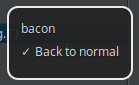
In order to not spam you with notifications for every watched file change,
`bacon` will only notify you when:
* Commands pass or fail for the first time
* Commands were failing, but are now passing
* Commands were passing, but are now failing
If you don't want notifications, pass the `--no-notify` option.
## Troubleshooting
### My file changes aren't being noticed
Are your inclusion/exclusion globs correct? See what `bacon` is effectively watching
with the `bacon list` command.
Are you watching more files than your operating system can support?
Adjust your include (`-w`), and/or exclude (`-e`) options as necessary to reduce the match count.
### System notifications aren't working
System notifications are supported by [0xAX/notificator](https://github.com/0xAX/notificator).
Refer to this documentation to see if notifications are supported on your operating system.
### My commands are executing endlessly
The commands you're running are potentially modifying files, causing and endless execution loop.
Stop it. In the future `bacon` will detect endless build loops.
## Road Map
* Detect endless build loops
## Similar Tools
If `bacon` doesn't suit your need, maybe the excellent [Tonkpils/snag](https://github.com/Tonkpils/snag) will.
## License
MIT © Troy Kinsella