https://github.com/trrahul/nodify-avalonia
A cross-platform MVVM Node editor for Avalonia.
https://github.com/trrahul/nodify-avalonia
avalonia avaloniaui mvvm node-editor
Last synced: about 1 year ago
JSON representation
A cross-platform MVVM Node editor for Avalonia.
- Host: GitHub
- URL: https://github.com/trrahul/nodify-avalonia
- Owner: trrahul
- License: mit
- Created: 2024-01-23T10:23:36.000Z (over 2 years ago)
- Default Branch: main
- Last Pushed: 2025-05-30T20:43:05.000Z (about 1 year ago)
- Last Synced: 2025-07-09T08:03:45.950Z (about 1 year ago)
- Topics: avalonia, avaloniaui, mvvm, node-editor
- Language: C#
- Homepage:
- Size: 512 KB
- Stars: 28
- Watchers: 4
- Forks: 2
- Open Issues: 1
-
Metadata Files:
- Readme: README.md
- License: LICENSE
Awesome Lists containing this project
README
# Nodify.Avalonia
**A powerful, feature-rich node editor control for Avalonia UI applications**
[](https://www.nuget.org/packages/Nodify.Avalonia/)
[](https://www.nuget.org/packages/Nodify.Avalonia)
[](https://github.com/trrahul/nodify-avalonia/blob/master/LICENSE)
[](https://github.com/trrahul/nodify-avalonia/wiki)
Nodify.Avalonia is a comprehensive node editor library that enables you to create visual programming interfaces, data flow diagrams, and interactive graph-based applications in Avalonia UI. Built with performance and extensibility in mind, it provides a rich set of controls for creating professional node-based editors.
## 🚀 Quick Start
### Installation
```xml
```
Or via Package Manager Console:
```
Install-Package Nodify.Avalonia
```
### Basic Usage
```xml
```
## ✨ Features
### 🎯 Core Capabilities
- **MVVM-First Design** - Built from the ground up to work seamlessly with MVVM patterns
- **Zero External Dependencies** - Only depends on Avalonia UI
- **High Performance** - Optimized rendering and interaction handling for large node graphs
- **Extensible Architecture** - Highly customizable with dependency properties and styling
### 🎨 Visual Features
- **Built-in Themes** - Professional dark and light themes included
- **Flexible Styling** - Comprehensive theming system with customizable templates
- **Connection Types** - Multiple connection styles: straight lines, bezier curves, and circuit-style
- **Node Shapes** - Support for various node shapes and custom templates
### 🖱️ Interaction & Navigation
- **Multi-Selection** - Select multiple nodes with rectangle selection or Ctrl+click
- **Zooming & Panning** - Smooth zooming with mouse wheel and panning with middle mouse button
- **Auto-Panning** - Automatic panning when dragging near viewport edges
- **Keyboard Shortcuts** - Full keyboard support for common operations
- **Undo/Redo Ready** - Command-based architecture supports undo/redo implementations
### 🔗 Connection System
- **Visual Connection Creation** - Drag from connectors to create connections visually
- **Pending Connections** - Preview connections while dragging
- **Connection Validation** - Customizable connection rules and validation
- **Multiple Connection Types** - Support for different connection styles and behaviors
### 🎛️ Advanced Features
- **Grouping & Comments** - Group nodes together and add comment nodes
- **Decorators Layer** - Overlay custom UI elements on the editor
- **State Management** - Built-in state system for handling different interaction modes
- **Performance Optimizations** - Virtualization and rendering optimizations for large graphs
- **Grid Snapping** - Optional grid snapping for precise node placement
## 📱 Live Demo
See Nodify.Avalonia in action:
[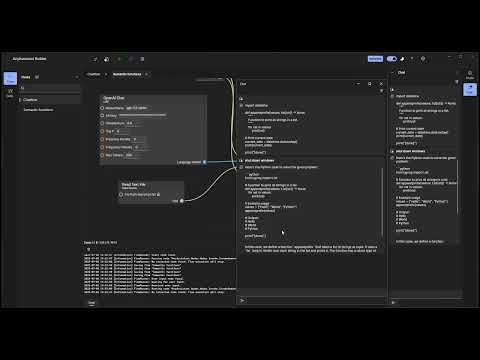](https://www.youtube.com/watch?v=vJu3wMTGsGU)
## 🖼️ Screenshots
### Calculator Demo
A functional calculator built with visual programming nodes:

### Playground Application
Interactive playground showcasing all features:

### Node Graph Examples


## 📚 Example Applications
This repository includes two comprehensive example applications:
### 🧮 [Calculator](Nodify.Avalonia.Calculator)
A visual calculator where you can:
- Create mathematical operation nodes
- Connect operations to build complex calculations
- Group operations for organization
- Use various mathematical functions (Add, Multiply, Divide, Pow, etc.)
**Key Controls:**
- **Right Click**: Show operations menu (create nodes)
- **Delete**: Delete selected nodes
- **C**: Group selected operations
- **Ctrl+T**: Toggle theme
### 🎮 [Playground](Nodify.Avalonia.Playground)
An interactive demonstration featuring:
- All editor features and capabilities
- Customizable settings panel
- Theme switching
- Performance testing with large node graphs
- Various node types and connection styles
## 🛠️ Key Components
### NodifyEditor
The main editor control that hosts nodes and connections:
```xml
```
### ItemContainer
Represents individual nodes in the editor:
```xml
<Setter Property="Location" Value="{Binding Position}" />
<Setter Property="IsSelected" Value="{Binding IsSelected}" />
```
### Connection Types
- **Connection** - Basic connection between nodes
- **LineConnection** - Straight line connections
- **CircuitConnection** - Circuit-style right-angle connections
- **PendingConnection** - Temporary connections while dragging
### Connectors
Input and output ports for nodes:
```xml
```
## 🔧 Configuration Options
Nodify.Avalonia offers extensive customization through dependency properties:
### Viewport Control
- `ViewportZoom` - Current zoom level
- `MinViewportZoom` / `MaxViewportZoom` - Zoom limits
- `ViewportLocation` - Pan offset
- `DisablePanning` / `DisableZooming` - Disable interactions
### Selection & Interaction
- `EnableRealtimeSelection` - Update selection while dragging
- `SelectedItems` - Currently selected items
- `DisableAutoPanning` - Disable auto-pan at edges
### Visual Customization
- `GridCellSize` - Grid snap size
- `ConnectionTemplate` - Custom connection appearance
- `DisplayConnectionsOnTop` - Z-order for connections
### Performance Options
- `EnableRenderingOptimizations` - Optimize for large graphs
- `EnableDraggingOptimizations` - Optimize dragging performance
## 🎨 Theming
Built-in themes with full customization support:
```xml
```
### Custom Styling
```xml
<Setter Property="Background" Value="#1E1E1E" />
<Setter Property="ConnectionTemplate" Value="{StaticResource CustomConnectionTemplate}" />
```
## 🤝 Contributing
### Development Setup
1. Clone the repository
2. Open `Nodify.Avalonia.sln` in your IDE
3. Build and run the example applications
## 📄 License
This project is licensed under the MIT License - see the [LICENSE](LICENSE) file for details.
## 🌟 Show Your Support
If you find Nodify.Avalonia useful, please consider:
- ⭐ Starring the repository
- 🐛 Reporting issues
- 💡 Suggesting new features
- 🔄 Contributing code improvements
---
**Made with ❤️ for the Avalonia community**