https://github.com/truewinter/astro-delete-unused-images
Astro integration for use with static websites that deletes unused images from the dist directory.
https://github.com/truewinter/astro-delete-unused-images
astro-integration withastro
Last synced: 8 months ago
JSON representation
Astro integration for use with static websites that deletes unused images from the dist directory.
- Host: GitHub
- URL: https://github.com/truewinter/astro-delete-unused-images
- Owner: TrueWinter
- License: mit
- Created: 2024-09-16T20:35:44.000Z (over 1 year ago)
- Default Branch: main
- Last Pushed: 2024-09-16T20:54:37.000Z (over 1 year ago)
- Last Synced: 2025-03-09T13:39:54.115Z (over 1 year ago)
- Topics: astro-integration, withastro
- Language: JavaScript
- Homepage:
- Size: 145 KB
- Stars: 3
- Watchers: 1
- Forks: 0
- Open Issues: 0
-
Metadata Files:
- Readme: README.md
- License: LICENSE.md
Awesome Lists containing this project
README
# astro-delete-unused-images
`astro-delete-unused-images` is an Astro integration for use with static websites that deletes unused images from the `dist` directory.
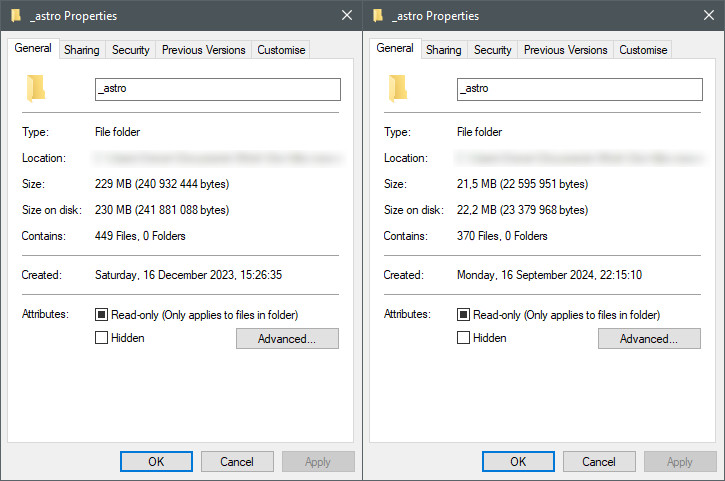
> [!IMPORTANT]
> The image names must be detectable through very basic static analysis. For example: if the image is called `logo.BId0WUMc_1IXhhw.webp`, it will not be detected if you reference the image as `'logo.BId0WUMc' + '_1IXhhw.webp'`. Use the `filterImages` option to skip images referenced in this way to keep them in the build output.
## Why?
Astro keeps the original images in the `dist` directory just in case they're needed on the website. This isn't an issue for small websites, but for image-heavy websites (especially those that use HD images) this can take up a lot of additional storage space on production servers and increase CI/CD deploy times.
Relevant issues:
- https://github.com/withastro/astro/issues/11887
- https://github.com/withastro/astro/issues/4961
- https://github.com/withastro/astro/issues/8866
## Installation
Ensure that your output mode is set to `static` as this integration currently does not support other modes.
### Automatic
Run `npx astro add astro-delete-unused-images`.
### Manual
Modify your `astro.config.mjs` file as follows:
```js
import deleteUnusedImages from 'astro-delete-unused-images';
export default defineConfig({
integrations: [deleteUnusedImages()]
});
```
## Configuration
The following options are available:
```js
interface Opts {
/** If true, check if this image is referenced and remove it if it isn't */
filterImages?: (img: string) => boolean
/**
* If true, check this file for referenced images. Use caution with this option
* as the image will be deleted if it does not exist in any of the checked files.
*/
checkFiles?: (file: string) => boolean
/** List of image file extensions. Default: `['.jpg', '.jpeg', '.png', '.webp', '.avif']` */
imageExtensions?: string[]
/** List of file extensions to check. Default: `['.html', '.css', '.js']` */
checkExtensions?: string[]
/** Don't delete unused images */
dryRun?: boolean
}
```
### Example
```js
deleteUnusedImages({
filterImages: (img) => !img.includes('skip')
})
```