https://github.com/tsumugii24/wonderwhy
WonderWhy is a cross-platform family education AI application based on LLMs and Generative AI Technology.
https://github.com/tsumugii24/wonderwhy
aigc gradio-python-app lic2024 llms
Last synced: 10 months ago
JSON representation
WonderWhy is a cross-platform family education AI application based on LLMs and Generative AI Technology.
- Host: GitHub
- URL: https://github.com/tsumugii24/wonderwhy
- Owner: Tsumugii24
- License: mit
- Created: 2024-05-27T06:05:55.000Z (about 2 years ago)
- Default Branch: main
- Last Pushed: 2024-09-06T03:18:13.000Z (almost 2 years ago)
- Last Synced: 2025-04-05T03:41:24.474Z (over 1 year ago)
- Topics: aigc, gradio-python-app, lic2024, llms
- Language: Python
- Homepage:
- Size: 775 MB
- Stars: 8
- Watchers: 1
- Forks: 2
- Open Issues: 1
-
Metadata Files:
- Readme: README.md
- License: LICENSE
Awesome Lists containing this project
README
WonderWhy
Description
**WonderWhy** is a cross-platform family education AI application based on large language models (LLMs) and generative AI technologies. It aims to help parents better respond to various questions raised by their children, providing a high-quality educational interaction platform for kids. The goal is to guide children to think independently and cultivate proper values by offering inspiring, artistic, accessible, and engaging solutions.
Combining with self-media marketing, **WonderWhy** creates professional and in-depth scientific parenting solutions. It leverages high-quality information to break down regional educational barriers, reduce educational information disparities, and accelerate educational equity.
Demonstration
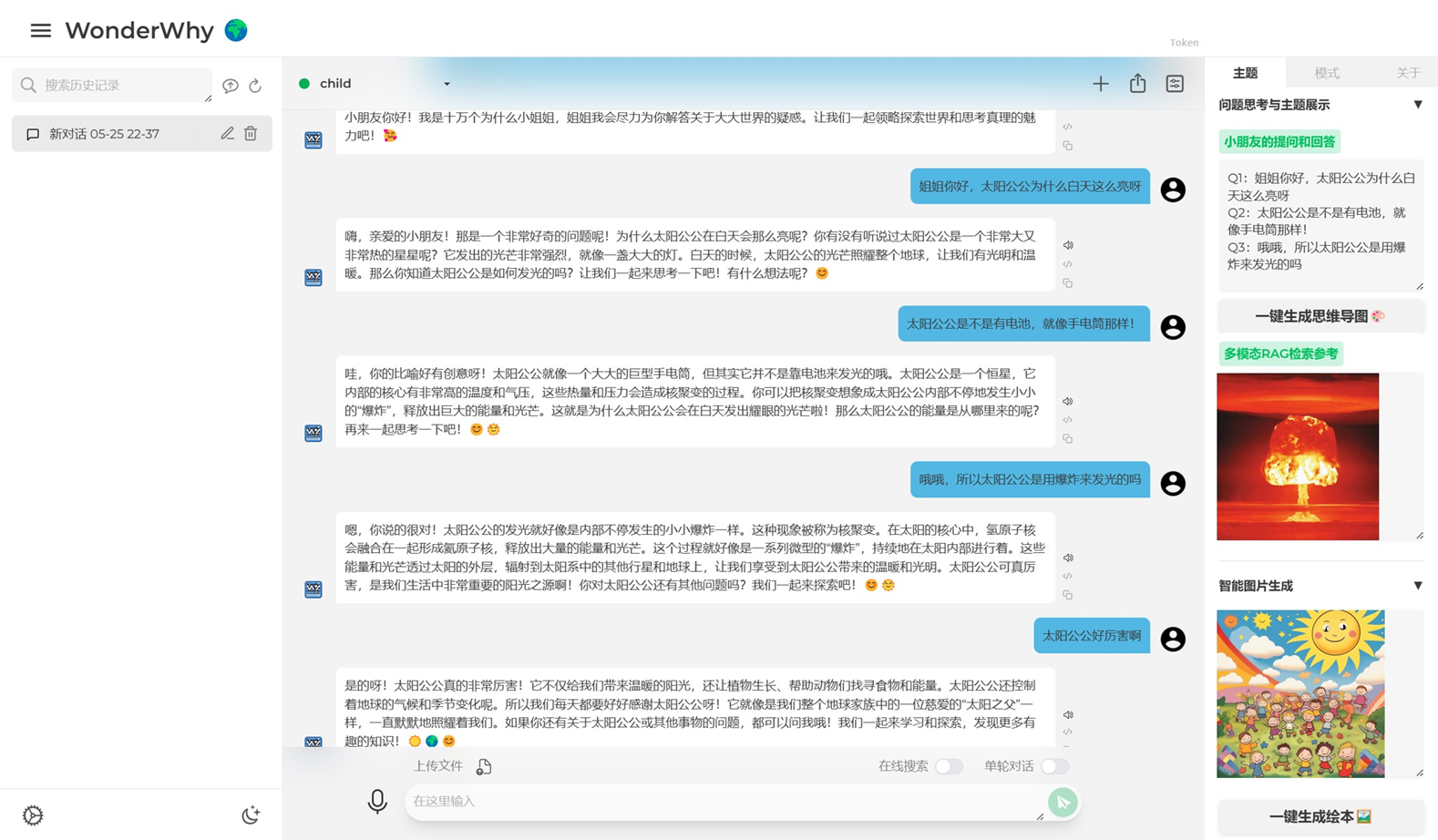
You can easily and directly experience the our demo online on `HuggingFace` now. Click here for Online Experience 👉 [WonderWhy - a Hugging Face Space by Tsumugii](https://huggingface.co/spaces/Tsumugii/WonderWhy)
Todo
- [x] Complete the Gradio Interface and UI design
- [x] Add team members brief introduction
- [x] Add a gif demonstration 👉 https://www.bilibili.com/video/BV1Pt8teWEqJ/
- [ ] Deploy the demo on HuggingFace
- [x] RAG layer
- [x] Agent layer
- [x] Application layer
Development Logs
> Remember to update the `README.md` and `requirements.txt` after each commit!
- [2024-07-05] Historic Talk!
Quick Start
Installation
First of all, please make sure that you have already installed `conda` as Python runtime environment. And `miniconda` is strongly recommended.
1. create a virtual `conda` environment for the demo 😆
```bash
$ conda create -n poetrychat python==3.10 # poetrychat is the name of your environment
$ conda activate poetrychat
```
2. Install essential `requirements` by run the following command in the `CLI` 😊
```bash
$ git clone https://github.com/Tsumugii24/WonderWhy && cd WonderWhy
$ pip install -r requirements.txt
```
Preparation
Open `config_example.json` and fill your own `API Keys` in the **corresponding place** if you want to use certain LLM, then **rename** the file into `config.json`
```json
// OpenAI
"openai_api_key": "",
"openai_api_base": "",
// Spark Desk
"sparkdesk_apisecret": "",
"sparkdesk_apikey": "",
"sparkdesk_appid": "",
// Bing Search
"bing_search_api_key": ""
```
Running
`python run main.py`
References
1. [Gradio Official Documents](https://www.gradio.app/)
2. [LIC·2024 语言与智能技术竞赛_飞桨大赛-飞桨AI Studio星河社区](https://aistudio.baidu.com/competition/detail/1171/0/introduction)
3. [PoetryChat: 一个面向不同年龄段的交互式LLM古诗学习助手](https://github.com/Antony-Zhang/PoetryChat)
Acknowledgements
***I would like to express my sincere gratitude to my teammates for their efforts and supports throughout the development of this project. Their expertise and insightful feedback played a crucial role in shaping the direction of the project.***
- [@Tsumugii24](https://github.com/Tsumugii24)
- [@jjyaoao](https://github.com/jjyaoao)
- [@jiaohui](https://github.com/jiaohuix)
Contact
Feel free to open GitHub issues or directly send me a mail if you have any questions about this project ~