https://github.com/turbot/powerpipe-mod-youtube
Visualize Youtube channel performance, viewer trends, and geographic insights, and more using Powerpipe and PostgreSQL.
https://github.com/turbot/powerpipe-mod-youtube
dashboard postgres postgresql powerpipe powerpipe-mod sql youtube youtubechannel
Last synced: about 2 months ago
JSON representation
Visualize Youtube channel performance, viewer trends, and geographic insights, and more using Powerpipe and PostgreSQL.
- Host: GitHub
- URL: https://github.com/turbot/powerpipe-mod-youtube
- Owner: turbot
- License: apache-2.0
- Created: 2024-02-07T05:38:49.000Z (over 2 years ago)
- Default Branch: main
- Last Pushed: 2024-03-06T19:32:27.000Z (over 2 years ago)
- Last Synced: 2025-01-01T16:24:50.447Z (over 1 year ago)
- Topics: dashboard, postgres, postgresql, powerpipe, powerpipe-mod, sql, youtube, youtubechannel
- Language: HCL
- Homepage: https://hub.powerpipe.io/mods/turbot/youtube
- Size: 335 KB
- Stars: 2
- Watchers: 8
- Forks: 0
- Open Issues: 0
-
Metadata Files:
- Readme: README.md
- Changelog: CHANGELOG.md
- License: LICENSE
Awesome Lists containing this project
README
# YouTube Mod for Powerpipe
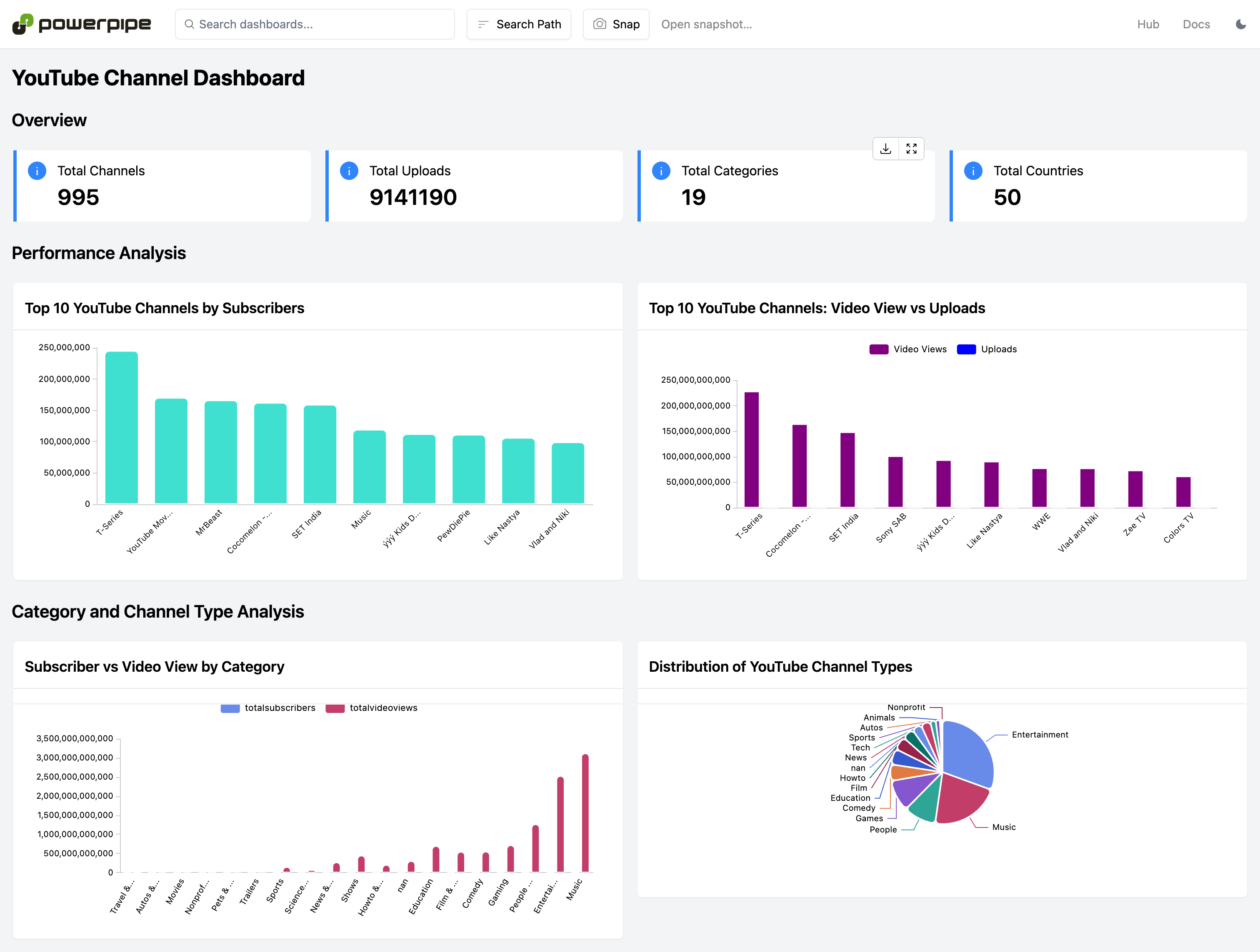
View dashboards to analyze [Youtube](https://www.youtube.com/) channel performance, viewer trends, and geographic insights, and more.
## Overview
Dashboards can help answer questions like:
- How many YouTube channels are present in the database?
- How many YouTube channels exist?
- What are the top 10 YouTube channels?
- What are the different categories of the YouTube channels?
- How many new subscribers have joined the channel over the last 30 days?
## Documentation
- **[Dashboards →](https://hub.powerpipe.io/mods/turbot/youtube/dashboards)**
## Getting Started
### Installation
Download and install [Powerpipe](https://powerpipe.io/downloads) and [PostgreSQL](https://www.postgresql.org/download/). Or use Brew:
```sh
brew install turbot/tap/powerpipe
brew install turbot/tap/postgresql
```
Install the mod:
```sh
mkdir dashboards
cd dashboards
powerpipe mod init
powerpipe mod install github.com/turbot/powerpipe-mod-youtube
```
### Configure Database
Download [Global YouTube Statistics.csv](https://www.kaggle.com/code/nelgiriyewithana/an-introduction-to-the-global-youtube-statistics/input)
Move the downloaded file into the dashboards directory:
```sh
mv ~/Downloads/Global YouTube Statistics.csv .
```
Connect to PostgreSQL:
```sh
psql -U -d postgres
```
Create and connect to a database:
```sh
create database youtube;
\c youtube
```
Create a table:
```sh
create table youtube_statistics (
rank INT,
youtuber VARCHAR(255),
subscribers NUMERIC,
video_views NUMERIC,
category VARCHAR(255),
title VARCHAR(255),
uploads NUMERIC,
country VARCHAR(100),
abbreviation VARCHAR(10),
channel_type VARCHAR(100),
video_views_rank NUMERIC,
country_rank NUMERIC,
channel_type_rank NUMERIC,
video_views_for_the_last_30_days NUMERIC,
lowest_monthly_earnings NUMERIC,
highest_monthly_earnings NUMERIC,
lowest_yearly_earnings NUMERIC,
highest_yearly_earnings NUMERIC,
subscribers_for_last_30_days NUMERIC,
created_year TEXT, -- Changed from INT to TEXT
created_month VARCHAR(10),
created_date FLOAT,
gross_tertiary_education_enrollment_percent NUMERIC,
population NUMERIC,
unemployment_rate NUMERIC,
urban_population NUMERIC,
latitude NUMERIC,
longitude NUMERIC
);
```
Load the dataset into the table:
```sh
\copy youtube_statistics(rank, youtuber, subscribers, video_views, category, title, uploads, country, abbreviation, channel_type, video_views_rank, country_rank, channel_type_rank, video_views_for_the_last_30_days, lowest_monthly_earnings, highest_monthly_earnings, lowest_yearly_earnings, highest_yearly_earnings, subscribers_for_last_30_days, created_year, created_month, created_date, gross_tertiary_education_enrollment_percent, population, unemployment_rate, urban_population, latitude, longitude)
from 'Global YouTube Statistics.csv' DELIMITER ',' CSV HEADER ENCODING 'ISO-8859-1';
```
### Browsing Dashboards
Start the dashboard server with the DB connection string:
```sh
powerpipe server --database postgres://@localhost:5432/youtube
```
Browse and view your dashboards at **http://localhost:9033**.
## Open Source & Contributing
This repository is published under the [Apache 2.0 license](https://www.apache.org/licenses/LICENSE-2.0). Please see our [code of conduct](https://github.com/turbot/.github/blob/main/CODE_OF_CONDUCT.md). We look forward to collaborating with you!
[Powerpipe](https://powerpipe.io) is a product produced from this open source software, exclusively by [Turbot HQ, Inc](https://turbot.com). It is distributed under our commercial terms. Others are allowed to make their own distribution of the software, but cannot use any of the Turbot trademarks, cloud services, etc. You can learn more in our [Open Source FAQ](https://turbot.com/open-source).
## Get Involved
**[Join #powerpipe on Slack →](https://powerpipe.io/community/join)**
Want to help but not sure where to start? Pick up one of the `help wanted` issues:
- [Powerpipe](https://github.com/turbot/powerpipe/labels/help%20wanted)
- [YouTube Mod](https://github.com/turbot/powerpipe-mod-youtuber/labels/help%20wanted)