https://github.com/tuupola/micropython-m5stack
MicroPython Kitchen Sink for M5Stack
https://github.com/tuupola/micropython-m5stack
esp32 m5stack micropython
Last synced: about 1 year ago
JSON representation
MicroPython Kitchen Sink for M5Stack
- Host: GitHub
- URL: https://github.com/tuupola/micropython-m5stack
- Owner: tuupola
- License: mit
- Created: 2017-10-11T20:11:54.000Z (almost 9 years ago)
- Default Branch: master
- Last Pushed: 2019-03-24T17:42:14.000Z (over 7 years ago)
- Last Synced: 2024-10-11T22:44:27.619Z (almost 2 years ago)
- Topics: esp32, m5stack, micropython
- Language: Python
- Size: 26.4 KB
- Stars: 80
- Watchers: 16
- Forks: 25
- Open Issues: 6
-
Metadata Files:
- Readme: README.md
- License: LICENSE.md
Awesome Lists containing this project
README
# MicroPython Kitchen Sink for M5Stack
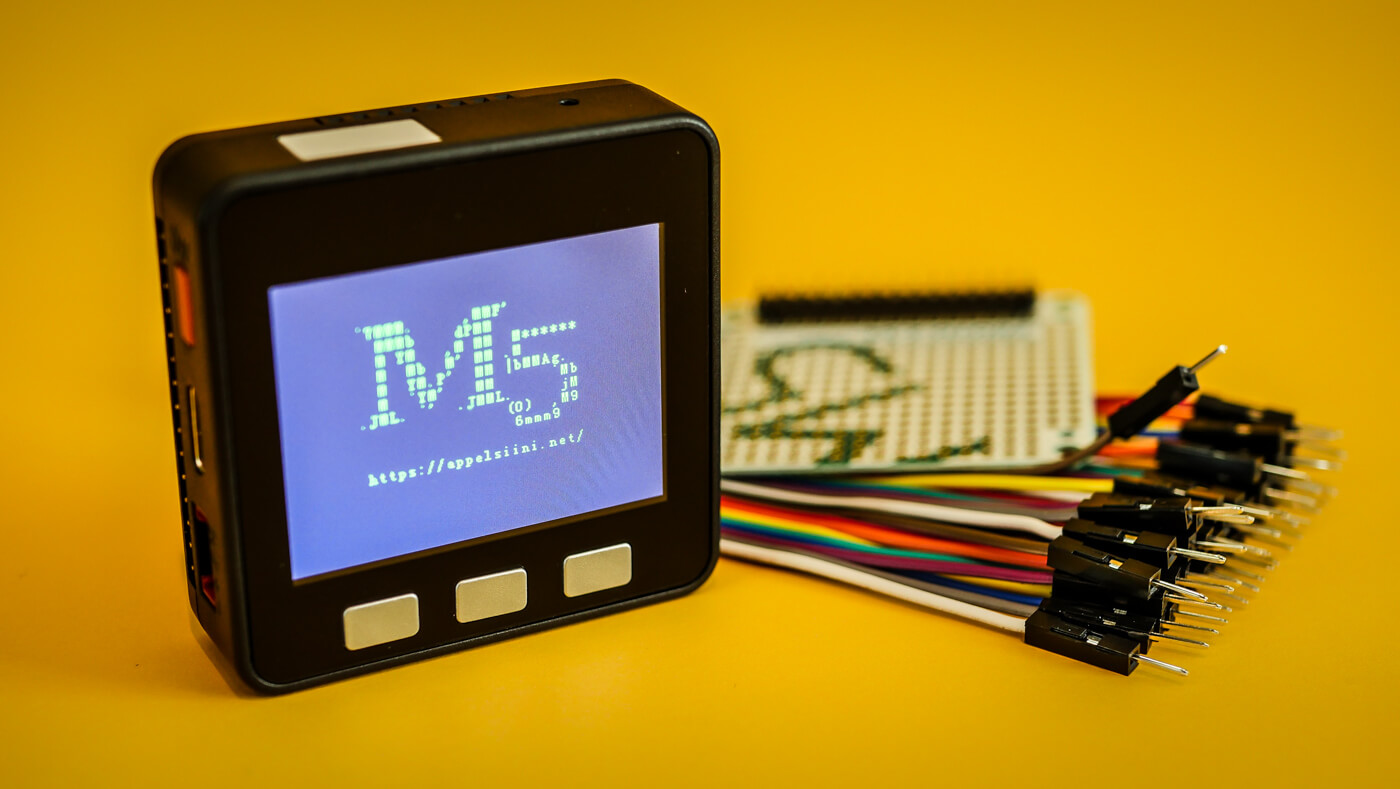
This repository contains few abstractions and helper libraries to help jumpstarting a MicroPython project with [M5Stack development kit](http://www.m5stack.com/). All development is done using [Loboris fork](https://github.com/loboris/MicroPython_ESP32_psRAM_LoBo) of MicroPython. Everything is still evolving. Code should be considered alpha quality. BC breaks will happen.
Use `make sync` to upload files to the board. Not that you must have [rshell](https://github.com/dhylands/rshell) installed. After uploading `make repl` accesses the serial repl.
```shell
$ sudo pip3 install rshell
$ make sync
$ make repl
```
The file `main.py` will contain the kitchen sink example. Helper libraries and absractions are in `lib` folder.
## Display
Light weight wrapper for [Loboris TFT module](https://github.com/loboris/MicroPython_ESP32_psRAM_LoBo/wiki/display) which retains all the original api and properties but adds a few helper methods. See [Loboris wiki](https://github.com/loboris/MicroPython_ESP32_psRAM_LoBo/wiki/display) for documentation.
```python
import m5stack
tft = m5stack.Display()
tft.text(tft.CENTER, 45, "`7MMM. ,MMF' \n")
tft.text(tft.CENTER, tft.LASTY, " MMMb dPMM \n")
tft.text(tft.CENTER, tft.LASTY, " M YM ,M MM M******\n")
tft.text(tft.CENTER, tft.LASTY, " M Mb M' MM .M \n")
tft.text(tft.CENTER, tft.LASTY, " M YM.P' MM |bMMAg. \n")
tft.text(tft.CENTER, tft.LASTY, " M `YM' MM `Mb\n")
tft.text(tft.CENTER, tft.LASTY, ".JML. `' .JMML. jM\n")
tft.text(tft.CENTER, tft.LASTY, " (O) ,M9\n")
tft.text(tft.CENTER, tft.LASTY, " 6mmm9 \n")
tft.text(tft.CENTER, tft.LASTY, " \n")
tft.text(tft.CENTER, tft.LASTY, "https://appelsiini.net/")
```
Helper methods for turning the display on and off. Under the hood this just sets `TFT_LED_PIN` high or low.
```python
tft.backlight(False)
tft.backlight(True)
```
## Buttons
Abstraction for the provided buttons using IRQ. Buttons are debounced and they can detect both pressing and relasing of the button.
```python
a = m5stack.ButtonA(
callback=lambda pin, pressed: print("Button A " + ("pressed" if pressed else "released"))
)
b = m5stack.ButtonB(
callback=lambda pin, pressed: print("Button B " + ("pressed" if pressed else "released"))
)
c = m5stack.ButtonC(callback=button_handler)
def button_handler(pin, pressed):
if pressed is True:
print("Button C pressed")
else:
print("Button C released")
```
## Speaker
Basic support for playing tones in the builtin speaker.
```python
import m5stack
m5stack.tone(2200, duration=10, volume=1)
```
## Battery
Basic support getting battery charge level. Value is returned as percentage in steps of 25 ie. 0, 25, 50, 75 and 100.
```python
from machine import I2C
from ip5306 import IP5306
i2c = I2C(scl=Pin(22), sda=Pin(21))
battery = IP5306(i2c)
print(str(battery.level) + "%"))
```
## License
The MIT License (MIT). Please see [License File](LICENSE.md) for more information.