https://github.com/tuxxin/inetpanel
Self-hosted hosting control panel using Cloudflare Zero Trust Tunnels to securely route multiple domains from a single machine, even on a residential ISP without opening firewall ports. Includes SSL, Multi-PHP, DB, DNS, Backups, WireGuard management and more.
https://github.com/tuxxin/inetpanel
apache cloudflare cloudflare-tunnel control-panel cpanel debian homelab multi-php no-port-forwarding php-fpm residential-hosting self-hosted webhosting wireguard zerotrust
Last synced: 3 months ago
JSON representation
Self-hosted hosting control panel using Cloudflare Zero Trust Tunnels to securely route multiple domains from a single machine, even on a residential ISP without opening firewall ports. Includes SSL, Multi-PHP, DB, DNS, Backups, WireGuard management and more.
- Host: GitHub
- URL: https://github.com/tuxxin/inetpanel
- Owner: tuxxin
- License: gpl-3.0
- Created: 2026-01-21T04:22:06.000Z (6 months ago)
- Default Branch: main
- Last Pushed: 2026-03-29T20:19:35.000Z (3 months ago)
- Last Synced: 2026-04-01T22:22:45.055Z (3 months ago)
- Topics: apache, cloudflare, cloudflare-tunnel, control-panel, cpanel, debian, homelab, multi-php, no-port-forwarding, php-fpm, residential-hosting, self-hosted, webhosting, wireguard, zerotrust
- Language: PHP
- Homepage: https://inetpanel.info
- Size: 796 KB
- Stars: 7
- Watchers: 2
- Forks: 2
- Open Issues: 0
-
Metadata Files:
- Readme: README.md
- Funding: .github/FUNDING.yml
- License: LICENSE
Awesome Lists containing this project
README
# iNetPanel
### Host websites from home — securely, with no open ports.
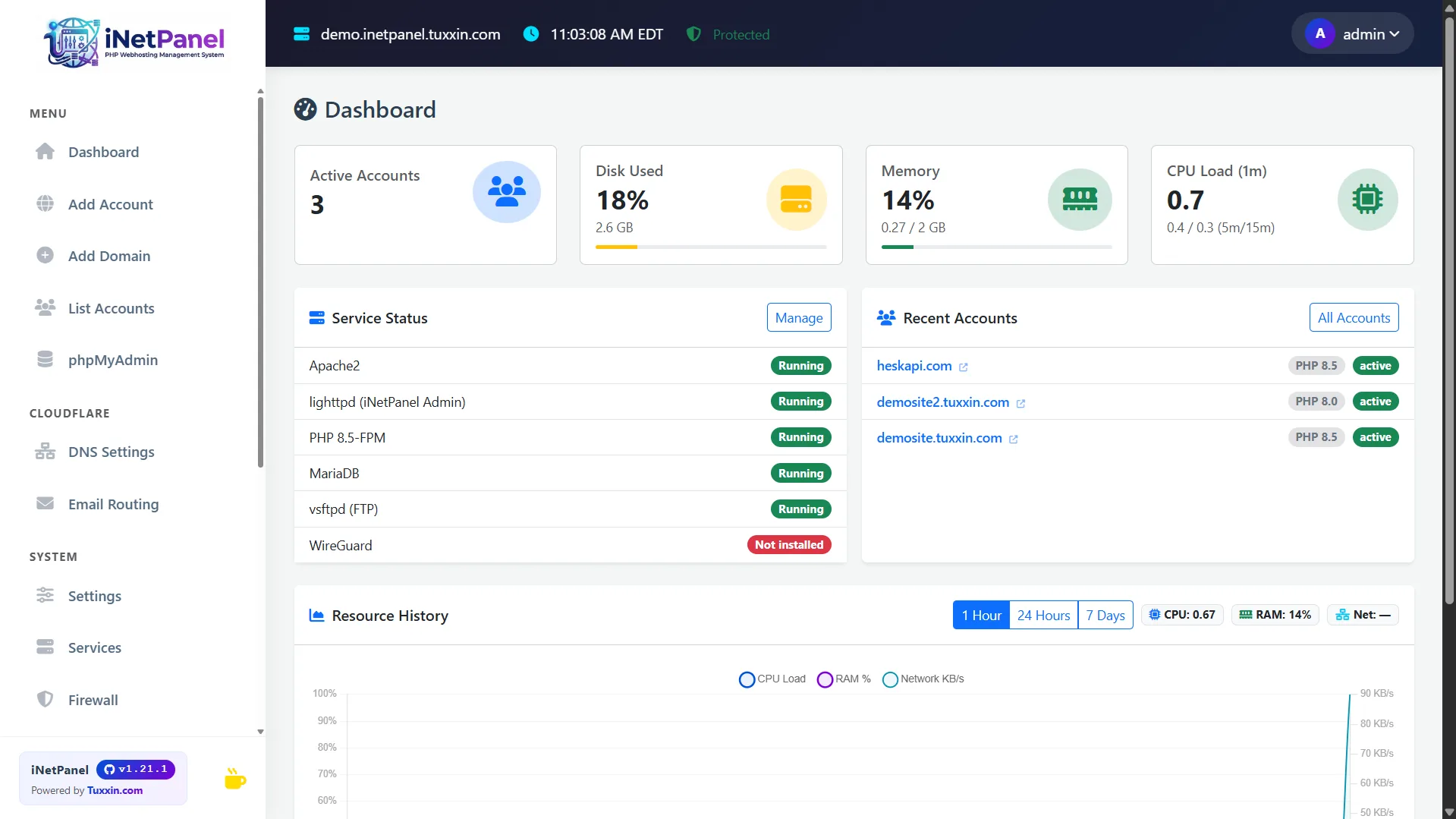
iNetPanel is a free, open-source hosting control panel designed for **home servers**. It uses **Cloudflare Zero Trust Tunnels** to bypass ISP limitations — no port forwarding, no exposed IP, no static IP required. Your server stays completely hidden while your sites are publicly accessible.
[](https://inetpanel.info/tour)
Full automated installation process, up and running in minutes

Full video: inetpanel.info/install
> **[Website](https://inetpanel.info)** · **[Features](https://inetpanel.info/features)** · **[Screenshots](https://inetpanel.info/tour)** · **[Documentation](https://inetpanel.info/docs)** · **[Compare](https://inetpanel.info/compare)**
---
## Quick Install
```bash
bash <(curl -s https://inetpanel.info/latest)
```
Requires a **clean Debian 12** server with root access. The guided installer handles everything.
> **[Full installation guide →](https://inetpanel.info/install)**
### Release Channels
| Channel | Installer | Updates | Use case |
|---|---|---|---|
| **Stable** | `inetpanel.info/latest` | Tagged GitHub releases | Production servers (default) |
| **Beta** | `inetpanel.info/latest-beta` | Latest code from `main` branch | Testing new features before release |
The **stable** installer downloads the latest tagged release. Updates are pulled from GitHub Releases only when a new version is published.
The **beta** installer clones the `main` branch directly. Updates pull the latest commit from `main`, which may include untested changes.
You can switch between channels at any time in **Settings → Updates → Release Channel** without reinstalling.
---
## Why iNetPanel?
Most hosting panels assume you have a VPS with a public IP and open ports. **iNetPanel is built for the opposite scenario** — a machine behind a NAT, a dynamic IP, an ISP that blocks port 80/443. With Cloudflare Tunnels, your domains route through Cloudflare's network directly to your server. No firewall rules, no DDNS hacks, no exposed attack surface.
Add a domain, and iNetPanel creates the Linux user, Apache vhost, PHP-FPM pool, MariaDB user, SSL certificate, DNS record, and Cloudflare tunnel route — all in one click.
---
## Key Features
### Hosting Management
- One-click account creation with Apache, PHP-FPM, FTP, SSL, and tunnel routing
- Multi-domain users — each domain gets its own vhost, document root and SSL certificate
- [Client portal](https://inetpanel.info/features) for hosting users with database management, SSH keys, file manager, and backups
- Multi-PHP version switching (5.6–8.5) per domain
- Hook scripts for custom post-deploy automation
### Security & Networking
- **Cloudflare Zero Trust Tunnel** — no ports exposed to the public internet
- Automatic Let's Encrypt SSL via DNS-01 challenge
- WireGuard VPN with auto-provisioned peers and full server lockdown option
- Firewall management (firewalld + fail2ban) from the panel
- [Security details →](https://inetpanel.info/features)
### Cloudflare Integration
- Full DNS record management (A, AAAA, CNAME, MX, TXT, SRV)
- DDoS mode and Development mode toggles
- Email routing management
- Dynamic DNS for changing IPs
### Server Tools
- Real-time dashboard with CPU, RAM, disk, and network monitoring
- Automated backups with system config archiving
- Image optimizer with AVIF generation
- phpMyAdmin auto-login from admin and client portals
- 35+ CLI commands for server management, security audits, and diagnostics
- [Full feature list →](https://inetpanel.info/features)
---
## Requirements
- **Debian 12** (Bookworm) — clean install
- **Root access**
- **Cloudflare account** (recommended) — or manual port-based mode without Cloudflare
---
## Links
| | |
|---|---|
| **Website** | [inetpanel.info](https://inetpanel.info) |
| **Product Tour** | [Screenshots & walkthrough](https://inetpanel.info/tour) |
| **Features** | [Full feature list](https://inetpanel.info/features) |
| **Compare** | [vs cPanel, Plesk, CloudPanel](https://inetpanel.info/compare) |
| **Documentation** | [Install guide & docs](https://inetpanel.info/docs) |
| **Install** | [Install guide](https://inetpanel.info/install) |
| **Issues** | [Report a bug](https://github.com/tuxxin/iNetPanel/issues) |
---
## Technical Stack
| Layer | Technology | Port |
|---|---|---|
| Admin panel | lighttpd + PHP-FPM | 80 |
| Client portal | lighttpd (same) | 80 |
| phpMyAdmin | Apache2 vhost | 8888 / 8443 (SSL) |
| Hosting sites | Apache2 SSL vhosts | 1080+ |
| Panel database | SQLite | — |
| Site databases | MariaDB (localhost) | 3306 |
| VPN | WireGuard | 1443/UDP |
---
## Directory Layout
```
/var/www/inetpanel/ Panel installation
├── public/ Web root (only dir served by lighttpd)
├── TiCore/ Core PHP classes
├── api/ JSON API endpoints
├── src/ Admin page views
├── themes/ Layout templates (admin + client portal)
└── db/ SQLite database
/home// Hosting user home
├── / Domain directory
├── /www/ Public document root
└── /logs/ Apache and PHP error logs
/root/scripts/ System scripts (deployed from repo)
/backup/ Automated backups
```
> **Security:** Only `public/` is web-accessible. All other directories are loaded internally by PHP and unreachable via HTTP.
---
## License
MIT — see [LICENSE](LICENSE)
---
Created by [Tuxxin](https://tuxxin.com) · [inetpanel.info](https://inetpanel.info)