https://github.com/twardoch/pypolona
Search the Polona.pl website of the Polish National Library and download all images from publications
https://github.com/twardoch/pypolona
download gooey library polona python search
Last synced: 9 months ago
JSON representation
Search the Polona.pl website of the Polish National Library and download all images from publications
- Host: GitHub
- URL: https://github.com/twardoch/pypolona
- Owner: twardoch
- License: mit
- Created: 2020-09-07T19:02:20.000Z (almost 6 years ago)
- Default Branch: master
- Last Pushed: 2025-07-18T14:04:18.000Z (12 months ago)
- Last Synced: 2025-08-19T05:26:13.549Z (11 months ago)
- Topics: download, gooey, library, polona, python, search
- Language: Python
- Homepage: https://twardoch.github.io/pypolona/
- Size: 370 MB
- Stars: 4
- Watchers: 3
- Forks: 3
- Open Issues: 0
-
Metadata Files:
- Readme: README.md
- Changelog: CHANGELOG.md
- Funding: .github/FUNDING.yml
- License: LICENSE
Awesome Lists containing this project
README
# PyPolona: Your Gateway to Poland's Digital Heritage
**PyPolona** is a versatile, free, and open-source application designed to help you explore, search, and download digital treasures from [Polona.pl](https://polona.pl/), the vast digital library of the National Library of Poland. Whether you prefer a graphical interface or a command-line tool, PyPolona offers a seamless experience for accessing Poland's rich cultural heritage.
[Polona.pl](https://polona.pl/) hosts an extensive collection of digitized items, including books, magazines, journals, graphics, maps, musical scores, ephemera, and manuscripts, contributed by the National Library of Poland and numerous partner institutions.
## Key Features
* **Comprehensive Search:** Effortlessly search the Polona.pl database using simple keywords, advanced queries, specific Polona URLs, or lists of document IDs.
* **Flexible Search Results:** View and save your search results in various formats:
* A simple list of Polona document IDs.
* Direct, clickable URLs to the items on Polona.pl.
* Structured data files in YAML or JSON format for further processing.
* **High-Resolution Downloads:** Download high-quality images of documents. You can choose to:
* Save all images from a document as individual JPEG files, organized into a dedicated subfolder. This subfolder will also include a YAML file with metadata for the document.
* Combine all images from a document into a single, convenient PDF file, with metadata embedded directly into the PDF.
* **Searchable Text PDFs:** Where available, PyPolona can also download an additional, lower-resolution PDF version of a document that includes searchable text (OCR layer).
* **User-Friendly GUI:** An intuitive graphical interface powered by `ezgooey`, making it easy for all users to navigate and utilize PyPolona's features.
* **Powerful CLI:** A robust command-line interface (`ppolona`) for users who prefer automation, scripting, or a terminal-based workflow.
* **Cross-Platform:** Available as a standalone application for macOS and Windows, and as a Python package installable via pip.
## Who is PyPolona For?
PyPolona is an invaluable tool for:
* **Researchers and Academics:** Accessing primary source materials for scholarly work.
* **Historians:** Exploring historical documents, periodicals, and ephemera.
* **Students:** Gathering resources for projects and studies related to Polish culture, literature, and history.
* **Genealogists:** Searching for family records, old newspapers, and regional histories.
* **Librarians and Archivists:** Exploring digital collections and potentially aiding in local archiving efforts.
* **Anyone with an interest in Polish cultural heritage** and the vast resources available in digital archives.
## Why Use PyPolona?
* **Programmatic Access:** Go beyond manual browsing with powerful search and download capabilities.
* **Bulk Operations:** Efficiently download multiple items or entire collections for offline use or further analysis.
* **Data Portability:** Save search results and metadata in standard formats for easy integration with other tools and workflows.
* **Local Archiving:** Create your own local collection of important documents from Polona.pl.
* **Accessibility:** Choose between an easy-to-use GUI and a flexible CLI to suit your workflow.
## Installation
You can install PyPolona either as a standalone application or as a Python package.
### Standalone Application
Pre-built versions are available for macOS and Windows, offering the easiest way to get started.
* **macOS (.dmg):**
1. Download the latest DMG file: [pypolona-mac.dmg](https://github.com/twardoch/pypolona/raw/master/download/pypolona-mac.dmg)
2. Open the downloaded `.dmg` file.
3. Drag the `PyPolona.app` icon to your `/Applications` folder.
4. **Important for first run:** Ctrl-click (or right-click) the `PyPolona.app` in your Applications folder, select "Open" from the menu, and then click "Open" in the dialog box. You only need to do this once. Subsequent launches can be done by double-clicking the app icon.
* **Windows (.zip containing installer):**
1. Download the latest ZIP file: [pypolona-win.zip](https://github.com/twardoch/pypolona/raw/master/download/pypolona-win.zip)
2. Unzip the downloaded file.
3. Run the `setup_pypolona.exe` (or similarly named installer) and follow the on-screen instructions.
### Python Package (via PyPI)
If you have Python 3.9 or newer installed, you can install PyPolona using pip.
1. **Ensure you have Python 3.9+:** You can check your Python version by opening a terminal or command prompt and typing `python --version` or `python3 --version`.
2. **Install PyPolona:**
```bash
pip install pypolona
```
(You might need to use `python3 -m pip install pypolona` on some systems, especially if you have multiple Python versions installed.)
## How to Use PyPolona (Graphical Interface - GUI)
After installing, launch PyPolona:
* **Standalone App (macOS):** Double-click `PyPolona.app` in your `/Applications` folder.
* **Standalone App (Windows):** Find and run `PyPolona` from your Start Menu or Desktop shortcut.
* **Python Package:** Open your terminal or command prompt and run `ppolona` or `python3 -m pypolona`. (Note: The GUI is launched by default when running `ppolona` without CLI-specific arguments that would make it run in CLI mode immediately).
The GUI is organized into tabs for easy navigation.
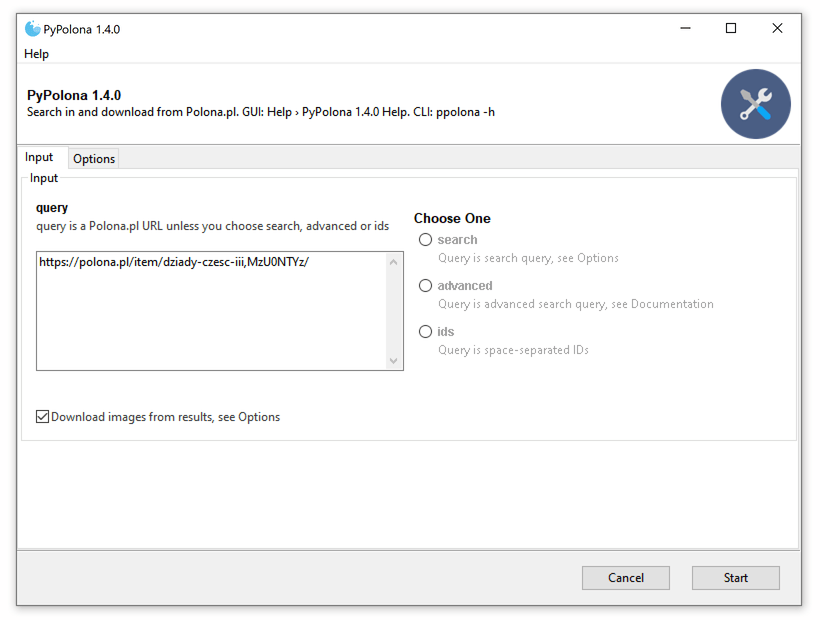
### Input and Search Settings
The "Input" tab is where you define what you're looking for.
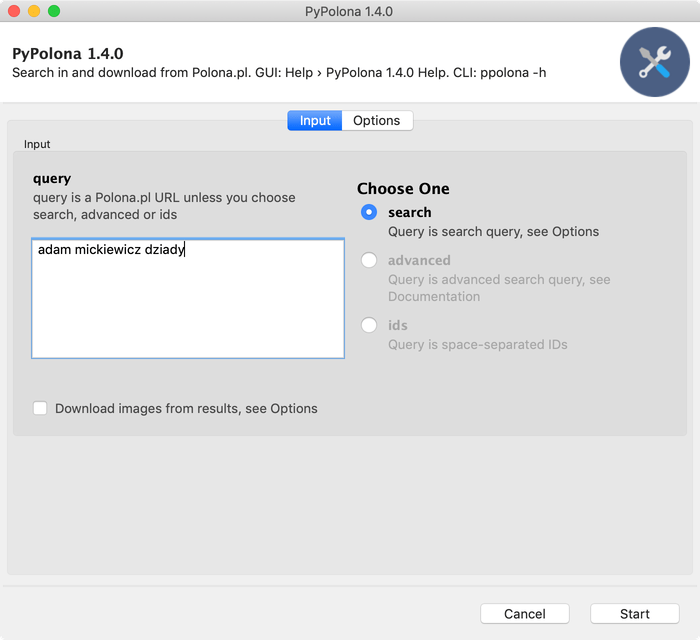
* **Query Field:** This is the main field where you enter your search terms or Polona identifiers.
* **Default (Polona URLs):** Paste one or more full Polona.pl item URLs, separated by spaces.
* **Query Type (Choose One):**
* **Search:** Select this to perform a keyword search (e.g., `adam mickiewicz`). Additional search options are in the "Options" tab.
* **Advanced:** For complex queries using Polona's advanced search syntax (see [Polona API documentation](https://polona.pl/api/entities/) for syntax details).
* **IDs:** Paste a list of space-separated Polona document IDs.
The "Options" tab allows you to refine your search:
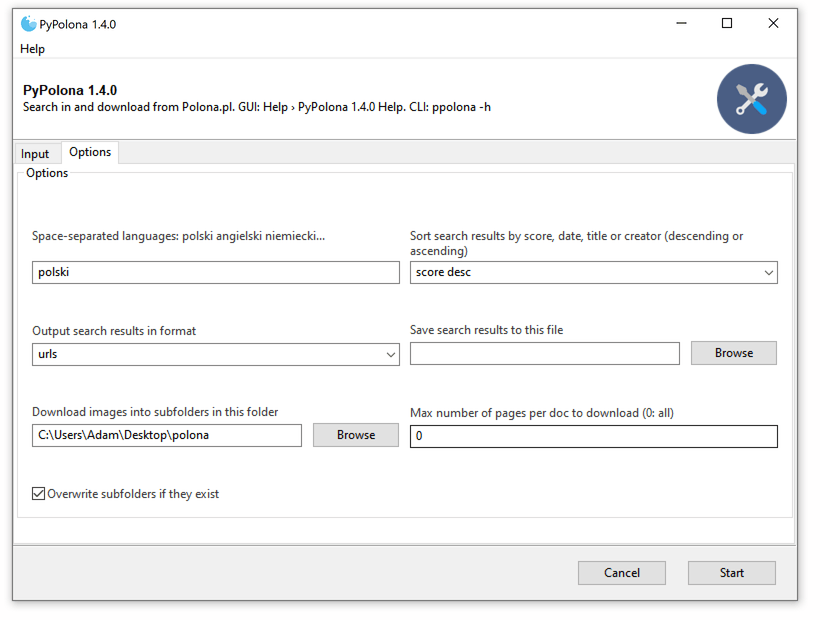
* **Languages:** Filter search results by language (e.g., `polski niemiecki angielski`). Use language names as found on the Polona.pl website.
* **Sort Search Results:** Order results by relevance (score), date, title, or creator, in ascending or descending order.
* **Output Search Results Format:** Choose how your search results are presented if you're not downloading:
* `ids`: A space-separated list of Polona document IDs.
* `urls`: A list of clickable URLs to the items on Polona.pl.
* `yaml`: A structured YAML file containing details of the found items.
* `json`: A structured JSON file.
* **Save Search Results to File:** Optionally, specify a file path to save the search results directly to a file. If not specified, results are printed in the GUI's output area.
### Download Settings
To download documents, first check the **"Download found docs"** option in the "Input" tab.
* **Download JPEGs into Subfolders vs. Single PDF:**
* **Enable "Download JPEGs into subfolders":** Each document will be saved as a collection of individual JPEG images within its own subfolder (named with year, title snippet, and ID). A YAML metadata file and any available text PDF (with `_text` suffix) will also be placed in this subfolder.
* **Disable "Download JPEGs into subfolders" (default for PDF):** Each document will be compiled into a single PDF file (named with year, title snippet, and ID). Metadata is embedded within this PDF. Any available text PDF will be saved separately with a `_text` suffix.
Further download customization is available in the "Options" tab:
* **Save Downloaded Docs in this Folder:** Choose the parent directory where your downloaded files or subfolders will be saved. Defaults to a `polona` folder on your Desktop.
* **Download Max Pages Per Doc:** Set a limit on the number of pages to download for each document (0 means all pages). Useful for quick tests or sampling large documents.
* **Skip Downloading Searchable PDFs (Option: `-T`/`--no-text-pdf`):** By default, if Polona offers a searchable text PDF for an item, PyPolona downloads it. Check this option to skip these additional text PDFs.
* **Skip Existing Subfolders/PDFs (Option: `-O`/`--no-overwrite`):** If a file or folder for a document already exists in the download directory, PyPolona will skip re-downloading it if this option is checked. Otherwise, it will overwrite existing files.
### Main Control Buttons
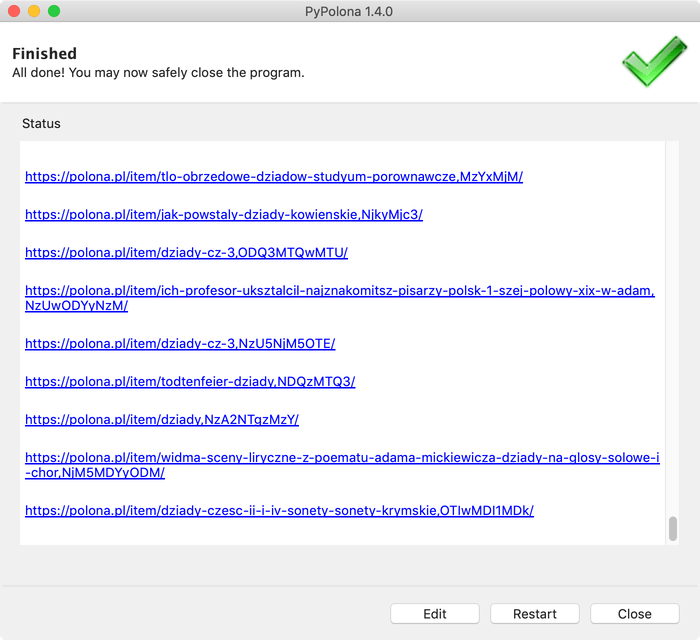
* **Start:** Begins the search and/or download process based on your current settings.
* **Cancel/Close:** Exits the application.
* **Stop (during processing):** Interrupts the current search or download task.
* **Edit (after processing):** Returns to the settings tabs to modify your query or options for a new task.
* **Restart (after processing):** Runs the same search/download task again with the current settings.
## How to Use PyPolona (Command-Line Interface - CLI)
The CLI (`ppolona`) offers the same functionality as the GUI but is operated through your terminal or command prompt.
* **If installed via pip:** Simply type `ppolona [options] query`
* **If using standalone macOS app:** The CLI executable is typically at `/Applications/PyPolona.app/Contents/MacOS/ppolona`.
* **If using standalone Windows app:** The installer usually adds the location of `ppolona.exe` to your system's PATH, or you may need to navigate to its installation directory.
For a full list of commands and options, use the help flag:
```bash
ppolona -h
```
This will display the following (version 1.6.2 shown as an example):
```
usage: ppolona [-h] [-S | -A | -I] [-D] [-i] [-l [language [language ...]]]
[-s {score desc,date desc,date asc,title asc,creator asc}]
[-f {ids,urls,yaml,json}] [-o results_file]
[-d download_folder] [-M num_pages] [-T] [-O] [-V]
query [query ...]
PyPolona 1.6.2: Search in and download from Polona.pl. GUI: Help > PyPolona Help. CLI: ppolona -h
Input:
query query is a Polona.pl URL unless you choose search,
advanced or ids
-S, --search Query is search query, see Options
-A, --advanced Query is advanced search query, see Documentation
-I, --ids Query is space-separated IDs
-D, --download Download found docs, see Options
-i, --images Download JPEGs into subfolders instead of PDF
Options:
-l [language [language ...]], --lang [language [language ...]]
Space-separated languages: polski angielski
niemiecki...
-s {score desc,date desc,date asc,title asc,creator asc}, --sort {score desc,date desc,date asc,title asc,creator asc}
Sort search results by score, date, title or creator
(descending or ascending)
-f {ids,urls,yaml,json}, --format {ids,urls,yaml,json}
Output search results in format
-o results_file, --output results_file
Save search results to this file
-d download_folder, --download-dir download_folder
Save downloaded docs in this folder
-M num_pages, --max-pages num_pages
Download max pages per doc (0: all)
-T, --no-text-pdf Skip downloading searchable PDFs
-O, --no-overwrite Skip existing subfolders/PDFs
-V, --version show program's version number and exit
```
**CLI Examples:**
1. **Search for "warszawa" and output results as URLs to the console:**
```bash
ppolona --search warszawa --format urls
```
2. **Download documents specified by Polona URLs as PDFs to a custom folder:**
```bash
ppolona https://polona.pl/item/some-item,ID123/ https://polona.pl/item/another-item,ID456/ --download --download-dir ~/Documents/PolonaDownloads
```
3. **Search for items by "Henryk Sienkiewicz" in Polish, sort by date descending, and download as JPEGs, max 10 pages per item:**
```bash
ppolona --search "Henryk Sienkiewicz" --lang polski --sort "date desc" --download --images --max-pages 10
```
---
## For Developers: Technical Deep Dive
This section provides technical details about PyPolona's architecture, codebase, and contribution guidelines.
### How the Code Works: Architecture and Workflow
PyPolona is built in Python and leverages several libraries to interact with Polona.pl and process data.
**Main Components:**
* **`pypolona/__main__.py`:**
* Serves as the primary entry point for both the GUI and CLI.
* Uses `argparse` to define and parse command-line arguments. These definitions are also used by `ezgooey`.
* Initializes `ezgooey` to generate the graphical user interface dynamically from the `argparse` configuration.
* Instantiates and invokes the `Polona` class from `polona.py` with the parsed arguments to perform the requested actions.
* **`pypolona/polona.py` (The `Polona` Class):**
* This is the heart of the application, containing all the core logic for interacting with the Polona.pl service and managing data.
* **Query Handling:** Parses input queries, distinguishing between direct Polona URLs, search terms, advanced queries, and lists of document IDs.
* **API Interaction:** Constructs requests to the official Polona.pl JSON API (primarily `https://polona.pl/api/entities/`). It handles pagination, filtering (e.g., by language), and sorting for search queries.
* **Search Result Processing:** Parses JSON responses from the API to extract item metadata (titles, IDs, dates, creator information, etc.) and prepares them for output in various formats (IDs, URLs, YAML, JSON).
* **Download Orchestration:** Manages the entire download process for documents.
* Fetches detailed metadata for each item to get scan URLs and other relevant information like Dublin Core (DC) metadata or links to searchable text PDFs.
* Handles the creation of output directories and filenames based on user options (JPEGs in subfolders or a single PDF).
* Implements logic for the `--no-overwrite` option to skip already downloaded files.
* **Image Downloading & PDF Creation:**
* Downloads individual high-resolution JPEG images for each page of a document.
* If PDF output is selected, it uses the `img2pdf` library to compile the downloaded JPEGs into a single PDF file.
* Optionally downloads available searchable text PDFs.
* **Metadata Embedding:** Utilizes `pikepdf` to embed rich metadata (title, author, date, source URL, keywords, etc., extracted from Polona's API and DC records) into the generated PDF files.
* **XML Processing:** Uses `lxml` and `lxml2json` to parse Dublin Core XML metadata associated with items, enriching the information available for each document.
* **`ezgooey` Library:**
* A key external dependency that PyPolona uses to automatically create the graphical user interface. `ezgooey` takes the `argparse.ArgumentParser` object defined in `__main__.py` and translates it into a user-friendly GUI, significantly simplifying GUI development.
**Core Workflows:**
1. **Search Workflow:**
* User provides input (query terms, URLs, IDs, and options) via the GUI or CLI.
* `__main__.py` parses these inputs using `argparse`.
* An instance of the `Polona` class is created, configured with the parsed options.
* If a search is requested (not direct IDs or URLs), the `Polona.search()` method is called.
* It constructs the appropriate API request URL, including search terms, filters (like language), sorting parameters, and pagination details.
* The request is sent to `https://polona.pl/api/entities/`.
* The JSON response is parsed to extract a list of matching items and their basic metadata.
* The extracted item IDs and metadata are then formatted according to the user's chosen output format (IDs, URLs, YAML, or JSON) and displayed or saved to a file.
2. **Download Workflow:**
* Triggered if the "Download found docs" option is enabled, operating on a list of Polona item IDs (either from a search or directly provided).
* For each item ID:
* The `Polona.download_id()` method fetches detailed metadata for the item by calling the Polona API (e.g., `https://polona.pl/api/entities/{item_id}`).
* Helper methods like `_process_hit()`, `_process_resources()`, and `_process_dc()` parse this detailed metadata to extract:
* URLs for individual page scans (JPEGs).
* URL for any available searchable text PDF.
* Dublin Core metadata.
* The `Polona.save_downloaded()` method orchestrates the actual saving:
* Determines the output path (a subfolder for JPEGs or a filename for a combined PDF) based on user settings.
* Checks `--no-overwrite` status to decide whether to skip or proceed.
* If downloading JPEGs into subfolders, it also saves a YAML file containing the item's metadata within that subfolder.
* Downloads each page's JPEG scan using `Polona.download_scan()`.
* If PDF output is selected:
* The downloaded JPEGs are collected in memory.
* `img2pdf.convert()` is used to create the main image-based PDF.
* `Polona.pdf_add_meta()` is then called to embed metadata into this newly created PDF using `pikepdf`.
* If a searchable text PDF is available and not skipped by the user, `Polona.download_save_textpdf()` downloads it, and `Polona.pdf_add_meta()` is called to add metadata to this text PDF as well.
### Key Libraries and Technologies
PyPolona relies on several powerful Python libraries:
* **`requests`**: For making HTTP requests to the Polona.pl API.
* **`ezgooey`** (which wraps **`Gooey`**): For automatically generating the graphical user interface from `argparse` definitions.
* **`argparse`**: Standard Python library for parsing command-line arguments.
* **`img2pdf`**: For converting collections of JPEG images into a single PDF document without re-encoding the images.
* **`pikepdf`**: For reading, manipulating, and writing PDF files, primarily used here for embedding metadata.
* **`lxml`** and **`lxml2json`**: For parsing and converting XML data, specifically the Dublin Core metadata provided by Polona.
* **`python-dateutil`**: For robust parsing of date strings from the API.
* **`html2text`**: Used to convert HTML error messages from the API (if any) into more readable plain text.
* **`yaplon`** (providing **`oyaml`**): For generating YAML formatted output of search results.
* **`orderedattrdict`**: Provides dictionary-like objects that allow attribute-style access, used for convenient handling of API response data.
* **`colored`**: For adding color to terminal output (used by `ezgooey`'s logging).
* **`pywin32`**: Windows-specific functionalities (conditional dependency).
### Project Structure
The repository is organized as follows:
* `pypolona/`: Contains the main source code for the PyPolona package.
* `__init__.py`: Package initializer, defines `__version__`.
* `__main__.py`: Entry point for both CLI and GUI, handles argument parsing and GUI setup.
* `polona.py`: Contains the `Polona` class with all core logic for API interaction, searching, and downloading.
* `icons/`: Application icons.
* `app/`: Scripts and configuration files related to building standalone applications.
* `dmgbuild_settings.py`: Configuration for `dmgbuild` to create the macOS DMG installer.
* *(A `.spec` file for PyInstaller for Windows builds, and an Inno Setup script `.iss` are typically used, as mentioned in the old README, though not explicitly listed in `llms.txt`'s file structure for the snapshot provided).*
* `docs/`: Contains images used in documentation. (Future documentation files might also reside here).
* `download/`: Stores the distributable application packages (DMG, ZIP).
* `.github/workflows/`: Defines GitHub Actions for Continuous Integration (CI).
* `ci.yml`: Configures linting, type checking, testing, and building on pushes/pulls.
* `pyproject.toml`: Project definition file for Hatch (build system). Specifies metadata, dependencies, scripts, and tool configurations (Ruff, Mypy, Pytest).
* `.gitignore`: Specifies intentionally untracked files that Git should ignore.
* `.pre-commit-config.yaml`: Configuration for pre-commit hooks to enforce code quality before committing.
* `LICENSE`: Contains the MIT License text.
* `README.md`: This file – comprehensive user and developer documentation.
* `CHANGELOG.md`: Tracks notable changes for each version.
### Coding Conventions and Contribution Guidelines
We welcome contributions to PyPolona! Please follow these guidelines:
* **Code Style:**
* Adhere to [PEP 8](https://www.python.org/dev/peps/pep-0008/) standards.
* Code formatting is enforced by **Ruff** using the configuration in `pyproject.toml`. Key aspects include a line length of 88 characters and the use of double quotes for strings.
* Run `ruff format .` and `ruff check --fix .` before committing.
* **Linting and Type Checking:**
* **Ruff** is used for comprehensive linting (see `pyproject.toml [tool.ruff.lint]` for enabled rules).
* **MyPy** is used for static type checking. Aim for complete and accurate type hinting for all new code. MyPy configuration is also in `pyproject.toml`.
* **Pre-commit Hooks:** The project uses pre-commit hooks (configured in `.pre-commit-config.yaml`) to automatically run Ruff and MyPy on staged files. Please install and use pre-commit:
```bash
pip install pre-commit
pre-commit install
```
* **Testing:**
* **Pytest** is the framework for automated tests.
* Contributions, especially new features or bug fixes, should ideally include corresponding tests.
* Tests are typically located in a `tests/` directory (though not explicitly present in the provided snapshot, it's standard practice).
* Run tests with `pytest`.
* **Dependencies:**
* Project dependencies are managed in `pyproject.toml` and handled by the [Hatch](https://hatch.pypa.io/latest/) build backend.
* For development, install dependencies including optional `[dev]` ones: `pip install .[dev]`.
* **Commits and Branches:**
* Write clear and descriptive commit messages. While not strictly enforced, [Conventional Commits](https://www.conventionalcommits.org/) are encouraged.
* Develop features or fixes in separate branches created from the `main` (or `master`) branch.
* Submit changes via Pull Requests to the `main` branch.
* **Continuous Integration (CI):**
* All pull requests and pushes to main branches are automatically checked by GitHub Actions as defined in `.github/workflows/ci.yml`. This includes linting, type checking, and running tests. Ensure your changes pass CI.
* **Issue Tracking:**
* Use [GitHub Issues](https://github.com/twardoch/pypolona/issues) to report bugs, suggest features, or discuss changes.
### Building from Source
PyPolona uses [Hatch](https://hatch.pypa.io/latest/) as its build system.
1. **Prerequisites:**
* Python 3.9+
* Hatch: `pip install hatch`
2. **General Build Commands (run from the project root):**
* To build source distribution (sdist) and wheel:
```bash
hatch build
```
* To clean previous build artifacts:
```bash
hatch build --clean
```
* Refer to `pyproject.toml [tool.hatch.scripts]` for other Hatch scripts like `check` or `publish`.
3. **Building Standalone Applications:**
* **macOS (.dmg):**
* The DMG is built using `dmgbuild`. The configuration is in `app/dmgbuild_settings.py`.
* The process usually involves first creating a standalone `.app` bundle (e.g., with PyInstaller or potentially `hatch build` if configured for it) and then packaging it with `dmgbuild`.
* The project's original `README.md` mentioned a `./macdeploy` script, which likely automates these steps.
* **Windows (Installer):**
* The process typically involves:
1. Creating a standalone executable using **PyInstaller**. A `.spec` file (e.g., `app/pyinstaller-win.spec`, though not in the provided `llms.txt` snapshot) usually configures this.
2. Packaging the executable and other necessary files into an installer using a tool like **Inno Setup** (configured via an `.iss` script, e.g., `app/pypolona.iss`).
* The project's original `README.md` provides command snippets for these steps which can be adapted.
### More About Polona.pl
* [Polona.pl](https://polona.pl/) — The main Polona website.
* [Polona/API](https://polona.pl/api/entities/) — The JSON API that PyPolona primarily uses.
* [Polona/blog](http://www.blog.polona.pl/) — The official blog (Polish).
* [Polona/typo](http://typo.polona.pl/en/) — A creative mini-site allowing users to typeset words using letters from random digitized publications.
### License
PyPolona is licensed under the **MIT License**. See the [LICENSE](./LICENSE) file for the full text.
Copyright (c) 2020 Adam Twardoch.
This project is not affiliated with and not endorsed by Polona.pl or the National Library of Poland.