https://github.com/twinters/talk-generator
talk-generator is capable of generating coherent slide decks based on a single topic suggestion.
https://github.com/twinters/talk-generator
art evolutionary-computation funny-experiments python python3
Last synced: about 1 month ago
JSON representation
talk-generator is capable of generating coherent slide decks based on a single topic suggestion.
- Host: GitHub
- URL: https://github.com/twinters/talk-generator
- Owner: twinters
- License: mit
- Created: 2018-07-03T00:19:42.000Z (almost 8 years ago)
- Default Branch: master
- Last Pushed: 2026-04-28T20:39:45.000Z (about 2 months ago)
- Last Synced: 2026-05-01T19:33:25.302Z (about 2 months ago)
- Topics: art, evolutionary-computation, funny-experiments, python, python3
- Language: Python
- Homepage: https://twinters.github.io/talk-generator/
- Size: 10.7 MB
- Stars: 1
- Watchers: 1
- Forks: 0
- Open Issues: 10
-
Metadata Files:
- Readme: README.md
- License: LICENSE
- Security: SECURITY.md
Awesome Lists containing this project
README
# Talk Powerpoint Generator
[](https://circleci.com/gh/korymath/talk-generator)
[](https://codecov.io/gh/korymath/talk-generator)
[](https://github.com/korymath/britbot/blob/master/LICENSE.md)
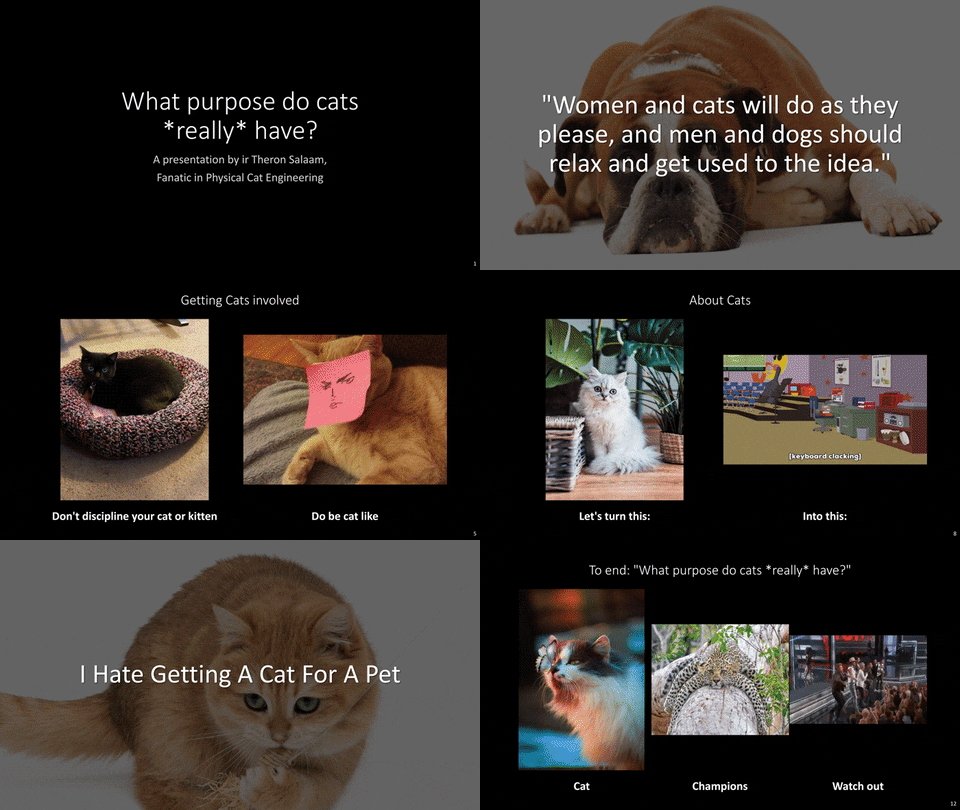
This program automatically generates PowerPoints about any topic.
These presentation slide decks can be used by improvisers for the improvisational comedy format *"Improvised TED talk"* or *"Powerpoint Karaoke"*.
In such games, the actors have to present an unseen presentation slide deck, but pretend to be an expert and explain *"their"* slide show choices.
## Demo
Ty out this generator on our online platform: [talkgenerator.com](http://talkgenerator.com/).
### Example
## Easy Install and Run
Our program relies on certain APIs that require authentication in order to use it.
Create a file named `.env` (don't forget the period) in your project directory, and fill this with the correct API keys as described on our [wiki page about this](https://github.com/korymath/talk-generator/wiki/Setting-Up-API-Keys).
```sh
# Make a new Python 3 virtual environment
python3 -m venv venv;
# Activate the virtual environment
source venv/bin/activate;
# Upgrade pip and install requirements
pip install --upgrade pip setuptools;
python3 -m pip install -r requirements.txt;
# Download NLTK dependencies
python run_nltk_download.py;
# Install the Talk Generator
pip install -e .;
# Generate a 10 slide talk with topic peanuts
talkgenerator --topic "peanuts" --num_slides 10
```
### Run arguments
| Argument | Description |
| ---------------------- | ------------------------- |
| `topic` | The topic of the generator. This works best if it is a common, well-known noun. Use comma-separated words to generate a slide deck about multiple topics |
| `slides` | The number of slides in the generated presentation (*default: 10*) |
| `schema` | The presentation schema to use when generating the presentation. Currently, only two modes are implemented, being `default` and `test` (for testing during development) |
| `title` | Title of the presentation. Either `topic` or this one should to be set in order to generate a slide deck (just setting `topic` is usually more fun though) |
| `presenter` | The name that will be present on the first slide. Leave blank for an automatically generated name |
| `output_folder` | The folder to output the generated presentations (*default: `./output/`*) |
| `save_ppt` | If this flag is true(*default*), the generated powerpoint will be saved on the computer in the `output_folder`|
| `open_ppt` | If this flag is true (*default*), the generated powerpoint will automatically open after generating|
| `parallel` | If this flag is true (*default*), the generator will generate all slides in parallel |
## Program structure
See the [wiki](https://github.com/korymath/talk-generator/wiki/Program-structure) to know more about the inner implementation.
## Tests
Test files are `tests/*.py`, prefixed with `test_`. Test files use the `unittest` module.
They can easily be run all together when using PyCharm by right clicking on `talk-generator` and pressing *Run 'Unittests in talk-generator'*
```sh
coverage run -m pytest; coverage html
```
Test coverage is automatically handled by `codecov`. Tests are automatically run with CircleCI based on the `.yml` file in the `.circleci` directory.
## Credits
This generator is made by
[Thomas Winters](https://github.com/TWinters)
and [Kory Mathewson](https://github.com/korymath),
with contributions from
[Shaun Farrugia](https://github.com/h0h0h0)
and [Julian Faid](https://github.com/jfaid).
If you would like to refer to this project in academic work, please cite the following paper:
Winters T., Mathewson K.W. (2019) **Automatically Generating Engaging Presentation Slide Decks**. In: Ekárt A., Liapis A., Castro Pena M. (eds) Computational Intelligence in Music, Sound, Art and Design. EvoMUSART 2019. Lecture Notes in Computer Science, vol 11453. Springer, Cham
```sh
@InProceedings{winters2019tedric,
author="Winters, Thomas
and Mathewson, Kory W.",
editor="Ek{\'a}rt, Anik{\'o}
and Liapis, Antonios
and Castro Pena, Mar{\'i}a Luz",
title="Automatically Generating Engaging Presentation Slide Decks",
booktitle="Computational Intelligence in Music, Sound, Art and Design",
year="2019",
publisher="Springer International Publishing",
address="Cham",
pages="127--141",
isbn="978-3-030-16667-0"
}
```
## License
MIT License. Copyright (c) 2018-2020 [Kory Mathewson](https://github.com/korymath) and [Thomas Winters](https://github.com/TWinters)