https://github.com/type-mcp/mcp-anything
One command to turn any codebase into an MCP server
https://github.com/type-mcp/mcp-anything
ai anthropic automation claude cli code-generation developer-tools fastapi flask llm mcp mcp-server model-context-protocol openapi python spring-boot swagger
Last synced: 4 months ago
JSON representation
One command to turn any codebase into an MCP server
- Host: GitHub
- URL: https://github.com/type-mcp/mcp-anything
- Owner: Type-MCP
- License: apache-2.0
- Created: 2026-03-14T09:29:24.000Z (5 months ago)
- Default Branch: main
- Last Pushed: 2026-04-08T08:09:13.000Z (4 months ago)
- Last Synced: 2026-04-08T10:07:53.400Z (4 months ago)
- Topics: ai, anthropic, automation, claude, cli, code-generation, developer-tools, fastapi, flask, llm, mcp, mcp-server, model-context-protocol, openapi, python, spring-boot, swagger
- Language: Python
- Homepage: https://mcp-anything.com/waitlist
- Size: 5.2 MB
- Stars: 29
- Watchers: 1
- Forks: 2
- Open Issues: 0
-
Metadata Files:
- Readme: README.md
- Contributing: CONTRIBUTING.md
- License: LICENSE
- Roadmap: ROADMAP.md
Awesome Lists containing this project
- awesome-mcp-devtools - type-mcp/mcp-anything - Auto-generates MCP servers from any codebase or API spec (FastAPI, Flask, Spring Boot, Express, Go, Rails, OpenAPI, GraphQL, gRPC) in one command. (Utilities / Development Tools)
- awesome-mcp-devtools - type-mcp/mcp-anything - Auto-generates MCP servers from any codebase or API spec (FastAPI, Flask, Spring Boot, Express, Go, Rails, OpenAPI, GraphQL, gRPC) in one command. (Utilities / Development Tools)
README
# MCP-Anything
**One command to turn any codebase into an MCP server. Not just REST APIs. Not just OpenAPI specs.**
[](https://discord.gg/5zCwnfJBxG)
[](https://opensource.org/licenses/Apache-2.0)
[](https://www.python.org/downloads/)
[](https://pypi.org/project/mcp-anything/)

## Get started
```bash
pip install mcp-anything
# Generate an MCP server from any codebase
mcp-anything generate /path/to/your/app
# Or from a URL (OpenAPI, GraphQL, gRPC spec)
mcp-anything generate https://api.example.com/openapi.json
# Or directly from a local spec file
mcp-anything generate ./openapi.json
```
You get a complete, pip-installable MCP server in `./mcp--server/`. Add it to your agent in seconds:
**stdio (local, default):** add `mcp.json` to your Claude Code `.mcp.json`:
```json
{
"mcpServers": {
"my-app": { "command": "mcp-my-app", "args": [] }
}
}
```
**HTTP (remote/shared, recommended):** start the server and point your agent at it:
```bash
mcp-anything generate /path/to/app --transport http
mcp-my-app # server runs on http://localhost:8000/sse
```
```json
{
"mcpServers": {
"my-app": { "url": "http://localhost:8000/sse" }
}
}
```
## Targets
By default, mcp-anything generates a **Python / FastMCP** server. Use `--target=mcp-use` to generate a **TypeScript / mcp-use** server instead:
```bash
mcp-anything generate /path/to/app --target mcp-use
```
The TypeScript server uses the [mcp-use](https://github.com/mcp-use/mcp-use) SDK and ships with a built-in inspector.
| | `--target fastmcp` (default) | `--target mcp-use` |
|---|---|---|
| Language | Python | TypeScript |
| SDK | FastMCP | mcp-use |
| Transport | stdio / HTTP | HTTP (port 3000) |
| Inspector | External | Built-in at /inspector |
| Install | `pip install -e .` | `npm install && npm run dev` |
## What's supported
mcp-anything detects and wraps source code across 8 ecosystems — REST frameworks, CLI tools, API specs, and protocol-based services.
| Ecosystem | Framework / Source | Confidence |
|---|---|---|
| **Python** | argparse CLI | 0.90 |
| | Click CLI | 0.90 |
| | Typer CLI | 0.85 |
| | Flask | 0.95 |
| | FastAPI | 0.95 |
| | Django REST Framework | 0.95 |
| **Java / Kotlin** | Spring Boot (Java + Kotlin) | 0.95 |
| | Spring MVC (Java + Kotlin) | 0.85 |
| | JAX-RS / Quarkus (Java + Kotlin) | 0.90 |
| | Micronaut | 0.90 |
| **JavaScript / TypeScript** | Express.js | 0.95 |
| **Go** | Gin | 0.95 |
| | Echo | 0.95 |
| | Chi | 0.95 |
| | Fiber | 0.95 |
| | gorilla/mux | 0.90 |
| | net/http | 0.85 |
| **Ruby** | Rails | 0.95 |
| **Rust** | Actix-web | 0.95 |
| | Axum | 0.95 |
| | Rocket | 0.95 |
| | Warp | 0.90 |
| **API Specs** | OpenAPI 3.x / Swagger 2.x | 0.88 |
| | GraphQL SDL | 0.95 |
| | gRPC / Protobuf | 0.95 |
| **Protocol / IPC** | WebSocket (JSON-RPC) | 0.85 |
| | MQTT / paho-mqtt | 0.90 |
| | ZeroMQ | 0.90 |
| | XML-RPC / raw socket | 0.90 |
| | D-Bus | 0.90 |
> Pass a URL directly for API specs: `mcp-anything generate https://api.example.com/openapi.json`
---
## Scoping: control what gets exposed
Large codebases can have hundreds or thousands of endpoints. You don't want all of them as MCP tools. Three mechanisms let you control scope:
**Quick filter with `--include` / `--exclude`:**
```bash
# Only expose /api/v2 endpoints
mcp-anything generate ./my-app --include "/api/v2/*"
# Exclude internal and debug routes
mcp-anything generate ./my-app --exclude "/internal/*" --exclude "debug_*"
```
**Review mode — curate before generating:**
```bash
# Step 1: analyze and pause
mcp-anything generate ./my-app --review
# Step 2: edit the generated scope.yaml (enable/disable per capability)
vim mcp-my-app-server/scope.yaml
# Step 3: resume generation with your curated scope
mcp-anything generate ./my-app --resume
```
**Reusable scope file:**
```bash
# Use a pre-built scope file (check it into your repo)
mcp-anything generate ./my-app --scope-file ./mcp-scope.yaml
```
Patterns match against capability names, source file paths, and descriptions using glob syntax. In the scope file, you can also set `enabled: false` on individual capabilities for precise control.
## Description overrides: customize tool descriptions
Auto-generated descriptions come from source code (docstrings, OpenAPI summaries, route comments). They're usually good enough, but sometimes you want cleaner wording for your LLM agent.
After generation, a `descriptions.yaml` file is written to the output directory with every tool and parameter description. Edit it, then re-run with `--description` to apply your changes:
```bash
# 1. Generate as usual
mcp-anything generate ./my-app
# 2. Edit descriptions
vim mcp-my-app-server/descriptions.yaml
```
The file looks like this:
```yaml
# Edit tool descriptions below. Run `mcp-anything generate --description` to apply.
tools:
list_users:
description: "List all users with optional filtering"
parameters:
role:
description: "Filter by user role"
limit:
description: "Max results to return"
create_user:
description: "Create a new user account"
parameters:
name:
description: "Full name of the user"
```
```bash
# 3. Apply overrides — run from the generated server directory
cd mcp-my-app-server
mcp-anything generate --description
# Or from anywhere, pointing to the output directory
mcp-anything generate --description -o ./mcp-my-app-server
```
Only changed descriptions are applied. The pipeline detects edits and re-generates only the affected phases (implement, document, package), keeping everything else intact.
## Output
```
mcp--server/
├── src//
│ ├── server.py # FastMCP server (stdio or HTTP/SSE)
│ ├── backend.py # Backend adapter (CLI / HTTP proxy / Python call)
│ ├── tools/ # Tool modules, one file per capability group
│ ├── prompts.py # Server-delivered MCP prompts
│ └── resources.py # Dynamic MCP resources
├── AGENTS.md # Tool index for coding agents
├── Dockerfile # Container deployment (HTTP mode)
├── mcp.json # Ready-to-paste MCP client config
└── pyproject.toml # pip install -e .
```
### Why we generate AGENTS.md
MCP solves tool *invocation* — an agent calls a tool and gets a result. It doesn't solve tool *discovery* at the project level.
When an agent like Claude Code opens your repo, it reads `AGENTS.md` before making any MCP calls. That file tells it what the server can do, which tools exist, and how to use them — without needing an active connection. As [this article](https://itnext.io/mcp-is-dead-long-live-mcp-a67bd74a6576) argues, the next generation of agent workflows depends on agents being able to reason about available capabilities *before* invoking them. `AGENTS.md` is that bridge: a human-readable, agent-indexed map of everything the generated server exposes.
### Why prefer HTTP transport
stdio MCP runs the server as a local subprocess — one process per agent session, tied to your machine. It works for personal use but doesn't scale.
HTTP transport (`--transport http`) lets you:
- Deploy once, connect from anywhere (CI, cloud agents, teammates)
- Share a single server instance across multiple agent sessions
- Run in Docker or any container platform
For anything beyond local prototyping, HTTP is the right default.
## Concrete example: GitHub MCP Server
The [official GitHub MCP server](https://github.com/github/github-mcp-server) is a hand-built Go project exposing ~80 curated tools (issues, PRs, repos, actions, security alerts, etc.). It took a team months to build and maintain.
What happens if you point mcp-anything at GitHub's public OpenAPI spec instead?
```bash
mcp-anything generate https://raw.githubusercontent.com/github/rest-api-description/main/descriptions/api.github.com/api.github.com.json --name github --no-llm
```
| | Official (hand-built) | **mcp-anything (auto-generated)** |
|--|----------------------|----------------------------------|
| **Language** | Go | Python |
| **Build time** | Months | Seconds |
| **Tools** | ~80 (curated subset) | ~1,093 (every API operation) |
| **Backend** | Native Go SDK + GraphQL | `httpx` HTTP proxy from OpenAPI spec |
| **Auth** | PAT / OAuth | PAT via `GITHUB_API_KEY` env var |
| **Transport** | stdio, HTTP | stdio (default), HTTP (`--transport http`) |
| **Docs** | Hand-written README | Auto-generated AGENTS.md + MCP resources |
The generated server covers **every** GitHub REST API endpoint — repos, issues, PRs, actions, packages, security advisories, code search, gists, orgs, teams, notifications, and more. Each endpoint becomes an MCP tool with typed parameters extracted from the OpenAPI spec.
The official server is **curated**: 80 tools chosen for what LLMs actually need, with custom logic and GraphQL integration. The auto-generated server is **comprehensive**: 1,093 tools covering the entire API surface. It's the difference between a bespoke suit and an instant wardrobe — one fits perfectly, the other covers everything immediately.
See [`examples/github-server/`](examples/github-server/) for the full generated code.
### Scoping down to match the official server
But what if you only want the same ~80 tools the official server exposes? Use `--scope-file`:
```bash
mcp-anything generate \
https://raw.githubusercontent.com/github/rest-api-description/main/descriptions/api.github.com/api.github.com.json \
--name github-scoped --no-llm \
--scope-file examples/github-server-scoped/scope.yaml \
-o examples/github-server-scoped
```
| | Official (hand-built) | Full auto-generated | **Scoped auto-generated** |
|--|----------------------|---------------------|--------------------------|
| **Tools** | ~80 (curated) | 1,093 (every endpoint) | **67 (matching official)** |
| **Build time** | Months | ~6 seconds | ~6 seconds |
| **Coverage** | Curated subset + GraphQL | Entire REST API | Same REST endpoints as official |
| **Scope control** | Hardcoded in Go | None needed | `scope.yaml` (69 lines) |
The scope file ([`examples/github-server-scoped/scope.yaml`](examples/github-server-scoped/scope.yaml)) uses `exclude_patterns: ["*"]` to exclude everything by default, then `enabled: true` on the 67 specific tools that map to official endpoints. 11 official tools use GraphQL or Copilot-specific APIs and have no REST equivalent — these are documented in the scope file.
**Reproduce it yourself:**
```bash
# 1. Generate the full server (1,093 tools)
mcp-anything generate \
https://raw.githubusercontent.com/github/rest-api-description/main/descriptions/api.github.com/api.github.com.json \
--name github --no-llm
# 2. Generate the scoped server (67 tools, matching official)
mcp-anything generate \
https://raw.githubusercontent.com/github/rest-api-description/main/descriptions/api.github.com/api.github.com.json \
--name github-scoped --no-llm \
--scope-file examples/github-server-scoped/scope.yaml
# 3. Or use review mode to curate interactively
mcp-anything generate \
https://raw.githubusercontent.com/github/rest-api-description/main/descriptions/api.github.com/api.github.com.json \
--name github-custom --no-llm --review
# Edit mcp-github-custom-server/scope.yaml, then:
mcp-anything generate \
https://raw.githubusercontent.com/github/rest-api-description/main/descriptions/api.github.com/api.github.com.json \
--name github-custom --resume
```
See [`examples/github-server-scoped/`](examples/github-server-scoped/) for the scoped output.
## Roadmap
See [ROADMAP.md](ROADMAP.md) for the full roadmap. See [CONTRIBUTING.md](CONTRIBUTING.md) to know how to contribute to the project.
---
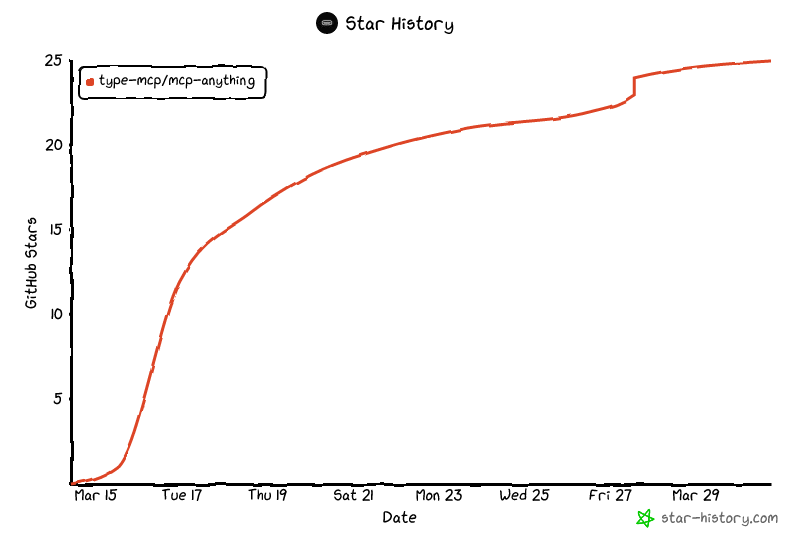
## Star History
---
Stop writing MCP servers by hand.