https://github.com/tysonandre/languageserver-phan-neovim
Phan language server support for neovim.
https://github.com/tysonandre/languageserver-phan-neovim
error-detection neovim neovim-plugin phan php vim
Last synced: about 2 months ago
JSON representation
Phan language server support for neovim.
- Host: GitHub
- URL: https://github.com/tysonandre/languageserver-phan-neovim
- Owner: TysonAndre
- Created: 2017-10-01T05:18:02.000Z (over 8 years ago)
- Default Branch: master
- Last Pushed: 2021-08-22T17:45:33.000Z (almost 5 years ago)
- Last Synced: 2025-03-20T21:12:09.154Z (over 1 year ago)
- Topics: error-detection, neovim, neovim-plugin, phan, php, vim
- Language: Vim script
- Homepage:
- Size: 478 KB
- Stars: 1
- Watchers: 2
- Forks: 0
- Open Issues: 3
-
Metadata Files:
- Readme: README.md
Awesome Lists containing this project
README
# LanguageServer-phan-neovim
[](https://php.net/) [](https://gitter.im/phan/phan?utm_source=badge&utm_medium=badge&utm_campaign=pr-badge)
A PHP language server plugin for [LanguageClient-neovim](https://github.com/autozimu/LanguageClient-neovim).
This uses Phan's static analysis capabilities to quickly emit diagnostic issue messages.
This uses [Phan](https://github.com/phan/phan).
Also see [LanguageServer-php-neovim](https://github.com/roxma/LanguageServer-php-neovim), a plugin for a different language server (with different features) that this is based on.
## Features
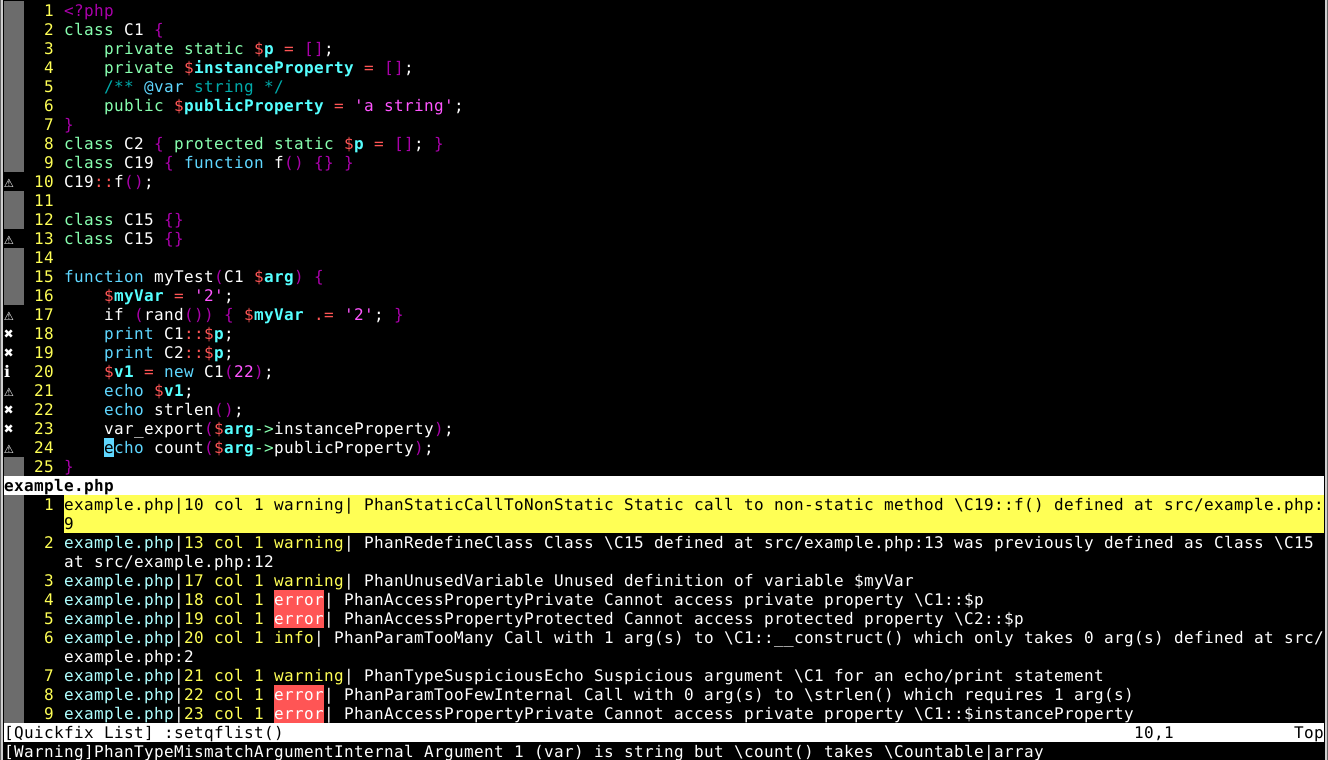
+ Adds improved [error detection from Phan](https://github.com/phan/phan#features) to neovim.
+ Analyzes code while you're typing.
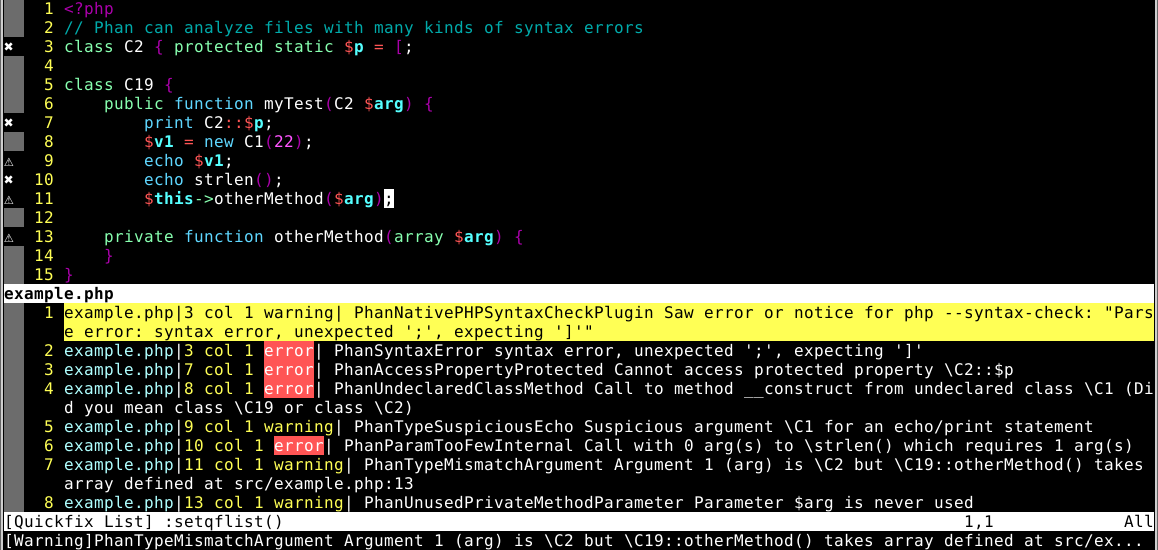
+ Analyzes remaining statements of code with syntax errors.
+ Supports "Go To Definition" (`:call LanguageClient#textDocument_definition()`)
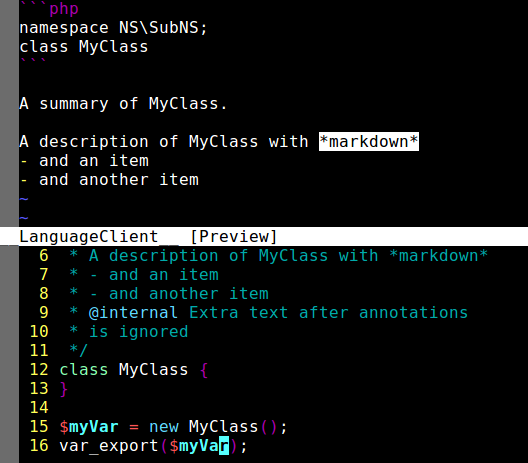
+ Supports "Hover" (`:call LanguageClient#textDocument_hover()`)
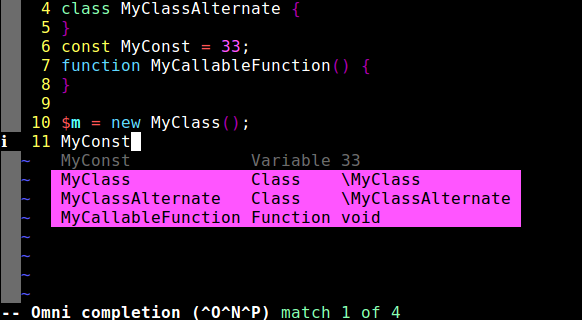
+ Supports "Completion" (e.g. with C-x o) (requires `let g:phan_enable_completion = 1` to be added to your vim/neovim config)
See [LanguageClient-neovim](https://github.com/autozimu/LanguageClient-neovim/) and [Example Configuration for LanguageServer-phan-neovim](#configuration) for more documentation on how to use these features.
## Issue Tracker
**Note: This is just the [neovim plugin that spawns Phan](https://github.com/TysonAndre/LanguageServer-phan-neovim). Phan is implemented purely in PHP [in its own repository](https://github.com/phan/phan),
bugs in Phan analysis need to be fixed there and all issues should be reported [there](https://github.com/phan/phan/issues).**
However, bugs in this neovim plugin (crashes, etc) or related to the language server protocol should be reported [in this plugin's issue tracker](https://github.com/TysonAndre/LanguageServer-phan-neovim/issues)
## Examples
### Error Detection
### Error Detection (Tolerating Syntax Errors)
### Hover
### Completion
## Installation
### Dependencies:
1. PHP 7.2+ must be installed.
You can either add it to your PATH or set the `g:phan_php_binary` setting in `~/.config/nvim/init.vim`. (e.g. `let g:phan_php_binary = '/usr/local/php7.1/bin/php'`)
2. (Optional) For optimal performance and accuracy of analysis,
[the `php-ast` PECL extension](https://pecl.php.net/package/ast) should be installed and enabled.
Using [vim-plug](https://github.com/junegunn/vim-plug).
See https://github.com/junegunn/vim-plug#usage if you are unfamiliar with vim-plug. After adding the plugins to your neovim config, `:PlugInstall` must be called to install the plugins.
```vim
" Oddly, LanguageClient seems to need a key in LanguageClient_serverCommands when starting up in order for this plugin to work.
" Use literally anything as a placeholder. even 'php': ['/bin/false'],
let g:LanguageClient_serverCommands = {
\ 'php': [$HOME . '/.vim/plugged/LanguageServer-phan-neovim/vendor/phan/phan/phan', '--require-config-exists', '--language-server-on-stdin', '--quick', '--language-server-allow-missing-pcntl', '--use-fallback-parser', '--allow-polyfill-parser', '--memory-limit', '2G', '--language-server-enable-go-to-definition', '--language-server-enable-hover', '--language-server-enable-completion', '--language-server-hide-category', '--analyze-all-files', '--plugin', 'InvokePHPNativeSyntaxCheckPlugin'],
\ }
"" The below would be ~/.vim/plugged in vim
"" uncomment it if a section with plug#begin does not exist already
" call plug#begin('~/.local/share/nvim/plugged')
" Note: this may need to be 'composer.phar update', or contain the full path to composer.phar.
" To update the language server this vim plugin installs, run `:PlugUpdate! LanguageServer-phan-neovim`
Plug 'TysonAndre/LanguageServer-phan-neovim', {'do': 'composer update'}
" Currently, the Phan Language Server only works with a single directory,
" and that directory must be manually configured.
let g:phan_analyzed_directory = '/home/username/path/to/project-with-phan-config/'
"" As a workaround, you can try to guess other projects on startup based on the current working directory
" if getcwd() =~ 'my-other-project"
" let g:phan_analyzed_directory = '/home/username/path/to/my-other-project/'
" endif
" You can optionally use a different Phan version from the one that gets bundled with this
" (Or phan.phar)
" let g:phan_executable_path = '~/path/to/phan-installation/phan'
" Completion is enabled by default if you're running the latest version of this vim plugin.
" let g:phan_enable_completion = 1
" Enable this to run Phan analysis only on file save
" (Not while editing the file)
" This will reduce CPU used and make crashes less likely.
" (LanguageClient-neovim won't automatically restart the server)
" let g:phan_analyze_only_on_save = 1
" You can also add custom CLI flags manually
let g:phan_additional_cli_flags = [
\'--strict-type-checking',
\'--plugin', 'InvokePHPNativeSyntaxCheckPlugin'
\]
" Dependency:
Plug 'autozimu/LanguageClient-neovim', { 'branch': 'next', 'do': 'bash install.sh' }
" call plug#end() " uncomment if a section with plug#begin and plug#end does not exist already
```
Many more settings for the Phan Language Server exist. [`:help LanguageServer-phan-neovim` will bring up documentation for these settings](doc/LanguageServer-phan-neovim.txt)
I recommend adding some of the following settings to your Vim 8/Neovim settings as well (this is optional):
```vim
function! CopenInBackground()
" get current window number
let winnum = winnr()
" Open the QuickFix window with a height of 5 rows
copen 5
" Switch back from the QuickFix window to the original window and redraw
execute winnum . "wincmd w"
:redraw!
endfunction!
" From :help LanguageClient
augroup LanguageClient_config
autocmd!
" The below setting is recommended for LanguageClient-neovim
" to stop the left column from flickering on and off
" Note: This affects all open panes of vim.
" Use setlocal instead of set if you want to only affect the active pane.
autocmd User LanguageClientStarted set signcolumn=yes
autocmd User LanguageClientStopped set signcolumn=auto
" Discard *all* errors in the QuickFix window if the language server
" stops or crashes
autocmd User LanguageClientStopped call setqflist([])
" This will automatically open the QuickFix window with 5 lines of space
" when the language server starts
" (and close it when it's stopped or crashes)
autocmd User LanguageClientStarted call CopenInBackground()
autocmd User LanguageClientStopped cclose
augroup end
```
If you install this plugin manually, then execute the following commands in this directory:
```sh
# Or possibly composer.phar install
composer install
```
## Updating
This repo is updated much less frequently than the Phan repo itself.
To update the version of Phan that is bundled with this client, run `:PlugUpdate! LanguageServer-phan-neovim`
## Configuration
You must add this to your vimrc or neovim config:
```vim
autocmd FileType php LanguageClientStart
```
[LanguageClient - Quick Start](https://github.com/autozimu/LanguageClient-neovim#quick-start) has example configuration.
Example aliases
```vim
" Keyboard shortcuts to go to the definition or type definition.
nnoremap g1 :call LanguageClient#textDocument_definition()
nnoremap g2 :call LanguageClient#textDocument_typeDefinition()
" By default, this hover command opens the hover description in a preview pane,
" which can be closed with C-w z or C-w C-z
nnoremap g3 :call LanguageClient#textDocument_hover()
" These shortcuts (Ctrl-W followed by the string 'g1', etc.)
" can be used to open the definition in a new pane.
nnoremap g1 :call LanguageClient#textDocument_definition({'gotoCmd': 'split'})
nnoremap g2 :call LanguageClient#textDocument_typeDefinition({'gotoCmd': 'split'})
nnoremap g3 :call LanguageClient#textDocument_hover()
```
Note: By default, LanguageClient-neovim supports code completion requests with `C-x o`
## Documentation
`:help LanguageServer-phan-neovim` can be used to see [the documentation for this PHP language server](doc/LanguageServer-phan-neovim.txt).
`:help LanguageClient` can be used to get documentation for the Vim/Neovim language client settings.