https://github.com/ufologist/weappdevtools-cli
微信小程序开发者工具命令行小秘书
https://github.com/ufologist/weappdevtools-cli
cli spec upload weapp wechatdevtools
Last synced: about 1 year ago
JSON representation
微信小程序开发者工具命令行小秘书
- Host: GitHub
- URL: https://github.com/ufologist/weappdevtools-cli
- Owner: ufologist
- License: mit
- Created: 2018-09-30T09:17:49.000Z (almost 8 years ago)
- Default Branch: master
- Last Pushed: 2020-05-25T08:48:52.000Z (about 6 years ago)
- Last Synced: 2025-03-26T10:52:19.973Z (over 1 year ago)
- Topics: cli, spec, upload, weapp, wechatdevtools
- Language: JavaScript
- Size: 49.8 KB
- Stars: 5
- Watchers: 1
- Forks: 1
- Open Issues: 0
-
Metadata Files:
- Readme: README.md
- Changelog: CHANGELOG.md
- License: LICENSE
Awesome Lists containing this project
README
# weappdevtools-cli
[![NPM version][npm-image]][npm-url] [![changelog][changelog-image]][changelog-url] [![license][license-image]][license-url]
[npm-image]: https://img.shields.io/npm/v/weappdevtools-cli.svg?style=flat-square
[npm-url]: https://npmjs.org/package/weappdevtools-cli
[license-image]: https://img.shields.io/badge/License-MIT-blue.svg?style=flat-square
[license-url]: https://github.com/ufologist/weappdevtools-cli/blob/master/LICENSE
[changelog-image]: https://img.shields.io/badge/CHANGE-LOG-blue.svg?style=flat-square
[changelog-url]: https://github.com/ufologist/weappdevtools-cli/blob/master/CHANGELOG.md
> 微信小程序官方已经推出了 [miniprogram-ci](https://developers.weixin.qq.com/miniprogram/dev/devtools/ci.html "开发者可不打开小程序开发者工具,独立使用 miniprogram-ci 进行小程序代码的上传、预览等操作"), 推荐大家使用, `weappdevtools-cli` 可以光荣的退休了
微信小程序开发者工具命令行小秘书
## Why
通过工具规范化微信小程序上传代码时需要人为填写的 **版本号** 和 **备注**
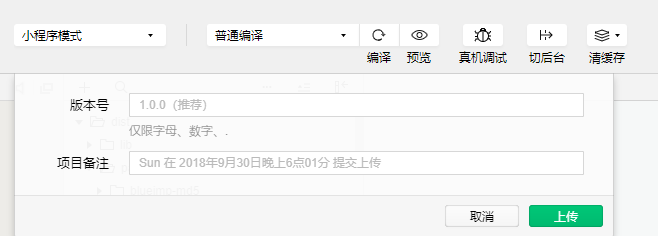
* 生成的 **版本号** 规则
* 尝试读取微信小程序项目根目录下的 `package.json` 文件中的版本号
* 尝试读取微信小程序项目 GIT 最后提交的日志的 hash 值
* 组合: `${pkg.version}.${hash}.${env}`
* 例如: `1.0.0.7004c7b.prod`
* 生成的 **备注** 规则
* 读取命令行中传入的环境参数: `--env`
* 读取命令行中传入的备注参数: `--desc`
* 尝试读取微信小程序项目 GIT 最后提交的日志的 message
* 组合: `env: ${env} ${desc || message}`
* 例如: `env: test 补充信息`
## Installation
```
npm install weappdevtools-cli -g
```
## Example usage
### upload
```
cd /path/to/weapp-project-root-dir
weappdevtools-cli upload --env=test
```
or
```
weappdevtools-cli upload --projectRoot=/path/to/weapp-project-root-dir --env=test
```
```
√ Get last commit log: {"hash":"7004c7bxxxxxxxxxxxxxxxxxxxxxxxxxxxxxxxxxxxxx","date":"2018-09-28 13:42:26 +0800","message":"","author_name":"","author_email":""}
√ Find wechatdevtools process: {"name":"wechatdevtools.exe","pid":26096,"path":"E:\\Program Files\\Tencent\\微信web开发者工具\\wechatdevtools.exe"}
--------------------------
Use wechatdevtools cli: E:\Program Files\Tencent\微信web开发者工具\cli.bat
--------------------------
--------------------------
> cli.bat -u 1.0.0.7004c7b@E:\a\b\c\fe-weapp-xxx --upload-desc "env: test" --upload-info-output "E:\a\b\c\fe-weapp-xxx\upload-info.json"
--------------------------
Initializing...
idePortFile: C:\Users\xx\AppData\Local\微信web开发者工具\User Data\Default\.ide
IDE server has started, listening on http://127.0.0.1:60233
initialization finished
uploading project...
upload success
--------------------------
┌─────────────────────┬───────────────────────┬────────────────────┬────────────┐
│ 时间 │ 项目 │ 版本号 │ 项目备注 │
├─────────────────────┼───────────────────────┼────────────────────┼────────────┤
│ 2018-12-26 11:45:26 │ E:\a\b\c\fe-weapp-xxx │ 1.0.0.7004c7b.test │ env: test │
└─────────────────────┴───────────────────────┴────────────────────┴────────────┘
--------------------------
本次上传的额外信息: {"size":{"total":408.67,"packages":[{"name":"__FULL__","size":408.67}]}}
```
### preview
```
weappdevtools-cli preview --projectRoot=/path/to/weapp-project-root-dir
```
```
√ Find wechatdevtools process: {"name":"wechatdevtools.exe","pid":26096,"path":"E:\\Program Files\\Tencent\\微信web开发者工具\\wechatdevtools.exe"}
--------------------------
Use wechatdevtools cli: E:\Program Files\Tencent\微信web开发者工具\cli.bat
--------------------------
--------------------------
> cli.bat -p E:\a\b\c\fe-weapp-xxx --preview-info-output "E:\a\b\c\fe-weapp-xxx\preview-info.json"
--------------------------
Initializing...
idePortFile: C:\Users\xx\AppData\Local\微信web开发者工具\User Data\Default\.ide
IDE server has started, listening on http://127.0.0.1:60233
initialization finished
preparing preview...
[qrcode]
preview success
--------------------------
本次预览的额外信息: {"size":{"total":408.67,"packages":[{"name":"__FULL__","size":408.67}]}}
```
## Notice
* 需要将开发者工具的`设置-安全设置-服务端口`打开
* 需要将目标项目从"微信web开发者工具"中删除掉一次(执行命令后会自动再加上该项目)
* 如果你的项目的开发模式非微信小程序原生的开发模式, 例如使用了 [min](https://github.com/meili/min-cli) 或者其他(wepy/mpvue/taro/...)
* 需要给 `project.config.json` 添加 [`miniprogramRoot`](https://developers.weixin.qq.com/miniprogram/dev/devtools/projectconfig.html) 参数