https://github.com/uknownothingsnow/JsBridge
android java and javascript bridge, inspired by wechat webview jsbridge
https://github.com/uknownothingsnow/JsBridge
Last synced: 12 months ago
JSON representation
android java and javascript bridge, inspired by wechat webview jsbridge
- Host: GitHub
- URL: https://github.com/uknownothingsnow/JsBridge
- Owner: uknownothingsnow
- Created: 2015-02-26T12:10:58.000Z (about 11 years ago)
- Default Branch: master
- Last Pushed: 2024-05-13T05:14:53.000Z (almost 2 years ago)
- Last Synced: 2025-03-26T17:11:20.682Z (12 months ago)
- Language: Java
- Size: 634 KB
- Stars: 9,826
- Watchers: 256
- Forks: 2,022
- Open Issues: 146
-
Metadata Files:
- Readme: README.md
Awesome Lists containing this project
- awesome - uknownothingsnow/JsBridge - android java and javascript bridge, inspired by wechat webview jsbridge (Java)
README
# JsBridge
-----
inspired and modified from [this](https://github.com/jacin1/JsBridge) and wechat jsBridge file, with some bugs fix and feature enhancement.
This project make a bridge between Java and JavaScript.
It provides safe and convenient way to call Java code from js and call js code from java.
## How JsBridge Work

## Demo
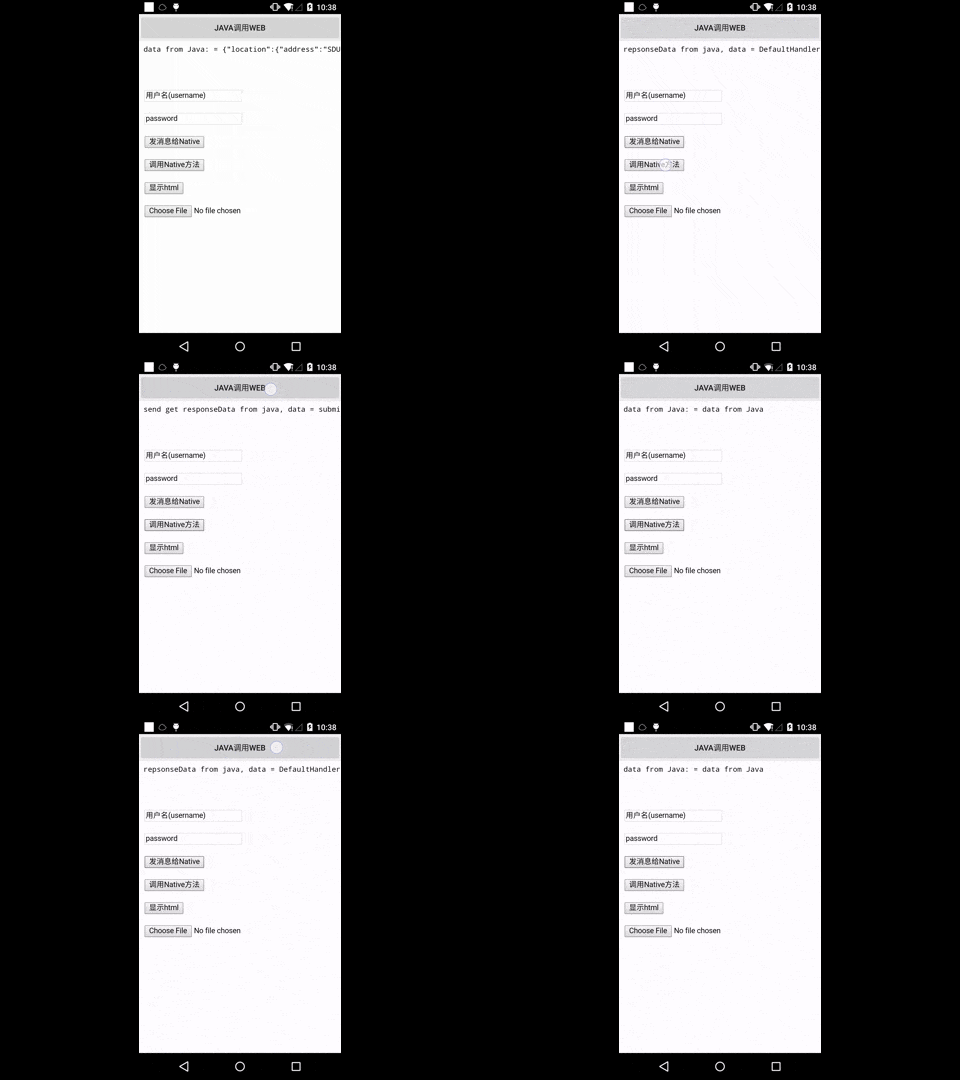
## Usage
## JitPack.io
I strongly recommend https://jitpack.io
```groovy
repositories {
// ...
maven { url "https://jitpack.io" }
}
dependencies {
compile 'com.github.lzyzsd:jsbridge:1.0.4'
}
```
## Use it in Java
add com.github.lzyzsd.jsbridge.BridgeWebView to your layout, it is inherited from WebView.
### Register a Java handler function so that js can call
```java
webView.registerHandler("submitFromWeb", new BridgeHandler() {
@Override
public void handler(String data, CallBackFunction function) {
Log.i(TAG, "handler = submitFromWeb, data from web = " + data);
function.onCallBack("submitFromWeb exe, response data from Java");
}
});
```
js can call this Java handler method "submitFromWeb" through:
```javascript
WebViewJavascriptBridge.callHandler(
'submitFromWeb'
, {'param': str1}
, function(responseData) {
document.getElementById("show").innerHTML = "send get responseData from java, data = " + responseData
}
);
```
You can set a default handler in Java, so that js can send message to Java without assigned handlerName
```java
webView.setDefaultHandler(new DefaultHandler());
```
```javascript
window.WebViewJavascriptBridge.doSend(
data
, function(responseData) {
document.getElementById("show").innerHTML = "repsonseData from java, data = " + responseData
}
);
```
### Register a JavaScript handler function so that Java can call
```javascript
WebViewJavascriptBridge.registerHandler("functionInJs", function(data, responseCallback) {
document.getElementById("show").innerHTML = ("data from Java: = " + data);
var responseData = "Javascript Says Right back aka!";
responseCallback(responseData);
});
```
Java can call this js handler function "functionInJs" through:
```java
webView.callHandler("functionInJs", new Gson().toJson(user), new CallBackFunction() {
@Override
public void onCallBack(String data) {
}
});
```
You can also define a default handler use init method, so that Java can send message to js without assigned handlerName
for example:
```javascript
window.WebViewJavascriptBridge.init(function(message, responseCallback) {
console.log('JS got a message', message);
var data = {
'Javascript Responds': 'Wee!'
};
console.log('JS responding with', data);
responseCallback(data);
});
```
```java
webView.send("hello");
```
will print 'JS got a message hello' and 'JS responding with' in webview console.
### Switch to CustomWebview
* activity_main.xml
```xml
```
* MainActivity.java
Class BridgeWebview change to CustomWebview;
```java
CustomWebView webView = (CustomWebView) findViewById(R.id.webView);
```
## Notice
This lib will inject a WebViewJavascriptBridge Object to window object.
You can listen to `WebViewJavascriptBridgeReady` event to ensure `window.WebViewJavascriptBridge` is exist, as the blow code shows:
```javascript
if (window.WebViewJavascriptBridge) {
//do your work here
} else {
document.addEventListener(
'WebViewJavascriptBridgeReady'
, function() {
//do your work here
},
false
);
}
```
Or put all JsBridge function call into `window.WVJBCallbacks` array if `window.WebViewJavascriptBridge` is undefined, this task queue will be flushed when `WebViewJavascriptBridgeReady` event triggered.
Copy and paste setupWebViewJavascriptBridge into your JS:
```javascript
function setupWebViewJavascriptBridge(callback) {
if (window.WebViewJavascriptBridge) {
return callback(WebViewJavascriptBridge);
}
if (window.WVJBCallbacks) {
return window.WVJBCallbacks.push(callback);
}
window.WVJBCallbacks = [callback];
}
```
Call `setupWebViewJavascriptBridge` and then use the bridge to register handlers or call Java handlers:
```javascript
setupWebViewJavascriptBridge(function(bridge) {
bridge.registerHandler('JS Echo', function(data, responseCallback) {
console.log("JS Echo called with:", data);
responseCallback(data);
});
bridge.callHandler('ObjC Echo', {'key':'value'}, function(responseData) {
console.log("JS received response:", responseData);
});
});
```
It same with https://github.com/marcuswestin/WebViewJavascriptBridge, that would be easier for you to define same behavior in different platform between Android and iOS. Meanwhile, writing concise code.
## License
This project is licensed under the terms of the MIT license.