https://github.com/ulhpc/sw
User Software Management on the UL HPC Platform based on RESIF v3 and streamline Easybuild. BEWARE: public export in progress, some files missing until this operation is completed.
https://github.com/ulhpc/sw
Last synced: 8 months ago
JSON representation
User Software Management on the UL HPC Platform based on RESIF v3 and streamline Easybuild. BEWARE: public export in progress, some files missing until this operation is completed.
- Host: GitHub
- URL: https://github.com/ulhpc/sw
- Owner: ULHPC
- Created: 2021-04-14T08:03:11.000Z (about 5 years ago)
- Default Branch: devel
- Last Pushed: 2022-08-30T19:24:21.000Z (almost 4 years ago)
- Last Synced: 2025-01-17T00:47:58.451Z (over 1 year ago)
- Language: Shell
- Homepage:
- Size: 3.25 MB
- Stars: 2
- Watchers: 7
- Forks: 1
- Open Issues: 0
-
Metadata Files:
- Readme: README.md
- Contributing: docs/contributing/README.md
Awesome Lists containing this project
README
**IMPORTANT: Public export toward this repository IN PROGRESS, some files will be missing until this operation is completed and this banner disappears**
 [](http://www.gnu.org/licenses/gpl-3.0.html) [](https://github.com/ULHPC/sw/issues/) [](https://github.com/ULHPC/sw/) [](https://github.com/ULHPC/sw)
_ _ _ _ _ ____ ____ ____ _____ ____ ___ _____ _____ ___
| | | | | | | | | _ \ / ___| | _ \| ____/ ___|_ _| ___| |___ / / _ \
| | | | | | |_| | |_) | | | |_) | _| \___ \| || |_ |_ \| | | |
| |_| | |___ | _ | __/| |___ | _ <| |___ ___) | || _| ___) | |_| |
\___/|_____| |_| |_|_| \____| |_| \_\_____|____/___|_| |____(_)___/
Copyright (c) 2020-2021 UL HPC Team
__User Software Management for [Uni.lu HPC](https://hpc.uni.lu) Facility based on the RESIF 3.0 framework__
This is the **Public** repository exposing the main scripts, concepts and documentation facilitating the dissemination of our concepts.
[Accepted paper](https://orbilu.uni.lu/handle/10993/47115) describing RESIF3 concepts and architecture was presented during [ACM PEARC'21](https://pearc.acm.org/pearc21/) [1] -- [doi](https://dl.acm.org/doi/10.1145/3437359.3465600) | [orbilu](https://orbilu.uni.lu/handle/10993/47115)
> [1] S. Varrette, E. Kieffer, F. Pinel, E. Krishnasamy, S. Peter, H. Cartiaux, and X. Besseron, "_RESIF 3.0: Toward a Flexible & Automated Management of User Software Environment on HPC facility_", in ACM Practice and Experience in Advanced Research Computing ([PEARC'21](https://pearc.acm.org/pearc21/)), Virtual Event, 2021.
[](slides/2021/ACM-PEARC21/slides_acm-pearc21-resif3.pdf)
### BibTex entry
```bibtex
@InProceedings{VKPKPCB_PEARC21,
author = {S. Varrette and E. Kieffer and F. Pinel and E. Krishnasamy and S. Peter and H. Cartiaux and X. Besseron},
title = {{RESIF 3.0: Toward a Flexible & Automated Management of User Software Environment on HPC facility}},
booktitle = {ACM Practice and Experience in Advanced Research Computing (PEARC'21)},
year = {2021},
publisher = {Association for Computing Machinery (ACM)},
OPTseries = {{PEARC'21}},
month = {July},
address = {Virtual Event},
doi = {10.1145/3437359.3465600},
isbn = {978-1-4503-8292-2/21/07},
url = {https://pearc.acm.org/pearc21/},
},
```
## Installation / Repository Setup
To clone this repository, proceed as follows (adapt accordingly):
``` bash
$ mkdir -p ~/git/github.com/ULHPC
$ cd ~/git/github.com/ULHPC
$ git clone https://github.com/ULHPC/sw.git
```
**`/!\ IMPORTANT`**: Once cloned and after following [Preliminaries guidelines](docs/setup.md) (LMod install, virtualenv setup, Github token etc. -- see [`docs/setup.md`](docs/setup.md) and [`docs/contributing/setup-github-integration.md`](docs/contributing/setup-github-integration.md)), initiate your local copy of the repository by running:
``` bash
$ cd ~/git/github.com/ULHPC/sw
$ make setup
```
__Post setup checks (laptop)__
From that point, you should be able to load Easybuild from your laptop, and all the following commands should succeed:
``` bash
### On your laptop
source settings/default.sh
eb --version
eb --show-config
# check that you are able to interact/update the ULHPC fork copy
make fork-easyconfigs-update
# check that you can interact with github
eb --check-github # All checks PASSed!
```
__Post setup checks (on supercomputer login node)__
When repeating the setup on the cluster, you can check that you are ready if the following commands should succeed:
``` bash
### On iris, this will go on a broadwell node
./scripts/get-interactive-job
source settings/${ULHPC_CLUSTER}.sh
# enable SSH agent
eval "$(ssh-agent)"
ssh-add ~/.ssh/id_rsa
eb --version
eb --show-config
# check that you are able to interact/update the ULHPC fork copy
make fork-easyconfigs-update
# check that you can interact with github
eb --check-github # ONLY new-pr and update-pr should FAIL
# reason is that most probably you don't want the ssh key on the cluster authorized
# to push on ULHPC fork
eval "$(ssh-agent -k)" # ONLY new-pr and update-pr should FAIL
# reason is that most probably you don't want the ssh key on the cluster authorized
# to push on ULHPC fork
```
## Documentation
See [`docs/`](docs/README.md).
The documentation for this project is handled by [`mkdocs`](http://www.mkdocs.org/#installation).
You might wish to generate locally the docs:
* Install [`mkdocs`](http://www.mkdocs.org/#installation)
* Preview your documentation from the project root by running `mkdocs serve` and visit with your favorite browser the URL `http://localhost:8000`
- Alternatively, you can run `make doc` at the root of the repository.
* (eventually) build the full documentation locally (in the `site/` directory) by running `mkdocs build`.
## Software set organizations
See [`docs/swsets.md`](docs/swsets.md).
Software sets holds a categorised list of software, defined as Module [`Bundle`](https://easybuild.readthedocs.io/en/latest/version-specific/generic_easyblocks.html#bundle) for the ULHPC environment holding the dependencies of hierarchical bundles structured under `easyconfigs/u` as follows:
```bash
├── ULHPC/[...]-.eb #### === Default global bundle for 'regular' nodes ===
│ ├── ULHPC-toolchains/[...]-.eb ### Toolchains, compilers, debuggers, programming languages...
│ ├── ULHPC-bio/[...]-.eb ### Bioinformatics, biology and biomedical
│ ├── ULHPC-cs/[...]-.eb ### Computational science, including:
│ └── [...]
└── ULHPC-gpu/[...]-.eb #### === Specific GPU versions compiled under {foss,intel}cuda toolchains ===
```
See [`easyconfigs/u/ULHPC*`](easyconfigs/u/)

A strong versioning policy is enforced, which fix the core component versions of the bundles.

## User Software builds
Slurm launchers are provided under `scripts/` to facilitate software builds.
**`/!\ IMPORTANT`** RESIF 3 supports 3 operation modes depicted below:
| Operation Mode | Architecture | Launcher script |
|---------------------- |------------ |---------------------------------------------------------------- |
| Easybuild bootstrap/update | * | `setup.sh` |
| _Home_/_Testing_ builds | default | `[sbatch] ./scripts/[]/launcher-test-build-cpu.sh` |
| | CPU non-default | `[sbatch] ./scripts/[]/launcher-test-build-cpu-.sh` |
| | GPU optimized | `[sbatch] ./scripts/[]/launcher-test-build-gpu.sh` |
| _Production_ `` builds | default | `[sbatch] ./scripts/prod/launcher-resif-prod-build-cpu.sh -v ` |
| | CPU non-default | `[sbatch] ./scripts/prod/launcher-resif-prod-build-cpu-.sh -v ` |
| | GPU optimized | `[sbatch] ./scripts/prod/launcher-resif-prod-build-gpu.sh -v ` |
**See [`docs/build.md`](docs/build.md) for more details**
_Note_: for convenience, a GNU screen configuration file [`config/screenrc`](config/screenrc) is provided to quickly bootstrap the appropriate tabs:
```bash
screen -c config/screenrc
# 'SW' tab meant for git / sync operations. To enable the ssh agent:
# eval "$(ssh-agent)"
# ssh-add ~/.ssh/id_rsa
# make up
# make fork-easyconfigs-update
# 'broadwell' tab for associated build. Ex interactive job:
# ./scripts/get-interactive-job
# 'skylake' tab for associated build. Ex interactive job:
# ./scripts/get-interactive-job-skylake
# 'gpu' tab for associated build. Ex interactive job:
# ./scripts/get-interactive-job-gpu
# 'epyc' tab for aion builds
# ssh aion
# ./scripts/get-interactive-job
```
Don't forget to kill your ssh agent when you have finish: `eval "$(ssh-agent -k)"`
In all cases, **production** builds **MUST** be run as `resif` using the launcher scripts under `scripts/prod/*`.
Software and modules will be installed in that case under `/opt/apps/resif` (`$LOCAL_RESIF_ROOT_DIR`) -- See [Technical Docs](https://hpc-docs.uni.lu/environment/modules/#ulhpc-modulepath).
You **MUST BE VERY CAREFUL** when running these scripts as they alter the production environment.
The final organizations of the software and modules is depicted below:
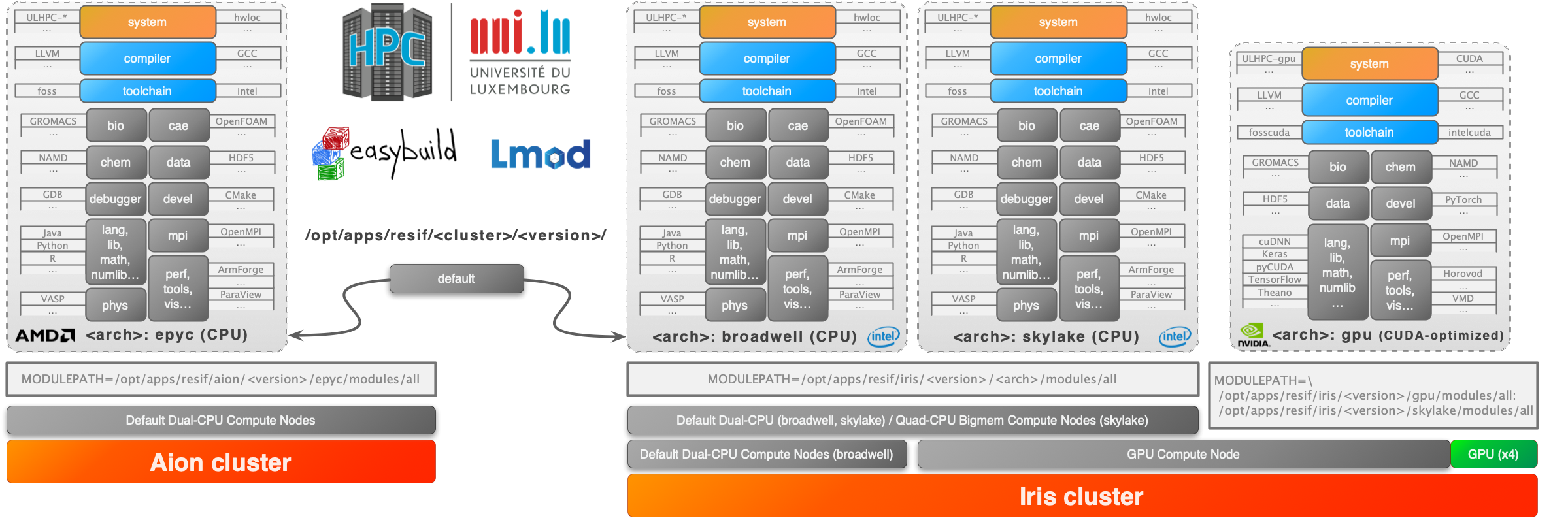
## Workflow and ULHPC Bundle Development guidelines
You first need to review the expected [Git workflow](docs/contributing/git-flow.md)

To add a new software to one of the ULHPC bundle module, you need to find and eventually adapt an existing Easyconfig file. Searching such files can be done using either `eb -S `, or via the provided script [`./scripts/suggest-easyconfigs [-v ] `](scripts/suggest-easyconfigs) which
1. search for Easyconfigs matching the proposed pattern, sorted by increasing version (`sort -V`)
2. check among those easyconfigs is any would be available for the target toolchain as that's probably the one you should use
3. suggest a single easyconfig to try (most recent version)
Example:
``` bash
$> ./scripts/suggest-easyconfigs -h
$> ./scripts/suggest-easyconfigs PAPI
=> Searching Easyconfigs matching pattern 'PAPI'
PAPI-5.4.3-foss-2016a.eb
PAPI-5.5.1-GCCcore-6.3.0.eb
PAPI-5.5.1-GCCcore-6.4.0.eb
PAPI-5.6.0-GCCcore-6.4.0.eb
PAPI-5.7.0-GCCcore-7.3.0.eb
PAPI-5.7.0-GCCcore-8.2.0.eb
PAPI-6.0.0-GCCcore-8.3.0.eb
Total: 7 entries
... potential exact match for 2019b toolchain
PAPI-6.0.0-GCCcore-8.3.0.eb
--> suggesting 'PAPI-6.0.0-GCCcore-8.3.0.eb'
```
See also [`docs/workflow.md`](docs/workflow.md) for more details.
## Submitting working Easyconfigs to easybuilders
See [`docs/contributing/`](docs/contributing/README.md)
To limit the explosion of custom easyconfigs as was done in the past, the key objective of this project is to **minimize** the number of custom easyconfigs to the _strict_ minimum and thus to submit a maximum of easyconfigs to the community for integration in the official [`easybuilders/easybuild-easyconfigs`](https://github.com/easybuilders/easybuild-easyconfigs) repository.
A set of helper scripts are provided to facilitate this operation -- Typical workflow:
```bash
# Creating a new pull requests (typically ion your laptop)
./scripts/PR-create -n easyconfigs///.eb # Dry-run
./scripts/PR-create easyconfigs///.eb
# Complete it with a successfull test report ON IRIS/AION
sbatch ./scripts/PR-rebuild-upload-test-report.sh
# (eventually) Update/complete the pull-request with new version/additional EB files
eb --update-pr .eb --pr-commit-msg "" # use native easybuild command here
# Update your local easyconfigs from remote PR commits
./scripts/update-from-PR [-n]
# Repo cleanup upon merged pull-request
./scripts/PR-close [-n]
```
## Issues / Feature request
You can submit bug / issues / feature request using the [`ULHPC/sw` Project Tracker](https://github.com/ULHPC/sw/issues)