https://github.com/ulysseszh/ulyssesys
A shell theme, can be used with Oh My Zsh or Oh My Posh
https://github.com/ulysseszh/ulyssesys
oh-my-posh-theme oh-my-zsh-theme powershell-theme zsh-theme
Last synced: 9 months ago
JSON representation
A shell theme, can be used with Oh My Zsh or Oh My Posh
- Host: GitHub
- URL: https://github.com/ulysseszh/ulyssesys
- Owner: UlyssesZh
- License: mit
- Created: 2024-01-05T09:25:47.000Z (over 2 years ago)
- Default Branch: master
- Last Pushed: 2025-05-26T20:51:21.000Z (about 1 year ago)
- Last Synced: 2025-05-26T21:39:59.587Z (about 1 year ago)
- Topics: oh-my-posh-theme, oh-my-zsh-theme, powershell-theme, zsh-theme
- Language: Shell
- Homepage:
- Size: 83 KB
- Stars: 0
- Watchers: 1
- Forks: 0
- Open Issues: 0
-
Metadata Files:
- Readme: README.md
- License: LICENSE
Awesome Lists containing this project
README
# ulyssesys
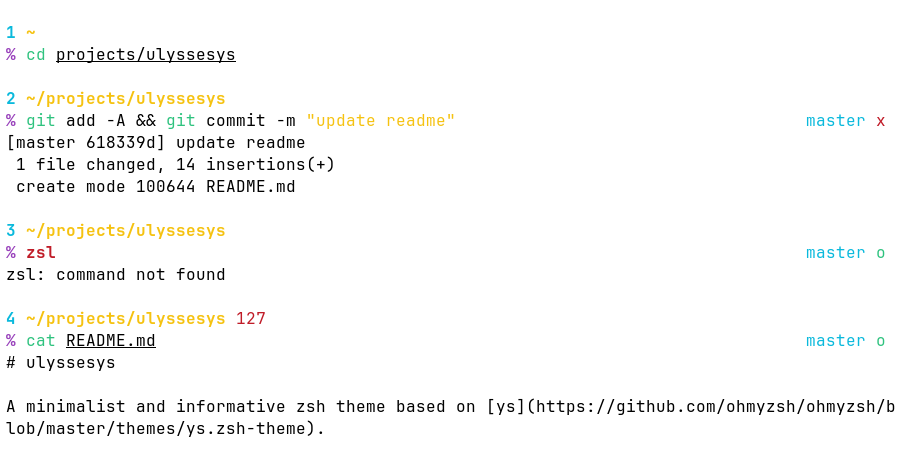
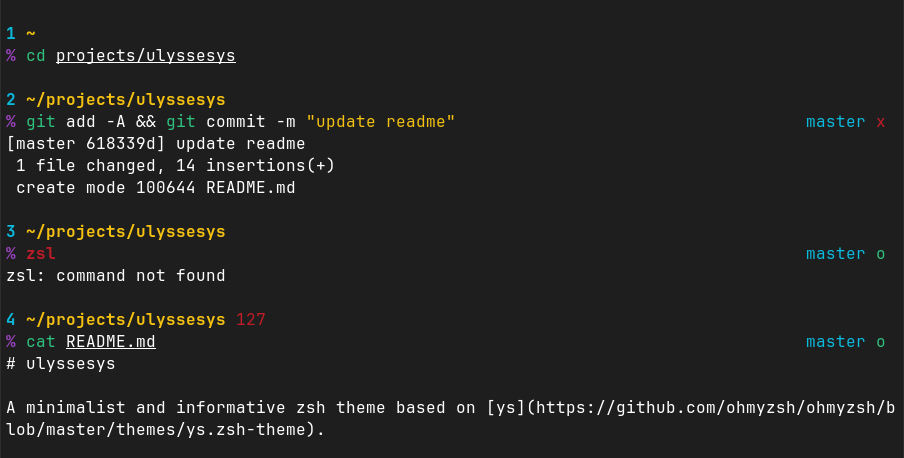
A minimalist and informative shell theme based on [ys](https://github.com/ohmyzsh/ohmyzsh/wiki/Themes#ys).
## Features
- Only ANSI colors and ASCII chars are used, so that this theme is suitable for both graphical terminal emulators
and virtual terminals (text TTY).
- The colors are designed so that this theme can be used with both light and dark backgrounds.
- Shows command index, full path to the current directory, exit code of last command, and current Git branch,
in a non-cluttering way.
- Indicates `nix-shell` environment
(for Zsh, use with the [nix-shell plugin](https://github.com/chisui/zsh-nix-shell)).
## Screenshots
## Installation
### Zsh
With [Oh My Zsh](https://ohmyz.sh/) installed, run
```shell
curl --output-dir $ZSH/custom/themes --create-dirs --remote-name https://github.com/UlyssesZh/ulyssesys/raw/refs/heads/master/ulyssesys.zsh-theme
```
Then, in `~/.zshrc`, set `ZSH_THEME=ulyssesys` before `source $ZSH/oh-my-zsh.sh`.
### PowerShell
With [Oh My Posh](https://ohmyposh.dev) installed, add this to `$PROFILE`:
```powershell
oh-my-posh init pwsh --config "https://github.com/UlyssesZh/ulyssesys/raw/refs/heads/master/ulyssesys.omp.json" | Invoke-Expression
```
## License
MIT.