https://github.com/umaranis/svelte-code-editor
Code Editor for Svelte based on CodeMirror
https://github.com/umaranis/svelte-code-editor
code codeeditor editor svelte svelte5 sveltekit
Last synced: about 1 month ago
JSON representation
Code Editor for Svelte based on CodeMirror
- Host: GitHub
- URL: https://github.com/umaranis/svelte-code-editor
- Owner: umaranis
- Created: 2025-03-24T06:15:15.000Z (over 1 year ago)
- Default Branch: main
- Last Pushed: 2025-11-14T22:36:53.000Z (8 months ago)
- Last Synced: 2025-11-15T00:22:55.356Z (8 months ago)
- Topics: code, codeeditor, editor, svelte, svelte5, sveltekit
- Language: Svelte
- Homepage: https://svelte-code-editor.vercel.app
- Size: 303 KB
- Stars: 8
- Watchers: 1
- Forks: 0
- Open Issues: 0
-
Metadata Files:
- Readme: README.md
Awesome Lists containing this project
README
# svelte-code-editor
`svelte-code-editor` is a code editor for Svelte based on CodeMirror.
It is extracted out of the official [Svelte playground](https://svelte.dev/playground) into a component to facilitate reuse.
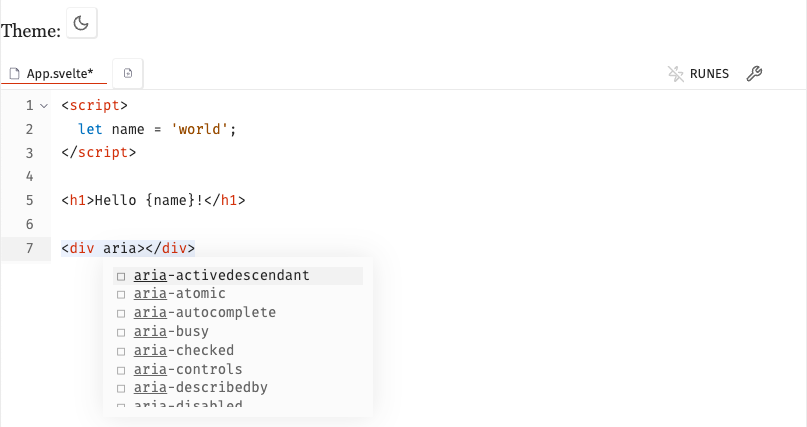
The package contains the following components:
| Component | Description |
|-----------|-------------|
| `Editor` | Core code editor component based on CodeMirror |
| `TabbedEditor` | Editor with tab support for multiple files |
| `ThemeToggle` | Toggle between light and dark themes |
## Features
- 🎨 Syntax highlighting for Svelte, JavaScript, Typescript and CSS
- ✨ Autocompletion for Svelte, JavaScript, and CSS
- 🔍 Search and replace
- ⌨️ Vim mode
- 🌓 Dark and light themes
## Installation
```bash
pnpm add @umaranis/svelte-code-editor
```
## Usage
1- Import the desired components into the page `import TabbedEditor from '$lib/TabbedEditor.svelte';`
2- Create `File` and `Workspace` objects
3- Include the component in your page ``
Here is an example:
```svelte
import Editor from '$lib/Editor.svelte';
import TabbedEditor from '$lib/TabbedEditor.svelte';
import { Workspace } from '$lib/Workspace.svelte';
import ThemeToggle from '$lib/components/ThemeToggle.svelte';
import type { File } from '$lib/Workspace.svelte';
import '@umaranis/svelte-code-editor/styles/index.css';
const file: File = {
type: 'file',
name: 'App.svelte',
basename: 'App.svelte',
contents: '',
text: true
};
const workspace = new Workspace([file], {
initial: 'App.svelte',
svelte_version: 'latest',
onupdate() {},
onreset() {}
});
Welcome to your svelte-code-editor project
Theme:
```