https://github.com/umercodez/websocketcam
Access Android camera via WebSocket client API and run AI / computer vision tasks with ease on live camera stream
https://github.com/umercodez/websocketcam
ai-image-detection android-camera camera camera-streamer computer-vision computer-vision-opencv computer-vision-tools image-processing live-camera live-image-recognition object-detection pose-detection websocket
Last synced: about 2 months ago
JSON representation
Access Android camera via WebSocket client API and run AI / computer vision tasks with ease on live camera stream
- Host: GitHub
- URL: https://github.com/umercodez/websocketcam
- Owner: UmerCodez
- License: gpl-3.0
- Created: 2026-02-16T15:41:07.000Z (6 months ago)
- Default Branch: main
- Last Pushed: 2026-06-06T09:55:50.000Z (2 months ago)
- Last Synced: 2026-06-06T11:21:11.996Z (2 months ago)
- Topics: ai-image-detection, android-camera, camera, camera-streamer, computer-vision, computer-vision-opencv, computer-vision-tools, image-processing, live-camera, live-image-recognition, object-detection, pose-detection, websocket
- Language: Kotlin
- Homepage:
- Size: 1.78 MB
- Stars: 59
- Watchers: 5
- Forks: 3
- Open Issues: 3
-
Metadata Files:
- Readme: README.md
- License: LICENSE
Awesome Lists containing this project
README
# Websocket CAM

    
[ ](https://github.com/UmerCodez/WebsocketCAM/releases) [
 ](https://f-droid.org/packages/app.umerfarooq.websocketcam/) [
 ](https://github.com/ImranR98/Obtainium)
### Access Android camera using a WebSocket client API to perform real-time AI and computer vision tasks on a live video stream.


The app broadcasts live camera frames as **JPEG** images over WebSocket connections, where each **JPEG** image is received as a **byte array** through the WebSocket’s `onMessage` callback. The app supports multiple client connections, enabling each client to independently perform AI or computer vision processing in parallel.
### Features
- Supports multiple websocket client connections
- Change camera settings without restarting the Websocket Server
- Access the live feed directly from a browser over the local network via browser's websocket client API (not browser's address bar)
- No ads, no tracking and no data collection
## Displaying live camera stream using Python
A simple Python example using OpenCV and WebSocket libraries to connect to the WebSocket CAM app and display the live camera stream.
```bash
pip install opencv-python numpy websocket-client
```
```python
import cv2
import numpy as np
import websocket
SERVER_URL = "ws://192.168.18.50:8080"
def on_message(ws, message):
# Convert received bytes into numpy array
np_arr = np.frombuffer(message, np.uint8)
# Decode JPEG
frame = cv2.imdecode(np_arr, cv2.IMREAD_COLOR)
if frame is not None:
cv2.imshow("Camera Stream", frame)
if cv2.waitKey(1) & 0xFF == 27: # ESC key to exit
ws.close()
cv2.destroyAllWindows()
else:
print("Failed to decode frame")
def on_error(ws, error):
print("WebSocket error:", error)
def on_close(ws, close_status_code, close_msg):
print("Connection closed:", close_status_code, close_msg)
cv2.destroyAllWindows()
def on_open(ws):
print("Connected to Websocket CAM, open camera to see live stream")
if __name__ == "__main__":
websocket.enableTrace(False)
ws = websocket.WebSocketApp(
SERVER_URL,
on_open=on_open,
on_message=on_message,
on_error=on_error,
on_close=on_close,
)
try:
ws.run_forever()
except KeyboardInterrupt:
print("\n Stopped by user")
ws.close()
cv2.destroyAllWindows()
```
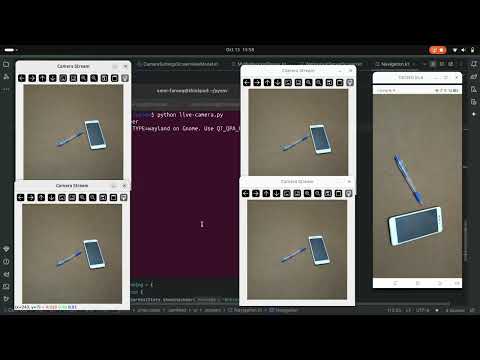
Start the WebSocket server in the app, then run the this Python script in **multiple terminals** to view **multiple live streams** simultaneously
## Demo (Youtube)
See the demo on Youtube 👇
[](https://www.youtube.com/watch?v=OIhSXAkaWBA)
### Examples
Working examples of this app are availbe here [WebsocketCAM examples](https://github.com/UmerCodez/WebsocketCAM-examples)
   