https://github.com/umurarslan/excel2config
Simple CLI tool generates network configuration based on Excel sheets which include Jinja2 template and data tables.
https://github.com/umurarslan/excel2config
cisco config-generator configuration excel import-excel jinja2 network network-automation network-configuration network-programming networking networking-in-python nokia python
Last synced: 6 months ago
JSON representation
Simple CLI tool generates network configuration based on Excel sheets which include Jinja2 template and data tables.
- Host: GitHub
- URL: https://github.com/umurarslan/excel2config
- Owner: umurarslan
- License: mit
- Created: 2022-07-17T23:29:31.000Z (almost 4 years ago)
- Default Branch: main
- Last Pushed: 2023-07-07T23:21:18.000Z (about 3 years ago)
- Last Synced: 2025-09-04T21:59:00.650Z (11 months ago)
- Topics: cisco, config-generator, configuration, excel, import-excel, jinja2, network, network-automation, network-configuration, network-programming, networking, networking-in-python, nokia, python
- Language: Python
- Homepage:
- Size: 148 KB
- Stars: 2
- Watchers: 1
- Forks: 0
- Open Issues: 0
-
Metadata Files:
- Readme: README.md
- License: LICENSE
Awesome Lists containing this project
README
# Excel2Config
Excel2Config simple CLI tool generates network configuration based on Excel sheets which include Jinja2 template and data tables.
---
## Requirements
[Python >= 3.9](https://www.python.org/downloads/)
> For Windows, select the **Add Python 3.x to PATH** checkbox during installation.
---
## Installation
```
pip install excel2config
```
### Installation Check
After installation **excel2config** command added to **System Path** and can be executed from any path easily as below:
```
> excel2config -h
usage: excel2config [-h] [excelfile]
positional arguments:
excelfile excel file path [e.g. srlinux_config_1.xlsx] (OPTIONAL, default: config.xlsx)
options:
-h, --help show this help message and exit
```
---
## Usage
### Simple Usage
Run **excel2config** command with **Excel File Path** from any path and check text output files in **Output Folder**:
```
excel2config
```
Example for Windows:
```
PS C:\Users\alg\desktop> excel2config C:\Users\alg\Desktop\test\config.xlsx
2022-07-17 09:07:40.275 INFO : OUTPUT FOLDER CREATED
2022-07-17 09:07:40.447 INFO : [C:\Users\alg\Desktop\test\config.xlsx] / [] START!
2022-07-17 09:07:40.463 INFO : [C:\Users\alg\Desktop\test\config.xlsx] / [] DONE!
2022-07-17 09:07:40.479 INFO : ALL DONE!
!!! ALL DONE! Press any key to exit...
PS C:\Users\alg\desktop> dir OUTPUTS_config_20220717-090740
Directory: C:\Users\alg\desktop\OUTPUTS_config_20220717-090740
Mode LastWriteTime Length Name
---- ------------- ------ ----
-a---- 17/07/2022 09:07 426 leaf1.txt
-a---- 17/07/2022 09:07 258 leaf2.txt
PS C:\Users\alg\desktop>
```
### Excel File
> Only **.xlsx** Excel file format supported.
> For new features (e.g. Custom Jinja Function) check latest example Excel in project **/examples** folder.
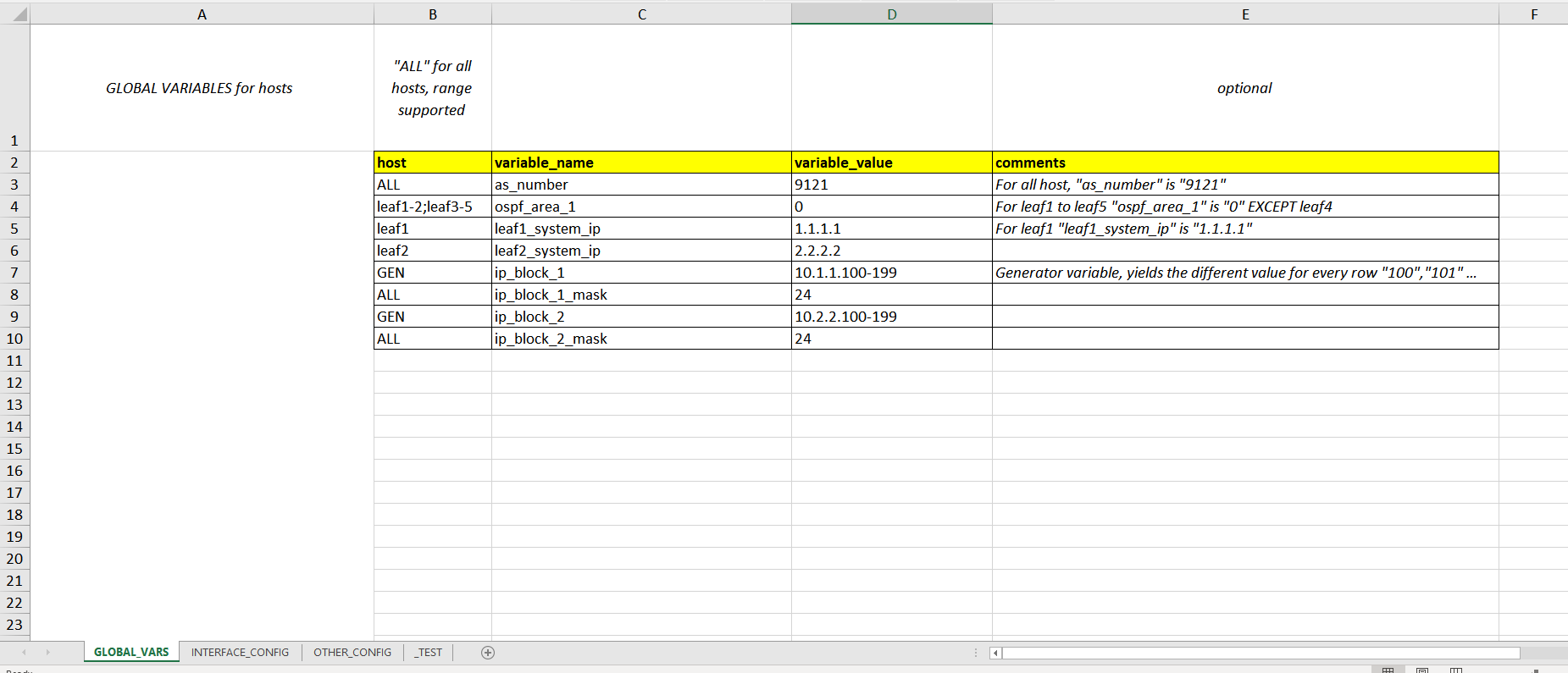
In Excel File first sheet is **GLOBAL_VARS**, this sheet optional and only for global template variables such as host-based (**e.g. leaf1**), all-host (**ALL**) and generator (**GEN**).
***GLOBAL_VARS Excel Sheet:***
Besides GLOBAL_VARS sheet, other sheets have two parts:
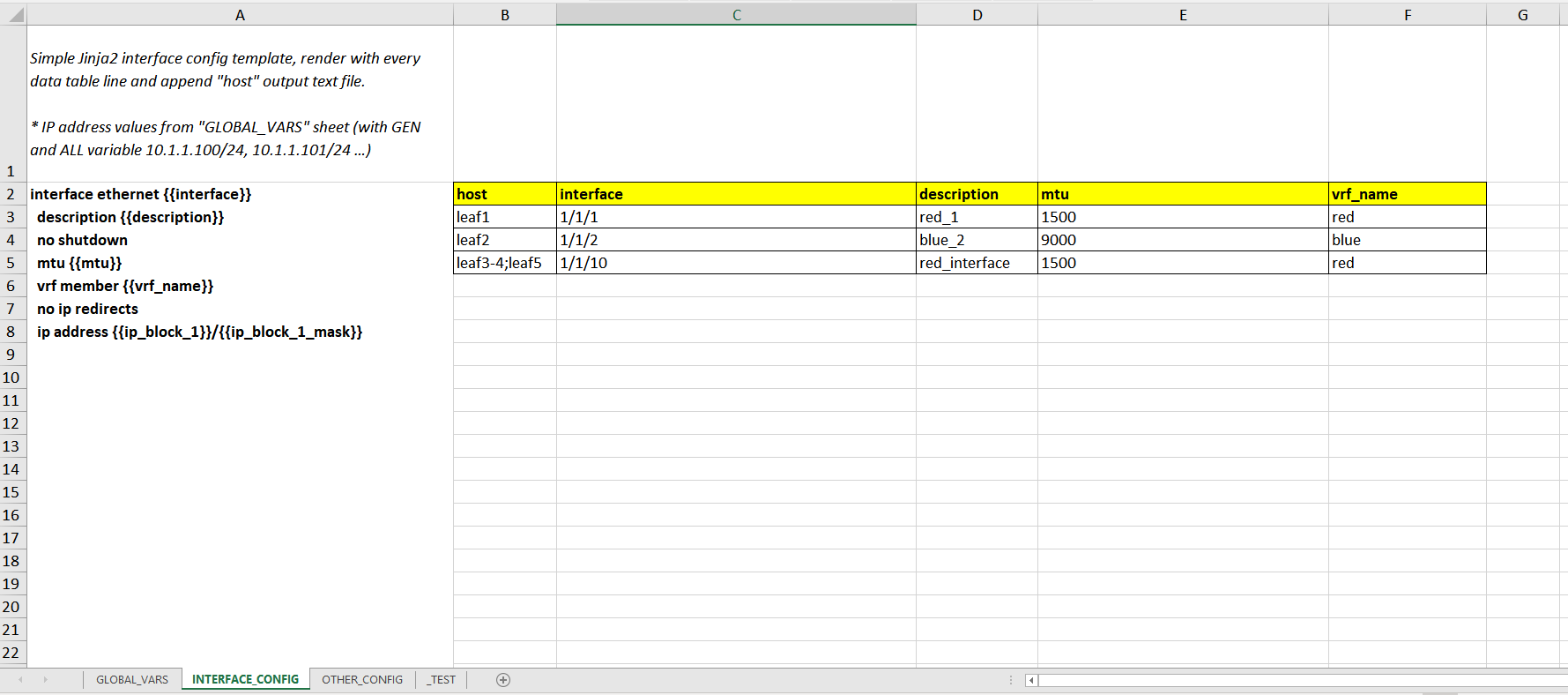
- **Jinja2 Template (A2 cell):** Jinja2 "IF", "FOR" and Filters can be used in template cell.
- **Data Tables (Header rows start with B2 cell, Variable rows start with B3 cell):** Range and generator supported in variable rows.
> Sheet name and Data Header name must have only **[A-Za-z0-9_]** (alphanumeric with underscore) characters and **not start with numeric** characters.
> Sheet name starts with underscore "_" will be ignored. (e.g. **_TEST**)
As below example Jinja template render with every data table line and append **host** (e.g. leaf1) output text file.
***INTERFACE_CONFIG Excel Sheet:***
***INTERFACE_CONFIG "leaf1.txt" outputs:***
```
interface ethernet 1/1/1
description red_1
no shutdown
mtu 1500
vrf member red
no ip redirects
ip address 10.1.1.100/24
```
***OTHER_CONFIG Excel Sheet:***
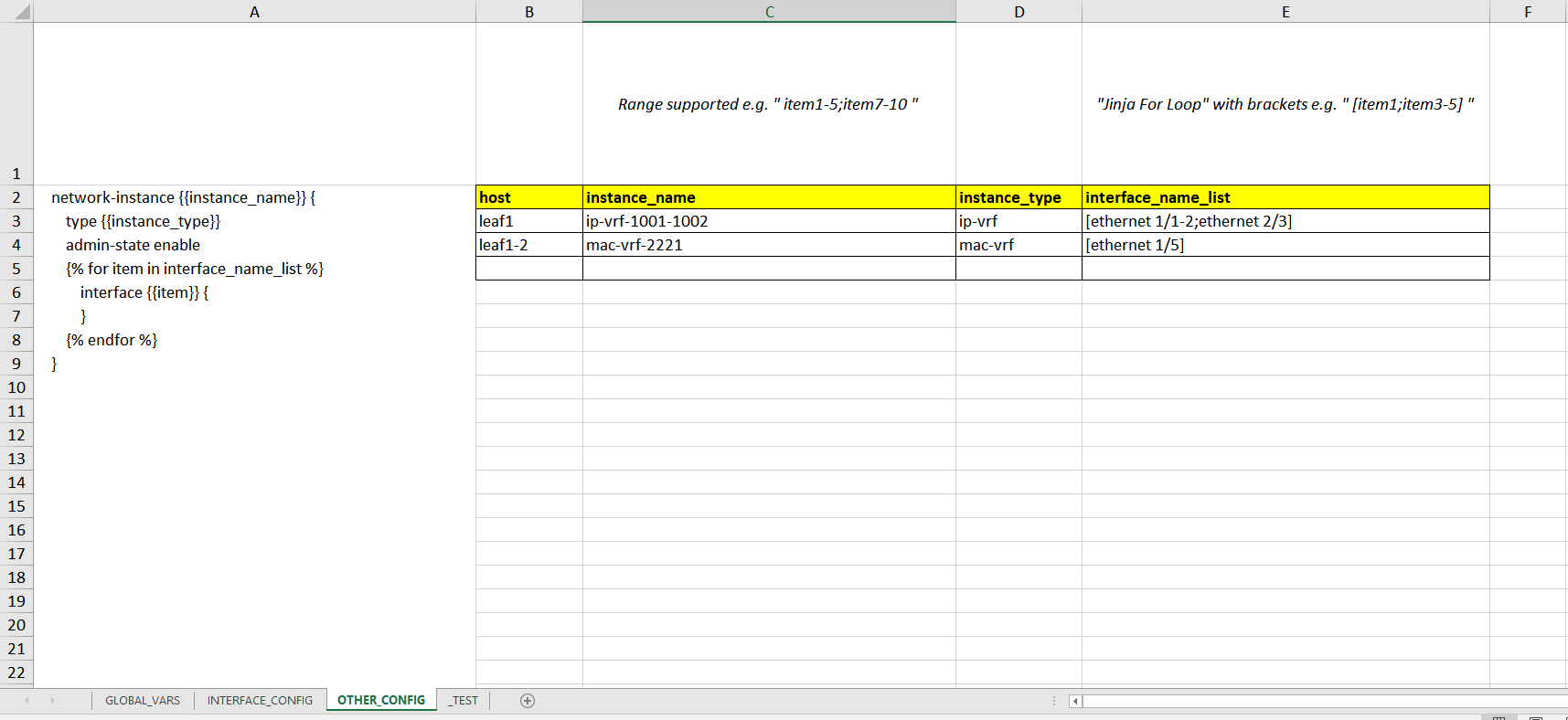
Example Excel file and outputs are in project **/examples** folder.
*EOF*