https://github.com/umurotti/3d-visualizer
A lightweight 3D visualizer built with Flask and Three.js. It lets you render meshes, point clouds, frustums, and coordinate axes in the browser — all controlled live via a Python API.
https://github.com/umurotti/3d-visualizer
3d-visualization flask interactive open-source threejs trimesh visualizer webgl
Last synced: 11 months ago
JSON representation
A lightweight 3D visualizer built with Flask and Three.js. It lets you render meshes, point clouds, frustums, and coordinate axes in the browser — all controlled live via a Python API.
- Host: GitHub
- URL: https://github.com/umurotti/3d-visualizer
- Owner: umurotti
- License: mit
- Created: 2025-04-15T11:03:34.000Z (about 1 year ago)
- Default Branch: main
- Last Pushed: 2025-05-05T09:29:15.000Z (about 1 year ago)
- Last Synced: 2025-05-13T14:23:35.543Z (about 1 year ago)
- Topics: 3d-visualization, flask, interactive, open-source, threejs, trimesh, visualizer, webgl
- Language: JavaScript
- Homepage:
- Size: 7.56 MB
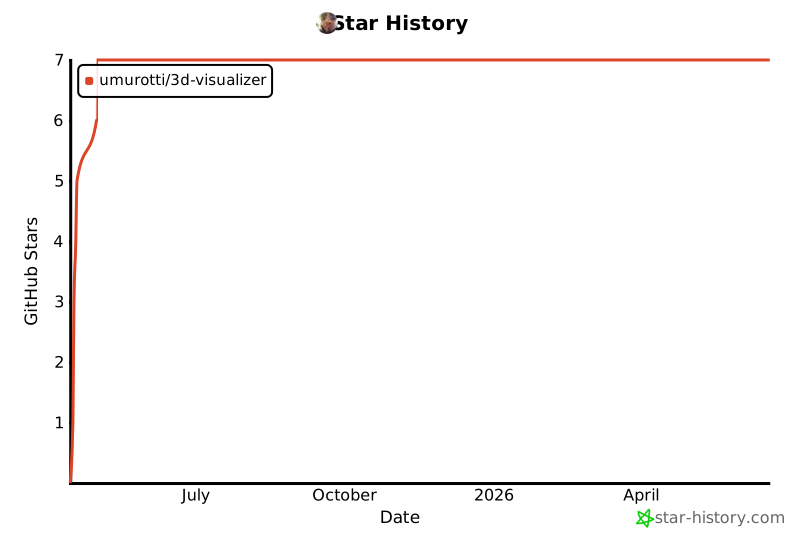
- Stars: 7
- Watchers: 3
- Forks: 0
- Open Issues: 4
-
Metadata Files:
- Readme: README.md
- Contributing: CONTRIBUTING.md
- License: LICENSE
- Code of conduct: CODE_OF_CONDUCT.md
- Security: SECURITY.md
Awesome Lists containing this project
README
# 🔭 3D Visualizer
A lightweight 3D visualizer built with **Flask** and **Three.js**.
It lets you render meshes (Trimesh), point clouds, frustums, and coordinate axes in the browser — all controlled live via a Python API.
---
## 📦 Features
- ✅ Render point clouds and triangle meshes
- ✅ Add camera frustums (green = random, red = known view)
- ✅ Show object and global coordinate systems
- ✅ Toggle visibility of individual elements (e.g. frustums, mesh)
- ✅ OrbitControls to rotate, pan, and zoom the view
- ✅ Light automatically follows the camera
---
## 🚀 Quick Start
### 1. Install dependencies
```bash
pip install flask flask-cors
```
---
### 2. Run the server
```bash
python app.py
```
🌐 Open the browser at: [http://localahost:{YOUR-PORT-HERE}](http://localhost:{your-port-here})
---
### 3. Example usage from Python
```python
from viewer_client import Online3DViewer
import trimesh
import numpy as np
# Start viewer client
viewer = Online3DViewer()
# Create dummy point cloud and mesh
points = np.random.rand(100, 3)
mesh = trimesh.creation.icosphere()
# Load mesh and point cloud
viewer.load_scene(mesh=mesh, pointcloud=points)
# Add camera frustums
pose_matrix = np.eye(4)
viewer.add_frustum(pose_matrix) # Default green
# Red frustum for known views
viewer.add_frustum(pose_matrix, color='red')
# Add coordinate axis
viewer.add_object_axis(pose_matrix, label="Object Frame")
# Show global XYZ
viewer.add_global_axes()
# Update mesh
viewer.update_mesh(mesh, label="epoch_1")
# Update pointcloud
viewer.update_point_cloud(points+2, label="epoch_1")
```

---
## 🧪 Demo
You can run a full demonstration using real mesh data (Stanford Bunny) to showcase all interactive features: mesh updates, frustum visualization, global/object axes, and orbiting motion.
This demo:
- Loads the Stanford Bunny mesh
- Centers it at the origin
- Iteratively updates the mesh position and orientation along a circular orbit
- Visualizes each iteration with a new green frustum and labeled object axis
- Adds a red frustum for a known view
### 🔁 Iterative Mesh Update Demo
To run it:
```bash
python run_demo.py
```
### 🐇 Demo Preview

### 🗂️ Demo Folder Structure
```
demo/
└── bunny/
└── reconstruction/
└── bun_zipper_res3.ply
```
Ensure that the `bun_zipper_res3.ply` file is present in the path above.
You can download the Stanford Bunny `.ply` file from the [Stanford 3D Scanning Repository](http://graphics.stanford.edu/data/3Dscanrep/) if needed.
---
## 💡 Notes
- Works best with recent versions of Chrome or Firefox
- Designed for local visual debugging — not production
- Easily embeddable in larger training/experiment loops
Inspired by the needs of fast real-time mesh and pose inspection during model training.
## Star History
[](https://www.star-history.com/#umurotti/3d-visualizer&Date)