https://github.com/unbalancedparentheses/vim-lunfardo
:koala: got vim? vim distribution with sane defaults
https://github.com/unbalancedparentheses/vim-lunfardo
Last synced: over 1 year ago
JSON representation
:koala: got vim? vim distribution with sane defaults
- Host: GitHub
- URL: https://github.com/unbalancedparentheses/vim-lunfardo
- Owner: unbalancedparentheses
- License: gpl-3.0
- Created: 2015-01-29T18:03:49.000Z (over 11 years ago)
- Default Branch: master
- Last Pushed: 2016-05-08T15:04:10.000Z (about 10 years ago)
- Last Synced: 2025-01-16T00:16:19.626Z (over 1 year ago)
- Language: VimL
- Homepage:
- Size: 39.1 KB
- Stars: 7
- Watchers: 1
- Forks: 0
- Open Issues: 16
-
Metadata Files:
- Readme: README.md
- License: LICENSE
Awesome Lists containing this project
README
# Vim Lunfardo
In the mid XIX century, Buenos Aires was pullulating with immigrants, mainly Spanish and Italian. Many of them were impoverished and blended in with
the already-poor locals: the descendents of aborigins and african slaves.
From the amalgam of the newcomers' languages with Argentina's 'castilian', emerged ther slang known as Lunfardo.
It was created by criminals, mainly to avoid being understood by prison guards.
It was disseminated thanks to 'tango' lyrics, a music which was born as suburban, marginal and was swiftly forbidden by the Church and higher classes. Tango was played and danced in ports, brothels, bars and prisons.
Nowadays, Lunfardo has blended into the castilian language and is part of its idiosincrasy.
---
# Installing Vim Lunfardo
Assuming you're using an Unix-like OS (*BSD, GNU/Linux, OS X, Solaris, etc), you already have vim installed, as well as git & curl you can skip the whole manual and just type in your favorite shell the following command:
```bash
curl -L https://raw.githubusercontent.com/unbalancedparentheses/vim-lunfardo/master/bootstrap.sh | bash
```
# Introduction to Vim
Here're some tips in case you've never used VIM before:
* [Learn Vim Progressively](http://yannesposito.com/Scratch/en/blog/Learn-Vim-Progressively/)
* Play [vim adventures](http://vim-adventures.com/)
* Type `vimtutor` into a shell to go through a brief interactive
tutorial inside VIM.
* Watch the screencasts at [vimcasts.org](http://vimcasts.org/)
* Read [Learn Vimscript the Hard Way](http://learnvimscriptthehardway.stevelosh.com/)
* Watch Derek Wyatt's energetic tutorial videos at [his site](http://derekwyatt.org/vim/tutorials/)
* Read [Why do Vim experts prefer buffers over tabs?](https://stackoverflow.com/questions/26708822/why-do-vim-experts-prefer-buffers-over-tabs)
* Read wycats' perspective on learning Vim at
[Everyone who tried to convince me to use vim was wrong](http://yehudakatz.com/2010/07/29/everyone-who-tried-to-convince-me-to-use-vim-was-wrong/)
* Read this and other answers to a question about vim at StackOverflow:
[Your problem with Vim is that you don't grok vi](http://stackoverflow.com/questions/1218390/what-is-your-most-productive-shortcut-with-vim/1220118#1220118)
* Practice with [vim golf](http://vimgolf.com/)'s challenges
##Vim cheatsheet

# Features
## Plugins
### jumplist
* `` jump back to the previous (older) location
* `` jump forward to the next (newer) location
###[vim-sleuth](https://github.com/tpope/vim-sleuth)
This plugin automatically adjusts 'shiftwidth' and 'expandtab' heuristically based on the current file, or, in the case the current file is new, blank, or otherwise insufficient, by looking at other files of the same type in the current and parent directories.
### indent and unindent
* in visual mode indent select lines
* in visual mode unindent select lines
### [CtrlP](https://github.com/kien/ctrlp.vim)
Fuzzy file, buffer, mru and tag finder
* `` invokes CtrlP
* `` to purge the cache for the current directory to get new files, remove deleted files and apply new ignore options
* `` and `` to cycle between modes
* `` to switch to filename only search instead of full path
* `` to switch to regexp mode
* ``, `` or the arrow keys to navigate the result list
* `` or ``, `` to open the selected entry in a new tab or in a new split
* ``, `` to select the next/previous string in the prompt's history
* `` to create a new file and its parent directories
* `` to mark/unmark multiple files and to open them
### Yank ring
* `` Yank menu
### Command line history
* `` Command history
### [GoldenView](https://github.com/zhaocai/GoldenView.Vim)
Tiled Window Management for Vim with golden view ratio rule forced by autoresize:
* `` split window
* `` switch current window with the main pane
* `` toggle back current window with the main pan
* `` next window
* `` previous window
### [BufferGator](https://github.com/jeetsukumaran/vim-buffergator)
Buffergator is a plugin for listing, navigating between, and selecting buffers to edit. Upon invocation (using the command, :BuffergatorOpen or BuffergatorToggle, or the provided key mapping, b), a catalog of listed buffers are displayed in a separate new window split (vertical or horizontal, based on user options; default = vertical). From this "buffer catalog", a buffer can be selected and opened in an existing window, a new window split (vertical or horizontal), or a new tab page.
Selected buffers can be "previewed", i.e. opened in a window or tab page, but with focus remaining in the buffer catalog. Even better, you can "walk" up and down the list of buffers shown in the catalog by using (or ) / (or ). These keys select the next/previous buffer in succession, respectively, opening it for preview without leaving the buffer catalog viewer.
### [ferret](https://github.com/wincent/ferret)
Ferret provides an :Ack command for searching across multiple files using The Silver Searcher, Ack, or Grep. Support for passing options through to the underlying search command exists, along with the ability to use full regular expression syntax without doing special escaping.
* `a` Search prompt
* `s` Search for the word currently under the cursor
### Autocomplete
If your vim has lua enabled and the patch version is bigger than patch-7.3-885
then [neocomplete](https://github.com/Shougo/neocomplete.vim) is used for autocomplete.
If your vim hasn't lua enabled then
[neocomplcache](https://github.com/Shougo/neocomplcache.vim) is used for autocomplete.
* `` autocompletes
### Snippets
If your vim has python enabled then
[ultisnips](https://github.com/SirVer/ultisnips) is used for inserting snippets.
If your vim hasn't python enabled then
[neosnippet](https://github.com/Shougo/neosnippet.vim) is used for inserting snippets.
In any case, [honza/vim-snippets](https://github.com/honza/vim-snippets) are used
as snippets.
If *neosnippet* snippets engine is used then also [neosnippet-snippets](https://github.com/Shougo/neosnippet-snippets/) are used as snippets.
* `` expands snippets
### [fugitive](http://github.com/tpope/vim-fugitive)
A Git wrapper so awesome, it should be illegal:
* `gb` maps to :Gblame
* `gs` maps to :Gstatus
* `gd` maps to :Gdiff
* `gl` maps to :Glog
* `gc` maps to :Gcommit
* `gp` maps to :Git push
### [vimshell](https://github.com/Shougo/vimshell.vim)
Powerful shell implemented by vim
* `S` opens shell
### [syntastic](https://github.com/scrooloose/syntastic)
Syntax checking hacks for vim
* `` checks and shows warnings and errors
###[autoformat](https://github.com/Chiel92/vim-autoformat)
Provide easy code formatting in Vim by integrating existing code formatters
* `` autoformats code
### [easy-align](https://github.com/junegunn/vim-easy-align)
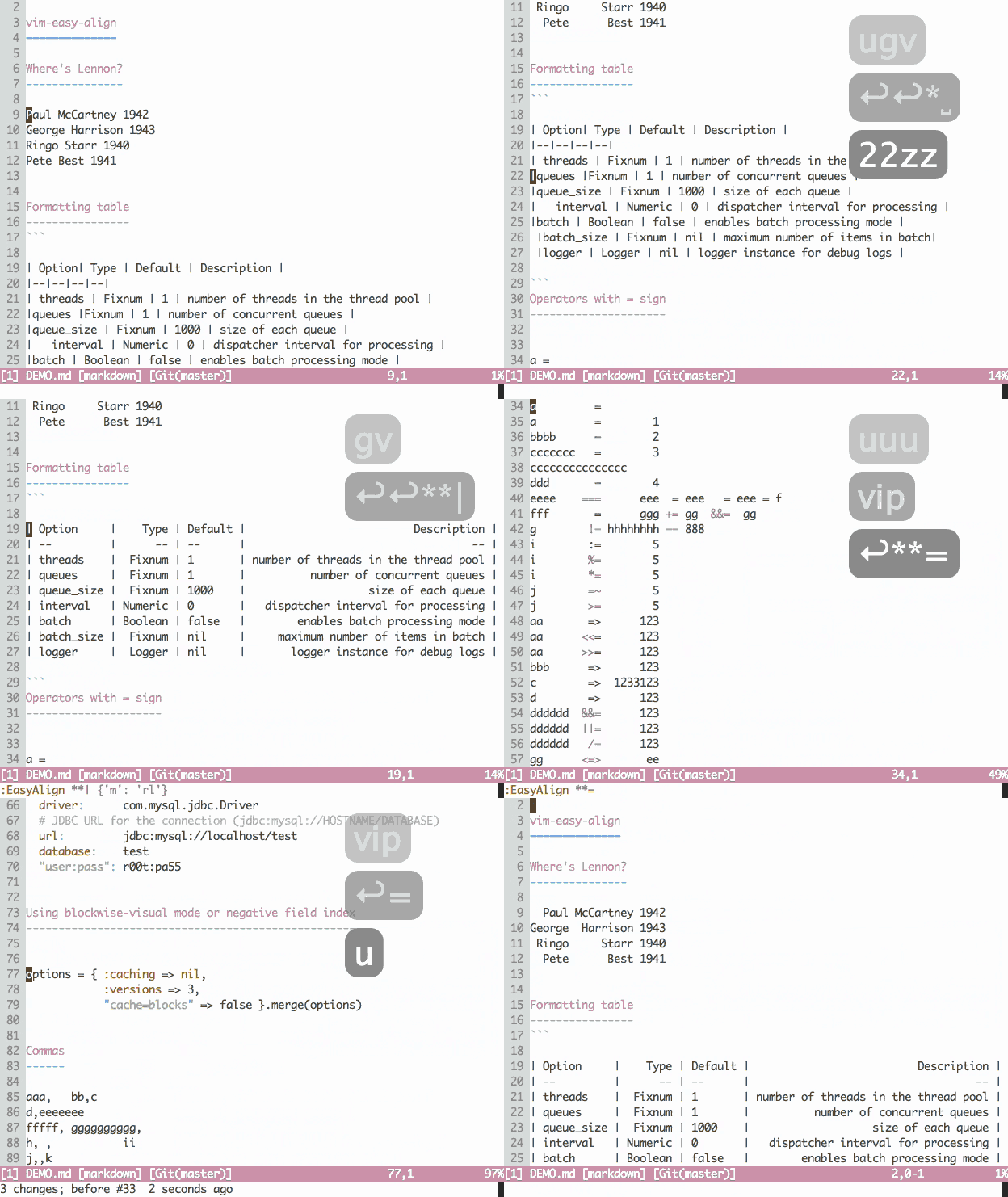
With the following lines of text
```
apple =red
grass+=green
sky-= blue
```
Try these commands:
- `vip=`
- `v`isual-select `i`nner `p`aragraph
- Start EasyAlign command (``)
- Align around `=`
- `gaip=`
- Start EasyAlign command (`ga`) for `i`nner `p`aragraph
- Align around `=`
Notice that the commands are repeatable with `.`
# Inspiration
- [spf13-vim](https://github.com/spf13/spf13-vim)
- [janus](https://github.com/carlhuda/janus)
- [bling](https://github.com/bling/dotvim)
- [astrails](https://github.com/astrails/dotvim)
- [thoughtbot](https://robots.thoughtbot.com/tags/vim)'s posts