https://github.com/undeadkernel/anise_framework
Programming framework for the development and deployment of algorithms and tasks
https://github.com/undeadkernel/anise_framework
Last synced: over 1 year ago
JSON representation
Programming framework for the development and deployment of algorithms and tasks
- Host: GitHub
- URL: https://github.com/undeadkernel/anise_framework
- Owner: UndeadKernel
- Created: 2014-10-28T12:42:39.000Z (over 11 years ago)
- Default Branch: master
- Last Pushed: 2015-11-16T12:30:37.000Z (over 10 years ago)
- Last Synced: 2025-01-23T20:36:36.040Z (over 1 year ago)
- Language: C++
- Homepage:
- Size: 12.4 MB
- Stars: 0
- Watchers: 3
- Forks: 4
- Open Issues: 0
-
Metadata Files:
- Readme: README.md
Awesome Lists containing this project
README
# ANISE Framework: Node Based Algorithm Programming Framework (for its acronym in Sindarin) #
ANISE is a C++ framework using the QT libraries for developing reusable, memory efficient and multi-threaded
capable algorithms in C++ without the need to worry excessively about memory management and multi-threading
for the GNU/Linux operating system. This framework is suitable for building small and efficient desktop
algorithms or large scale algorithms targeting a clustering environment, for instance.
## ANISE Overview ##
### Data Management ###
The framework provides an environment for developing algorithms as a series of interconnected nodes. Nodes are
able to receive data from other nodes, process all the received data, and forward the processing results to
other nodes. Each node is only responsible for managing its own memory; the data sent to other nodes is
efficiently managed by the framework. The data is distributed using the CoW (Copy-on-Write) paradigm: The
forwarded data is able to be read without incurring in any memory operations. The data, however, is copied
whenever it needs to be modified.
### Automatic Multi-Threading ###
Every node runs in parallel, whenever it is possible, using as many kernel threads as the local system
provides. Nodes start processing data as soon as it is made available and can forward new data to other nodes.
### Algorithm Reusability ###
Algorithms are able to be logically split into nodes that process incoming data and forward data to other
nodes. A collection of nodes and how they are connected is known as a mesh. Nodes can be reused in multiple
meshes and contexts. Each node receives and forwards a particular (and predefined) type of data. As long as
the nodes receive the type of data they expect, they can be used in different meshes. This enables the
creation of reusable components that can be shared among different algorithms.
Nodes are built as standalone libraries that the ANISE framework incorporates. As such, the framework is a
standalone unit that incorporates external libraries (Nodes) to extend its functionality. Each Node is able to
have its own code-base and different compilation process.
## ANISE Components ##
### The Gate ###
```c++
class CGate
{
QString m_name; // A unique identifier of a gate.
QString m_msg_type; // The type of data that can be linked to the gate.
CNode *m_linked_Node; // The Node linked to this gate.
QList> m_linked_gates; // Gates this gate is linked to.
};
```
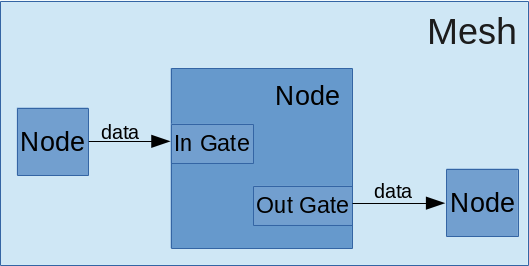
Nodes in the ANISE framework communicate by receiving and forwarding data among each other. Gates are the
means by which Nodes connect to each other. A gate is identified by a *name*, *belongs to only one Node* and
specifies the *type of data* the gate can handle. Gates can only connect to other gates of the same type.
Additionally, a gate might be either an input or an output gate. Input gates can be connected to multiple
output gates and output gates might have multiple (different) input gates connected to them.
### The Node ###
Nodes are the core of the ANISE framework. Each Node is a logical unit capable of receiving, processing and
forwarding data to other Nodes. Each Node has a configuration component that specifies, among other things,
the input and output gates available to the Node. Input gates receive a predefined type of data and either
forward it to the processing component of the Node or add it to a queue for later processing. Output gates are
connected to other Input gates (with a matching data type) and transmit the data forwarded by the processing
component of the Node.
```c++
class CNodeConfig
{
QString m_name; // Unique identifier for the Node
Qstring m_description; // Description of the Node
QList m_parameter_template_map; // List of parameters
QList m_input_tempaltes; // List of gates
QList m_output_templates; // List of gates
};
```
Each Node has a configuration (```class CNodeConfig```) that specifies different properties inherent to a
Node. The developer of a Node is able to modify the configuration of the node by specifying the default name
of the Node; a user-readable description of the Node; the input and output gates available to the Node; and
the parameters the Node expects. When using a Node, the user is not able to add or change the details of the
gates, parameters or description. The user is, however, capable of changing the name of the node, assigning
values to parameters and connecting output gates with other input gates.
## Node Programming and Development ##
### Building the Framework ###
The framework currently uses the QT 5.4.0 libraries. Before Nodes can be developed, the framework must be
downloaded and compiled. Download the framework with:
```
$ git clone https://github.com/UndeadKernel/anise_framework.git
```
This will create a folder called 'anise_framework' in the current directory. The framework can be compiled
into either a debug or release mode. In debug mode, messages from the framework and all nodes are printed on
the screen detailed with the line and function where they were printed. Debugging symbols are also enabled.
The performance of the framework in **debug mode** is suboptimal and, as such, should only be used to debug
Nodes in development. On the contrary, the **release mode** suppresses most of the output messages and
increases and optimizes the framework for performance.
Compile the framework with **debug mode** enabled with the following commands:
```
$ qmake CONFIG+=debug
$ make
```
The compiled framework will be created under the folder 'bin/debug/anise-framework'.
Compile the framework in **release mode** with the following commands:
```
$ qmake CONFIG=+release
$ make
```
The compiled framework will be created under the folder 'bin/release/anise-framework'.
The previous commands will also compile the framework and all Nodes and Data structures also located in
```src_nodes``` and ```src_data```, respectively.
In the same folder where the framework is built, two folders are also created (or must be created if they do
not exist). The folder *nodes* has all the nodes (in the form of .so libraries) that the framework will read
and incorporate when started. Likewise, the folder *data* contains all the data structures the framework
knows about and is able to use within Nodes.
### Building the Framework with QT Creator ###
The framework can be easily compiled using QT Creator as well. Open the file **anids-framework.pro** and
select a build mode (either debug or release) and compile as usual. The same folder
Nodes can be developed using any IDE or programming toolchain. However, QT Creator enables an easy integration
with the framework for ease of development. If QT creator is used, building the framework i
### Creating a New Node ###
A Node can be developed by adding a new QT project folder in ```src_nodes``` and adding the corresponding
'.pro' of the project to 'src_nodes.pro'. If this path for building Nodes is taken, when the framework is
built, as described in the previous section, the Node in development will also be compiled and automatically
placed where it needs to be. Otherwise, if chosen to develop the Node outside of QT creator, the Node must be
compiled as a library and placed in the **nodes* folder where the framework binary (*anise-framework*) is
located.
To start developing a Node, copy the contents of 'src_nodes/skeleton' into a new folder and change the name of
the contents named *skeleton* to match the name of the node you have chosen. Keep the file extensions. A Node
implementation should look like:
```c++
class CNewNode: public CNode
{
Q_OBJECT
private:
// Data Structures
public:
// Constructor
explicit CNewNode(const CNodeConfig &config, QObject *parent = 0);
// Set the configuration template for this Node.
static void configure(CNodeConfig &config);
protected:
// Function called when the simulation is started.
virtual bool start();
// Receive data sent by other nodes connected to this node.
virtual void data(QString gate_name, const CConstDataPointer &data);
};
```
It's the responsibility of the Node developer to implement 4 functions:
1. The Node **constructor**
2. The **configure** function
3. The **start** function
4. The **data** function
The requirements and purpose of these functions are described in the following subsections.
#### The Node **constructor** ####
The constructor must call the ```CNode()``` parent class constructor as well. For example:
```c++
CNewNode::CNewNode(const CNodeConfig &config, QObject *parent/* = 0*/)
: CNode(config, parent)
{
}
```
#### The **configure** Function ####
The configure function is where the node is setup to receive certain parameters, to create input and output
gates, to set a default Node name and to set a user-readable Node description.
This is an example configure function that sets all these 4 options:
```c++
void CNewNode::configure(CNodeConfig &config)
{
config.setName("New");
// Set a Description of this node.
config.setDescription("");
// Add parameters
config.addFilename("file", "Input File", "File to be read from disk.");
// Add the gates.
config.addInput("in", "table");
config.addOutput("out", "table");
}
```
#### The **start** Function ####
This function is called only once when the framework is started for each instance of the Node being used in a
mesh. Initialization of dynamic memory that should be used during the entire lifetime of the Node should be
performed here. The function returns *true* if all is well, oitherwise, the function returns *false* to
indicate that something went wrong. If *false* is returned, the entire simulation is halted.
It's important to note that all Nodes are instantiated at the same time when a mesh in created.
Example:
```c++
bool CNewNode::start()
{
qDebug() << "Start called.";
m_member_variable = new int[10000];
if(m_member_variable != nullptr)
return true;
else
return true;
}
```
#### The **data** Function ####
Whenever a Node forwards data to another Node the gate that picks up the forwarded data calls this function.
The function is called with the name of the gate that is calling this function as the first parameter, and
with the data the gate received as the second parameter.
This is where the node can do all the processing work in needs to be. After finishing processing data in this
function, the resultant data can be forwarded to other nodes connected to the output gates of this Node. The
function ```commit()``` is used to forward the data. The first parameter of this function specifies the name
of the gate to output data from, the second parameter specifies the data we are sending out.
Example:
```c++
void CNewNode::data(QString gate_name, const CConstDataPointer &data)
{
if(gate_name == "input") {
auto pmsg = data.staticCast();
QString msg = pmsg->getMessage();
if(msg == "start") {
commit("out", m_data);
// We can now clear the data so that it is freed
// ... when it is no longer being used.
m_data.clear();
}
else if(msg == "error") {
qCritical() << "Error found while processing data.";
commitError("out", "Received an error.");
}
}
}
```