https://github.com/underautomation/fanuc.net
🦾.NET library to communicate with Fanuc robots. Nothing to install on the robot. 100% managed assembly with no dependencies. Modern alternative to PCDK (FRROBOT.DLL) or Robot IF (FRRJIF.DLL): pay once for a company-wide license, then use forever—no runtime or development fees, unlimited robots, developers, and redistributed software.
https://github.com/underautomation/fanuc.net
fanuc ftp industrial karel kcl robotics telnet
Last synced: 2 months ago
JSON representation
🦾.NET library to communicate with Fanuc robots. Nothing to install on the robot. 100% managed assembly with no dependencies. Modern alternative to PCDK (FRROBOT.DLL) or Robot IF (FRRJIF.DLL): pay once for a company-wide license, then use forever—no runtime or development fees, unlimited robots, developers, and redistributed software.
- Host: GitHub
- URL: https://github.com/underautomation/fanuc.net
- Owner: underautomation
- License: other
- Created: 2022-04-19T11:22:59.000Z (about 4 years ago)
- Default Branch: main
- Last Pushed: 2026-03-23T23:25:41.000Z (3 months ago)
- Last Synced: 2026-03-24T06:30:17.635Z (3 months ago)
- Topics: fanuc, ftp, industrial, karel, kcl, robotics, telnet
- Language: C#
- Homepage: https://underautomation.com/fanuc
- Size: 165 MB
- Stars: 53
- Watchers: 10
- Forks: 5
- Open Issues: 7
-
Metadata Files:
- Readme: README.md
- License: License.md
Awesome Lists containing this project
README
# Fanuc Communication SDK
[](https://underautomation.com)
[](https://www.nuget.org/packages/UnderAutomation.Fanuc/)
[](#)
[](#)
[](#)
[](#)
### 🤖 Effortlessly Communicate with Fanuc robots
The **Fanuc SDK** enables seamless integration with Fanuc robots for automation, data exchange, and remote control. Ideal for industrial automation, research, and advanced robotics applications.
It allows you to connect to a **real robot**, but also to **ROBOGUIDE**.
🔗 **More Information:** [https://underautomation.com/fanuc](https://underautomation.com/fanuc)
🔗 Also available for **[🟨 LabVIEW](https://github.com/underautomation/Fanuc.vi)** & **[🐍 Python](https://github.com/underautomation/Fanuc.py)**
---
[⭐ Star if you like it !](https://github.com/underautomation/Fanuc.NET/stargazers)
[👁️ Watch to be notified of latest updates !](https://github.com/underautomation/Fanuc.NET/watchers)
---
## 🚀 TL;DR (Too Long; Didn’t Read)
- ✔️ **PCDK Alternative:** No need for Fanuc’s PCDK or Robot Interface
- 📖 **Read/Write Variables:** Access and modify system variables.
- 🔄 **Register Control:** Read/write registers for positions, numbers, and strings.
- 🎬 **Program Control:** Run, abort, and reset programs.
- 🔔 **Alarm Management:** Reset alarms and view alarm history.
- ⚡ **I/O Control:** Manage ports and I/O values (UI, UO, GI, GO, etc.).
- 🔍 **State Monitoring:** Get safety status, position, diagnostics, and more.
- 📂 **File Management:** Easily manipulate files.
- 🏎️ **Remote motion:** Remote move the robot
- 📐 **Kinematics Calculations:** Perform forward and inverse kinematics offline.
No additional installations or Fanuc options are required to use this SDK.
---
## 📥 Download Example Applications
Explore the **Fanuc SDK** with fully functional example applications and precompiled binaries for various platforms. [See Github releases](https://github.com/underautomation/Fanuc.NET/releases)
### 🔹 Windows Forms Application (Full Feature Showcase)
A Windows Forms application demonstrating all the features of the library.
📌 **Download:** [📥 UnderAutomation.Fanuc.Showcase.Forms.exe](https://github.com/underautomation/Fanuc.NET/releases/latest/download/UnderAutomation.Fanuc.Showcase.Forms.exe)
---
**Read variables :**

---
**Move the robot :**

---
**High speed Read & Write registers :**

---
**Live remote control with Jostick or 3D Mouse:**
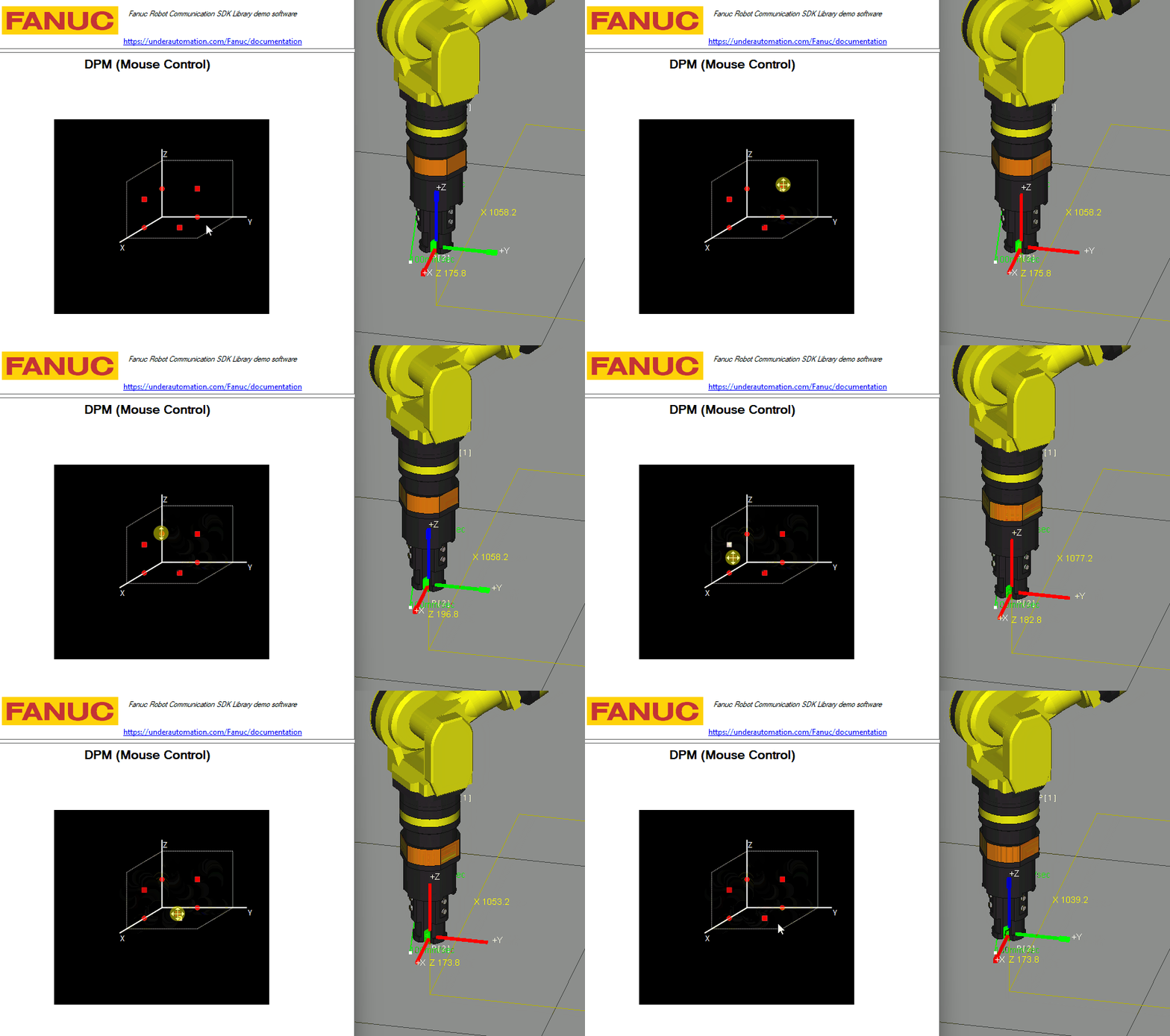
---
**TP Editor with breakpoints:**
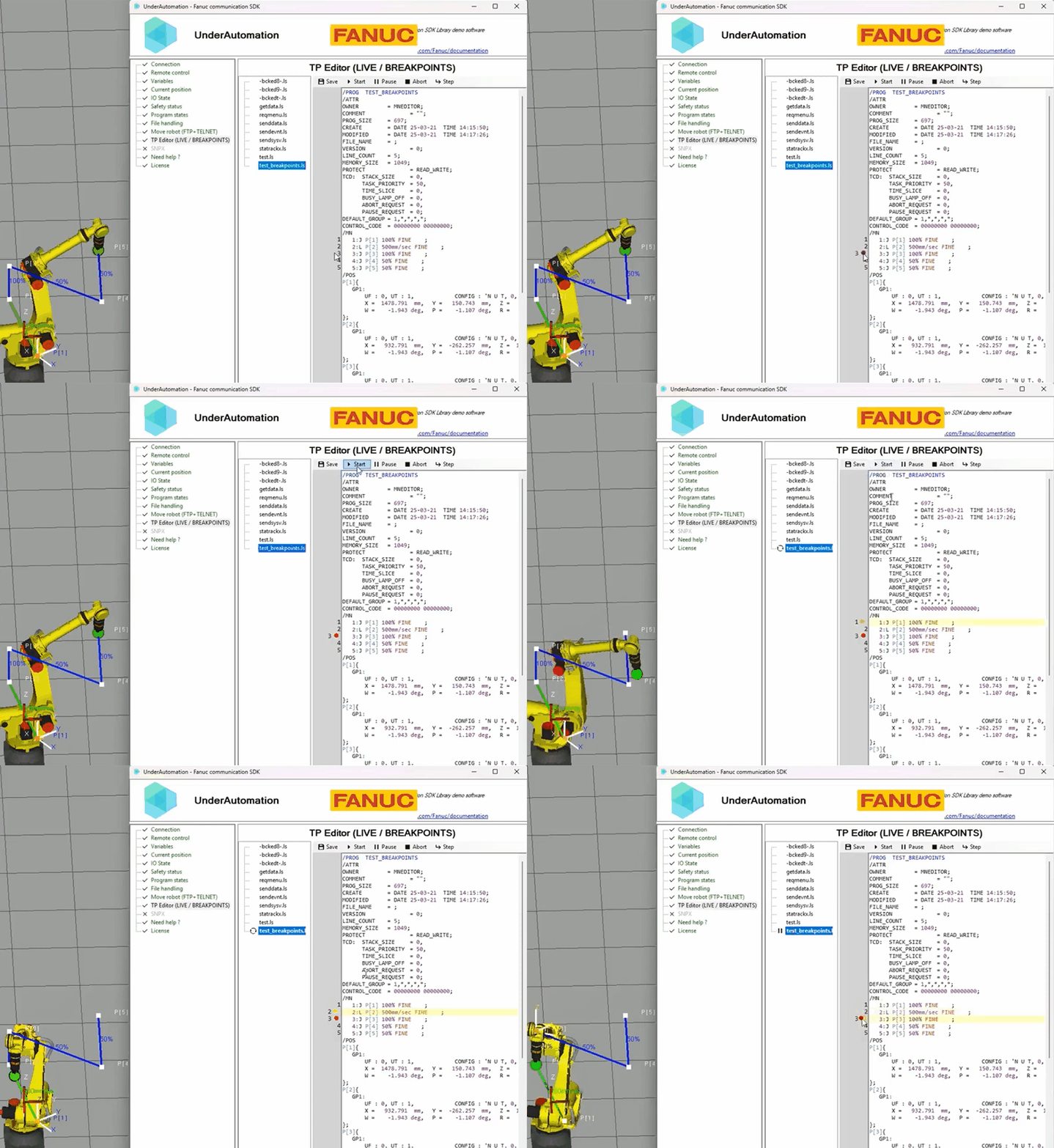
---
**Forward and Inverse Kinematics:**
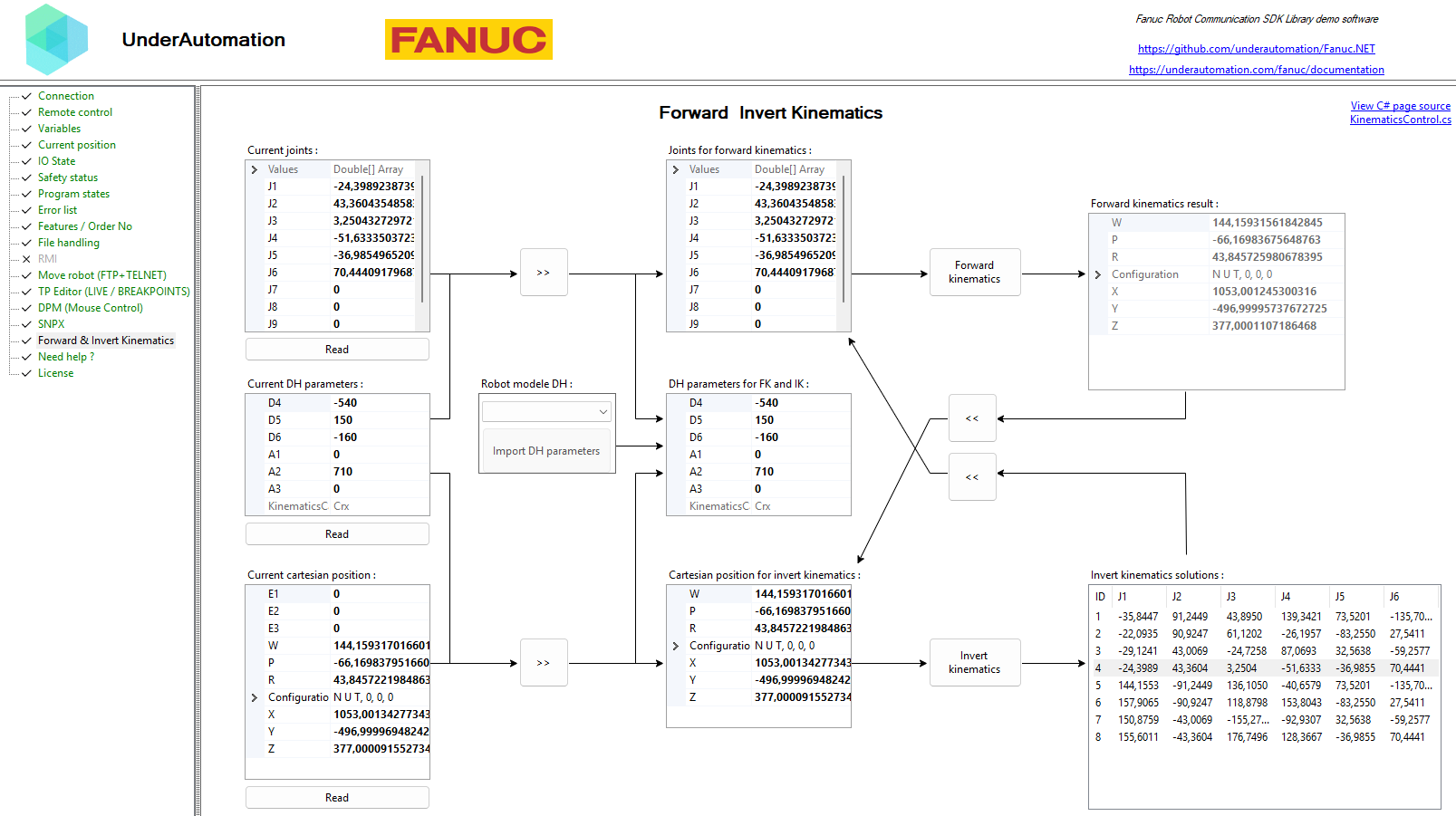
---
## 📌 Features
### 🖥️ **1. Remote Control via Telnet KCL**
Telnet KCL (Keyboard Command Line) allows sending commands to control the robot **remotely**—no additional options needed on the controller.
#### 🔹 Reset alarms
```csharp
robot.Telnet.Reset();
```
#### 🔹 Start, pause, hold, abort programs
```csharp
robot.Telnet.Run("MyProgram");
robot.Telnet.Pause("MyProgram");
robot.Telnet.Hold("MyProgram");
robot.Telnet.Continue("MyProgram");
robot.Telnet.Abort("MyProgram", force: true);
```
#### 🔹 Set variables dynamically
```csharp
robot.Telnet.SetVariable("my_variable", 42);
robot.Telnet.SetVariable("$RMT_MASTER", 1);
```
#### 🔹 Control robot I/O ports
```csharp
// Set an output port (example: DOUT port 2 = 0)
robot.Telnet.SetPort(KCLPorts.DOUT, 2, 0);
// Simulate an input port (example: DIN port 3 = 1)
robot.Telnet.Simulate(KCLPorts.DIN, 3, 1);
robot.Telnet.Unsimulate(KCLPorts.DIN, 3);
```
---
### 🚀 **2. High-Speed Data Exchange via SNPX (RobotIF)**
SNPX (also known as **SRTP/RobotIF**) enables fast, structured data communication with the robot.
It is used to **read/write registers, monitor alarms, and check robot status**.
#### 🔹 Read & write position registers
```csharp
// Read position register 1
Position register1 = robot.Snpx.PositionRegisters.Read(1);
// Set a new value for register 2
robot.Snpx.PositionRegisters.Write(2, new Position { X = 100, Y = 50, Z = 25 });
```
#### 🔹 Read & write numeric registers
```csharp
// Read register R[1]
double value = robot.Snpx.Registers.Read(1);
// Write a value to R[2]
robot.Snpx.Registers.Write(2, 123.45);
```
#### 🔹 Read and control robot signals (UI, UO, GI, GO)
```csharp
// Read a User Input (UI) state
bool UI1 = robot.Snpx.UI.Read(1);
// Set a User Output (UO) signal
robot.Snpx.UO.Write(3, true);
```
#### 🔹 Read & write variables
```csharp
// Write a system variable
robot.Snpx.IntegerSystemVariables.Write("$RMT_MASTER", 1);
robot.Snpx.StringSystemVariables.Write("$ALM_IF.$LAST_ALM", "No alarms");
robot.Snpx.PositionSystemVariables.Write("$CELL_FLOOR", cellFloor);
// Write a Karel program variable
robot.Snpx.IntegerSystemVariables.Write("$[KarelProgram]KarelVariable", 1);
```
#### Clear alarms
```csharp
// Clear alarms
robot.Snpx.ClearAlarms();
```
#### Get current position
```csharp
// Read current joint and cartesian position
Position position = robot.Snpx.CurrentPosition.ReadWorldPosition();
// Read User frame cartesian position
robot.Snpx.CurrentPosition.ReadUserFramePosition(1);
```
---
### 📂 **3. File & Variable Management via FTP Memory Access**
The SDK provides **direct FTP access** to the robot's memory for **file transfer, variable reading, and configuration management**.
#### 🔹 Upload, download, and delete files
```csharp
// Upload a TP program to the controller
robot.Ftp.DirectFileHandling.UploadFileToController(@"C:\Programs\MyPrg.tp", "md:/MyPrg.tp");
// Download a file from the robot
robot.Ftp.DirectFileHandling.DownloadFileFromController("md:/Backup.va", @"C:\Backup\Backup.va");
// Delete a file on the robot
robot.Ftp.DirectFileHandling.DeleteFile("md:/OldProgram.tp");
```
#### 🔹 Read all declared variables
```csharp
var allVariables = robot.Ftp.GetAllVariables();
foreach (var variable in allVariables)
{
Console.WriteLine($"{variable.Name} = {variable.Value}");
}
```
#### 🔹 Read known system variables
```csharp
// Read system variable $RMT_MASTER
int remoteMode = robot.Ftp.KnownVariableFiles.GetSystemFile().RmtMaster;
```
#### 🔹 Check robot safety status
```csharp
SafetyStatus safetyStatus = robot.Ftp.GetSafetyStatus();
Console.WriteLine($"Emergency Stop: {safetyStatus.ExternalEStop}");
Console.WriteLine($"Teach Pendant Enabled: {safetyStatus.TPEnable}");
```
#### 🔹 Retrieve the robot's current position
```csharp
CurrentPosition currentPosition = robot.Ftp.GetCurrentPosition();
Console.WriteLine($"Cartesian Position: X={currentPosition.Cartesian.X}, Y={currentPosition.Cartesian.Y}, Z={currentPosition.Cartesian.Z}");
```
---
## 🔧 Configuration
### ✅ **Enable Telnet KCL**
1. **Go to** `SETUP > Host Comm`
2. **Select** `TELNET` and press `[DETAIL]`
3. **Set a password** and restart the robot
### ✅ **Enable FTP Memory Access**
1. **Go to** `SETUP > Host Comm > FTP`
2. **Set a username & password**
3. **Perform a cold start**
### ✅ **Enable SNPX**
- If Your Robot Uses "FANUC America Corp." Parameters (R650 FRA):
You need to enable option R553 ("HMI Device SNPX") in the robot's software configuration.
- If Your Robot Uses "FANUC Ltd." Parameters (R651 FRL):
No additional option is required—SNPX is included by default.
---
## 📐 **Kinematics Calculations:**
The SDK includes tools for performing forward and inverse kinematics calculations offline, allowing you to compute the robot's end-effector position based on joint angles and vice versa, from DH parameters.
```csharp
using UnderAutomation.Fanuc.Kinematics;
JointsPosition position = new JointsPosition(10, 20, 120, 0, 0, 25);
// ---- Get DH parameters ----
// Example: CRX-10iA/L
DhParameters dh = new DhParameters(-540, 150, -160, 0, 710, 0);
// From a known arm model
dh = DhParameters.FromArmKinematicModel(ArmKinematicModels.CRX10iA);
// From OPW parameters: M10iA/7L
dh = DhParameters.FromOpwParameters(0.15, -0.20, 0.60, 0.86, 0.10);
// From an online robot (SYSMOTN file)
dh = DhParameters.FromSymotnFile(_robot.Ftp.KnownVariableFiles.GetSymotnFile())[0];
// ---- Forward kinematics ----
CartesianPosition pose = KinematicsUtils.ForwardKinematics(position, dh);
// ---- Inverse kinematics with multiple solutions ----
JointsPosition[] positions = KinematicsUtils.InverseKinematics(pose, dh);
```
---
## 🛠 Installation
### 1️⃣ **Get the SDK**
Choose the installation method that works best for you:
| Method | NuGet (Recommended) | Direct Download |
| ------------------ | --------------------------------------------------------------------------------------- | ------------------------------------------------------------------------------------------------------------------ |
| **How to Install** | Install via NuGet. [See on Nuget](https://www.nuget.org/packages/UnderAutomation.Fanuc) | Download and reference the DLL manually |
| | `dotnet add package UnderAutomation.Fanuc ` | 📥 [Download ZIP](https://github.com/underautomation/Fanuc.NET/releases/latest/download/UnderAutomation.Fanuc.zip) |
### 2️⃣ **Reference the SDK in Your Code**
```csharp
using UnderAutomation.Fanuc;
```
### 3️⃣ **Connect to Your Robot**
```csharp
var robot = new FanucRobot();
var parameters = new ConnectParameters("192.168.0.1");
parameters.Language = Languages.English; // Japanese and Chinese controllers are also supported
parameters.Telnet.Enable = true;
parameters.Telnet.TelnetKclPassword = "your_telnet_password";
parameters.Ftp.Enable = true;
parameters.Ftp.FtpUser = "";
parameters.Ftp.FtpPassword = "";
parameters.Snpx.Enable = true;
parameters.Rmi.Enable = true;
robot.Connect(parameters);
```
---
## 🔍 Compatibility
✅ **Supported Robots:** R-J3iB, R-30iA, R-30iB
✅ **Operating Systems:** Windows, Linux, macOS
✅ **.NET Versions:** .NET Framework (≥3.5), .NET Standard, .NET Core, .NET 5/6/8/9
---
## 📢 Contributing
We welcome contributions! Feel free to:
- Report issues via [GitHub Issues](https://github.com/underautomation/Fanuc/issues)
- Submit pull requests with improvements
- Share feedback & feature requests
---
## 📜 License
**⚠️ This SDK requires a commercial license.**
🔗 Learn more: [UnderAutomation Licensing](https://underautomation.com/fanuc/eula)
---
## 📬 Need Help?
If you have any questions or need support:
- 📖 **Check the Docs**: [Documentation](https://underautomation.com/fanuc/documentation)
- 📩 **Contact Us**: [Support](https://underautomation.com/contact)